Salesforce’s new AI coding agent, Agentforce Vibes, can transform your development workflow and enable you to turn ideas into working applications faster than ever. But like any tool, the real magic happens when you know how to use it efficiently. Here are five pro tips to help you get the most out of Agentforce Vibes, optimize your request usage, and write better code.
1. Understand the consumption model
Each Salesforce org receives a daily quota of 50 premium requests or one million tokens, whichever is consumed first. It’s important to be mindful when using Agentforce Vibes, so that you don’t reach the limits for requests or tokens when you need them most. Just because you can always use Agentforce Vibes to deploy a single metadata or tweak a single line of code doesn’t mean you should.
Don’t waste requests on simple tasks that are faster to do the old-fashioned way using the Salesforce CLI or Salesforce Extensions for Visual Studio Code. Save your premium requests for high-value actions like complex planning, coding, and making tool calls via MCP servers.
2. Leverage scratch orgs for more quota
Scratch orgs are source-driven, ephemeral environments that you can spin up in seconds, which makes them ideal for enterprise vibe coding.
Even better, every scratch org has its own separate quota of Agentforce Vibes premium requests. If you have access to five scratch orgs, you effectively have access to 250 premium requests per day (50 per org). This can help you extend your vibe coding sessions on heavy development days.
You can create scratch orgs using the Salesforce VS Code extension using the SFDX: Create a Default Scratch Org command or with the terminal:
3. Master the slash commands
Slash commands are powerful shortcuts that supercharge your workflow. You can use these commands to trigger specific behaviors:
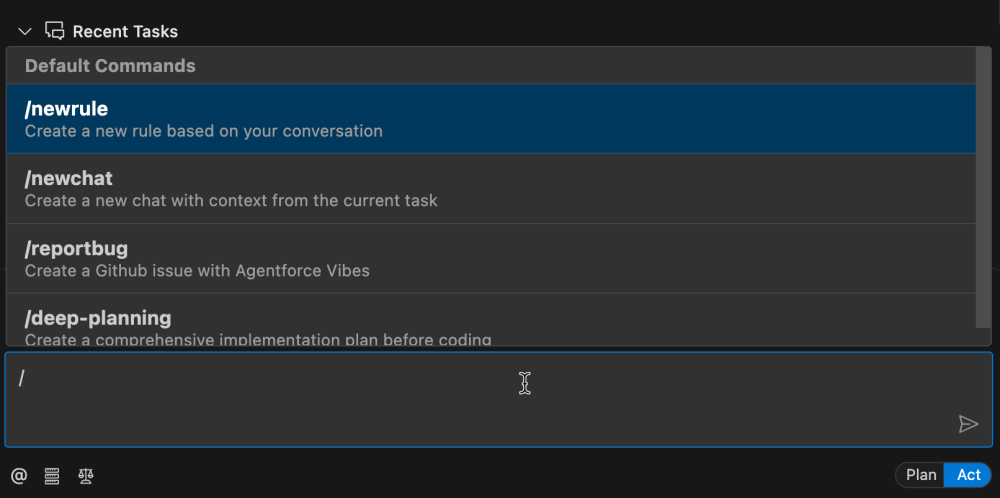
\/newrule: Create a system-level prompt that aligns Agentforce with your specific coding style, best practices, and engineering principles. This ensures that every task it performs adheres to your standards./newchat: Use this to summarize your current conversation’s context — what you were doing, what you accomplished, and how — and bring it into a fresh chat. This is an excellent way to save context while starting with a clean slate to save requests./reportbug: Quickly create a GitHub issue if you encounter unexpected behavior with Agentforce Vibes./deep-planning: Transform your coding agent into an architecture. This command prompts Agentforce Vibes to analyze your codebase and create a comprehensive implementation plan for a new feature or refactor. It generates a detailed file with types, objects, and implementation steps that it can reference in future tasks, significantly improving output quality.
4. Use @ mentions to inject the right context
Every time Agentforce Vibes has to read a file to understand your code, it consumes a request. You can save requests and get faster, better results by being explicit. Use @ mentions (e.g., @force-app/main/default/classes/AccountController.cls) to inject the content of specific files and folders directly into your prompt. When you provide the necessary context upfront, Agentforce Vibes can skip the “reading” phase and immediately start modifying or creating files.
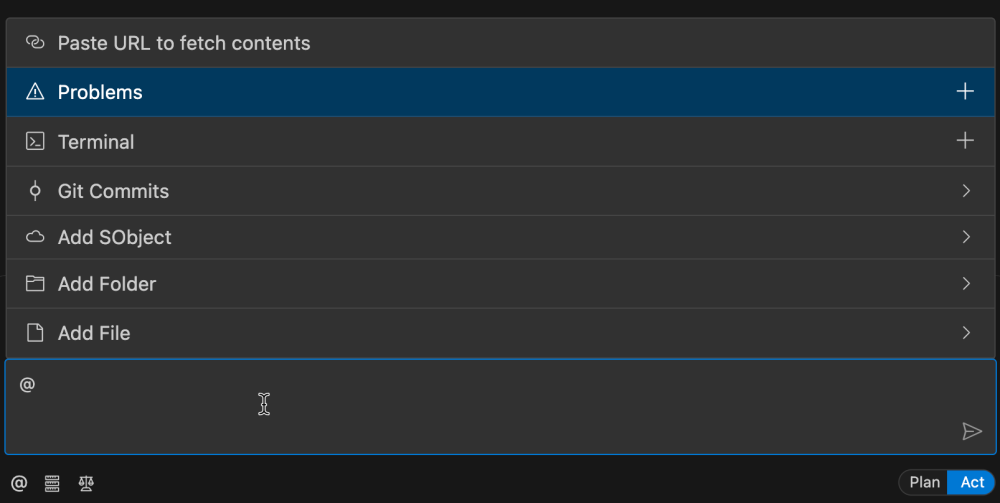
Mentions aren’t just for files. Use @terminal and @problems to provide the contents of your terminal and problems panel to help debug errors and issues. Include Git commits to share changes made to the codebase and paste URLs to introduce additional context like documentation into your prompt.
5. Control access in production
You might not want AI coding tools active in your live production environment. You can disable Agentforce Vibes for specific orgs directly in Setup:
- Go to Setup > Agentforce Vibes Extensions.
- Toggle the setting to Disable the extension for that specific org.
This prevents users from using Agentforce Vibes whenever that production org is set as their default in Salesforce DX, keeping your production environment secure and human-controlled.
Conclusion
Mastering vibe coding isn’t just about prompting for code, but strategically managing your resources to work smarter. By leveraging scratch orgs, slash commands, and precise context, you can make every request to Agentforce Vibes an impactful one. These tips will help you get the maximum mileage out of your daily quota, ensuring that you maintain high-velocity development even within the consumption limits.
Resources
- Documentation: Agentforce Vibes Overview – Daily Request Limit
- Documentation: Salesforce Extensions for Visual Studio Code
- Documentation: Salesforce CLI Quickstart
- Documentation: Scratch Orgs Developer Guide
- Documentation: Disable Agentforce Vibes Extension in a Salesforce Org
About the author
Charles Watkins is a self-taught Developer Advocate at Salesforce and a software developer. He spends his time blogging, crafting code samples, and live streaming. You can follow him on LinkedIn.