Salesforce Omnistudio is a low-code toolkit for building streamlined, industry-focused digital experiences. One of Omnistudio’s core features, Flexcards, allows teams to create dynamic, reusable UI components that surface real-time information from Salesforce objects queried through the Salesforce Object Query Language (SOQL), custom JSON payloads, and external systems. The Omnistudio MCP Server acts as a smart interpreter of Flexcard requirements, enabling users to quickly and consistently generate, iterate, and validate their components.
In this blog post, we’ll show you how you can use the Omnistudio MCP Server to bridge the gap between AI and Omnistudio’s low-code development process, enabling your organization to deliver consistent and efficient customer interactions.
Manual steps slow down development
Despite Omnistudio’s low-code tools, developers and business users face persistent challenges that slow down development and cause inconsistencies across teams and environments. For example, translating business requirements into Flexcard JSON metadata, configuring data sources, and managing conditional states across connected Omnistudio components can all require significant manual effort.
Business user challenges:
- Translation gap: Converting a high-level requirement (for example, “a card to show order status”) into a working Flexcard configuration remains a manual, multi-step process
- Technical hurdles: Iterating on a design requires familiarity with Flexcard schemas, creating dependency on developers for even simple adjustments
Developer challenges:
- Tedious metadata: Manually creating Flexcard metadata is time-consuming and inconsistent across different components and teams
- Template overload: Existing templates help, but they often require heavy customization, leading to divergent and hard-to-maintain implementations
- Cumbersome testing: Simulating Flexcard behavior across different states and data scenarios before deployment is often a complex task
In short, teams need a unified, AI-powered, and standardized way to manage the complete Flexcard development lifecycle.
Introducing the Omnistudio MCP Server
To address these challenges, Salesforce introduced the Omnistudio MCP Server, an early beta architecture that brings AI and Model Context Protocol (MCP) together to simplify the full Omnistudio development process.
Model Context Protocol (MCP) is an emerging standard for connecting AI models to external tools and APIs in a secure and consistent way. The Omnistudio MCP Server is a specialized implementation of Model Context Protocol, designed to function as a governed pathway for connecting AI agents directly to your Omnistudio development lifecycle. Think of the Omnistudio MCP Server as a smart interpreter that sits between an AI agent and Salesforce.
Optimized for Claude 4 and designed specifically to support Flexcard development, the Omnistudio MCP Server enables AI-driven authoring, modification, simulation, and testing. This helps teams accelerate delivery while preserving structure, governance, and implementation quality.
Leverage AI to quickly go from mockup to live component
The Flexcard tools in Omnistudio MCP Server can process a variety of inputs, such as requirements written in plain text, screenshots, detailed PDFs with specifications, and a Figma file or image mockup of the desired layout. The tools then generate a functional Flexcard skeleton, map the necessary data sources, and provide a preview in a simulated environment.
This approach allows business users to start with a simple sketch or design, and allows developers to bypass repetitive metadata creation and focus on refining logic, states, and final functionality.
The server’s AI capabilities bridges the gap between design, requirements, and working metadata, cutting down turnaround time from days to hours.
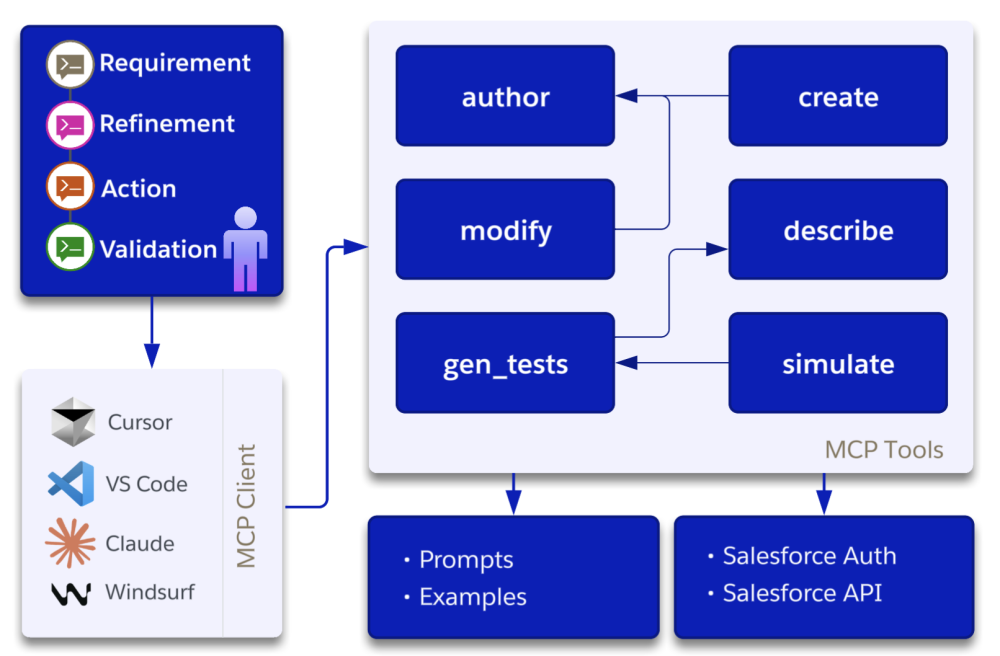
How the Omnistudio MCP Server works
Users provide requirements to the Omnistudio MCP Server, refine those requirements, and take actions to create and test Flexcards using the server’s tools. The following is a snapshot of the basic flow.
Step 1: Capture the requirements
Let’s say that you want to create a Flexcard showing a customer’s order history with a “Contact Support button.
First, you’ll provide your requirements using one or more of the formats below (you can choose whichever combination works best for you).
- Natural language: Text-based specifications
- Requirement as documents: A PDF containing business requirements and UI specs
- Visual designs: A Figma file or an image mockup
The Omnistudio MCP Server then uses AI and metadata schema knowledge to interpret this input.
Step 2: Generate the Flexcard
The server uses two core tools to build the initial component.
author: Converts the requirement into a Flexcard JSON definition (layout, styles, data bindings, etc.)create: Pushes the validated Flexcard metadata into the Salesforce org
Note that Flexcards leverage Oministudio services like Integration Procedures for orchestrating fast server-side operations and external API calls, and Data Mappers for extracting, transforming, and loading Salesforce data in a structured way. Together, these capabilities allow Flexcards to consolidate data from multiple sources and present it clearly.
Step 3: Iterate and improve
The server makes refinements using AI-assisted feedback.
modify: Makes changes based on updated specs to the existing Flexcard, or creates a new versiondescribe: Generates a summary of an existing Flexcard to onboard collaborators or compare versions.
Step 4: Validate before deployment
Before going live, you can ensure that everything works as expected using the following tools.
gen_tests: Generates test cases covering different UI states and data scenariossimulate: Renders the Flexcard in a safe, non-production environment for a real-time preview
Real-world examples
To see how this works in practice, here are a few examples of turning common business requests into functional Flexcards quickly and easily.
Claims summary card: By providing a PDF spec from the business team with UI requirements for an insurance claim, you can generate a Flexcard that summarizes claim details with conditional formatting for eligibility status pulled directly from a Salesforce Object.
Order status tracker: Using a simple text prompt to track customer orders with estimated delivery and a “Request Update” button, you can create a real-time order tracking Flexcard that integrates with live inventory data via an Integration Procedure.
Product recommendation card: Starting with an image or screenshot of a marketing mockup, you can create a dynamic Flexcard that displays AI-driven product suggestions and real-time pricing, complete with quick-add actions for sales agents.
Getting started
Before you begin, install the Salesforce CLI and then add the following configuration to your Oministudio MCP Server client settings.
After saving the Omnistudio MCP Server settings, Cursor downloads the required package and starts the server. You must first authenticate an org via the Salesforce CLI before proceeding, after which you can start a new conversation in the agent window by asking: “Create a FlexCard displaying some fields from five accounts using SOQL.”
Conclusion
In this post, we explored how you can bridge the gap between AI and low-code development. We covered the challenges of manual Flexcard creation, how the Omnistudio MCP server acts as a smart interpreter, and the four-step workflow to capture, generate, iterate, and validate your components.
By integrating this AI-powered approach, you can accelerate your delivery by moving from requirements to live components within hours rather than days. This process also reduces manual errors through standardized metadata generation while maintaining governance over your development lifecycle.
Resources
- Trailhead: Omnistudio Flexcard Fundamentals
About the author
Rajmani Kumar is a Principal Engineer at Salesforce specializing in Industries Cloud solutions, including Omnistudio and MCP. He focuses on enhancing developer productivity, building scalable enterprise architectures, and advancing next-generation automation and integration tooling.