The Spring ’26 release is rolling out to your sandbox and production environments starting this month and continuing through February 2026. Get ready, because this release is packed with product updates, and new features to enhance your development experience.
In this post, we’ll take a look at the highlights for developers across Lightning Web Components (LWC), Apex, Agentforce, Agentforce Vibes, Data 360, Agentforce 360 Platform developer tools, and APIs.
LWC updates in the Spring ’26 Release
The Spring ’26 release introduces several quality-of-life improvements for LWC developers. These updates range from new ways to handle user actions to full support for modern coding tools like TypeScript.
Dynamic event listeners
Before this release, you had to list every single event handler (like onclick or onmouseenter) directly in your HTML template. If you wanted to change how a component reacted to a user at runtime, you often had to use complex workarounds.
The new lwc:on directive allows you to attach event listeners dynamically. Instead of hard-coding handlers in the HTML, you can now pass a single JavaScript object containing all your event logic.
- How it works: The keys in your object represent the event names (like
click), and the values are the functions that run when that event happens - The benefit: You can now programmatically swap out behaviors in your JavaScript without ever touching the HTML template
We wrote a dedicated dynamicEventListener recipe in our LWC Recipes sample app. The recipe features a simple box element that uses lwc:on={boxEventHandlers} to respond to user interactions. When the user toggles between “Click Mode” and “Hover Mode,” the boxEventHandlers getter returns a different set of event handlers, and LWC automatically updates which events the box listens to — no template changes required, just a clean swap of behavior driven entirely by JavaScript.
GraphQL mutations in LWC
Spring ’26 brings full GraphQL mutation support to Lightning Web Components through the new executeMutation method from lightning/graphql. While the existing @wire(graphql) adapter handles read operations reactively, executeMutation provides an imperative API for creating, updating, and deleting records directly from your JavaScript code.
You define your mutation using the gql template literal with typed input variables (e.g., ContactCreateInput!, ContactUpdateInput!), then call executeMutation with the query and variables. The response returns exactly the fields you specify in the Record payload, giving you precise control over the data returned after each operation.
Here is a simple example of using mutations to create records:
To learn more about GraphQL mutations, check out these Lightning web components (added to the LWC Recipes sample app):
graphqlMutationCreategraphqlMutationUpdategraphqlMutationDelete
TypeScript support for base components
We’ve completed the TypeScript rollout for Lightning base components. You can now get full support for every base component (like lightning-input or lightning-button) via the @salesforce/lightning-types package.
- Why use it? This package provides IntelliSense and catches errors in your code before you even try to deploy it
- Pro-Tip: If you created your own custom types in the past, we recommend switching to the official package for better consistency
In our example LWC component below, we import type definitions for LightningInput, LightningButton, and LightningCombobox from the @salesforce/lightning-types package, then cast event.target to these types in our event handlers — enabling full autocomplete and type safety for properties like value, validity, and label. This showcases how the completed TypeScript rollout lets you build LWCs while catching errors at compile time rather than runtime.
Tooling setup
Step 1: Install dependencies: Add TypeScript and the Lightning type definitions to your project:npm install --save-dev typescript @salesforce/lightning-types.
Step 2: Enable TypeScript in VS Code: Add this setting to your .vscode/settings.json:
This automatically generates a tsconfig.json in your lwc directory.
Step 3: Compile before deploying: Run the TypeScript compiler to generate JavaScript files: npx tsc --project ./force-app/main/default/lwc.
Step 4: Deploy to Salesforce: Deploy the compiled JavaScript files:sf project deploy start --source-dir force-app.
Note: The Agentforce 360 Platform stores only JavaScript; your ..ts files are compiled locally, and the resulting .jsfiles are what gets deployed to your org.
Navigate to flows from LWC
Launching a flow from a custom component is now much simpler thanks to the new sstandard__flow PageReference type.
- Direct Launch: You can trigger any active flow by its API name directly from your LWC code
Pass data: Use the state object to send information from your component into the flow’s input variables.
Check out the navToFlow Lightning web component in the GitHub pull request for our LWC Recipes sample app.
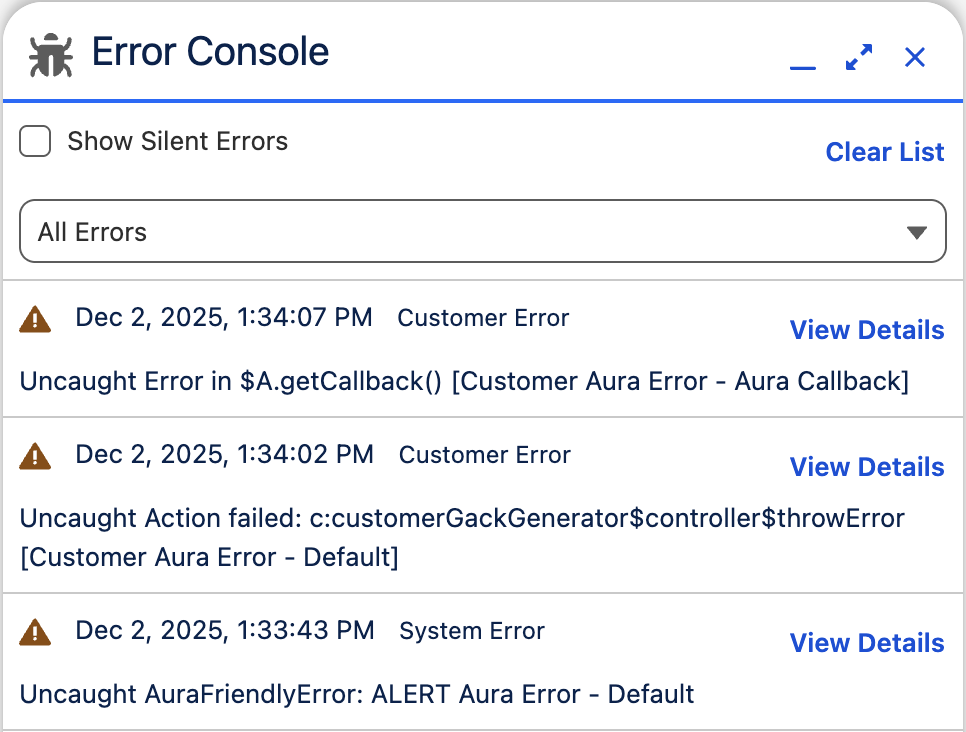
Error Console
Tired of “red box” error popups interrupting your testing? The new Error Console handles non-fatal errors in the background.
- Seamless experience: You can keep working while errors are quietly logged for you to review later
- Complete history: Even fatal errors that require a popup are logged here, giving you a full history to help with debugging
To enable it, go to Setup > User Interface and turn on “Use Error Console for error reporting in Lightning Experience” under Advanced Settings.
Lightning Out 2.0 improvements
Lightning Out 2.0 (introduced last release) gets several usability improvements. You can now configure host domains directly in the Lightning Out 2.0 App Manager. Add the external domain there, and to your Trusted Domains allowlist, in Session Settings.
Generated code blocks now include an app-id attribute for cleaner app identification.
In the Lightning Out 2.0 App Manager, you can now add Lightning web components (LWCs) with complex namespaces, such as those with mixed casing. Complex namespaces like complexNs/lwcComponent are now supported. Use either format: complexNs/lwcComponent (forward slash) or complex_ns-lwc-component (hyphen with underscores for namespace segments).
To learn more, check out the release notes section.
LWC Beta features
The release offers several Beta features discussed below. Note that Beta features are intended for experimentation and are subject to the Salesforce Beta Services Terms.
Complex Template Expressions (Beta)
Spring ’26 introduces Complex Template Expressions — a game-changing feature that lets you write JavaScript expressions directly in your LWC templates. Previously, even simple logic like concatenating strings or conditional display required that you create getter methods in your JavaScript file. Now, you can write expressions inline, dramatically reducing boilerplate code.
Before you would have to write a JavaScript getter like this for basic string concatenation:
The HTML template would look like this:
With template expressions, we can get rid of the getter and move the logic to the presentation layer instead:
The feature supports template literals, ternary operators, optional chaining, null coalescing, logical operators, arithmetic operations, array methods, and even inline event handlers. Below are some examples of using template expressions:
Lightning empty state and illustration components (Beta)
Spring ’26 introduces two new base components — lightning-empty-state and lightning-illustration — that provide beautiful, SLDS-compliant empty state experiences with zero custom styling effort.
The lightning-empty-state component delivers a complete empty state pattern with an illustration, title, description slot, and call-to-action slot.
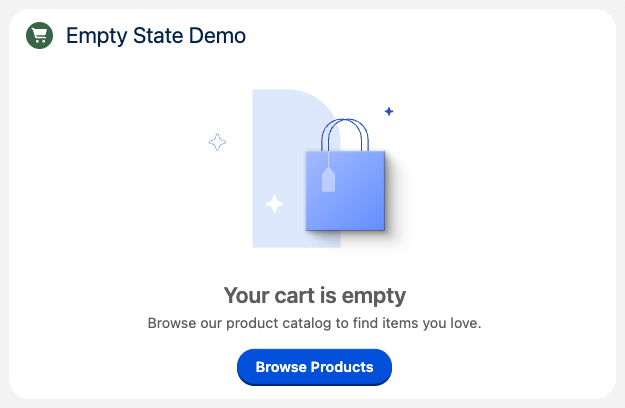
Here is an example of using the lightning-empty-state component:
For scenarios where you only need the illustration without accompanying text, use lightning-illustration. Below is an example of how to use this:
Both components automatically adapt to SLDS themes including dark mode, ensuring that your empty states look polished in any context. Available illustration names include cart:noitems, access:request, and many more from the SLDS illustration library. This eliminates the need to manually import SVGs or build custom empty state layouts — just drop in the component and you’re done.
Apex updates in the Spring ’26 release
Apex is also getting several developer improvements in the Spring ’26 release.
Apex cursors
Apex cursors (now GA in API v66.0) let you work with large SOQL result sets in manageable chunks — without the rigidity of batch Apex. Create a cursor once, then fetch records from any position, forwards or backwards.
Below is an example that shows basic usage:
Processing large datasets with Queueable
Cursors can be serialized and passed between Queueable jobs, perfect for chaining through millions of records.
Here is example code showing this in action:
Pagination for UI
Cursors support @AuraEnabledserialization — pass them between LWC and Apex for seamless page navigation.
Here is an example showing pagination in action:
Why cursors + Queueable over batch Apex?
| Batch Apex | Cursors + Queueable |
| Fixed batch size for all transactions | Flexible — fetch 100 or 500 based on workload |
| One-directional processing | Bidirectional traversal |
| Limited control per transaction | Fine-grained async limit utilization |
Note: Cursors don’t bypass limits — they help you use them smarter. Each fetch() counts against the SOQL query limit, and rows fetched count against the query row limit. Track usage with Limits.getApexCursorRows() and Limits.getApexCursors().
Extract picklist values based on record type
Spring ’26 introduces a powerful new Apex method that eliminates a long-standing pain point for Salesforce Developers: ConnectApi.RecordUi.getPicklistValuesByRecordType(objectApiName, recordTypeId).
Previously, retrieving record type-specific picklist values in Apex required cumbersome callouts to the UI API — but no more. With this single method call, you can now fetch all picklist values for a specific record type directly in Apex, making it incredibly efficient for building dynamic forms, especially those with dependent picklist hierarchies like Continent > Country > City.
Here is an example showing the new method in action. The returned PicklistValuesCollection contains all picklist fields for that record type in one request, including their dependent relationships and default values — no multiple API calls, no callouts, just clean native Apex.
Visualforce PDF rendering service with Apex Blob.toPdf()
Starting with Spring ’26 (enforced in Summer ’26), the Blob.toPdf() method now leverages the same powerful rendering engine as Visualforce PDFs, bringing consistent rendering, expanded font support, and full multibyte character support for CJK languages (Chinese, Japanese, Korean), Thai, Arabic, and more. The API remains unchanged — Blob.toPdf() still accepts any HTML string and returns a blob — but the underlying engine delivers a modern, sans-serif default font and reliable international character rendering. This makes it perfect for generating professional documents like certificates, invoices, and reports that serve global audiences.
Here’s a practical example of generating a styled certificate. Check out this sample certificate that’s generated using the code shared in this gist.
Note: If your existing PDFs rely on the old serif default font, you may notice changes in line breaks and character spacing. To maintain backward compatibility, explicitly set font-family: serif; in your CSS. To prepare, review this update in Setup > Release Updates and test in your sandbox before the Summer ’26 enforcement date (check Trust Status for your instance’s specific upgrade timeline).
Miscellaneous Apex updates
In addition to these important updates, there are a few interesting changes to Apex:
- Now you can deploy Apex classes faster by running only relevant tests. This feature is in Beta.
RunRelevantTestsis a new test level that automatically analyzes your deployment and runs only the tests relevant to your code changes. Use it withsf project deploy start --test-level RunRelevantTeststo dramatically speed up deployments in orgs with large test suites.- Two new annotations provide fine-grained control:
@IsTest(critical=true)ensures that a test always runs, while@IsTest(testFor='ApexClass:MyClass')runs the test only when specified components are modified.
- Use the new method overload for
purgeOldAsyncJobs()(see docs) to specify the number of the oldest completed async jobs in your org that you want to purge. Providing an upper bound for the number of records to delete enables incremental progress when large volumes of records are to be deleted. - Create agent actions based on Apex classes by annotating methods in those classes, generating an OpenAPI spec document, and deploying that document to your org.
Agentforce monthly updates
Agentforce enables you to customize pre-built agents, or create and deploy enterprise-ready agents, that work seamlessly across Salesforce apps, Slack, third-party platforms, and other apps. We’re adding some important developer features in the upcoming monthly releases.
As a reminder, Salesforce releases Agentforce updates frequently, so keep an eye on the monthly release section of the Spring ’26 release notes for the latest information.
New Agentforce Builder (Beta)
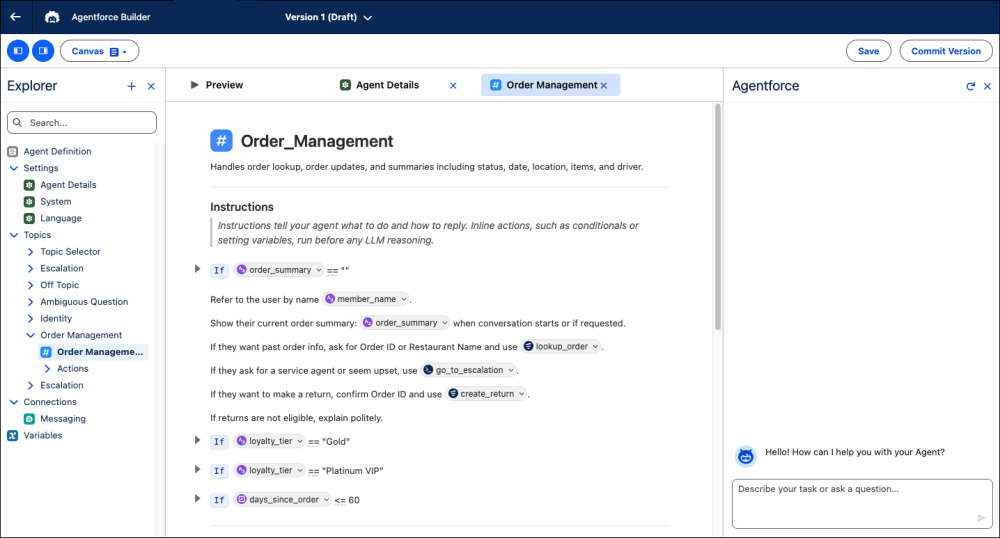
Salesforce has reimagined the developer experience for building agents with the new Agentforce Builder (Beta), designed to give the business predictability without sacrificing the creativity of LLMs.
The new builder introduces a text editor-inspired interface with a clean file explorer, letting you build complex agents faster. It offers two distinct ways to work: a Canvas view for quickly assembling logic patterns (like if-then conditions) and resources, and a Script view for scripting.
Key builder capabilities:
- Deterministic logic: You no longer have to rely only on prompts. Now, you can reliably map business processes by chaining actions in sequence and controlling exactly when an agent transitions between topics.
- Contextual control: Use variables within conditional logic to tailor agent behavior based on real-time context.
- Deep debugging: The enhanced preview experience offers detailed tracing and reasoning summaries for every message, making it easier to pinpoint exactly why an agent made a decision.
Under the hood, the new agent building experience is driven by an upgraded graph-based Atlas Reasoning Engine and Agent Script, a new language that allows you to seamlessly combine programmatic logic with natural language prompts for the agent.
Agent Script (Beta)
Agent Script (Beta) is a new language that combines the flexibility of natural language with the reliability of code. While agents are great at understanding conversation, they sometimes need clear boundaries. Agent Script lets you mix standard instructions with strict rules (like “if-else” conditions and variable checks), so you can control exactly how an agent makes decisions. This means that your agent can communicate naturally, but will always follow your business logic precisely.
Rather than relying on broad, unstructured inputs, Agent Script enables you to curate the specific instructions and state variables available to the agent. This precision ensures that the LLM receives a streamlined, high-signal prompt, reducing ambiguity and improving the accuracy of the agent’s responses.
Check out the Agent Script Recipes sample app to learn more about syntax and how to work with Agent Script.
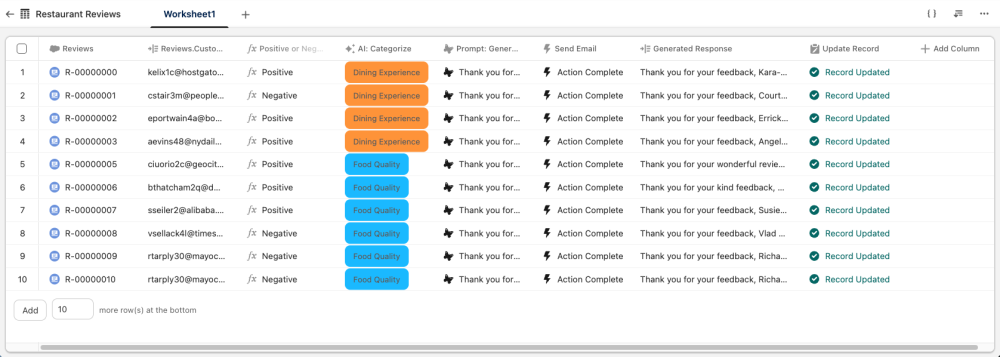
Agent Grid (Beta)
Agentforce Grid offers a spreadsheet-like environment where you can rapidly test and iterate on AI workflows using real data from your CRM. By combining agents, prompts, and actions in a single view, it provides immediate feedback to help you refine logic and accelerate time to value.
Agentforce DX
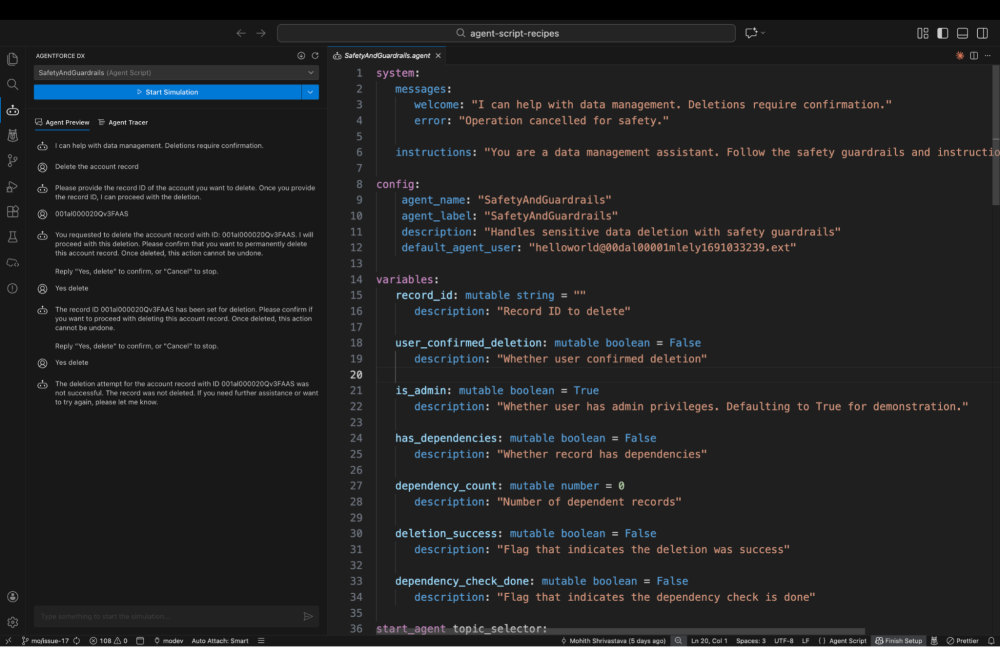
Agentforce DX is the pro-code equivalent of the Agentforce Builder UI. It allows you to build, test, and deploy agents using the tools you already know and love: VS Code and the Salesforce CLI.
This toolkit is designed to minimize context switching and bridge the gap between low-code and pro-code. You can retrieve an agent built by an admin in Agentforce Builder, pull it locally in VS Code, and refine it with complex logic.
Key Beta features in the Agentforce DX VS Code Extension v1.6.0
Available in Salesforce CLI v2.115.15 and Agentforce DX VS Code Extension v1.6.0, this release introduces several game-changing features in Beta:
- VS Code integration: The new Agent Script extension treats Agent Script like a first-class citizen. The extension ships with an Agent Script language server that provides syntax highlighting, visual cues (like red squiggles for errors), internal validation, and outline support.
- Advanced previewing: You can preview an agent’s conversation directly from the script file. Just like in Agentforce Builder, there are two preview modes:
- Simulated: Uses mocked actions for quick logic testing
- Live: Connects to real Apex classes, flows, and org resources
Check out this Agentforce Decoded video and this codeLive recording to learn more about Agent Script and Agentforce DX.
Data 360 monthly updates
Like Agentforce, Data 360 gets updates on a monthly basis, so please keep an eye on the monthly release notes section for Data 360 to learn more. If you missed any features released in previous months, check out the monthly release notes section for the Winter ’26 release.
New Apex methods in the ConnectApi.CdpQuery class
The ConnectApi.CdpQuery class now provides methods to query standard or real-time data graphs by ID or lookup keys, with support for specific dataspaces and live data retrieval. Additionally, developers can access configuration details for these graphs using the new getDataGraphMetadata methods.
Miscellaneous updates
- You can now use platform encryption with your own key to encrypt data in Data 360.
- This month’s update introduced extensive Connect REST API resources for managing Data 360 metadata components, including endpoints to configure external connections, define data model objects (DMOs) and mappings, and orchestrate machine learning model setups. Additionally, developers can use new resources to manage private network routes and securely stage, rotate, and maintain OAuth credentials for external client apps.
Agentforce 360 Platform development tool updates updates
Agentforce Vibes extension
Agentforce Vibes extension is an AI-powered developer tool that’s available as a VS Code extension in VS Code desktop and Agentforce Vibes IDE.
We have released several updates focused on making the coding agents smarter, your workflow smoother, and your context management more precise. Here is a roundup of the key features and improvements from versions 3.3.0 through 3.8.0.
Smarter planning with/deep-planning
We introduced a new four-step workflow designed to tackle complex problems. By running /deep-planning, the agent now follows a structured path:
- Scans your codebase.
- Clarifies requirements with you.
- Generates a comprehensive implementation plan.
- Launches a new task pre-loaded with all the necessary context.
To keep these long tasks on track, we also added a Focus Chain. This feature maintains a live “to-do” list that persists across context resets, ensuring that the agent never loses sight of the original goal during multi-step workflows.
Greater control over context
In our latest update, we’ve added support for auto and manual compaction. This gives you direct control over your context window and token usage, allowing you to manage context more effectively.
Streamlined MCP experience
We’ve removed friction from the Model Context Protocol (MCP) workflow:
- Auto-approval for read-only: The Salesforce DX MCP server now automatically approves read-only tools. You won’t be bombarded with prompts for safe actions, but write operations will still require your permission.
- Performance boost: Toggling auto-approve no longer triggers server reconnections, eliminating UI delays.
- UI updates: We renamed the MCP tab from “Installed” to “Configure” and refined the Enable/Disable user experience.
Security and quality of life
- LWC and Apex rules are now enabled by default to ensure best practices from the start
- Safe commands have received several security fixes and improvements
- UI refinements include an updated task header and Focus Chain design.
New mobile MCP tools
This January, we’re launching a Developer Preview of our mobile MCP server’s newest capabilities. These tools let you generate native mobile apps with Mobile SDK and Agentforce Service Agent.
Salesforce CLI
Below are some of the latest features added to the Salesforce CLI.
Unified Logic Testing (Beta)
You can now execute both Apex and Flow tests in a single request to ensure interoperability.
Retrieve Package Source
You can now retrieve the source metadata for specific Second-Generation (2GP) or unlocked package versions (starting with 04t) directly to a local directory.
sf package version retrieve --package 04tXXX --output-dir my-directory --target-dev-hub devhub@example.com
Quality-of-life improvements
- Login timeouts: Prevent the CLI from hanging indefinitely during login issues by setting a custom timeout (default is now two minutes):
export SF_WEB_OAUTH_SERVER_TIMEOUT=180000
- Test polling: Adjust how often the CLI checks for test results (in seconds) to reduce API calls or wait times:
sf apex run test --class-names MyClassTest --poll-interval 5 --target-org my-org
Agentforce 360 API updates
Named Query API
Named Query API is generally available. Use Named Query API to define and expose custom SOQL queries, or as scalable actions for REST API clients. Named Query APIs can retrieve data quickly and more efficiently than existing Flow or Apex processes. Check out the documentation to learn more about the Named Query API.
Sending session IDs in outbound messages is being removed
To align with modern security best practices, you can no longer send session IDs in outbound messages starting February 16, 2026. Instead, use OAuth to authenticate. To learn more check out the release notes.
Creation of new connected apps is disabled by default
The ability to create new connected apps is disabled by default for all Salesforce orgs. This change improves security by removing the risks associated with connected apps. This update does not affect any existing connected apps, which will continue to function normally.
We recommend using external client apps for all new integrations, and migrating existing connected apps to external client apps.
More Spring ’26 learning resources
- Read the official release notes
- Join the Salesforce Developers Trailblazer Community group to connect with the global developer community
- Join the Release Readiness Trailblazers Community group to stay informed about the latest product enhancements and innovations across the Salesforce ecosystem
- Get hands on with the latest LWC updates with our LWC Recipes sample app.
About the author
Mohith Shrivastava is a Principal Developer Advocate at Salesforce with 15 years of experience building enterprise-scale products on the Agentforce 360 Platform. Mohith is currently among the lead contributors on Salesforce Stack Exchange, a developer forum where Salesforce Developers can ask questions and share knowledge. You can follow him on LinkedIn.