Bridging the gap between a great custom idea and a high-performance, native mobile app has traditionally involved a marathon of configuration. Custom apps require extensive mobile development knowledge, and Salesforce mobile developers are often web developers. Customers looking to build a custom mobile app need developers with Swift, Kotlin skillsets – which are often in short supply.
In this post, we are introducing the new Mobile App Generation Ecosystem (MAGE) — a suite of pro-code tools that transforms your mobile app generation and development experience. The platform will eventually feature a robust set of tools for upgrading existing apps, creating specialized security workflows, and making your mobile apps agentic. By generalizing these features into templates, we are building MAGE to be more than a standalone suite; it will serve as an open ecosystem where third-party partners can embed their own specialized tools, allowing a community of experts to contribute directly to your development workflow.
Today, MAGE is in Developer Preview and its initial features help you transform your prompts into real code. Whether you need a data-rich app built on the Salesforce Mobile SDK or an AI-driven experience powered by the Agentforce Mobile SDK, MAGE provides the high-quality scaffold you need to start building immediately.
Closing the mobile knowledge gap
For many Salesforce Developers who are building mobile applications, the primary hurdle isn’t the business logic, it’s the mobile-specific “plumbing.” Building purpose-built, custom, native mobile apps often presents a steep learning curve with respect to things like authentication flows, SDK versioning, and the specific quirks of Xcode and Android Studio project structures.
MAGE is designed to empower you by handling this specialized setup for you. Instead of spending hours troubleshooting header paths or OAuth redirects, MAGE generates a fully functional, modern code skeleton, allowing you to focus on building features rather than managing infrastructure.
A launchpad for pro-code builders
MAGE is built for developers who want to own their code. Unlike “no-code” builders that hide complexity behind a GUI, MAGE generates real files and project structures that you can open, edit, and commit to version control.
Under the hood: The agentic workflow engine
While the experience of generating an app feels like magic, it is powered by a sophisticated, “code-first” engine. To understand why MAGE is so effective at building complex mobile apps, it helps to look at the architectural philosophy behind it: deterministic orchestration. This method defines a sequence of steps in advance, following best practices, to ensure that a process or workflow always produces predictable results. In our case, we have applied deterministic orchestration to what we call the “factory model” for building mobile apps.
The factory model vs. the assistant model
Most AI agents follow a “superagent” or “assistant” model. In this approach, a single intelligence decides on the fly which tools to use based on your natural language prompts. This is highly flexible, but it can be unpredictable when building something as complex as a native mobile app.
Our workflow engine takes a different approach that we call the “factory” model. Instead of leaving the orchestration to chance, we use a pre-defined graph (built with TypeScript and LangGraph.js), where every step of the mobile development lifecycle is mapped out by Salesforce experts. Key features of the workflow engine include:
- Process knowledge: The engine “knows” the necessary sequence, from requirement analysis to SDK implementation, so you don’t have to.
- Agentic tools: The LLM is wielded as a precision tool for specific tasks in which it excels, such as semantic extraction or natural language interaction, while a deterministic algorithm handles the rigid logic and validation.
Persistent state: Unlike ephemeral chats, the engine maintains a persistent state. It knows exactly where you are in the project lifecycle, ensuring that if a build fails or a requirement changes, the system can route to a specific “node” to fix it.
Integrating with Agentforce Vibes
MAGE is designed to be accessible within Agentforce Vibes, alongside your other Model Context Protocol (MCP) tools. By delivering our agentic workflow engine’s deterministic services through MCP, we bring expert mobile orchestration directly into your Agentforce Vibes terminal. You get the creative freedom of Agentforce, backed by the industrial-strength “guardrails” of the engine factory. This combination ensures that the code generated isn’t just a hallucination of what a mobile app should look like. It’s a structurally sound, production-ready project that follows Salesforce mobile best practices.
Essentially, superagents like Agentforce Dev Assistant amplify your capability (help you do things faster), while the agentic workflow engine supplies the process knowledge (ensuring that you do them right). Together, they provide the ultimate launchpad for the next generation of Salesforce mobile apps.
What can you do with MAGE today?
MAGE is currently in Developer Preview, and here are some key features to try now:
- Generate high-quality boilerplate: Instantly spin up a native iOS (Swift) or Android (Kotlin) project that adheres to modern platform standards.
- Choose your path: Generate a project built with the Salesforce Mobile SDK (e.g., internal employee apps with a secure login) or the Agentforce Mobile SDK (e.g., customer-facing apps for chatting with AI agents). Our tool will automatically select the correct template based on your description.
- Eliminate manual human errors: MAGE automates the implementation of tricky platform-specific tasks, such as correctly adding files to Xcode projects to prevent compilation errors.
Generating code in real-time
To see MAGE in action, let’s walk through how a developer can use Agentforce Vibes and the Mobile MCP server to scaffold a native application from a simple prompt. For more information, review the MAGE documentation.
In this example, we’ll use our tools within Agentforce Vibes to build a B2C Service Agent application for Android. Start by enabling the server via your a4d_mcp_settings.json file.
For example, for MacOS:
1"magen": {
2"disabled": false,
3"timeout": 600,
4"type": "stdio",
5"command": "npx",
6"args": [
7"@salesforce/mobile-native-mcp-server"
8],
9"env": {
10"LOG_LEVEL": "debug",
11"CONNECTED_APP_CONSUMER_KEY": "",
12"CONNECTED_APP_CALLBACK_URL": ""
13}
14}
You can verify installation by opening your AI assistant and ensuring that the sfmobile-native-project-manager tool is available in your tool inventory. Upon first interaction, the server runs an environment validation to check for required plugins (like sfdx-mobilesdk-plugin) and guide you through installation if they are missing. Ensure your Salesforce Org has a Salesforce Connected App, and the following environment variables in your configuration like in the example listed above.
Below, we’re prompting the Dev Assistant in Agentforce Vibes to build a native app. The agentic workflow engine, which is pre-loaded with mobile-specific knowledge, identifies exactly what is needed to guide you toward a best-practice mobile application. For instance, the sfmobile-native-project-manager tool orchestrates the project and acts as the single source of truth for sequencing.
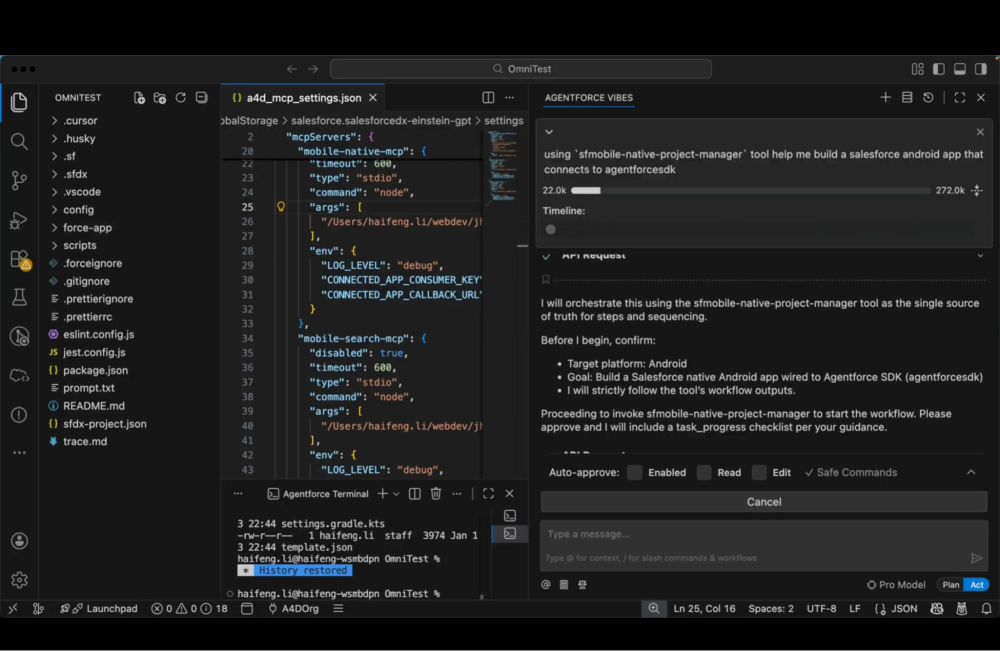
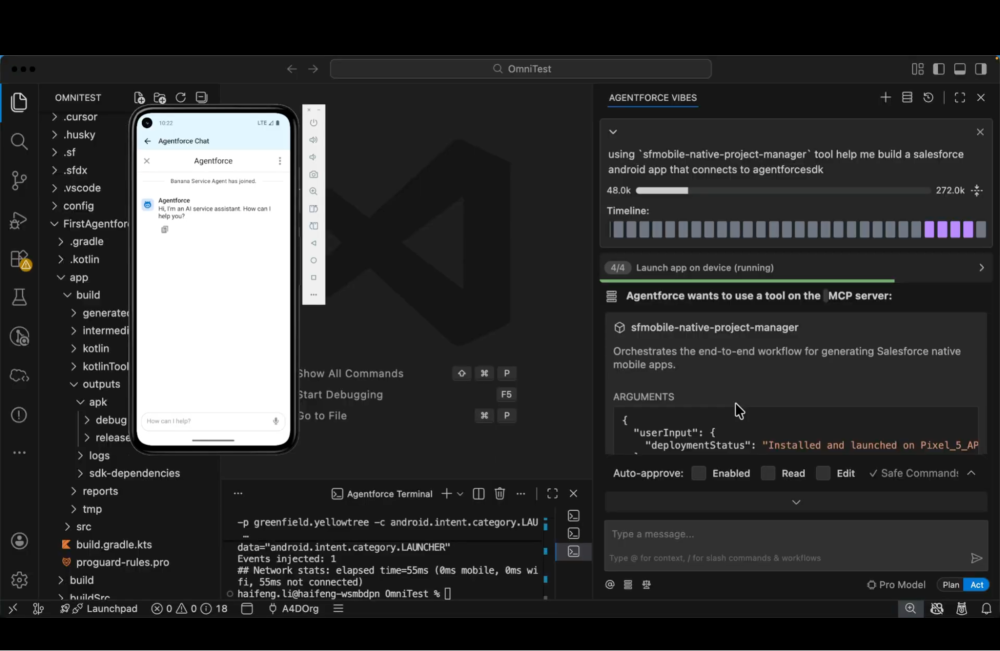
As the workflow runs, you can watch the project files being created and scaffolded directly in Agentforce Vibes. The engine starts by generating the first Android project files and continues building out the full directory structure. The toolset includes the ability to automatically open the mobile emulator to preview the progress.
Within a couple of minutes, the system scaffolds a functional Agentforce chat app as you can see in the screenshot below. The process concludes with a completion tool that wraps up the project nicely, leaving you with a source-controlled repository ready for customization.
Looking ahead for MAGE
It’s important to remember that today’s release is a Developer Preview. While MAGE already solves the “zero-to-one” problem of native mobile development, we are just scratching the surface of what’s possible.
In the upcoming releases, we’re looking to empower developers further by adding more tools to our ecosystem, providing functionality for new and existing mobile apps. These may include:
- Applying custom theming and branding to existing apps
- Adding specific template features like one-time passcodes or passwordless login
- Customizing the chat experience with the service agent
Keep an eye on the Mobile SDK release notes to learn about new features.
Conclusion
The Mobile App Generation Ecosystem toolset empowers pro-code developers to own the mobile experience from the terminal. To express interest in gaining access to the Developer Preview, please fill out our request form. Once you’ve tried it out, we’d love to hear your feedback through our feedback form.
Resources
- Mobile App Generation Ecosystem documentation
- Mobile Native MCP Server Release Package
- Mobile MCP Tools GitHub repository
- Get Started with Agentforce
- Mobile SDK Developer Guide
- Mobile SDK GitHub repository
About the author
Jessica Yang is an Associate Product Manager on the Mobile Platform Experience team at Salesforce. You can find her on LinkedIn.