Deploying artifacts built with Salesforce Omnistudio can be challenging. Teams often manage multiple steps, tools, validations, and reviews before a single change reaches the next environment, making deployments slower and more error-prone than they should be.
We’ve heard this feedback clearly. This post outlines how we’re making Omnistudio deployments easier and what’s coming on the Salesforce roadmap to reduce friction and create a more predictable deployment experience.
Salesforce is bringing new changes to help with this. These updates will guide you toward a cleaner, calmer process and support you as you work through Omnistudio deployment improvements across your org. They are shaped by what teams shared, what slowed them down, and what would help you build with more confidence.
How Omnistudio deployments work today
When you work with Omnistudio, the way you deploy your work depends on the runtime your org uses. Each runtime follows its own rules, and each one shapes how you move changes from one environment to another. Understanding these differences helps you plan your releases with more clarity and confidence.
Salesforce deployment paths by runtime
Each runtime sets the path you follow and the steps you take during deployments.
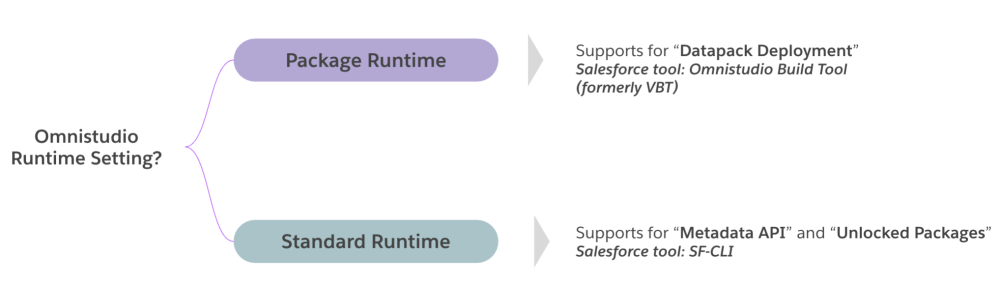
- Package Runtime: If your org uses the Package Runtime, your deployments go through DataPacks. You work with the Omnistudio Build Tool (formerly the Vlocity Build Tool or VBT), which sends your Omnistudio items as data. This method works well for teams who want a structured, bundle-based way to move changes.
- Standard/Core Runtime: If your org uses the Standard or Core Runtime, your deployments follow the same pattern you use for other Salesforce metadata. You rely on Metadata API or Unlocked Packages through the Salesforce CLI. This method fits naturally into DevOps workflows across the platform.
Why these paths feel different
Both the Build Tool and Metadata API help you deploy Omnistudio components. But they send different types of information, and this changes how versions behave, how related items move, and how your release steps unfold. A quick comparison makes this easier to grasp.
Deployment behavior overview
| AREA | BUILD TOOL (PACKAGE RUNTIME) | METADATA API (STANDARD/CORE RUNTIME) |
| What you deploy | Sends data entities as DataPacks | Sends metadata definitions |
| How versions behave | Often creates a new active version | Keeps the same version across orgs |
| Active vs inactive | Can deploy as active based on your settings | Keeps the state from your source org |
| Handling related items | Can include related items when configured | Needs you to add related items when you choose to deploy them |
| Selective updates | Sends the full bundle | Lets you deploy only what changed |
How teams decide
Your choice depends on your runtime and the DevOps habits your team already uses. Some teams stay with the Build Tool because it matches their history. Others lean toward the Metadata API path because it matches how the rest of their Salesforce deployments work.
Where Salesforce is focusing next
Salesforce is placing its main enhancements on the metadata-based path for the Omnistudio Standard Runtime. This is where you’ll see more support and improvements moving forward.
Common friction points teams encounter
When you work with Omnistudio every day, you may notice small points of friction that slow your progress and add pressure to your release cycle. These moments often show up in familiar places, and many teams across the ecosystem experience the same patterns. The challenges do not mean your process is broken. They simply show where the current deployment model asks for extra steps and care.
Separate component and metadata paths disrupt the flow
A common deployment challenge is that Omnistudio components and standard Salesforce metadata often require different deployment processes. Teams typically deploy Omnistudio components first, then run a separate deployment for the remaining metadata. This split workflow adds extra steps, increases release time, and interrupts the smooth end-to-end deployment flow teams expect.
Manual version selection adds pressure
Another place where teams feel friction is version selection. You may need to scan through multiple versions or trace which version is active in which environment. This takes more time when your team grows and your environments carry many versions from past releases.
Dependencies require extra tracking
Omnistudio components often depend on other pieces like Integration Procedures, Data Mappers, and Flexcards. These relationships make your experience stronger, but they also create extra steps during deployment. You have to find the related items, decide which ones need to move forward, and confirm everything is included. This adds effort that slows your release pace, especially during time-sensitive updates.
Diffs feel larger than the actual changes you made
Small updates in the designer can produce large diffs in your repository, and it can be hard to understand why the file looks so different from the work you did. This creates longer pull requests and increases the time your team needs to check and approve each change. It also makes collaboration slower when many people contribute to the same parts of the project.
Parallel work leads to more merge conflicts
When several teammates work on Omnistudio items at the same time, merge conflicts can show up often. Even small adjustments can collide with each other, pulling you out of your flow and forcing you to solve conflicts you didn’t expect. As your team grows, these moments become more frequent, and they add delays across your entire release line.
Packaging limits affect modular work
Some teams, especially independent software vendors (ISVs) and distributed groups, want to package Omnistudio components the same way they package other Salesforce assets. Today, those packaging patterns are harder to achieve. This makes modular releases more complex and increases the overhead needed to support multi-team collaboration.
How Salesforce is enhancing the deployment experience
Salesforce is strengthening the Omnistudio deployment path to give you more clarity, stability, confidence, and predictability. In the second half of the year, these enhancements will focus on the areas where teams feel the most pressure today — especially when balancing fast delivery with safe changes. The updates will move Omnistudio closer to the familiar Salesforce metadata model, helping your workflows feel steadier and more reliable over time.
Atomic deployment
Atomic deployment brings Omnistudio items and standard Salesforce metadata into one unified movement. This helps you avoid switching tools, running separate pipelines, repeating checks across environments, and delays caused by mismatched deployment timing. When everything moves together, your releases feel more natural, your plans stay on track, and your team can focus on work that brings value instead of work that adds friction.
Dependency management
Dependency management helps you understand how your Omnistudio components relate to each other by gathering Integration Procedures, Flexcards, Data Mappers, and linked items that support your deployment. Instead of tracing each connection on your own, you have a clear map that helps you decide what belongs in your release. This limits missed pieces, reduces last-minute corrections, eases testing across environments, and builds trust in your deployment steps.
Easy version management
Version management becomes easier when you work with a cleaner view that shows the active version you need and creates a fresh, active version in the target org. It also removes long lists of historical versions and keeps your Git history stable. This reduces confusion and helps each version flow from one environment to another without extra checks. When file names no longer change with each version, your history stays predictable, your reviews stay shorter, and your team can focus on what changed instead of where to find it.
Easy diff review
Diff review becomes easier when you see only what matters. Small designer updates now create small file updates, idempotent retrieval removes noise from repeated pulls, clear file structure supports faster reviews, and fewer false merge conflicts protect your development pace. If you picture a painter touching up a corner of a wall, you expect a tiny mark, not a full repaint. The new diff model works the same way and keeps your reviews focused on meaningful changes.
Packagability
With improved metadata, Omnistudio becomes compatible with Second-Generation Packaging, which helps ISVs, distributed teams, internal developers, and fast-moving squads plan their releases with more structure. You can group components with purpose, align Omnistudio with other Salesforce assets, manage updates across environments more cleanly, and support larger projects without adding unnecessary overhead. This gives your architecture room to grow as your product and your customer needs expand.
Get ready for a simpler experience with Omnistudio
These enhancements will help your work feel more aligned with standard Salesforce metadata, more stable across environments, more predictable during releases, and more comfortable for your team to manage. You’ll move through fewer steps and handle deployments with a pace that fits your workflow.
As these improvements roll out, your deployment flow becomes lighter and more consistent, giving you a setup that feels familiar and easier to manage. Join our events and webinars to learn more about what’s coming and share your perspective as we continue shaping the future of Omnistudio together.
Note: Forward-looking statements in this article are for informational purposes only and subject to change. Decisions should be made based on currently available functionality.
Resources
- Trailhead: Omnistudio Omniscript fundamentals
- Trailhead: Omnistudio Development Essentials
- YouTube video: Flexcards and Omniscripts | Salesforce Industries
- Salesforce+: Build Low-Code Digital Experiences with All-New Omnistudio
About the author
Dhairya Kedia is a Product Manager at Salesforce with over 5 years of industry experience across product management, product development, business analysis, and program management. Follow him on LinkedIn.
M R Rakesh Thampi is a Senior Content Analyst at Salesforce with extensive experience in product marketing and content strategy. He specializes in building scalable content strategies, using AI-powered tools and digital marketing best practices to create high-impact content that supports product launches, strengthens positioning, and drives demand across channels. Follow him on LinkedIn.