I joined Salesforce in early 2026 as a Developer Advocate. At this point in my career, I’ve advocated for a wide array of tools, but I had a confession to make during onboarding: I didn’t actually know what Salesforce did.
Beyond “it’s a CRM” and a dizzying array of “Clouds”, I felt like I was learning a whole new language. To avoid boiling the ocean, I went back to basics to answer a simple question: What is the core platform for developers?
To find out, I decided to build something. Not a “Hello World,” but something interactive that requires state management, UI logic, and data persistence. A Drag-and-Drop Tier List for Office Snacks.
But here’s the twist: I built it twice. First in React (my comfort zone), and then I rebuilt it entirely in Salesforce using Lightning Web Components (LWC).
Unlike the React version, which I “vibe-coded” with AI in one shot, I approached the Salesforce build differently. I used AI as a paired-programming tutor alongside official documentation and Trailhead. My goal wasn’t just to get working code, but to actually learn the architecture.
(Note: If you’re an experienced Salesforce developer, nothing here will wow or surprise you; you’ve likely seen these errors a thousand times. But for those of us new to the ecosystem, I wanted to document exactly what the transition feels like.)
Here is what I learned when I stopped reading the marketing brochures and started writing code.
Phase 1: The Control Group (React + Vite)
To make this a fair experiment, I needed a baseline. I spent about 20 minutes spinning up the React version. I didn’t need to learn anything here – I already understand React state. I just needed a functioning “Control Group” to accurately measure the friction and differences once I switched to the Salesforce ecosystem.
I’ll be honest: I “vibe-coded” this one. I fed an LLM a screenshot of a Tier List and told it: “Build me a similar drag-and-drop tier list app in React (Vite) with Tailwind CSS that lets you rank office snacks into S/A/B/C/D tiers, with localStorage persistence.”
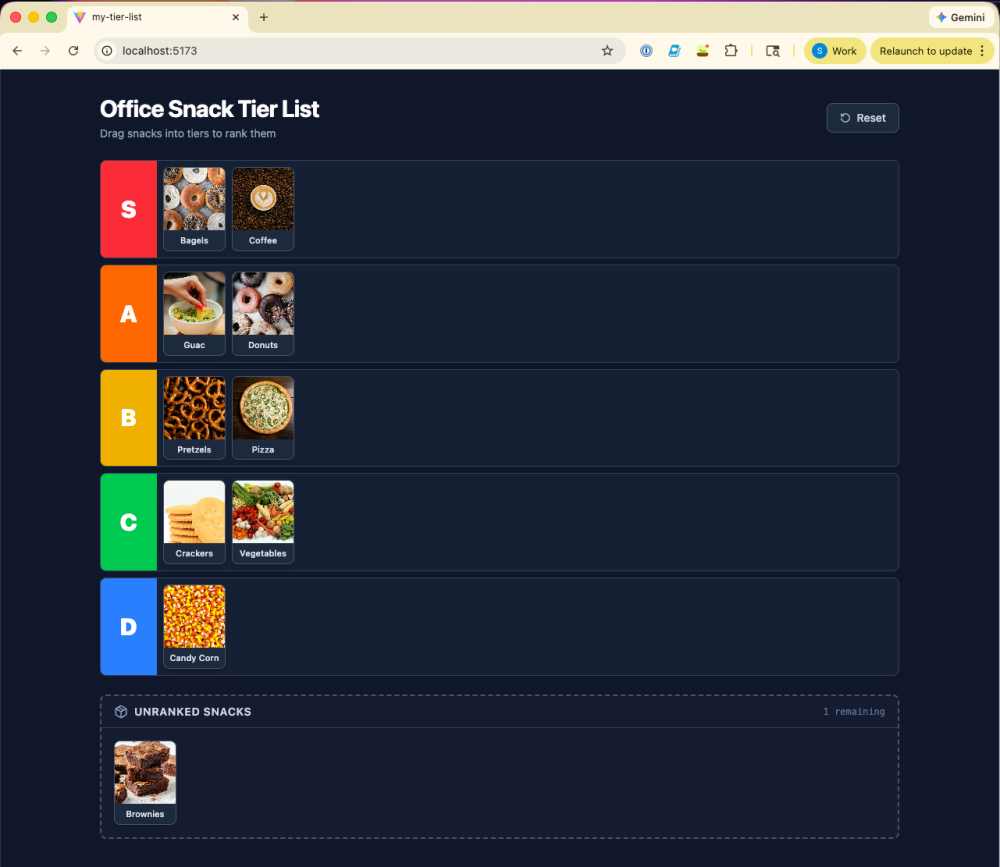
After some minor tweaks, the resulting app worked perfectly. I could drag a bagel to S-Tier and candy corn to D-Tier (where it belongs—please never bring this as an office snack.)
But looking at the generated code, I realized two things:
- Heavy Dependencies: The LLM immediately reached for a third-party library (dnd-kit) to handle the drag-and-drop mechanics. I wondered what the equivalent would be when developing on the Salesforce platform.
- Manual Persistence: To save my rankings, the app needed a 40-line function just to read from and write to the browser’s
localStorage. I assumed that in the Salesforce ecosystem, there would be a more streamlined way to handle this—and I was right.
If I wanted to make this “real”—shareable with coworkers or persistent across devices—I would have needed to spin up a backend (Node, Supabase, or Firebase) and write API endpoints.
That was the perfect segue to Salesforce.
Phase 2: The Variable – Salesforce LWC
My goal was simple: Recreate the exact same app using strictly Salesforce platform tools. No external database, no Node server. Just me and the Org.
Library vs. Native Web Standards
I expected a proprietary nightmare or a weird, archaic language. What I found was… JavaScript.
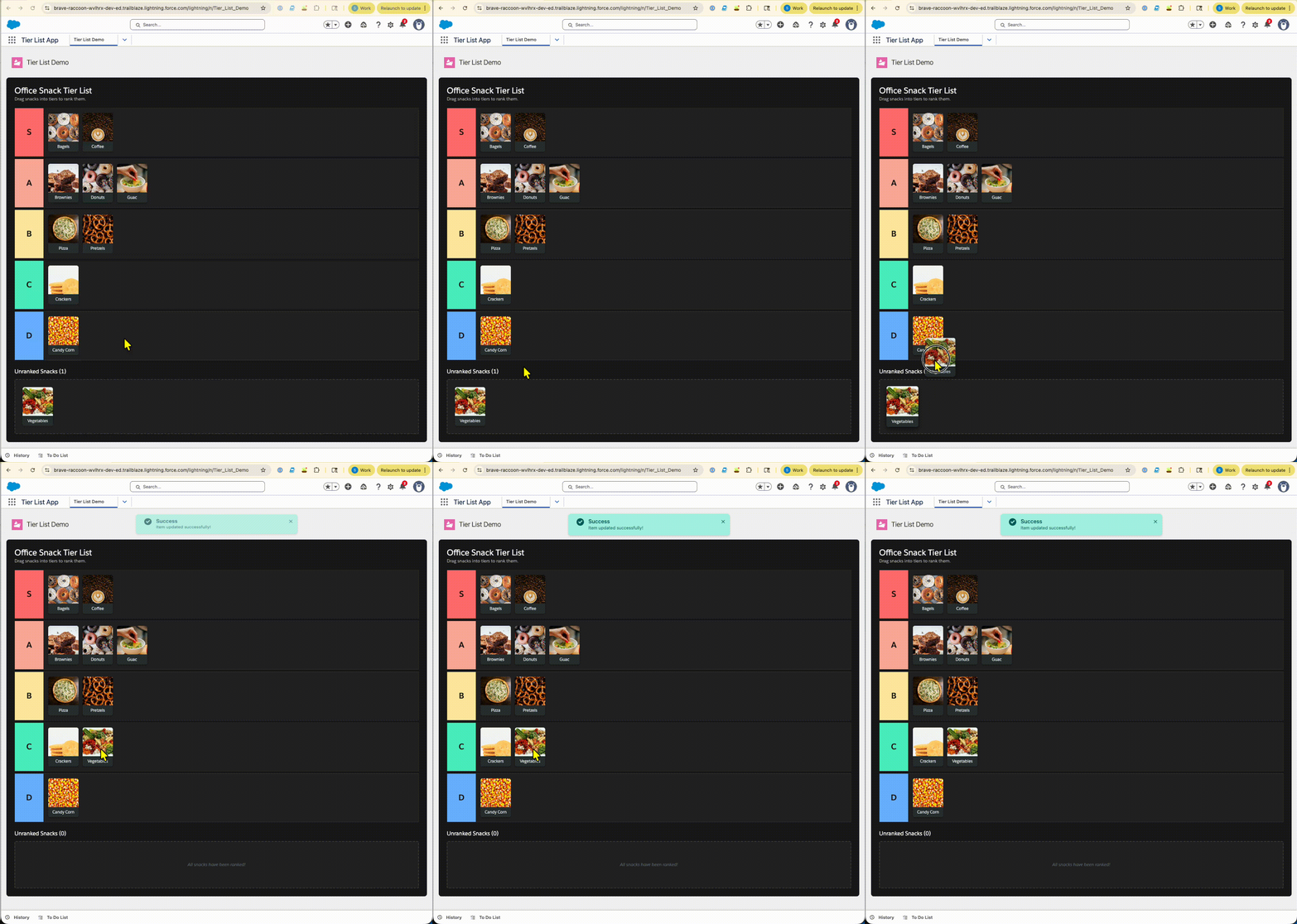
Salesforce uses Lightning Web Components (LWC). The code felt shockingly similar to React, but simpler in a key way: for the drag-and-drop logic, I didn’t need a massive npm package. I used standard HTML events (ondragstart, ondrop). Because LWC runs right in the browser without a heavy virtual DOM layer, the standard web APIs just worked.
Phase 3: Where React Needs a Backend, Salesforce Is the Backend
This was the biggest “aha!” moment. In my React app, “saving” data meant writing 40 lines of code to manually serialize JSON into the browser’s localStorage. And if I wanted to make that data permanent? I’d have to learn SQL, spin up a Postgres database, build a Node API, and handle CORS.
In Salesforce, I didn’t need to do any of that. I just created a Custom Object.
I went to the Object Manager, created a Tier_List_Item, and instantly had a secure, scalable relational database with an auto-generated API. And while I didn’t explore it deeply for this specific project, I realized I also got a full-blown enterprise security model right out of the box. If I ever needed to handle granular permissions—like ensuring only managers could edit the S-Tier snacks—I could configure that entirely through the standard UI instead of spending a week writing authentication middleware.
To get that data into my component, I used the @wire service—a reactive direct line to the database.
Manual State Management in React:
1// In React, we have to manually load the initial state from storage
2const [boardState, setBoardState] = useState(loadInitialState);
3
4// And we have to manually save it every time something moves const handleDragOver = (event) => {
5// ... calculation logic ... localStorage.setItem(STORAGE_KEY, JSON.stringify(next));
6};
Declarative Data Binding in Salesforce:
1// The platform fetches the data for us
2@wire(getAllItems) wiredItems;
3
4// We just tell the server to update the record
5handleDrop(event) {
6updateItemTier({ itemId: id, tier: newTier });
7}
The Takeaway
- In React: I spent my time managing libraries and local storage.
- In Salesforce: I spent more time writing logic. The platform provided the database, and the browser provided the interactivity.
The deployment cycle was slower (no hot-reload!), but the amount of “boilerplate” code required to get persistent data was significantly less. If I had known about Salesforce Live Preview before starting, my process would have been faster.
Phase 4: The “Chicken and Egg” Deployment Check
Connecting that frontend in Phase 2 to the backend in Phase 3 is where things got tricky. I wrote my LWC and my Apex controller to talk to the database, then hit deploy. The terminal screamed at me:
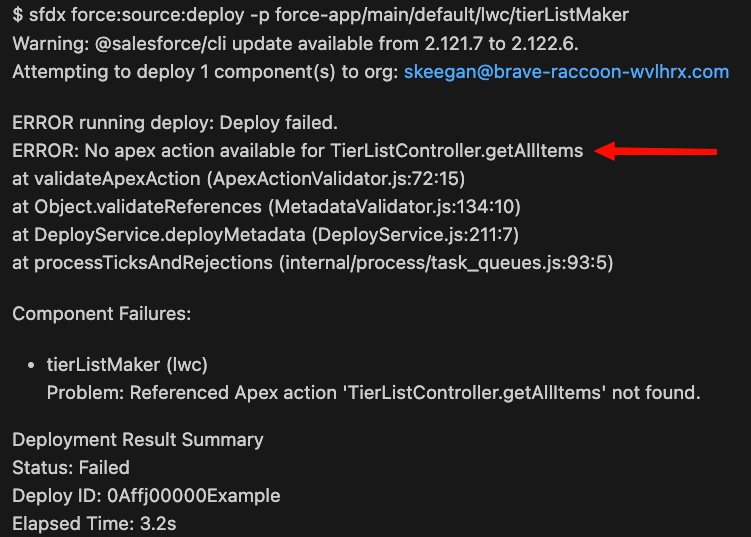
My instinct was to assume I had made a typo or something silly along the way. I checked all the usual suspects: spelling, file names, file paths, etc. But the code checked out.
In my React workflow, I would have simply pasted the error into an LLM, copied the fix, and moved on. But because I was using AI and the documentation to actually check my understanding, I stopped to figure out the why. This led me to a crucial difference: the Platform Compilation Model.
While not an official Salesforce term, this became a helpful mental model for how the platform validates code. In React, the browser is the only judge of your code. You can write a frontend function that calls an API that doesn’t exist yet, and the browser won’t care until the moment you actually run it.
In Salesforce, the server is the judge. When you deploy, the platform compiles your code to ensure it’s valid. It saw that my LWC was trying to shake hands with a backend method (getAllItems) that didn’t exist on the server yet.
I had to deploy the Apex Class (Backend) first, then the LWC (Frontend). It wasn’t just a syntax error—it was a reminder that I was coding for a tightly integrated platform, not just a browser.
Phase 5: Low-Code Superpowers (The “Real Dev” Moment)
Once I understood the architecture, I realized I had access to way more than just a database. Since my “Snacks” were now actual data records, I could use the full power of the Salesforce automation engine.
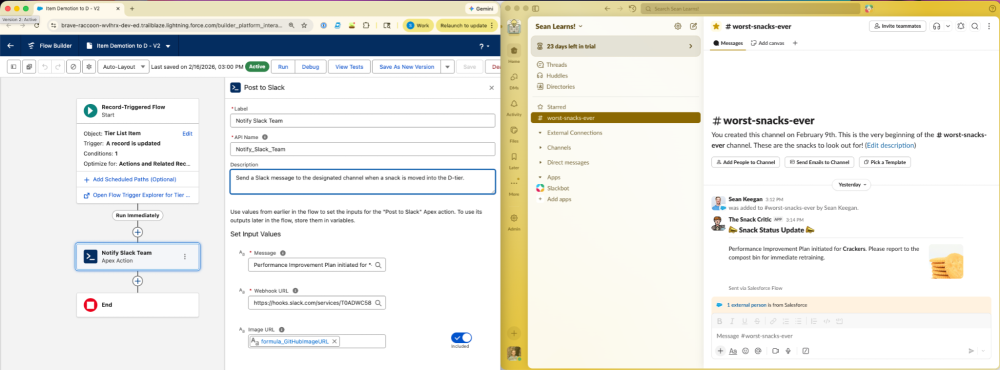
I wanted to add some hard-hitting business logic: “If a snack is demoted to D-Tier, notify the team on Slack.”
In my React app, this is where the fun stops and the infrastructure work begins. I would need a webhook, a cron job, or maybe a Zapier subscription. In Salesforce, I didn’t write a single line of code. I simply used a Flow.
I built a “Record-Triggered Flow” that listens for the Tier field changing to D. When it happens, it sends a message to a Slack channel.
The Humble Pie (Error 500)
Of course, it wasn’t all seamless. I got confident and tried to add a second feature: posting a “congratulations” message to the internal feed (Chatter) when a snack hit S-Tier.
I set it up, ran it, and… Error 500.
The error message was cryptic, even though my logic was sound. I spent way too long debugging my Flow before a mix of AI nudging and diving into the platform documentation pointed me to the object settings.
Turns out, there’s a small checkbox for “Feed Tracking” on my Custom Object that I hadn’t turned on. The system was trying to post to a feed that didn’t exist yet.
It was a frustrating, head-desk moment, but it was also a validating one. It was a good reminder that Low Code ≠ No Knowledge. You still need to think like a developer and know which switches to flip to make the platform work for you.
Conclusion: It’s a Platform, Not Just a CRM
So, what did I learn in my first three weeks?
I learned that the gap between a “Modern Web Developer” and a “Salesforce Developer” is much smaller than I thought. If you know JavaScript, you already know a large chunk of the syntax.
But more importantly, I learned what the platform actually does. It handles the boring but essential stuff—Auth, Database, Hosting, and APIs—so you can focus on the logic that matters. Whether that logic is “closing a million-dollar deal” or “ranking crackers as D-Tier,” the tools are fundamentally the same.
…And for the record: Bagels always belong in the S-Tier.
Want to Learn Along with Me?
I’m just getting started, and I used the Beginner Developer Trailmix in conjunction with my AI buddy to help learn the basics. If you want to build your own Tier List (or something actually useful), join me here:
- Beginner to Advanced Developer Roadmap (Trailhead)
- Introducing Lightning Web Components (Developer Documentation)
- Data Modeling (Trailhead)
- Salesforce Flow Basics (Trailhead)
About the Author
Sean Keegan is a Lead Developer Advocate at Salesforce based in New York City. A former math teacher, he is passionate about making complex tech accessible to everyone. Outside of work, you can find him playing video games, tending to his houseplants, or on the Ultimate Frisbee pitch. Connect with him on X/Twitter or LinkedIn.