


Prompt Builder makes it easy to ground a prompt in CRM data and invoke it from Flow or Apex. When your automation needs structured data, however, there can be a problem: the model’s response always comes back as a plain string. This isn’t a problem if you’re using it to summarize a record or draft an email to a customer. What about more complex workflows like creating a case from a customer email or extracting information from a contract? In those scenarios, you’re forced to write prompt instructions that beg the model to respond with JSON (and only JSON) and write an Apex class to parse and deserialize its output. This approach works — until the model wraps the response in Markdown fences, adds a friendly explanation, or hallucinates a field.
Structured Outputs moves format enforcement from your prompt to the platform. You define the shape of the response, and the platform guarantees the model returns valid, parseable JSON in that shape every time. This post walks through how to set it up and what you can build with it.
What Structured Outputs does
Structured Outputs applies system-level instructions to a prompt template that force the model to respond in a structured format, such as JSON. This is different from asking for JSON in your prompt. The response format is enforced by the platform, not by the model’s willingness to follow directions. You no longer need to specify a format in your prompt, provide example outputs, or strip Markdown fences from the response.
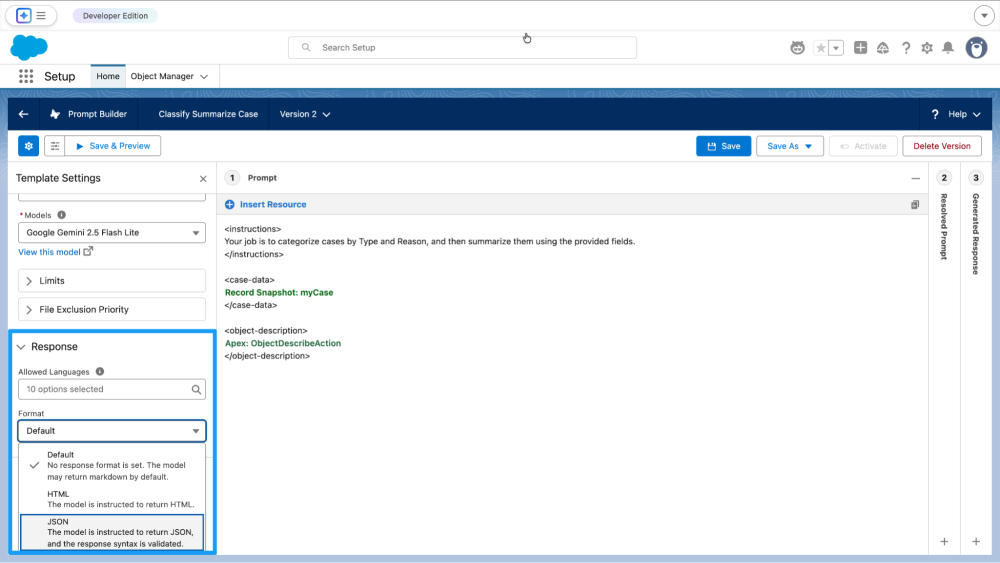
You enable it by switching the prompt template’s response format from Default to JSON. Now your prompt template will always return parseable JSON for use with Flow or Apex.
Defining the response shape with Lightning types
Getting JSON back is only half the battle. If you don’t specify the response’s fields, the model will choose them for you — and there’s a good chance they’ll differ from what your automation expects, leading to an error or worse, a crash. To be useful in an automation, the response needs to include specific fields with specific data types every time. In other words, it needs a type.
Object-based Lightning types let you define that type declaratively. Instead of specifying the fields in the prompt and writing an Apex wrapper class to model the response, you create a Lightning type with the fields you need — be they a String, Boolean, Integer, Date, or DateTime — and assign it as the prompt template’s response structure. The platform then ensures every response conforms to it.
To set one up:
- Click New Lightning Type in the Response Structure search bar.
- Name your type and add the fields you need.
- Save your template.
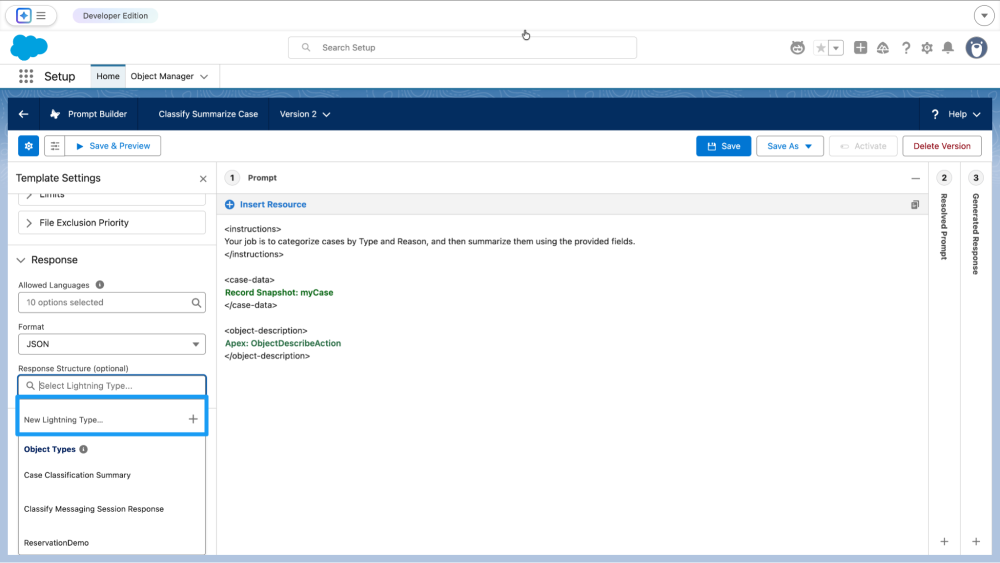
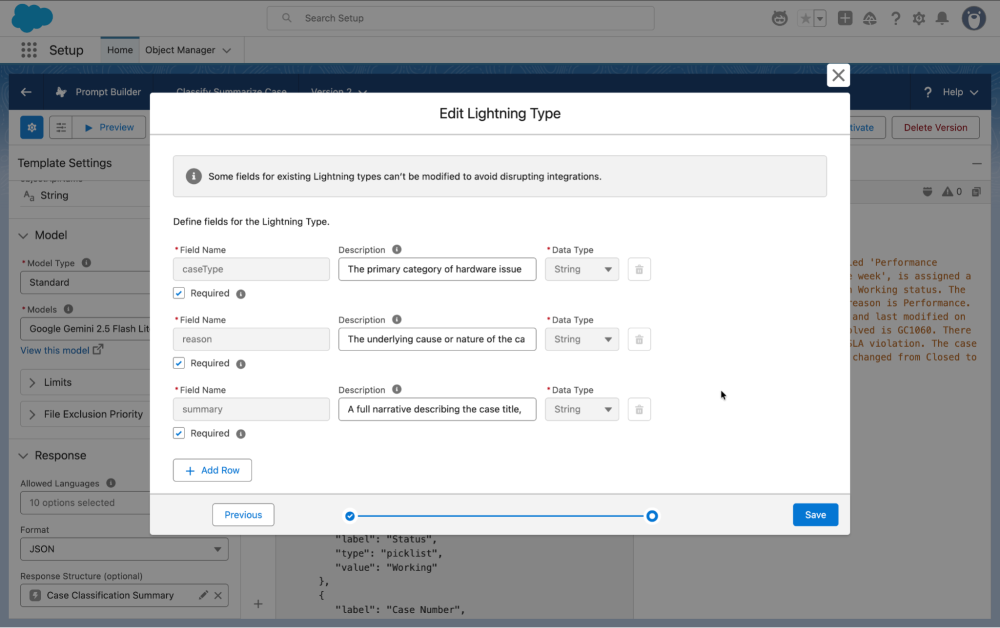
From this point on, every invocation returns JSON with exactly those fields regardless of how the prompt or model changes.
Using Structured Outputs in Flow
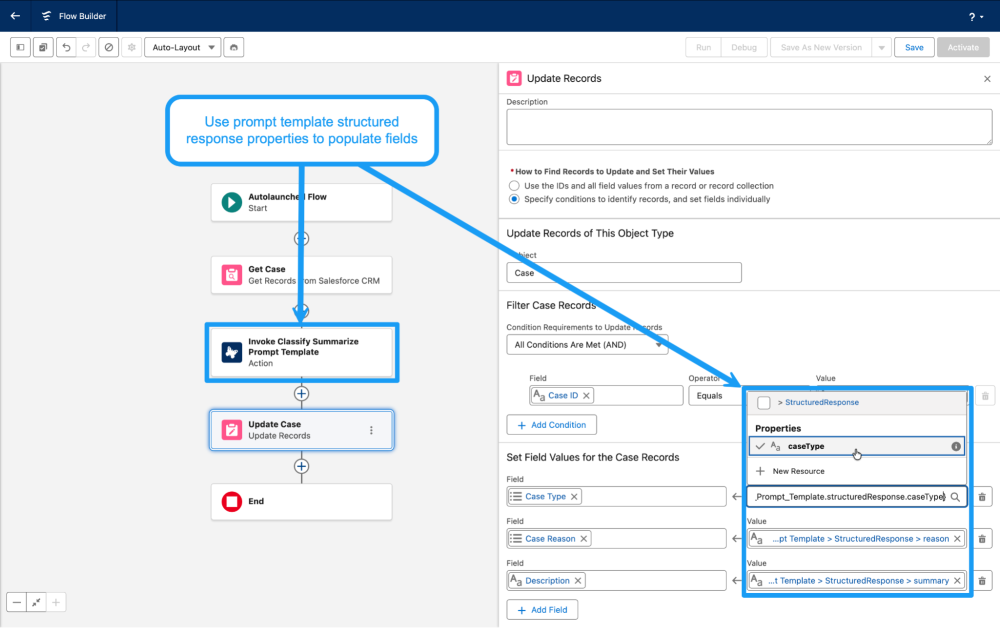
With a Lightning type assigned, your prompt template’s output fields are directly available in Flow. Add the prompt template as an Action element, and its structured response fields show up as variables you can map to record fields, use in Decision elements, or pass to subflows.
For example, a prompt template that classifies incoming cases could return caseType, reason, and summary fields. An Update Records element can map those fields directly to the Case record as shown below. The entire automation can be done without writing a line of code.
Using Structured Outputs in Apex
In Apex, structured outputs eliminate the JSON.deserialize step entirely. Invoke the template through the Connect API, and the response will include a structuredResponse property that you can cast directly. Each Object-based Lightning type has a system-generated Apex class accessible via the LightningTypes namespace.
1// Invoke the prompt template
2ConnectApi.EinsteinPromptTemplateGenerationsRepresentation result =
3    ConnectApi.EinsteinLlm.generateMessagesForPromptTemplate(
4        templateApiName, input
5    );
6
7// Cast directly to your Lightning Type — no deserialization needed with
8// LightningTypes.{Lightning Type API Name}
9LightningTypes.ClassifyMessagingSessionResponse output =
10    (LightningTypes.ClassifyMessagingSessionResponse)
11    result.generations[0].structuredResponse;
12
13// Use fields like any typed object
14System.debug(output.issueCategory);
15System.debug(output.title);
16System.debug(output.summary);
The structured outputs approach skips all the boilerplate: no wrapper classes, no JSON.deserialize, and no try-catch for malformed strings and stray newlines. The platform handles the format and code handles the logic.
Limitations
Structured outputs solve the format problem but they don’t solve everything.
Field types don’t support nested objects or arrays. Object-based Lightning types support only String, Boolean, Integer, Date, and DateTime properties. If you need to extract a list (for example, line items on a receipt), you’ll need to return that data as a JSON string field and parse it in Apex yourself. This is the biggest limitation for real-world workflows, so plan your data model around it.
Picklists aren’t natively supported. You can list acceptable picklist values in the field description, but the model can still hallucinate values outside your list. Add a Flow Decision element or Apex validation to check the returned value against your expected options and fall back to a default when it doesn’t match.
Lightning type changes can silently break downstream automations. Prompt templates are versioned, but the object-based Lightning types are not. If you rename or remove a field on a Lightning type that’s already wired into a Flow or Apex class, those automations will break. Create a new Lightning type for significant changes and update your automations deliberately. Don’t edit a live type in place.
Structured doesn’t mean accurate. Structured Outputs guarantees that the response will be valid, parseable JSON in the shape you defined. It doesn’t guarantee the values are correct. Treat Structured Outputs as a mechanism for ensuring reliable formatting, not a substitute for validation logic. Add checks to catch values that don’t make sense.
Conclusion
With Structured Outputs, your prompt templates can speak the same language as the rest of Salesforce: typed, structured, and ready for automation. It’s time to delete that parsing code, simplify those flows, and start building AI workflows that just work.
Resources
Spring ’26 Release Notes | Structured Outputs
EinsteinLLMClass API documentation
Use Structured Outputs to Format Model Responses
About the author
Charles Watkins is a self-taught Developer Advocate at Salesforce and a software developer. He spends his time blogging, coding, and live streaming. You can follow him on LinkedIn.