For an AI coding agent to be truly effective, it must have access to the right tools at the right time. But with the sheer number of Salesforce DX MCP Server tools available (and growing), it can be challenging for developers to manually select and configure the tools that their agents need. That’s where Abilities, a new feature in Agentforce Vibes, comes in. Abilities is an intelligent context activation system that helps Salesforce Developers automate their development environment.
By leveraging RAG-based semantic retrieval, Abilities solves the growing tool selection problem by identifying the most relevant Salesforce DX MCP Server tools for every request. This approach keeps your execution environment focused while improving output quality and reducing token usage.
In this post, we’ll examine the challenges of tool explosion, define how Abilities function, and dive into the mechanics of semantic retrieval and tool dependency expansion.
The problem: Tool explosion and manual configuration
In Agentforce Vibes, context is everything. As the Salesforce Platform grows, the number of MCP (Model Context Protocol) servers grows with it, and today, there are more than 80 Salesforce DX MCP Server tools available from within Agentforce Vibes, including task-based tools that handle CLI commands, testing, code analysis, accessibility checks, DevOps operations, mobile, and more.
Turning them all on at once creates problems: the prompt becomes larger, the model has too many choices, output quality drops, and token costs rise. But the opposite problem exists as well. If too few tools are available, Agentforce Vibes may not have the capabilities it needs to generate metadata, create Apex code, refactor LWCs, or successfully analyze code for security violations.
As the catalog of Salesforce DX MCP Server tools expands, several new challenges arise:
- Default limitations: Given the sheer number of possible tools, we’ve only enabled a limited subset by default. This is due to concerns that activating too many tools might degrade the user experience or overwhelm the model.
- User experience impact: This often leads to sub-optimal code generation where the code may fail to compile, fail deployment, or ignore Salesforce development conventions.
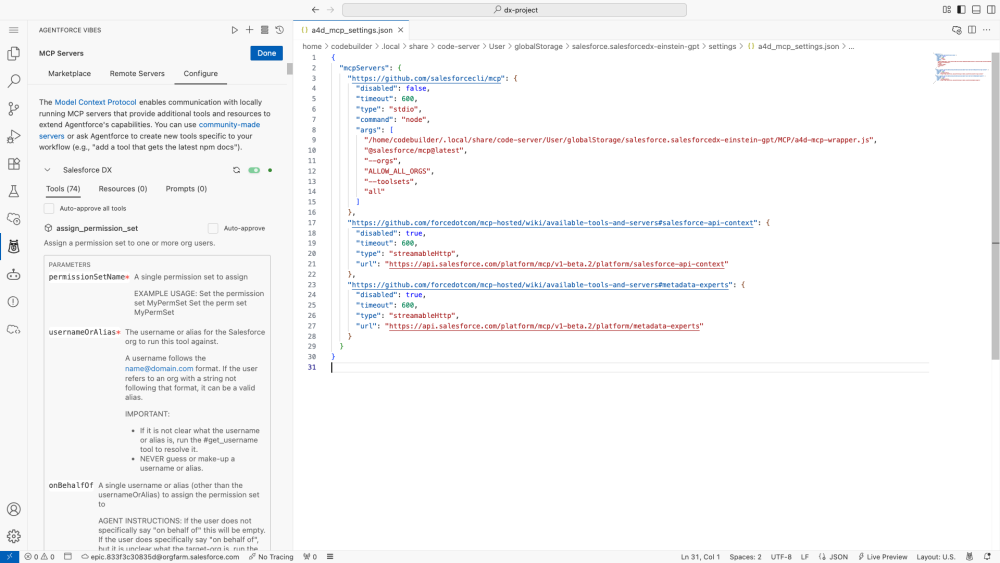
- Manual configuration barriers: Developers can customize available tools, but doing so requires manual editing of the local
mcp_config.jsonfile and specific knowledge of internal MCP server tool names. Consequently, most developers never make these changes and rely entirely on the default toolset, even when additional tools would improve outcomes.
We needed a way to give Agentforce Vibes exactly the tools it needs, exactly when it needs them.
The solution: Intelligent context activation with Abilities
Abilities are domain capabilities that define what Agentforce Vibes can do in a given development scenario. There is no manual configuration and no switching between development modes. The system responds directly to the developer’s intent. This keeps the execution environment small and focused while ensuring that Agentforce Vibes has the capabilities required to complete the development task.
Examples include capabilities for:
- Apex, LWC development
- DevOps operations
- Mobile development
- Core platform administration
Each Ability bundles together the DX MCP Server tools associated with that capability.
When a request arrives, Agentforce Vibes evaluates the developer’s prompt and determines which capabilities should be active for the task and exposes only the tools associated with those capabilities. This process is managed by an internal orchestration layer called the Ability Coordinator, which interprets the request and prepares the execution environment before the model is invoked. This happens automatically for every task and requires no configuration from the developer.
Abilities are composable and a request may activate more than one capability. In practical terms, Abilities answer one question: What tools should Agentforce Vibes have access to right now?
How Skills and Abilities work together
Abilities and Skills serve different but complementary roles. Abilities handle context activation; they detect what you’re trying to do and automatically select the right Salesforce DX MCP tools for the task. This improves model focus and keeps output aligned with Salesforce best practices.
Skills are reusable, task-level playbooks. They define how specific work gets done (e.g., refactoring a trigger, generating tests, running a deployment), so you don’t restate instructions every time.
Abilities determine what tools are available. Skills define how the work gets done. Together, they let Vibes intelligently configure itself per task while keeping the developer in control.
What drives Abilities
Abilities use retrieval-augmented generation (RAG) to select tools. Instead of sending the full catalog of available tools to the model, Abilities retrieve the most relevant tools using semantic search. This allows the system to scale as the tool catalog grows while keeping prompts small.
How semantic retrieval works
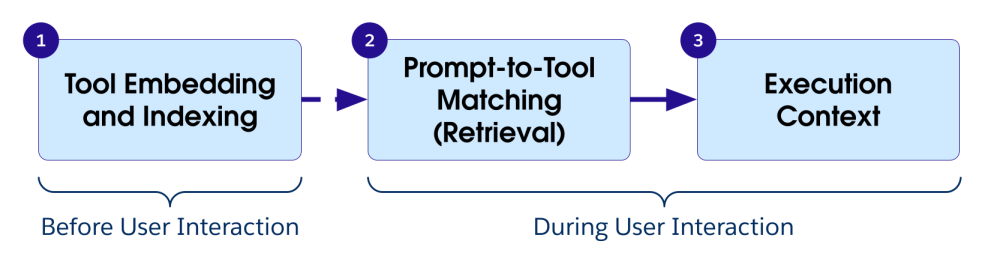
To ensure that Agentforce Vibes selects the right tools without overwhelming the model, we use a RAG-based retrieval process. This happens in three phases: indexing the tools, matching them to your prompt, and then injecting the tools into the model’s execution context.
Phase 1: Tool embedding and indexing
Before any user interaction occurs, we prepare the tool catalog for retrieval. The following process runs whenever the MCP tool catalog is updated:
- Vector conversion: Each tool definition, including its name, description, parameters, and intended usage context, is normalized and converted into a vector embedding.
- Storage: These embeddings are stored in a vector database. This allows the system to identify tools based on their “meaning” and function rather than just matching keywords.
Phase 2: Prompt-to-tool matching (retrieval)
When you submit a prompt, Agentforce Vibes performs a real-time similarity search:
- Prompt embedding: Your prompt is converted into a vector embedding using the same model used for the tool definitions
- Similarity search: The system performs a cosine similarity search, comparing the prompt vector against the vector index of tools to find the best semantic matches
- Top-K selection: To balance performance and accuracy, the system ranks the results and selects the top matches, typically around ten tools
Phase 3: Execution context
These selected tools are then injected into the model’s execution context as a temporary “function catalog.” This ensures the LLM has all the relevant capabilities it needs to fulfill your request while keeping the prompt size optimized for speed and cost.
Handling tool dependencies
Some MCP tools act as orchestrators that guide a workflow and require additional tools to complete the task. If only the orchestrator tool appears in the retrieved set, execution may fail because required tools are missing.
Abilities address this with post-selection expansion.
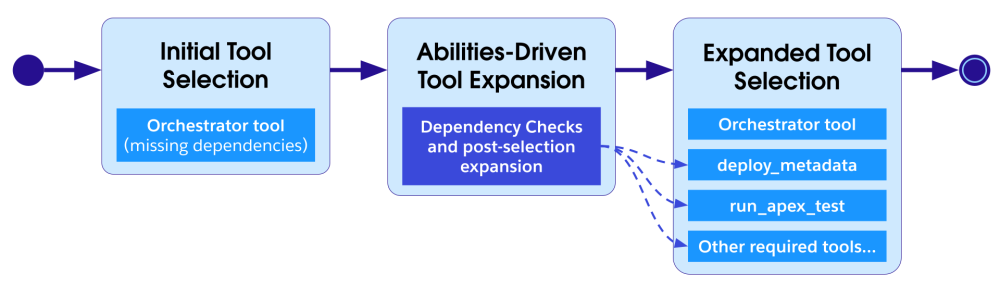
This ensures that the agent has the tools needed to complete the task while keeping the overall tool set small.
Conclusion
From intent to execution, Abilities ensure that Agentforce Vibes has exactly what it needs, every time. By utilizing RAG-based semantic retrieval and automated dependency expansion, this system effectively manages the expanding catalog of Salesforce DX MCP tools to deliver high-quality, focused development environments without manual configuration.
As Agentforce Vibes grows, the Abilities intelligent context activation system may expand to support:
- Additional Salesforce and third-party MCP servers
- Integration with Skills for task guidance once the right tools are activated
- Richer tool metadata for retrieval
- Improved dependency discovery
Resources
- Agenforce Vibes Developer Guide: Abilities
- Trailhead: Quick Start: Troubleshoot Code with Agentforce Vibes
- Trailhead: Get Started with Agentforce Vibes
- Video: Agentforce Vibes Decoded
About the authors
Jeff Douglas is a Product Management Director at Salesforce working on Agentforce Vibes and AI-powered developer tools. A Salesforce Developer since 2007, and one of the original Salesforce MVPs, he helped launch Trailhead and build several of its core learning and assessment systems. Jeff is an Army veteran, former brewery owner, foster and adoptive parent, woodworker, and owner of a growing herd of mini Scottish Highland cows. Connect with him on LinkedIn.
Ken Lewis is a Lead Member of Technical Services at Salesforce based in Oakland, CA. He formerly worked on Salesforce products for the Nonprofit sector, and enjoys making Salesforce products work best for all types of customers. Outside of work, you can find Ken playing racquetball, practicing on his home DJ setup, or exploring new restaurants and activities in the Bay Area. Connect with him on LinkedIn.