The Model Context Protocol (MCP) is changing how we expose APIs to AI agents. To continue our headless journey, Salesforce just released the Data 360 MCP server as an open-source GitHub repository in Developer Preview. This new server connects the Salesforce Data 360 APIs to any MCP client that supports stdio transport, such as Claude Code, Cursor, or Codex.
This post covers how the new MCP server works, how to install it locally, and how your feedback will help us shape the future of the tool.
Solving the context window challenge
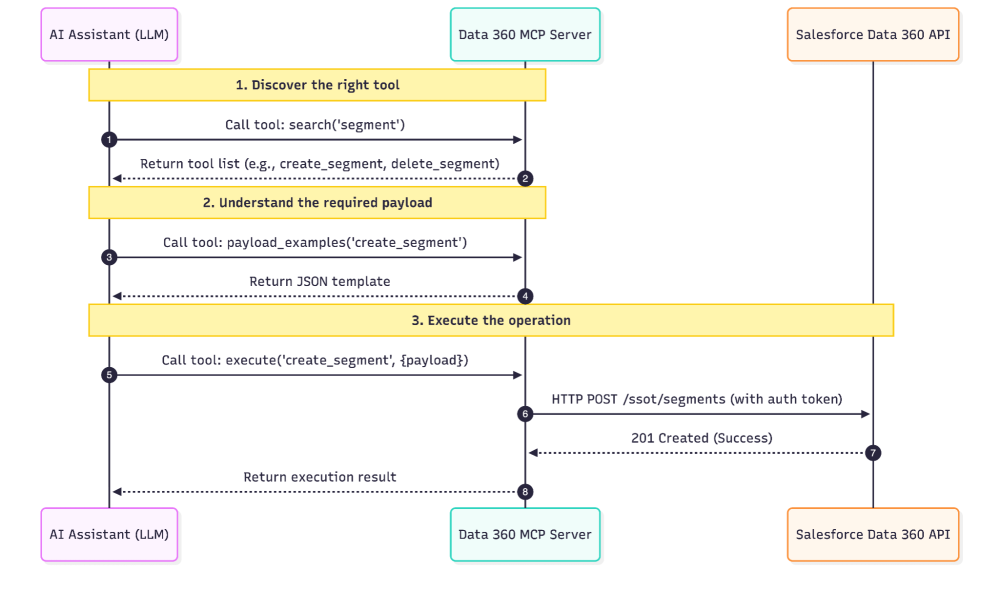
Data 360 has a massive API surface. Exposing every endpoint directly as a tool quickly overwhelms a large language model’s (LLM) context window. To solve this, our engineering team implemented a novel approach inspired by Cloudflare’s research on MCP server tool management at scale. Instead of registering the approximately 200 REST API operations individually, this MCP server consolidates them behind three facade tools:
search: Discovers tools by intent, keyword, or family.payload_examples: Fetches working JSON payloads so the LLM understands how to structure complex requests.execute: Runs the specific underlying tool by name and passes the correct parameters.
When an LLM wants to perform a task, it uses a typical workflow: it searches for the right capability, fetches a payload example to understand the required data structure, and then executes the operation. This approach saves context window space and improves the accuracy of the AI’s actions while remaining flexible enough to support the ever-growing headless capabilities of Data 360 far into the future.
What the Data 360 MCP server includes
Under the hood, the three facade tools give your AI client access to hundreds of REST API operations organized into tool families. These tools connect directly to most of the general availability (GA) APIs on Data 360.
| Tool Family | Description |
| DLO / DMO | Manage raw data tables (Data Lake Objects) and your unified schema (Data Model Objects) |
| Data Streams | Ingest data from generic sources, Salesforce CRM, Snowflake, or Amazon S3 |
| Mappings | Map source fields to target Data Model Object fields |
| Data Transforms | Build, run, validate, and schedule SQL-based transformations |
| Identity Resolution | Define rules that unify customer profiles, then publish and run them |
| Calculated Insights | Author SQL-defined metrics; enable, disable, run, validate, and query them |
| Segment / Dataspace | Build and publish audience segments; manage dataspaces and their members |
| Connection | Discover connectors and create, update, or test connections to data sources |
| Query | Run SQL queries; query profiles, calculated insights, and data graphs; explore metadata |
| Activation / Data Action | Send segments to external platforms and trigger automated data actions |
| Semantic Data Models | Build semantic models for business intelligence — data objects, dimensions, measures, calculated fields, metrics, and relationships |
| AI and Search | Configure Retrieval-Augmented Generation (RAG) retrievers and vector or hybrid search indexes for AI workloads |
| Other | Deploy data kit bundles, publish real-time events, handle GDPR requests, use AI-assisted mapping helpers, and apply preset mappings |
Getting started: installation and authentication
During this Developer Preview, the MCP server is designed for local execution and is not yet multitenant. This means each running instance connects a single user to a single Salesforce org.
To run the server, you need Java 17 or later, Maven 3.9 or later, and a Salesforce org with Data 360 enabled. You can use an Agentforce Developer Edition org or a Data 360-enabled Trailhead playground if you want to test it in an isolated environment. The server communicates via stdio, so it will work with any MCP client that supports this transport layer. Once your org is ready, follow the instructions in the README to connect your agent and start building.
The GitHub repo contains an installer script that helps set up dependencies and configure common MCP clients for use with the server.

Help us shape the general availability release
The new Data 360 MCP Server enables you to connect powerful LLMs to your Salesforce data without hitting context window limits. By using a novel facade tool architecture, we’ve made roughly 200 API operations easily accessible for agents and coding assistants.
The Developer Preview is a critical step before we integrate this architecture directly into the Salesforce platform for general availability. By releasing it as open-source now, we aim to speed up platform integration and gather direct feedback from developers. Install the server today, test it with your local tools, and share your feedback on GitHub to help us prepare for the GA release.
When the Data 360 MCP server becomes generally available, we’ll offer it as a Salesforce Hosted MCP Server alongside other product integration MCP servers. In the meantime, our entire Data 360 team will be testing it internally alongside you to build and refine a collection of Data 360 agent skills; stay tuned for more news on those!
About the authors
Alba Rivas works as a Principal Developer Advocate at Salesforce. You can follow her on Linkedin.
Chris Peterson is a Senior Director of Product Management at Salesforce, currently working on Data 360 Headless.