AI agents need shared business context to deliver trusted insights. Without consistent definitions for metrics such as “revenue” and “pipeline,” business logic remains scattered across queries, reports, and applications, creating repeated work and potentially conflicting answers. A shared semantic layer gives people and AI agents a common foundation for interpreting data and calculating results.
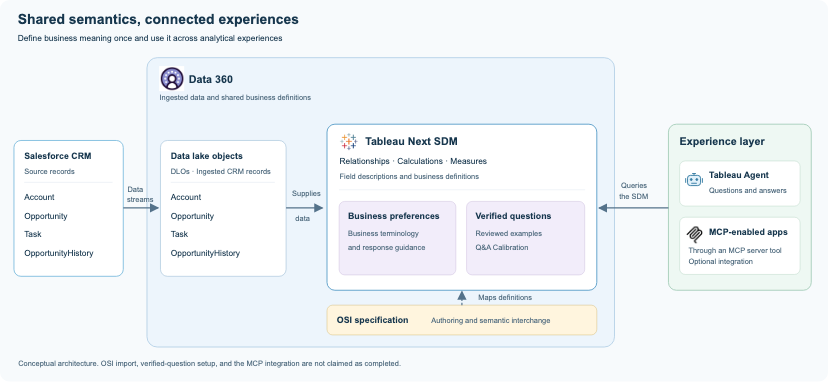
Salesforce Data 360 provides the foundation for bringing data, semantics, and AI-powered analytics together on the Salesforce Platform. Data lake objects (DLOs) hold ingested data, and data model objects (DMOs) organize it into a consistent structure. A Tableau semantic data model (SDM) enriches that data with reusable business definitions, relationships, and calculations. Agentforce Agent uses this shared foundation to answer analytical questions, while Model Context Protocol (MCP) extends access to connected AI clients. Together, these capabilities keep data and business logic on one platform while supporting consistent answers across conversational experiences.
By bringing Data 360, Tableau Semantics, and AIforce together, you can:
- Keep metrics consistent: Reuse the same calculations across reports, applications, and agent responses.
- Ask questions in business terms: Explore data using familiar language without needing to know underlying object and field names.
- Ground AI answers in business context: Give agents shared definitions to help interpret questions and return relevant results.
- Reduce development effort: Reuse established relationships and calculations instead of rebuilding logic for each experience.
- Maintain definitions in one place: Update shared business logic as requirements evolve.
- Keep data, semantics, and analytics on one platform: Bring together your Data 360 data, Tableau semantic model, and Agentforce analytics experience without adding a separate analytics platform.
- Apply governance across your analytics foundation: Use Data 360 classifications, governance tags, and policies to help control access to sensitive data and support governed analytical experiences.
This post explores how AIforce, Data 360, and Tableau Semantics work together to ground conversational analytics in shared business definitions and deliver more consistent, trusted answers.
How Data 360 and Tableau Semantics power conversational analytics
Delivering trusted conversational analytics requires data ingestion, shared business definitions, and end-user experiences to work together.
The workflow begins in Data 360. Data streams map Salesforce CRM objects and fields to corresponding data lake objects (DLOs) and fields, then ingest CRM records into those DLOs.
Next, you define the business context in an Open Semantic Interchange (OSI) specification that references the ingested DLOs and their fields. The Salesforce converter translates supported definitions into an initial Tableau semantic data model (SDM) definition. You then complete any missing relationships, metrics, and calculations before creating and validating the SDM in Tableau Semantics.
Applications query the SDM through the Semantic Query API. An MCP server exposes this capability to connected AI clients, while Agentforce agents can also use the same SDM to answer business questions. These experiences draw on shared business definitions and calculations, helping users get consistent answers across applications and conversational interfaces.
Defining business meaning with OSI YAML
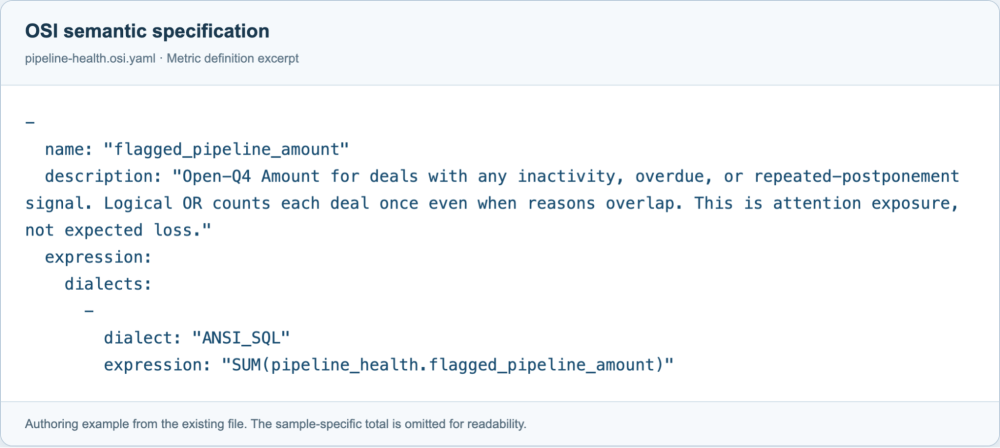
To build the semantic model, you first create an OSI YAML specification that captures the business meaning of the data. Its object and field references match the data available in Data 360, and it brings together four elements:
| Element | What it captures |
|---|---|
| Datasets | The sources and what each record represents. |
| Fields | Business attributes and their meaning. |
| Metrics | Measures and how they are calculated. |
| Business context | Reporting scope and interpretation rules. |
For example, “pipeline value” could mean all open deals, deals expected to close this quarter, or their probability-weighted value. The business chooses the meaning that fits its reporting needs, and you capture it in the YAML specification so connected experiences use the same definition.
You then use this YAML file as the input to the Salesforce conversion workflow. After importing the supported definitions into Tableau Semantics, you complete and validate any calculations and metrics that aren’t carried through conversion.
How to create and validate a semantic data model
With the OSI YAML specification in place, you can turn the business definitions into a semantic data model that applications and agents can query. The workflow below takes you from preparing the data in Data 360 to converting the specification, creating and validating the model, and checking its results.
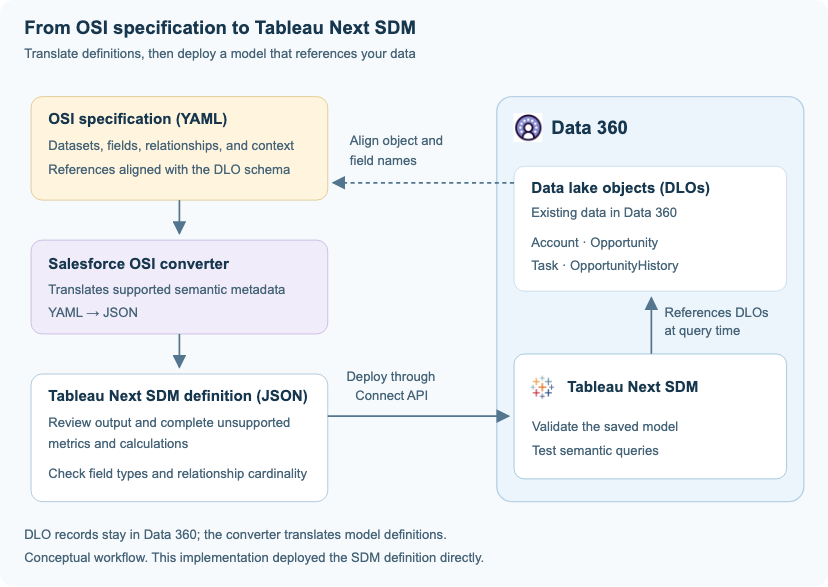
The following steps use Salesforce APIs to create, validate, and query the semantic model. These API calls can also be incorporated into scripts or deployment workflows to automate the process.
1. Prepare the data in Data 360
Connect Salesforce CRM to Data 360 and ingest the required records through data streams into DLOs. Before converting the specification, confirm that the YAML’s object and field references match the corresponding Data 360 object API names, field names, and object types (DLO or DMO). Add the required Data 360 metadata to the YAML—including the data space API name, source object API name, object type, and field data types—before running the converter, as described in the OSI workflow.
2. Convert the OSI YAML to SDM JSON
Use the Salesforce Ossie converter to translate supported YAML definitions into a Tableau Next SDM definition in JSON. After setting up the converter, run:
The command generates a JSON file named after the model’s API name, such as sales_pipeline_health_and_deal_risk.json. This file provides the starting definition for creating the SDM in Data 360.
3. Complete and create the semantic model
Review the generated JSON to confirm that it references the correct Data 360 objects, and complete any missing calculations, metrics, and descriptions. Then submit the completed definition to create the semantic model:
4. Validate the semantic model
Validate the saved model to check its definitions and references:
Review any validation errors and correct the model as needed. Confirm that validation returns isValid: true before checking the model’s query results.
5. Query the model and verify results
Create a query file that references your saved semantic model and selects the measures you want to retrieve, as shown below:
Check that the response includes the requested measures and that the results match the underlying data for the same filters and business definitions.
How business preferences guide the answer
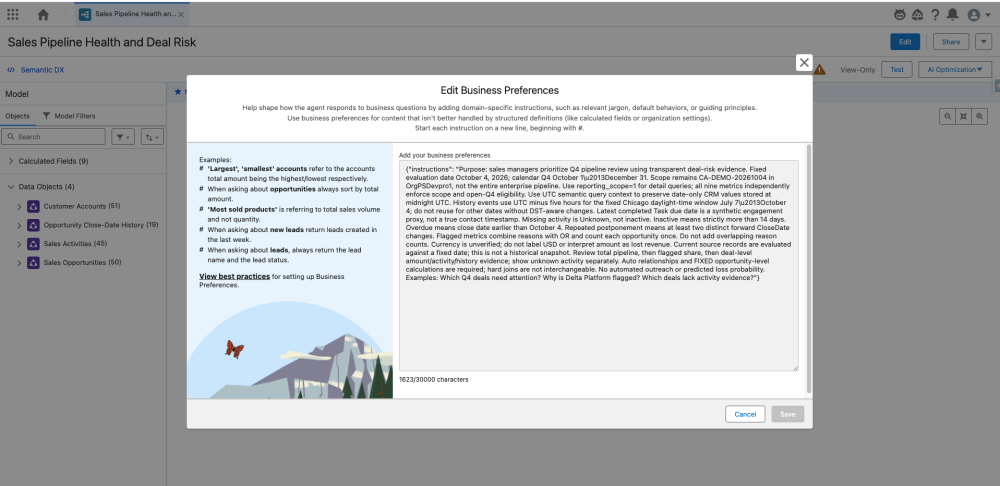
Along with relationships and calculations, the deployed SDM includes business preferences that guide how agents interpret and explain results. These preferences can guide agents to:
- Use the organization’s business terminology.
- State the reporting period and scope.
- Highlight missing data and explain relevant context.
How verified questions guide answers
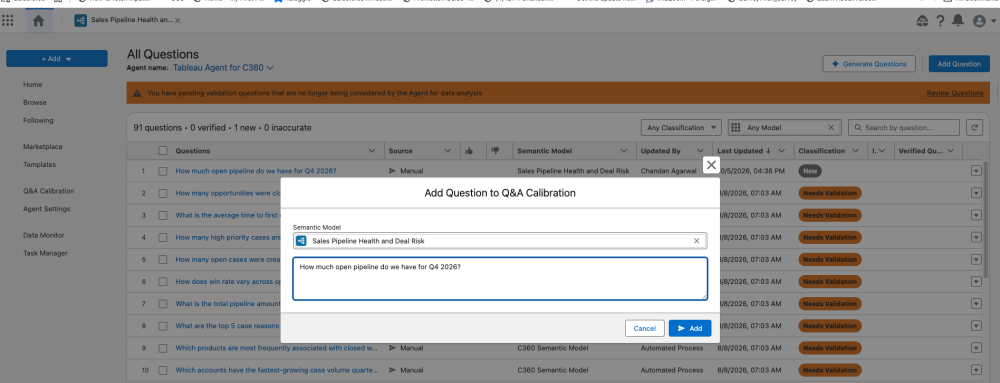
After deploying the SDM, you manually create verified questions through Q&A Calibration. You enter representative business questions, review the generated answers, and verify that they use the intended metrics, filters, and business definitions. These verified examples help the agent answer similar questions more consistently.
Conversational analytics with Agentforce and Claude (via MCP)
The following examples show an Agentforce agent and Claude (connected through MCP) answering the same business question:
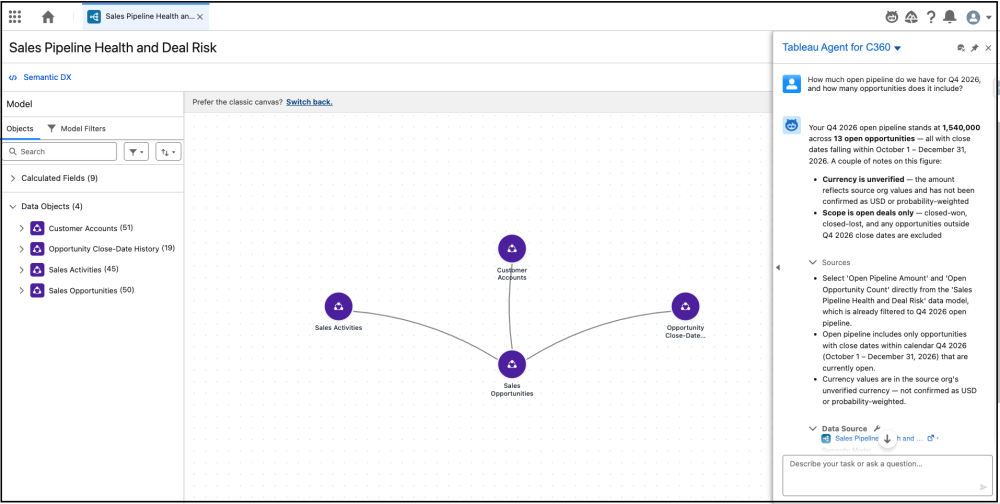
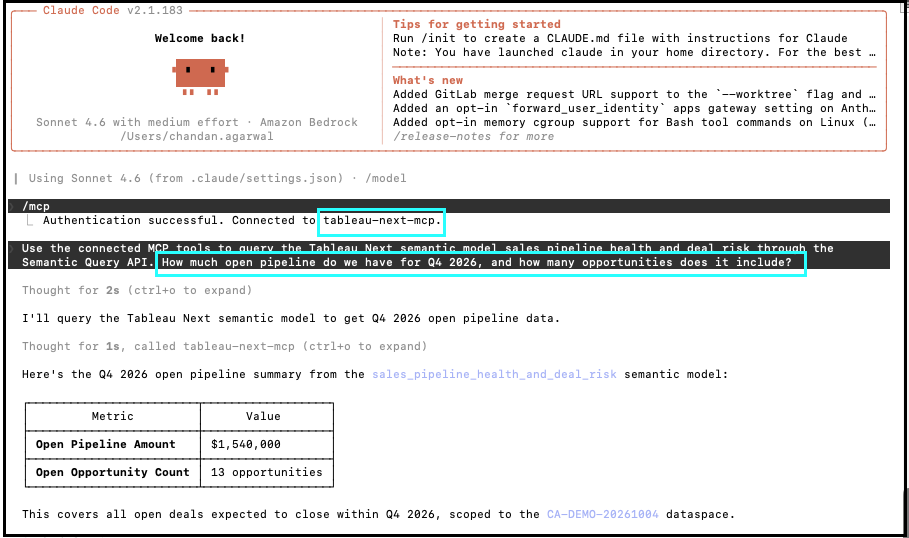
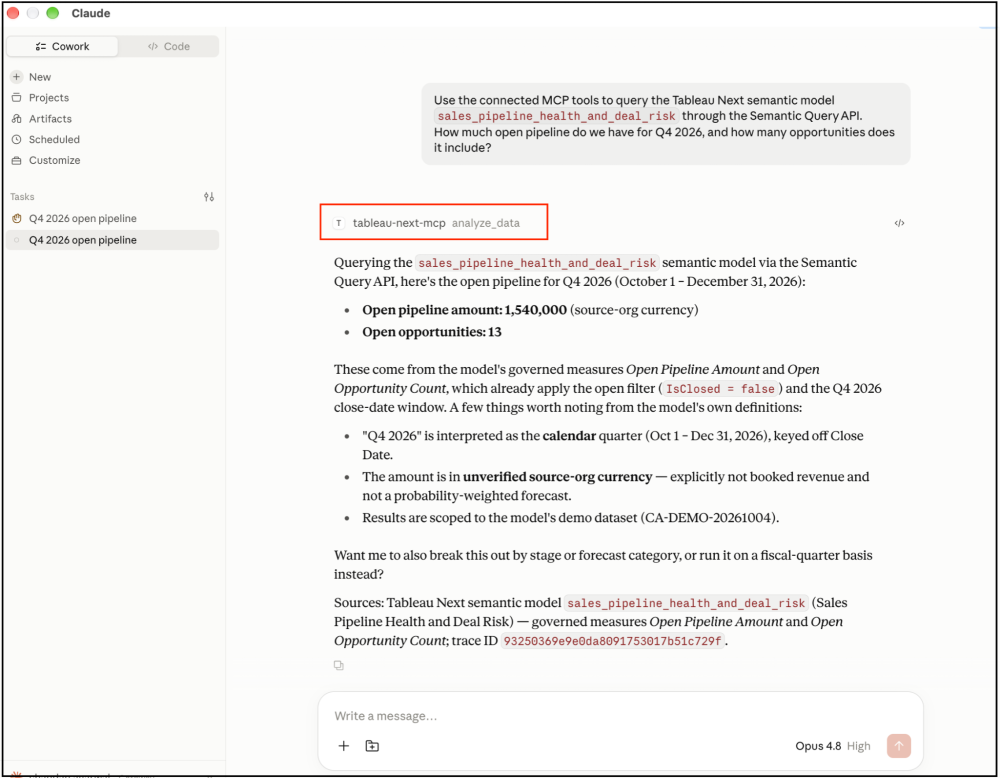
“How much open pipeline do we have for Q4 2026, and how many opportunities does it include?”
The following experiences use the Semantic Query API to query the Tableau Next SDM for the quarter’s open pipeline amount and opportunity count.
In Agentforce, the agent uses the semantic model to retrieve the requested metrics and explain the results.
In Claude Code, the client accesses the same semantic model through Tableau Next MCP, using the same business definitions to answer the question.
In Claude Desktop, the client accesses the same semantic model through Tableau Next MCP, using the same business definitions to answer the question.
Conclusion
With your data in Data 360, Tableau Semantics and Agentforce bring data, business definitions, and conversational analytics together on the same platform. You can build on this foundation without adding a separate analytics platform, while MCP extends access to the same semantic model through clients such as Claude Code.
OSI helps capture reusable semantic definitions, and the SDM puts those definitions to work through shared relationships and calculations. Model validation, business preferences, and verified questions help align analytical results and explanations with business expectations. Data 360 classifications, governance tags, and policies complement this foundation by helping control access to sensitive data.
Together, these capabilities let you reuse business logic across experiences, reduce duplicated development effort, and maintain definitions as requirements evolve. Start with a business question, establish what its terms mean, and validate the results. Then, extend that shared foundation to more questions and agents.
Resources
- OSI / Apache Ossie project — Open semantic metadata specification and conversion tooling.
- Tableau Semantics concepts — Models, dimensions, measures, and relationships.
- Semantic Query API overview — Querying a model through named fields and query context.
- Aggregation and totals — Aggregation behavior and relationship cardinality.
- Semantic authoring API entities — Metadata used to define Tableau Next SDMs.
- Business preferences best practices — Business context and guidance for analytical answers.
- Optimize and test a semantic model — Testing, calibration, and verified questions.
- Salesforce OSI converter — Setup and commands for converting OSI YAML into SDM JSON.
- OSI workflow — Conversion requirements and steps for importing semantic definitions.
- Tableau Next MCP reference — Connecting AI clients to Tableau Next analytics capabilities.
- Data 360 governance considerations — Support and considerations for governance tags and policies.
About the authors
Ravindra Varshney is a Senior Director, Software Engineering at Salesforce. You can find him on LinkedIn.
Gaurav Tewari is a Senior Product Manager at Salesforce. You can find him on LinkedIn.
Chandan Agarwal is a Principal Member of Technical Staff at Salesforce. You can find him on LinkedIn.
Special shoutout for their contribution to this post: Sonu Sharma is a Senior Director, Software Engineering at Salesforce. You can find him on LinkedIn