


 j
jExport Agentforce Session Tracing Data
Extract a single, unified JSON view of a full agent session trace with the Agentforce Session Trace OTel API. Import the output into your favorite observability tool or OpenTelemetry Protocol (OTLP) collector for further investigation.
This REST API extracts unified trace, metric and log data from two sources:
The JSON output includes every step of an Agentforce agent interaction: turns, messages, LLM calls, actions, metric scores, and feedback. The output format conforms with the OpenTelemetry (OTLP) specification, which is an open standard for sharing telemetry data with observability platforms and OTLP collectors.
The beta release of the Agentforce Session Trace OTel API has these limitations and considerations:
Only single-session queries are supported (one session ID per API request). Bulk query support is not yet available.
Salesforce Connect API standard rate limits apply (see Connect REST API Limits).
The API returns data for sessions that started (StartTimestamp) within the previous 72 hours of the API request.
Authenticate using OAuth 2.0 using an external client app (ECA). Alternatively, you can authenticate using your favorite REST client (using the auth token from the external client app).
Run the Agentforce Session Trace OTel API against the REST endpoint, passing in the session ID for the session you want to retrieve.
GET /services/data/v66.0/einstein/audit/otel/{session-id}
Here’s a high-level view of the response showing the spans hierarchy.
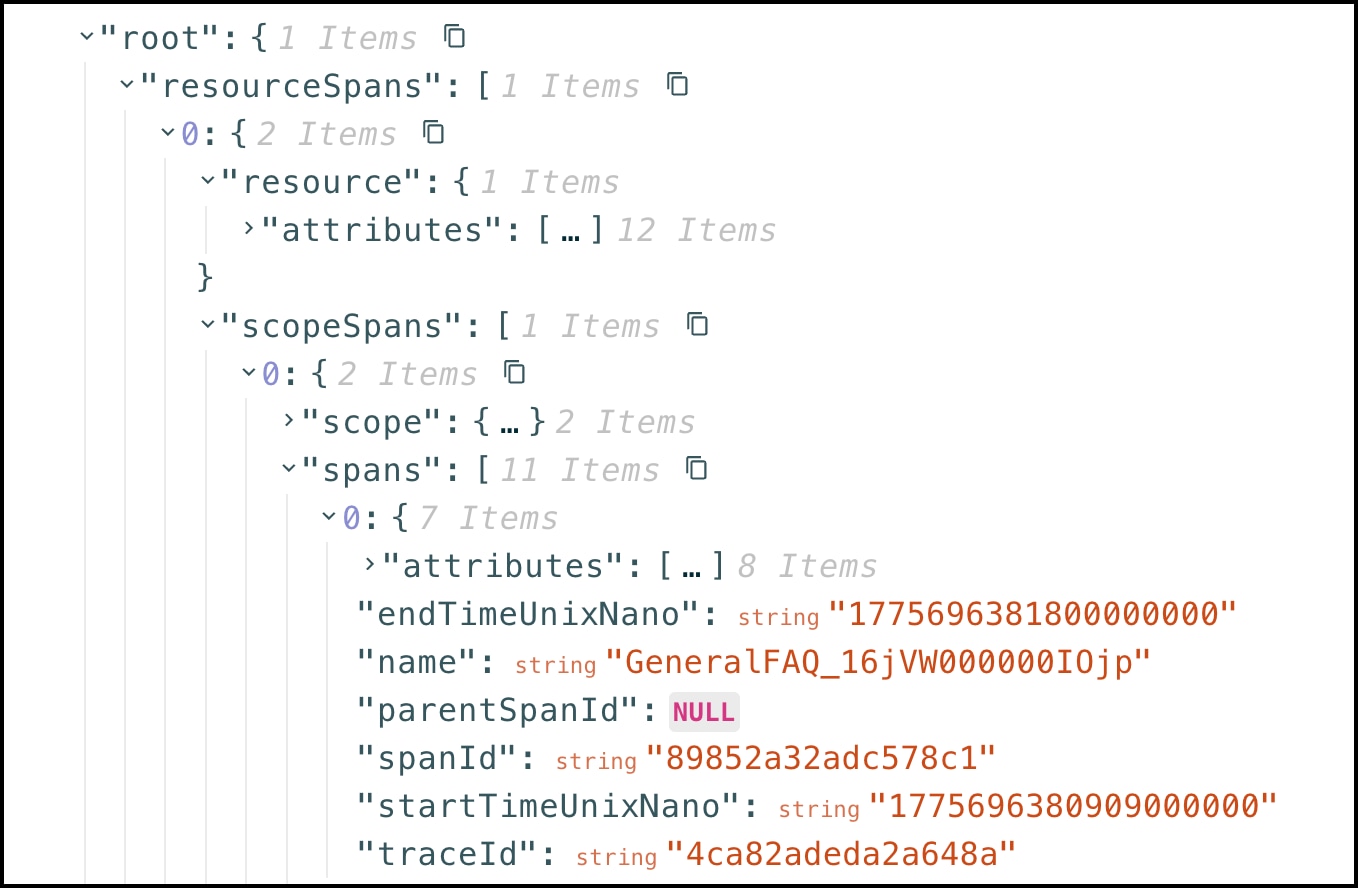
Most modern observability platforms (such as Splunk, Datadog, and New Relic) support OpenTelemetry Protocol (OTLP) ingestion. Because the API already returns OpenTelemetry-formatted data, you can feed it directly into the observability platform or into any OpenTelemetry Protocol (OTLP) collector.
You can use an OTLP collector to poll the Agentforce Session Trace OTel API, transform and enrich the data, and export it to an observability platform. Here is an example config for an OTLP collector.
1# otel-collector-config.yaml
2receivers:
3  # Custom receiver or use http receiver with poller
4  salesforce_otel:
5    endpoint: https://your-instance.salesforce.com
6    auth:
7      authenticator: oauth2client
8
9processors:
10  batch:
11    timeout: 10s
12  attributes:
13    actions:
14      - key: source
15        value: salesforce
16        action: insert
17
18exporters:
19  otlp/datadog:
20    endpoint: https://api.datadoghq.com
21    headers:
22      DD-API-KEY: ${DD_API_KEY}
23
24service:
25  pipelines:
26    traces:
27      receivers: [salesforce_otel]
28      processors: [batch, attributes]
29 exporters: [otlp/datadog]What does the Agentforce Session Trace OTel API return?
A full session trace in OTel ResourceSpans format. The output includes all turns, messages, LLM calls, action executions, metric scores, and feedback signals. All data is pre-joined. No Data Cloud SQL is required.
Do I need Data Cloud enabled?
Yes, for the Beta release. Agentforce Session Tracing data is stored in Data 360. The API queries the data using Data 360 SQL. The long-term Unified Planner native OTel path is designed to reduce this dependency, but it is not available in this beta release.
Does the API enforce data governance and dataspace access?
Yes. The underlying Data 360 query service enforces dataspace and governance rules based on the user context making the API call. The API uses the user context to query only what is allowed.
Does this API replace the existing STDM DMOs and Agent Analytics?
No. The OTel JSON API is additive. It’s designed for pro-code and API-based use cases like debugging, custom evals, and third-party export. The normalized STDM DMOs remain the foundation for Agentforce Studio analytics and observability
What are the Beta limitations?
How does authentication work?
OAuth 2.0 using an external client app (ECA). This is the same mechanism as the Agent Builder API. For Beta, no additional permissions beyond standard Agentforce access are required.
Can I send this data to my other observability platform (such as Datadog, Splunk, or New Relic)?
In the beta release, pull data via the API and pipe it to any OTLP-compatible endpoint. The OTel format means that no transformation is needed.
Example: Call the API in automated to pull multiple traces one by one.
Get me all the sessions that happened in one hour.
Which OpenTelemetry Specification is used for this API?
This trace uses OTLP (OpenTelemetry Protocol) v1.0.
Beta Feature
j