# Other Widgets
The Hello World example is a simplified scenario. The most common real world use cases are a custom data visualization, a selection widget, or even better, a widget that does both. With practice, you can add anything you want. To see a list, a third-party data visualization integration, a hierarchy, and more widgets, check out the example GitHub repository.
## GitHub Examples
Clone the [GitHub example repository](https://github.com/forcedotcom/sfdx-analytics), `git clone https://github.com/forcedotcom/sfdx-analytics.git`. Open the repository in Visual Studio. The Lightning Web Component examples are in the `quick-start/main/default/lwc` directory and include:
| Example | Description | Requirements |
| ---------------- | ------------------------------------------------------------------------------------------------- | ----------------------------------------------------------------------------------------------------------------------------------------------------------------------------------------------------------------------------------------------------------------------------------------------------------------------------------------------------------------------------------------------------------------------------------------------------------------------------------------------------------------------------------------------------------------------------------------------------------------------------------------------------------------------------------------------------------------------------------------------------------------------------------------------------------------------------- |
| `breadcrumb` | Leaves breadcrumbs as users navigate through a dashboard. | No step or attribute requirements |
| `graph` | Render a graph. | Requires 2 attributes from step results:- `sourceField` - graph edge sources (Dimension)
- `destinationField` - graph edge destinations (Dimension)
- `valueField` - Optional numeric weight for an edge (Measure)
|
| `hierarchy` | Render results into a hierarchical structure as a tree grid. | Requires 4 attributes from step results: - `idColumn` - primary key (Dimension)
- `parentIdColumn` - self-reference to parent record (Dimension)
- `labelColumn` - record label (Dimension)
- `root` - root node (String)
|
| `libsChartjs` | Render results using Chart.js. | Requires 2 attributes from step results:- `measureColumn` - segment size (Measure)
- `labelColumn` - segment label (Dimension)
|
| `list` | Render results in a list. | Requires a step, but no attributes. Set up the component with a simple step of `Count of Rows` on 1 field and it lists the field results. |
| `playButton` | Play recording of dashboard selection changes. | Requires a step and 1 attribute.- `delay` - delay between selection steps in milliseconds (Integer)
|
| `selectNavigate` | Navigate to another dashboard page. | Requires a step and 1 attribute.- `targetPage` - ID of page to navigate to on selection (String)
|
| `tdxGanttChart` | Gantt chart example with multiple attributes exposed for user input in a CRM Analytics dashboard. | Requires 4 attributes from step results, plus formatting attributes: - `fromColumn` - start of segment (Dimension)
- `toColumn` - end of segment (Dimension)
- `labelColumn` - segment label (Dimension)
- `colorColumn` - segment color (Dimension)
- `axesType` - the type of axes: `linear` or `time` (String)
- `title` - optional title for the chart (String)
- `titleFontSize` - optional title font size for the chart (Integer)
- `subtitle` - optional subtitle for the chart. (String)
- `subtitleFontSize` - optional subtitle font size for the chart (Integer)
- `theme` - theme to use for the chart (String)
- `backgroundColor` - the background color for the chart (String)
- `label` - the label for the chart (String)
|
| `wordcloud2` | Render a word cloud. | Requires 2 attributes from step results, plus formatting attributes: - `wordColumn` - column with words to display (Dimension)
- `measureColumn` - numerical value defining word size (Measure)
- `height` - height of the canvas (Integer)
- `width` - width of the canvas (Integer)
- `minTextSize` - minimum size of the text in px (Integer)
|
## Using the Hierarchy Component
To test and play with this component, create a custom static query in the dashboard editor.
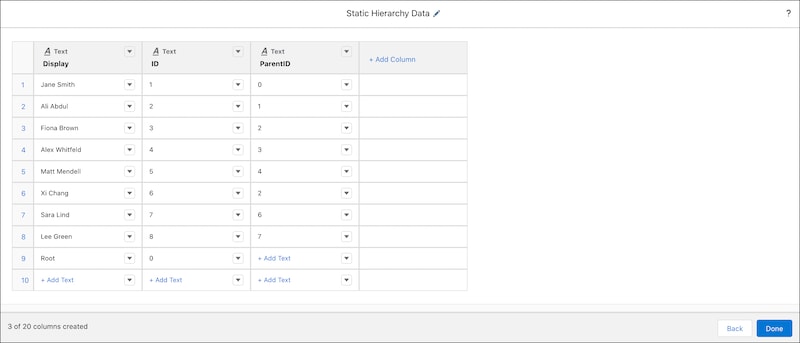
Drop a component on the dashboard, select **Hierarchy** from the **Lightning Components** list, and use **Existing Query** to set the custom static query as the component step.
In the component properties menu, set the **Component Attributes** to these values.
- **ID Column** - *ID*
- **Parent ID Column** - *ParentID*
- **Label Column** - *Display*
- **Root Node** - *0*
Save your work and preview the dashboard to see the working hierarchy component. If you make any updates to the component attributes, refresh the dashboard in preview mode to render the changes.
## Using the TDX Gantt Chart Demo Component
To test and play with this component, create a custom query in the dashboard editor. Use the Opportunities dataset to create a values table query with six columns. The six columns are **CreatedDate**, **CloseDate**, **Opportunity Name**, **Opportunity Owner**, **Amount**, and **Stage**.
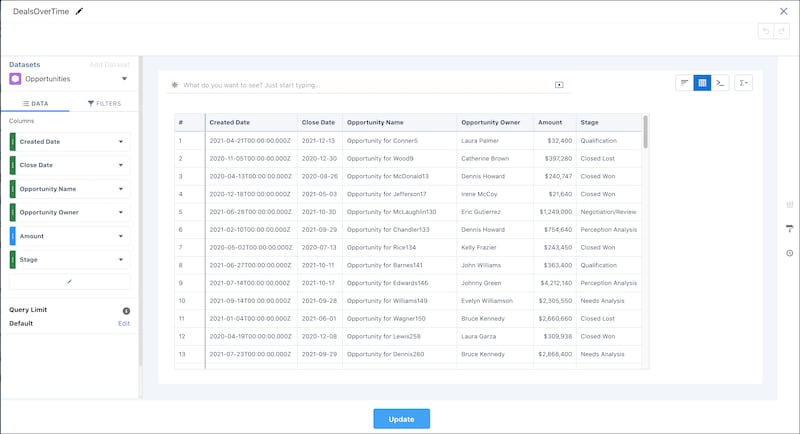
Drop a component on the dashboard, select **TDX Gantt Chart Demo** from the **Lightning Components** list, and use **Existing Query** to set the custom query as the component step.
In the component properties menu, set the **Component Attributes** to these values.
- **From Column** - *CreatedDate*
- **To Column** - *CloseDate*
- **Label Column** - *Opportunity Name*
- **Color Column** - *Stage*
- **Axes Type** - *time*
- **Title** - *Deals over Time*
- **Title Font Size** - *22*
- **Subtitle** - *Dealflow Analysis*
- **Subtitle Font Size** - *11*
- **Theme** - *Sunrise*
- **Background Color** - *#FFFFFF*
Save your work and preview the dashboard to see the working Gantt chart component. If you make any updates to the component attributes, refresh the dashboard in preview mode to render the changes.
## Using the Word Cloud 2 Component
To test and play with this component, create a custom query in the dashboard editor. Use the Opportunities dataset to create a compare table query with a column for Count of Rows and a column for **Scaled Size**. Make the **Scaled Size** column a formula of `A/10`. Group the columns by **Account.Industry**.

Drop a component on the dashboard, select **Word Cloud 2** from the **Lightning Components** list, and use **Existing Query** to set the custom static query as the component step.
In the component properties menu, set the **Component Attributes** to these values.
- **Words** - *Account.Industry*
- **Measure Column** - *Scaled Size*
- **Height** - *400*
- **Width** - *1000*
- **Min Text Size** - *20*
Save your work and preview the dashboard to see the working word cloud component. If you make any updates to the component attributes, refresh the dashboard in preview mode to render the changes.
:::note
Creating a query first isn’t required. You can also create a query when the component is added to the dashboard. You have the choice to select fields from the existing dataset or to change the data source to another dataset and then select fields.
:::
**See Also**
- [Component Attributes](/docs/analytics/bi-dev-guide-lwc-in-db/guide/bi-lwc-in-db-hw-example-attributes.md)
- [CRM Analytics Configuration](/docs/analytics/bi-dev-guide-lwc-in-db/guide/bi-lwc-in-db-hw-example-config.md)
- [Lightning Dashboards Configuration](/docs/analytics/bi-dev-guide-lwc-in-db/guide/bi-lwc-in-db-hw-example-lightning-dashboard-config.md)
- [Query Data](/docs/analytics/bi-dev-guide-lwc-in-db/guide/bi-lwc-in-db-hw-example-query-data.md)