ChatterFavorites Class
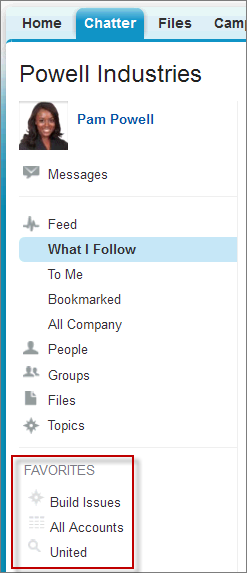
Chatter favorites give you easy access to topics, list views, and feed searches.
Use Connect in Apex to get and delete topics, list views, and feed searches that have been added as favorites. Add topics and feed searches as favorites, and update the last view date of a feed search or list view feed to the current system time.
In this image of Salesforce, “Build Issues” is a topic, “All Accounts” is a list view, and “United” is a feed search.
These methods are for ChatterFavorites. All methods are static.
All methods in this class require Chatter and are subject to the per user, per namespace, per hour rate limit.
-
addFavorite(communityId, subjectId, searchText)
Add a feed search favorite for a user.
-
addRecordFavorite(communityId, subjectId, targetId)
Add a topic as a favorite.
-
deleteFavorite(communityId, subjectId, favoriteId)
Delete a favorite.
-
getFavorite(communityId, subjectId, favoriteId)
Get information about a favorite.
-
getFavorites(communityId, subjectId)
Get a list of favorites for a user.
-
getFeedElements(communityId, subjectId, favoriteId)
Get the first page of feed elements for a favorite.
-
getFeedElements(communityId, subjectId, favoriteId, pageParam, pageSize, sortParam)
Get a page of sorted feed elements for a favorite.
-
Get a page of sorted feed elements for a favorite. Include no more than the specified number of comments per feed element.
-
updateFavorite(communityId, subjectId, favoriteId, updateLastViewDate)
Update the last view date of the saved search or list view feed to the current system time.
Add a feed search favorite for a user.
28.0
Yes
public static ConnectApi.FeedFavorite addFavorite(String communityId, String subjectId, String searchText)
- communityId
Type: String
ID for an Experience Cloud site,
internal, ornull.- subjectId
Type: String
ID of the context user or the alias
me.- searchText
Type: String
Specify the text of the search to be saved as a favorite. This method can only create a feed search favorite, not a list view favorite or a topic.
Type: ConnectApi.FeedFavorite
Add a topic as a favorite.
28.0
Yes
public static ConnectApi.FeedFavorite addRecordFavorite(String communityId, String subjectId, String targetId)
- communityId
Type: String
ID for an Experience Cloud site,
internal, ornull.- subjectId
Type: String
ID of the context user or the alias
me.- targetId
Type: String
The ID of the topic to add as a favorite.
Type: ConnectApi.FeedFavorite
Delete a favorite.
28.0
Yes
public static Void deleteFavorite(String communityId, String subjectId, String favoriteId)
- communityId
Type: String
ID for an Experience Cloud site,
internal, ornull.- subjectId
Type: String
ID of the context user or the alias
me.- favoriteId
Type: String
ID of a favorite.
Type: Void
Get information about a favorite.
28.0
Yes
public static ConnectApi.FeedFavorite getFavorite(String communityId, String subjectId, String favoriteId)
- communityId
Type: String
ID for an Experience Cloud site,
internal, ornull.- subjectId
Type: String
ID of the context user or the alias
me.- favoriteId
Type: String
ID of a favorite.
Type: ConnectApi.FeedFavorite
Get a list of favorites for a user.
28.0
Yes
public static ConnectApi.FeedFavorites getFavorites(String communityId, String subjectId)
- communityId
Type: String
ID for an Experience Cloud site,
internal, ornull.- subjectId
Type: String
ID of the context user or the alias
me.
Type: ConnectApi.FeedFavorites
Get the first page of feed elements for a favorite.
31.0
Yes
public static ConnectApi.FeedElementPage getFeedElements(String communityId, String subjectId, String favoriteId)
- communityId
Type: String
ID for an Experience Cloud site,
internal, ornull.- subjectId
Type: String
ID of the context user or the alias
me.- favoriteId
Type: String
ID of a favorite.
Type: ConnectApi.FeedElementPage
To test code that uses this method, use the matching set test method (prefix the method name with setTest). Use the set test method with the same parameters or the code throws an exception.
See Also
- setTestGetFeedElements(communityId, subjectId, favoriteId, result)
- Apex Developer Guide: Testing ConnectApi Code
Get a page of sorted feed elements for a favorite.
31.0
Yes
public static ConnectApi.FeedElementPage getFeedElements(String communityId, String subjectId, String favoriteId, String pageParam, Integer pageSize, ConnectApi.FeedSortOrder sortParam)
communityId
Type: String
ID for an Experience Cloud site, internal, or null.
subjectId
Type: String
ID of the context user or the alias me.
favoriteId
Type: String
ID of a favorite.
pageParam
Type: String
Page token to use to view the page. Page tokens are returned as part of the response class, for example, currentPageToken or nextPageToken. If you pass in null, the first page is returned.
pageSize
Type: Integer
Specifies the number of feed elements per page. Valid values are from 1 through 100. If you pass in null, the default size is 25.
sortParam
Type: ConnectApi.FeedSortOrder
Values are:
CreatedDateAsc—Sorts by oldest creation date. This sort order is available only forDirectMessageModeration,Draft,Isolated,Moderation, andPendingReviewfeeds.CreatedDateDesc—Sorts by most recent creation date.LastModifiedDateDesc—Sorts by most recent activity.MostViewed—Sorts by most viewed content. This sort order is available only forHomefeeds when theConnectApi.FeedFilterisUnansweredQuestions.Relevance—Sorts by most relevant content. This sort order is available only forCompany,Home, andTopicsfeeds.
If you pass in null, the default value CreatedDateDesc is used.
Type: ConnectApi.FeedElementPage
To test code that uses this method, use the matching set test method (prefix the method name with setTest). Use the set test method with the same parameters or the code throws an exception.
See Also
- setTestGetFeedElements(communityId, subjectId, favoriteId, pageParam, pageSize, sortParam, result)
- Apex Developer Guide: Testing ConnectApi Code
Get a page of sorted feed elements for a favorite. Include no more than the specified number of comments per feed element.
31.0
Yes
public static ConnectApi.FeedElementPage getFeedElements(String communityId, String subjectId, String favoriteId, Integer recentCommentCount, Integer elementsPerBundle, String pageParam, Integer pageSize, ConnectApi.FeedSortOrder sortParam)
communityId
Type: String
ID for an Experience Cloud site, internal, or null.
subjectId
Type: String
ID of the context user or the alias me.
favoriteId
Type: String
ID of a favorite.
recentCommentCount
Type: Integer
Maximum number of comments to return with each feed element. The default value is 3.
elementsPerBundle
Type: Integer
Maximum number of feed elements to include in a bundle. The value must be an integer between 0 and 10. The default value is 3.
pageParam
Type: String
Page token to use to view the page. Page tokens are returned as part of the response class, for example, currentPageToken or nextPageToken. If you pass in null, the first page is returned.
pageSize
Type: Integer
Specifies the number of feed elements per page. Valid values are from 1 through 100. If you pass in null, the default size is 25.
sortParam
Type: ConnectApi.FeedSortOrder
Values are:
CreatedDateAsc—Sorts by oldest creation date. This sort order is available only forDirectMessageModeration,Draft,Isolated,Moderation, andPendingReviewfeeds.CreatedDateDesc—Sorts by most recent creation date.LastModifiedDateDesc—Sorts by most recent activity.MostViewed—Sorts by most viewed content. This sort order is available only forHomefeeds when theConnectApi.FeedFilterisUnansweredQuestions.Relevance—Sorts by most relevant content. This sort order is available only forCompany,Home, andTopicsfeeds.
If you pass in null, the default value CreatedDateDesc is used.
Type: ConnectApi.FeedElementPage
To test code that uses this method, use the matching set test method (prefix the method name with setTest). Use the set test method with the same parameters or the code throws an exception.
See Also
- setTestGetFeedElements(communityId, subjectId, favoriteId, recentCommentCount, elementsPerBundle, pageParam, pageSize, sortParam, result)
- Apex Developer Guide: Testing ConnectApi Code
Update the last view date of the saved search or list view feed to the current system time.
28.0
Yes
public static ConnectApi.FeedFavorite updateFavorite(String communityId, String subjectId, String favoriteId, Boolean updateLastViewDate)
- communityId
Type: String
ID for an Experience Cloud site,
internal, ornull.- subjectId
Type: String
ID of the context user or the alias
me.- favoriteId
Type: String
ID of a favorite.
- updateLastViewDate
Type: Boolean
Specify whether to update the last view date of the specified favorite to the current system time (
true) or not (false).
Type: ConnectApi.FeedFavorite
These test methods are for ChatterFavorites. All methods are static.
For information about using these methods to test your ConnectApi code, see Testing ConnectApi Code.
-
setTestGetFeedElements(communityId, subjectId, favoriteId, result)
Register a
ConnectApi.FeedElementPageobject to be returned whengetFeedElementsis called with matching parameters in a test context. Use the method with the same parameters or the code throws an exception. -
setTestGetFeedElements(communityId, subjectId, favoriteId, pageParam, pageSize, sortParam, result)
Register a
ConnectApi.FeedElementPageobject to be returned whengetFeedElementsis called with matching parameters in a test context. Use the method with the same parameters or the code throws an exception. -
Register a
ConnectApi.FeedElementPageobject to be returned whengetFeedElementsis called with matching parameters in a test context. Use the method with the same parameters or the code throws an exception.
Register a ConnectApi.FeedElementPage object to be returned when getFeedElements is called with matching parameters in a test context. Use the method with the same parameters or the code throws an exception.
31.0
public static Void setTestGetFeedElements(String communityId, String subjectId, String favoriteId, ConnectApi.FeedElementPage result)
- communityId
Type: String
ID for an Experience Cloud site,
internal, ornull.- subjectId
Type: String
ID of the context user or the alias
me.- favoriteId
Type: String
ID of a favorite.
- result
Type:
ConnectApi.FeedElementPageObject containing test data.
Type: Void
See Also
Register a ConnectApi.FeedElementPage object to be returned when getFeedElements is called with matching parameters in a test context. Use the method with the same parameters or the code throws an exception.
31.0
public static Void setTestGetFeedElements(String communityId, String subjectId, String favoriteId, String pageParam, Integer pageSize, ConnectApi.FeedSortOrder sortParam, ConnectApi.FeedElementPage result)
communityId
Type: String
ID for an Experience Cloud site, internal, or null.
subjectId
Type: String
ID of the context user or the alias me.
favoriteId
Type: String
ID of a favorite.
pageParam
Type: String
Page token to use to view the page. Page tokens are returned as part of the response class, for example, currentPageToken or nextPageToken. If you pass in null, the first page is returned.
pageSize
Type: Integer
Specifies the number of feed elements per page. Valid values are from 1 through 100. If you pass in null, the default size is 25.
sortParam
Type: ConnectApi.FeedSortOrder
Values are:
CreatedDateAsc—Sorts by oldest creation date. This sort order is available only forDirectMessageModeration,Draft,Isolated,Moderation, andPendingReviewfeeds.CreatedDateDesc—Sorts by most recent creation date.LastModifiedDateDesc—Sorts by most recent activity.MostViewed—Sorts by most viewed content. This sort order is available only forHomefeeds when theConnectApi.FeedFilterisUnansweredQuestions.Relevance—Sorts by most relevant content. This sort order is available only forCompany,Home, andTopicsfeeds.
If you pass in null, the default value CreatedDateDesc is used.
result
Type: ConnectApi.FeedElementPage
Object containing test data.
Type: Void
See Also
- getFeedElements(communityId, subjectId, favoriteId, pageParam, pageSize, sortParam)
- Apex Developer Guide: Testing ConnectApi Code
Register a ConnectApi.FeedElementPage object to be returned when getFeedElements is called with matching parameters in a test context. Use the method with the same parameters or the code throws an exception.
31.0
public static Void setTestGetFeedElements(String communityId, String subjectId, String favoriteId, Integer recentCommentCount, Integer elementsPerBundle, String pageParam, Integer pageSize, ConnectApi.FeedSortOrder sortParam, ConnectApi.FeedElementPage result)
communityId
Type: String
ID for an Experience Cloud site, internal, or null.
subjectId
Type: String
ID of the context user or the alias me.
favoriteId
Type: String
ID of a favorite.
recentCommentCount
Type: Integer
Maximum number of comments to return with each feed element. The default value is 3.
elementsPerBundle
Type: Integer
Maximum number of feed elements to include in a bundle. The value must be an integer between 0 and 10. The default value is 3.
pageParam
Type: String
Page token to use to view the page. Page tokens are returned as part of the response class, for example, currentPageToken or nextPageToken. If you pass in null, the first page is returned.
pageSize
Type: Integer
Specifies the number of feed elements per page. Valid values are from 1 through 100. If you pass in null, the default size is 25.
sortParam
Type: ConnectApi.FeedSortOrder
Values are:
CreatedDateAsc—Sorts by oldest creation date. This sort order is available only forDirectMessageModeration,Draft,Isolated,Moderation, andPendingReviewfeeds.CreatedDateDesc—Sorts by most recent creation date.LastModifiedDateDesc—Sorts by most recent activity.MostViewed—Sorts by most viewed content. This sort order is available only forHomefeeds when theConnectApi.FeedFilterisUnansweredQuestions.Relevance—Sorts by most relevant content. This sort order is available only forCompany,Home, andTopicsfeeds.
If you pass in null, the default value CreatedDateDesc is used.
result
Type: ConnectApi.FeedElementPage
Object containing test data.
Type: Void
See Also
- getFeedElements(communityId, subjectId, favoriteId, recentCommentCount, elementsPerBundle, pageParam, pageSize, sortParam)
- Apex Developer Guide: Testing ConnectApi Code
These methods for ChatterFavorites are retired.
-
getFeedItems(communityId, subjectId, favoriteId)
Get the first page of feed items for a favorite.
-
getFeedItems(communityId, subjectId, favoriteId, pageParam, pageSize, sortParam)
Get a page of sorted feed items for a favorite.
-
getFeedItems(communityId, subjectId, favoriteId, recentCommentCount, pageParam, pageSize, sortParam)
Get a page of sorted feed items for a favorite. Include no more than the specified number of comments per feed item.
-
setTestGetFeedItems(communityId, subjectId, favoriteId, result)
Register a
ConnectApi.FeedItemPageobject to be returned whengetFeedItemsis called with matching parameters in a test context. Use the method with the same parameters or the code throws an exception. -
setTestGetFeedItems(communityId, subjectId, favoriteId, pageParam, pageSize, sortParam, result)
Register a
ConnectApi.FeedItemPageobject to be returned whengetFeedItemsis called with matching parameters in a test context. Use the method with the same parameters or the code throws an exception. -
Register a
ConnectApi.FeedItemPageobject to be returned whengetFeedItemsis called with matching parameters in a test context. Use the method with the same parameters or the code throws an exception.
Get the first page of feed items for a favorite.
28.0–31.0
In version 32.0 and later, use getFeedElements(communityId, subjectId, favoriteId).
Yes
public static ConnectApi.FeedItemPage getFeedItems(String communityId, String subjectId, String favoriteId)
- communityId
Type: String
ID for an Experience Cloud site,
internal, ornull.- subjectId
Type: String
ID of the context user or the alias
me.- favoriteId
Type: String
ID of a favorite.
Type: ConnectApi.FeedItemPage
To test code that uses this method, use the matching set test method (prefix the method name with setTest). Use the set test method with the same parameters or the code throws an exception.
See Also
- setTestGetFeedItems(communityId, subjectId, favoriteId, result)
- Apex Developer Guide: Testing ConnectApi Code
Get a page of sorted feed items for a favorite.
28.0–31.0
In version 32.0 and later, use getFeedElements(communityId, subjectId, favoriteId, pageParam, pageSize, sortParam).
Yes
public static ConnectApi.FeedItemPage getFeedItems(String communityId, String subjectId, String favoriteId, String pageParam, Integer pageSize, ConnectApi.FeedSortOrder sortParam)
communityId
Type: String
ID for an Experience Cloud site, internal, or null.
subjectId
Type: String
ID of the context user or the alias me.
favoriteId
Type: String
ID of a favorite.
pageParam
Type: String
Page token to use to view the page. Page tokens are returned as part of the response class, for example, currentPageToken or nextPageToken. If you pass in null, the first page is returned.
pageSize
Type: Integer
Number of feed items per page. Valid values are from 1 through 100. If you pass in null, the default size is 25.
sortParam
Type: ConnectApi.FeedSortOrder
Values are:
CreatedDateAsc—Sorts by oldest creation date. This sort order is available only forDirectMessageModeration,Draft,Isolated,Moderation, andPendingReviewfeeds.CreatedDateDesc—Sorts by most recent creation date.LastModifiedDateDesc—Sorts by most recent activity.MostViewed—Sorts by most viewed content. This sort order is available only forHomefeeds when theConnectApi.FeedFilterisUnansweredQuestions.Relevance—Sorts by most relevant content. This sort order is available only forCompany,Home, andTopicsfeeds.
Sorts the returned feed by the most recently created feed item, or by the most recently modified feed item. If you pass in null, the default value CreatedDateDesc is used.
Type: ConnectApi.FeedItemPage
To test code that uses this method, use the matching set test method (prefix the method name with setTest). Use the set test method with the same parameters or the code throws an exception.
See Also
- setTestGetFeedItems(communityId, subjectId, favoriteId, pageParam, pageSize, sortParam, result)
- Apex Developer Guide: Testing ConnectApi Code
Get a page of sorted feed items for a favorite. Include no more than the specified number of comments per feed item.
29.0–31.0
In version 32.0 and later, use getFeedElements(communityId, subjectId, favoriteId, recentCommentCount, elementsPerBundle, pageParam, pageSize, sortParam).
Yes
public static ConnectApi.FeedItemPage getFeedItems(String communityId, String subjectId, String favoriteId, Integer recentCommentCount, String pageParam, Integer pageSize, FeedSortOrder sortParam)
communityId
Type: String
ID for an Experience Cloud site, internal, or null.
subjectId
Type: String
ID of the context user or the alias me.
favoriteId
Type: String
ID of a favorite.
recentCommentCount
Type: Integer
Maximum number of comments to return with each feed item. The default value is 3.
pageParam
Type: String
Page token to use to view the page. Page tokens are returned as part of the response class, for example, currentPageToken or nextPageToken. If you pass in null, the first page is returned.
pageSize
Type: Integer
Number of feed items per page. Valid values are from 1 through 100. If you pass in null, the default size is 25.
sortParam
Type: ConnectApi.FeedSortOrder
Values are:
CreatedDateAsc—Sorts by oldest creation date. This sort order is available only forDirectMessageModeration,Draft,Isolated,Moderation, andPendingReviewfeeds.CreatedDateDesc—Sorts by most recent creation date.LastModifiedDateDesc—Sorts by most recent activity.MostViewed—Sorts by most viewed content. This sort order is available only forHomefeeds when theConnectApi.FeedFilterisUnansweredQuestions.Relevance—Sorts by most relevant content. This sort order is available only forCompany,Home, andTopicsfeeds.
Sorts the returned feed by the most recently created feed item, or by the most recently modified feed item. If you pass in null, the default value CreatedDateDesc is used.
Type: ConnectApi.FeedItemPage
To test code that uses this method, use the matching set test method (prefix the method name with setTest). Use the set test method with the same parameters or the code throws an exception.
See Also
- setTestGetFeedItems(communityId, subjectId, favoriteId, recentCommentCount, pageParam, pageSize, sortParam, result)
- Apex Developer Guide: Testing ConnectApi Code
Register a ConnectApi.FeedItemPage object to be returned when getFeedItems is called with matching parameters in a test context. Use the method with the same parameters or the code throws an exception.
28.0–31.0
public static Void setTestGetFeedItems(String communityId, String subjectId, String favoriteId, ConnectApi.FeedItemPage result)
- communityId
Type: String
ID for an Experience Cloud site,
internal, ornull.- subjectId
Type: String
ID of the context user or the alias
me.- favoriteId
Type: String
ID of a favorite.
- result
Type:
ConnectApi.FeedItemPageObject containing test data.
Type: Void
See Also
Register a ConnectApi.FeedItemPage object to be returned when getFeedItems is called with matching parameters in a test context. Use the method with the same parameters or the code throws an exception.
28.0–31.0
public static Void setTestGetFeedItems(String communityId, String subjectId, String favoriteId, String pageParam, Integer pageSize, FeedSortOrder sortParam, ConnectApi.FeedItemPage result)
communityId
Type: String
ID for an Experience Cloud site, internal, or null.
subjectId
Type: String
ID of the context user or the alias me.
favoriteId
Type: String
ID of a favorite.
pageParam
Type: String
Page token to use to view the page. Page tokens are returned as part of the response class, for example, currentPageToken or nextPageToken. If you pass in null, the first page is returned.
pageSize
Type: Integer
Number of feed items per page. Valid values are from 1 through 100. If you pass in null, the default size is 25.
sortParam
Type: ConnectApi.FeedSortOrder
Values are:
CreatedDateAsc—Sorts by oldest creation date. This sort order is available only forDirectMessageModeration,Draft,Isolated,Moderation, andPendingReviewfeeds.CreatedDateDesc—Sorts by most recent creation date.LastModifiedDateDesc—Sorts by most recent activity.MostViewed—Sorts by most viewed content. This sort order is available only forHomefeeds when theConnectApi.FeedFilterisUnansweredQuestions.Relevance—Sorts by most relevant content. This sort order is available only forCompany,Home, andTopicsfeeds.
Sorts the returned feed by the most recently created feed item, or by the most recently modified feed item. If you pass in null, the default value CreatedDateDesc is used.
result
Type: ConnectApi.FeedItemPage
Object containing test data.
Type: Void
See Also
- getFeedItems(communityId, subjectId, favoriteId, pageParam, pageSize, sortParam)
- Apex Developer Guide: Testing ConnectApi Code
Register a ConnectApi.FeedItemPage object to be returned when getFeedItems is called with matching parameters in a test context. Use the method with the same parameters or the code throws an exception.
29.0–31.0
public static Void setTestGetFeedItems(String communityId, String subjectId, String favoriteId, Integer recentCommentCount, String pageParam, Integer pageSize, FeedSortOrder sortParam, ConnectApi.FeedItemPage result)
communityId
Type: String
ID for an Experience Cloud site, internal, or null.
subjectId
Type: String
ID of the context user or the alias me.
favoriteId
Type: String
ID of a favorite.
recentCommentCount
Type: Integer
Maximum number of comments to return with each feed item. The default value is 3.
pageParam
Type: String
Page token to use to view the page. Page tokens are returned as part of the response class, for example, currentPageToken or nextPageToken. If you pass in null, the first page is returned.
pageSize
Type: Integer
Number of feed items per page. Valid values are from 1 through 100. If you pass in null, the default size is 25.
sortParam
Type: ConnectApi.FeedSortOrder
Values are:
CreatedDateAsc—Sorts by oldest creation date. This sort order is available only forDirectMessageModeration,Draft,Isolated,Moderation, andPendingReviewfeeds.CreatedDateDesc—Sorts by most recent creation date.LastModifiedDateDesc—Sorts by most recent activity.MostViewed—Sorts by most viewed content. This sort order is available only forHomefeeds when theConnectApi.FeedFilterisUnansweredQuestions.Relevance—Sorts by most relevant content. This sort order is available only forCompany,Home, andTopicsfeeds.
Sorts the returned feed by the most recently created feed item, or by the most recently modified feed item. If you pass in null, the default value CreatedDateDesc is used.
result
Type: ConnectApi.FeedItemPage
Object containing test data.
Type: Void
See Also