


 j
j1.0.46
API Overview
With the Catalogs API, you can:
- Create, view, edit, and delete catalogs and categories.
- Assign and unassign products to categories.
- Search for a product within a category.
- Search for categories within a catalog or within a merchandising system.
For more information, see the Catalogs and Categories sections of the Salesforce B2C Commerce Infocenter.
Authentication & Authorization
The client managing catalog and category information must have access to the Categories and Catalogs resources. This API requires a bearer token in the header of the request. The client accessing the API must first authenticate against Account Manager to get the bearer token.
You must include the relevant scope(s) in the client ID used to generate the token. For a full list of required permissions, see the Authorization Scopes Catalog.
For detailed setup instructions, see the Authorization for Admin APIs guide.
Use Cases
Here are some common use cases for the API:
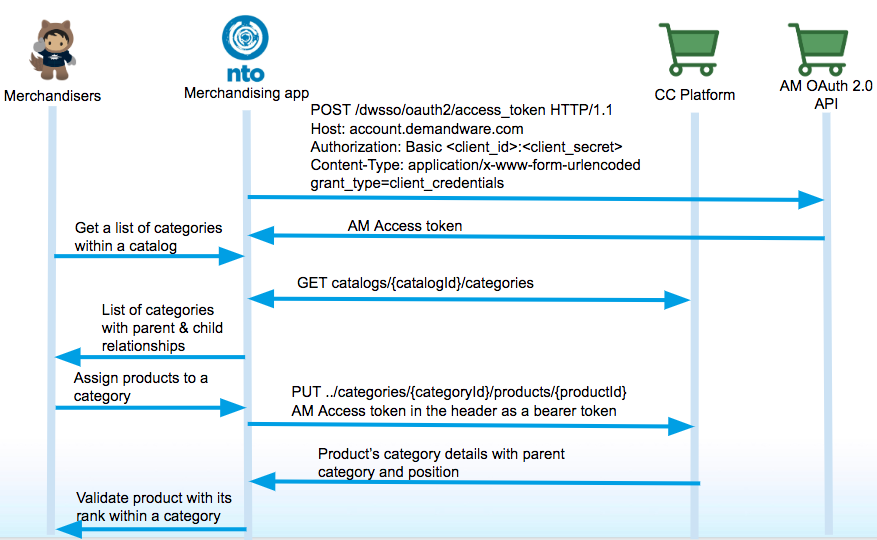
Categorize Products
Use the Catalogs API to assign products to categories so that shoppers can find all products that are merchandized in that category.
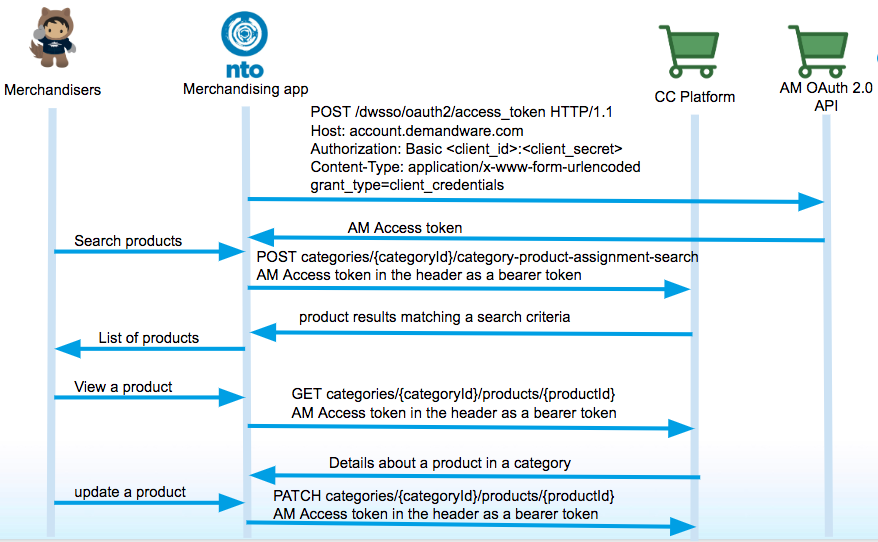
Validate Product Category Assignments
Use the Catalogs API to search for products assigned to a category within a site catalog to validate whether a product is merchandized and ready to be sold in one or more ecommerce channels. You can also update a product to make sure it meets the readiness criteria for each channel.
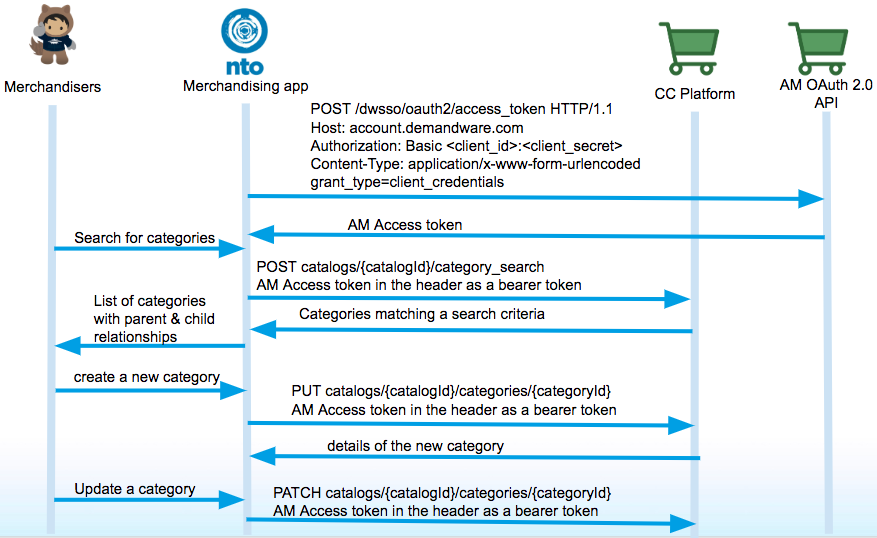
Edit Categories
Use the Catalogs API to edit categories assigned to a catalog to change the navigation path, make a category online or offline, change position of a category relative to other categories within a catalog.
Resources
A Salesforce B2C Commerce storefront implementation uses a Catalog, Category, and Product architecture to organize your storefront. Product data is stored in a catalog, and the stored product data is organized by categories. You can create any number of catalog, category, and product scenarios to address your business needs.
Catalogs
A catalog is a collection of categories, products, and images. It’s best practice to create two catalogs: the master catalog and the storefront catalog. The master catalog provides the same structure as an external system of record for your products. The storefront catalog is where you create categories that appear on your storefront.
Categories
You create and organize categories and subcategories to organize and group products in your catalog and on your storefront. Categories allow Products to be organized into hierarchical structures. Categories can have relationships to other parent categories. Each category also can provide a context that is inherited by subcategories, for example a category may have an attribute value assigned to it and any product assigned to the category or a subcategory would inherit the attribute value as long as the product is assigned. Once the product is removed from the category those attribute values would no longer be in the context of the product.
Products
Products are the items and services for sale on the storefront. All of your product data is stored in your master catalog. For a product or service to show on your storefront, it must be assigned to a category.
Let us know so we can improve!