Set an Environment Base Path to Route Requests to an MRT Environment
This Page
All Documentation
If your store domain is backed by multiple Managed Runtime environments (MRT) and uses a single domain, use environment base paths to route requests to the correct environment. Set an environment base path for each environment to route requests via a CDN. Also, use an environment base path to host the storefront within a specific subpath.
The bundle assets and proxies of a single Managed Runtime environment, as well as the PWA Kit local developer environment, are placed at the root level.
For example, your environment could have its bundle assets accessed at https://pwa-kit.mobify-storefront.com/mobify/bundle/... and its proxies at https://pwa-kit.mobify-storefront.com/mobify/proxy/....
If you were to place a domain www.example.com in front of the above environment, your bundle and proxy URLs will become www.example.com/mobify/bundle/... and www.example.com/mobify/proxy/....
But what if you wanted to have multiple environments under www.example.com? Or what if you wanted to place the PWA in a subpath under your domain, such as www.example.com/shop?
This guide explains how you can set up these scenarios by setting an environment base path.
Prerequisites
PWA Kit release version 3.17.1 or later.
The corresponding commerce-sdk-react 5.1.1 and retail-react-app 9.1.1.
Your setup must have a CDN, such as eCDN, in front of your Managed Runtime Environment.
Before You Begin
This guide covers how to set an environment base path.
The environment base path is applied to URLs needed for the app to function, such as:
/mobify/... URLs — This includes /mobify/bundle/..., /mobify/proxy/..., and so on.
/callback URLs — This includes SLAS callback URLs used for password reset, and so on.
Express routes — This includes /worker.js and any custom express endpoints defined inside ssr.js.
Be aware that these endpoints are e-commerce site and locale agnostic. These URLs serve the same resource regardless of the base path.
By default, the environment base path isn’t added to app URLs that are defined with React Router. These URLs, which correspond to pages and routes defined in route.jsx, can have the environment base path added by setting showBasePath to true in your PWA Kit config file.
After you set the base path, start the local app and observe that your /mobify and express routes now include envBasePath in the URL.
If you set showBasePath to true, observe that your page URLs now include envBasePath after your domain.
App Changes
Add the envBasePath property to all custom outbound /mobify and express routes in your app.
Make sure you test your app. If you notice any express URLs where the base path should be added, update the URL to include the environment base path via getEnvBasePath().
You can import getEnvBasePath() using this import:
Set an Environment Base Path to Your Remote Environment
You must update several systems to set an environment base path for your remote Managed Runtime environment.
SLAS Configuration
SLAS clients use two fields, redirect_uri and callback_url, that receive requests as part of the login process. The URLs you set in these fields must include the base paths of your environments.
For example, if you have two environments with base paths of /shop and /store and your domain is www.example.com, your SLAS redirect_uri should be set to:
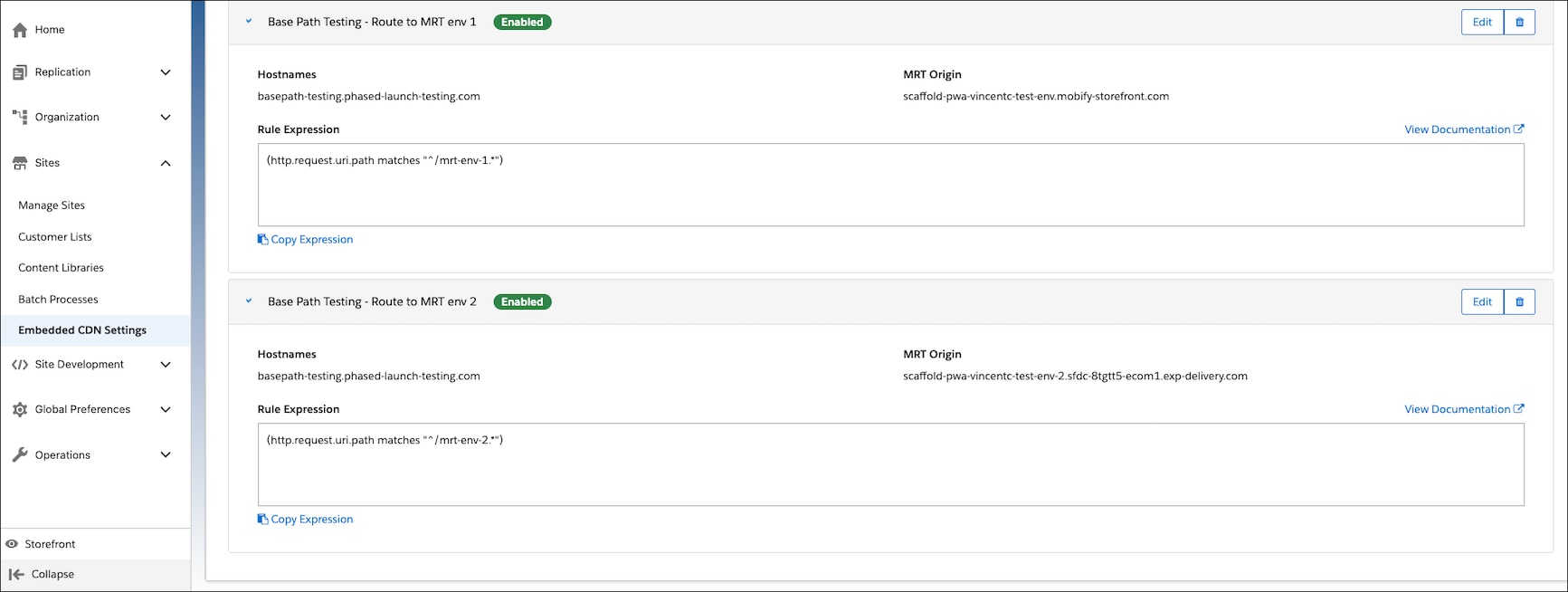
Set up origin rules to route your domain and paths to the underlying Managed Runtime environments serving your site.
For example, you have two different environments that can be accessed at www.example.com/mrt-env-1 and www.example.com/mrt-env-2.
In this example, envBasePath for mrt-env-1 is /mrt-env-1 and similarly envBasePath for mrt-env-2 is /mrt-env-2.
Your origin rule can look as follows:
In the preceding image, the target MRT origin is the MRT hostname you’re targeting with the base path.
PWA and MRT Configuration
On bundle upload (npm run push), the push command passes along the properties set in your config/default.jsssrParameters to MRT as part of the bundle’s upload properties.
To set a base path for another MRT environment, update the envBasePath property in your config/default.js and upload another bundle.
To help keep track of which base path is set with the bundle upload, consider including the base path in the upload message:
1npm run push -- -s your-MRT-project --target your-target-environment --message "Bundle with base path /shop"
For repeat deployments, consider creating a continuous integration (CI) job or script that sets the correct base path for each target environment.
Once the bundle is deployed onto MRT, view your store and verify that the base path is set in calls to /mobify paths.
URL Redirects
When a base path is set on an environment, MRT redirects are affected in these ways.
Redirect From
No change. MRT automatically appends the base path.
If you have an existing redirect-from, it continues to work as-is.
Redirect To
MRT doesn’t automatically append the base path, because absolute URLs or external domains are valid targets.
If you modify the base path, review your redirect-to targets to ensure the targets are what you expect.
Storefront Preview
Storefront Preview is compatible with base paths. However, Storefront Preview operates on a per-environment basis. Keep these considerations in mind.
When you preview a store on Runtime Admin, the domain that’s used by Storefront Preview is the environment host name that’s set in MRT, not your external-facing domain.
Storefront Preview can’t switch targets to a bundle running on a different environment. If you’re using Storefront Preview on environment A with base path /store-a, you can’t switch to environment B with base path /store-b via URL. Open a separate Storefront Preview instance targeting environment B’s MRT host name.
Best Practices
Try to avoid overlaps among your environment base path, site ID, and locale. While www.example.com/us/us/us/... can work, it may cause confusion about which URI segment corresponds to which property.
When defining custom express endpoints, don’t set your endpoint’s first URI part to be equivalent to the base path. For example, app.get('/:basePath/:otherParam/test') isn’t ideal, because the duplication can cause confusion.
Node 22 Deprecation
Node 22 has an end-of-life date of June 1, 2027. We strongly recommend that you update your production projects to Node 24 by upgrading to the latest minor version of PWA Kit 3.x. See full details on Node support dates and upgrade steps in Upgrade Node Version.


 j
j