Starting in PWA Kit 3.16, Composable Storefront orders are integrated with Salesforce Order Management (SOM). Also, starting in PWA Kit 3.19, registered shoppers can manage their SOM orders in Composable Storefront. The storefront shows customer order details and order history from SOM, if available. The integration requires that you set up a connection between the B2C Commerce instance and the SOM organization. Providing shoppers with a real-time view of their past and current orders from SOM empowers them to check their order status and history, which reduces support costs. This integration keeps storefront orders synchronized with the merchant’s backend order management system.
Prerequisite: Connect Your B2C Commerce Instance and the Order Management Organization
Before the storefront can show SOM orders, perform these steps.
Step 1: Connect a B2C Commerce Instance to the SOM organization
To test the integration, place an order from the storefront to SOM by using the placeOrder hook. After the connection is set up, call OrderMgr.placeOrder(order) to create an order in SOM.
This code snippet shows one way to place an order and handle the order placement flow. It places an order in SOM via the placeOrder hook. Next, it gets the export and confirmation status if the order placement was successful. You can implement additional logic to satisfy your specific requirements.
Payment methods aren’t shown in the storefront because they aren’t returned in B2C Commerce API (SCAPI) calls.
If an order contains multiple shipments, items are grouped by shipment and each group shows its shipping address. Tracking details, such as carrier, status, and tracking number or URL, are shown separately and aren’t tied to a specific shipping address because Order Management shipment data can’t be reliably correlated to the delivery address.
Getting Orders from SOM
By default, Composable Storefront tries to get order data from SOM. It makes these SCAPI calls with the additional oms parameters.
Get order details: The storefront calls GET orders/{orderNo} with query parameter expand=oms,oms_shipments. For more information, see getOrder in the B2C Commerce API Guide.
Get order history: The storefront calls GET customers/{}/orders with query parameter expand=oms. See getCustomerOrders in the B2C Commerce API Guide.
Placing Orders in SOM
If the connection is set up between the B2C Commerce instance and SOM, placing an order creates the order in SOM. Place the order using the placeOrder hook and by calling OrderMgr.placeOrder(order).
Managing Orders in SOM
Starting with PWA Kit 3.19, the Salesforce Order Management (SOM) integration in your Composable Storefront lets registered shoppers manage orders stored in SOM. PWA Kit provides default implementations for the order actions in SOM so you don’t have to implement them. The actions available are for shoppers tracking order shipments, canceling an order, and returning order items.
SOM enriches orders with order data, in the omsData field that is included in the SCAPI call. The order actions call these SCAPI endpoints:
Managing orders requires that you connect your B2C Commerce instance to the Salesforce Order Management organization. See this prerequisite step.
Accessing the Order Detail Page
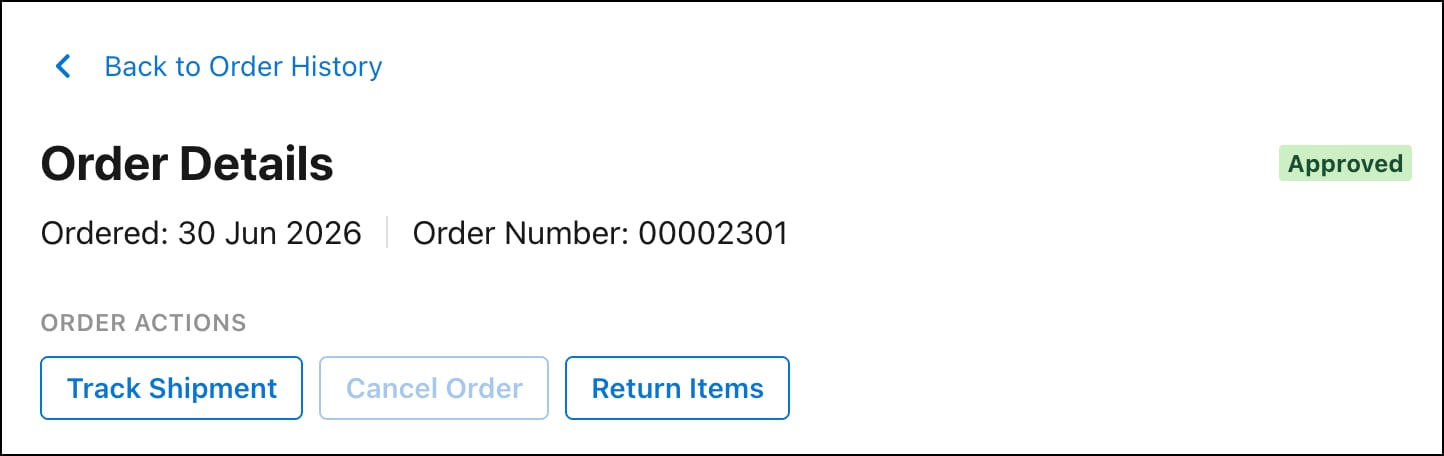
A shopper accesses the order management actions in the order detail page. These are the steps for a shopper to access the order detail page.
Log in and then click the My Account icon.
Click Order History.
Next to an order, click View Details.
Tracking Order Shipments
After an order has been fulfilled, a registered shopper can track the order shipments by clicking Track Shipment on the order detail page. Clicking Track Shipment redirects the shopper to an external site where they can track the shipments.
Canceling an Order
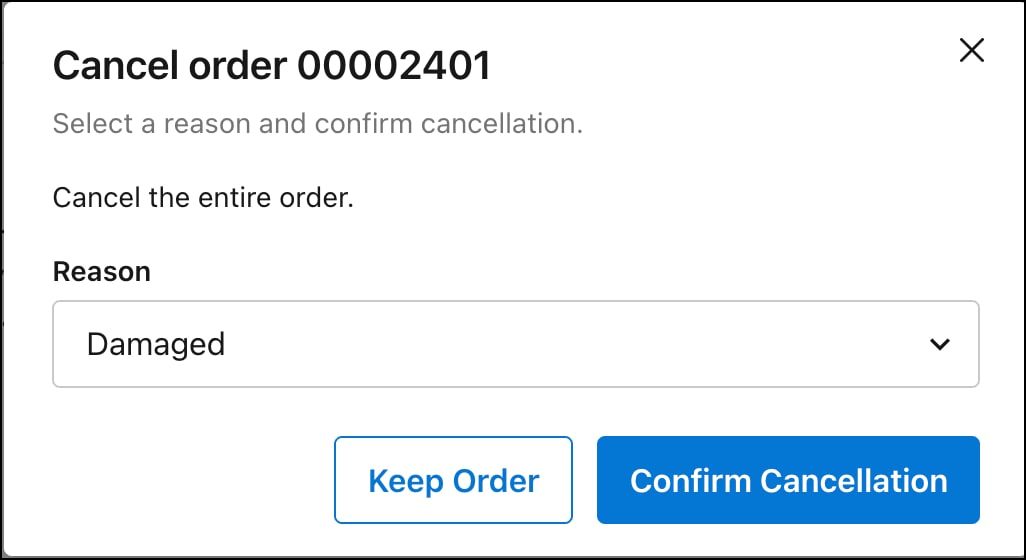
For orders that haven’t been fulfilled yet, registered shoppers can cancel the orders they created by clicking Cancel Order on the order detail page. After an order has been fulfilled and shipped, it is no longer cancelable. To be able to cancel an order, every item in the order must be cancelable.
Returning Eligible Items
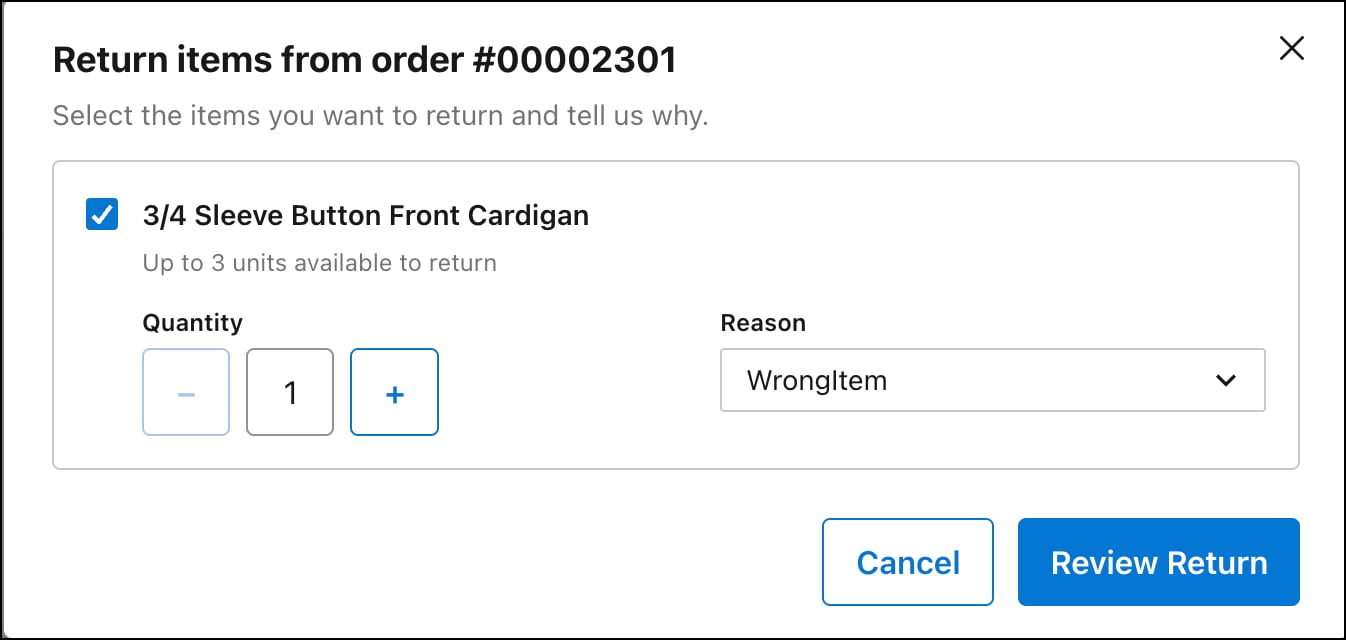
After an order has been fulfilled, a registered shopper can return eligible items by clicking Return Items on the order detail page. In the Return items modal, the shopper can select one or more items to return, their quantity, and the return reason.
After submitting a return request, the order’s status badge reflects the return’s progress. This progress includes partial return status, when a return is initiated for a subset of items in an order.
Return and cancellation reasons come from SOM. They aren’t hardcoded in PWA Kit.
Note
Order Refunds
SOM processes the refunds for order cancellations and returns, and not B2C Commerce or PWA Kit. There is nothing to implement in PWA Kit for refunds. The storefront’s responsibility ends at initiating the return or cancellation.
For returns, the automated refund occurs only after the item is physically returned, not when the shopper initiates the return:
Shopper requests a return. The create-return-order API creates a return order in SOM.
The item is physically returned, and the return order is closed manually in the SOM UI or via an API integration.
The close event triggers the EnsureRefunds API, which makes a callout to the payment service provider (PSP) to process the refund. A credit memo is generated.
For cancellations, the same automated refund process fires on the order’s status change.
Status Badge
The status badge shows the order status for each order. The status badge indicates order placement, fulfillment, cancellation, and return progress.
To customize the display status, override getOrderDisplayStatus(order) in app/utils/order-status-utils.js, which aggregates item-level SOM statuses into a single display status.
Node 20 Deprecation
Node 20 has an end-of-life date of April 30, 2026. We strongly recommend that you update your production projects to Node 22 or Node 24 by upgrading to the latest minor version of PWA Kit 3.x. See full details on Node support dates and upgrade steps in Upgrade Node Version.


 j
j