Storefront Next is built on React Router, leveraging its Framework Mode to provide a structured foundation for routing and data handling. As such, Storefront Next represents a server-rendered single-page application (SPA). This application model means that only the initial navigation request to a route is processed and responded to by the server. All subsequent client-side navigation requests are routed on the client and only trigger requests for data or additionally required assets, or both. Server-side rendering (SSR) ensures fast initial load times while client-side navigation and rendering (CSR) eliminates full page reloads after hydration, combining the strengths of SSR and CSR without their respective tradeoffs.
Storefront Next uses these data loading components:
Loaders: Server-side functions that fetch data before component rendering.
Actions: Server-side functions that handle data mutations triggered by form submissions or programmatic calls.
Fetchers: Client-side functions that enable loading data from or submitting data to routes without causing navigation. Fetchers can call loaders (for reads) or actions (for writes) on any route, making them ideal for in-page interactions.
Middlewares: Functions that run in a pipeline before loaders and actions and allow intercepting navigation requests before a route renders.
Cookies and Sessions: Server-side mechanisms for persisting state across requests, such as user preferences, authentication tokens, and flash messages.
Dependencies
Package
Version
Purpose
react-router
7.18.0
Framework mode with loaders, middlewares, actions
react
19.2.3
React 19 with use() hook
Paradigms
Server-Load Everything
One of the many strengths of React Router lies in its highly flexible mechanisms for controlling and calibrating data retrieval and data flows within an app. While it’s technically possible to implement complex, server/client-segregated data flows, we made the deliberate architectural decision for Storefront Next to promote a server-load everything paradigm.
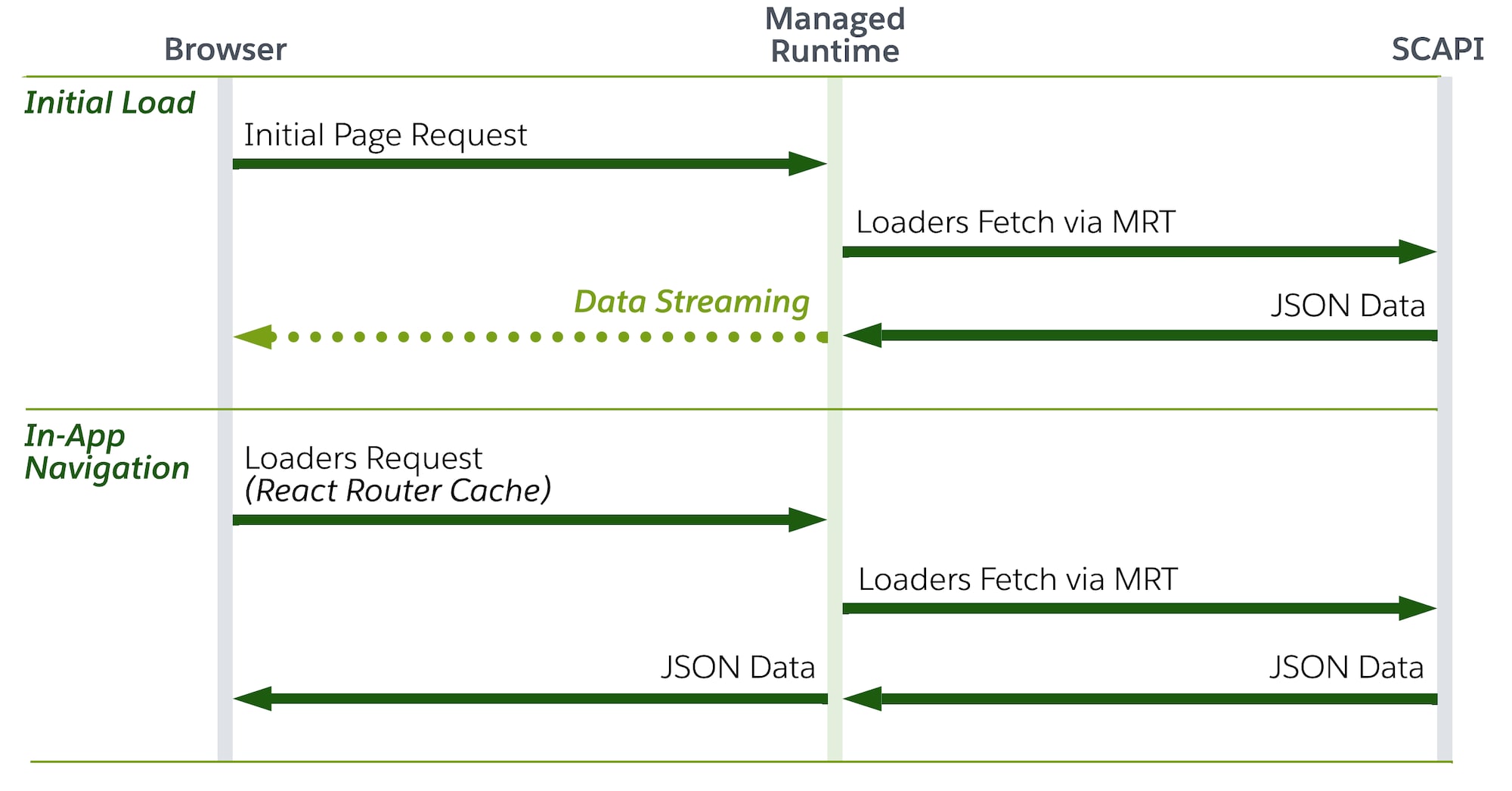
In our proposed architecture, Managed Runtime (MRT) isn’t only used as a simple data proxy, but acts as the data orchestration layer. Using React Router’s server data loading functionality, we’re able to aggregate parallel and sequential SCAPI requests into a single request to MRT and progressively stream the response to the client. This ultimately means that all API requests are executed on the server (that is, MRT).
Important
A solid understanding of this paradigm is suggested, as it directly impacts the structure and bundling of the app code, as well as overarching aspects such as performance, authentication, security, and SEO.
Route-Level Data Fetching
In Storefront Next, we promote route-level data fetching via loaders, as they are the only mechanism that guarantees data is fetched before component rendering on the server.
Component-level data fetching (for example, useEffect or direct fetch calls within components) isn’t recommended for initial page loads, as data is absent during SSR, resulting in degraded SEO and slower perceived performance. All of these client-side data fetching strategies should only be considered for interaction-driven data scenarios.
Note
Data Classification
Another pillar of an effective data fetching strategy is classifying data by its route-level relevance. This strategy requires answering three questions per route.
What data must be available before the route renders? (Blocking data, critical for SEO, and typically desirable for above-the-fold content.)
What data can be deferred? (Streamed data, below-the-fold content, but also negotiable for above-the-fold content in case of visually stable content/layouts.)
What data is interaction-driven? (Outside the initial data fetching lifecycle; fetched on user action.)
Critical Data
Critical data comprises all information required to produce a complete, semantically correct, and layout-stable initial HTML response. This data includes above-the-fold content that determines Largest Contentful Paint (LCP), layout-defining attributes such as image dimensions that affect Cumulative Layout Shift (CLS), and all SEO-relevant artifacts such as accurate title, meta description, canonical links, structured data, and correct HTTP status codes (for example, 200, 301, 404), and so on. It also includes any data necessary to render the correct document state for crawlers and social previews. Data is considered critical if its absence delays meaningful paint, changes initial layout, misrepresents document semantics, or produces an incorrect status code.
Non-Critical Data
Non-critical data comprises information that doesn’t affect initial render completeness, layout stability, document semantics, or HTTP correctness. It doesn’t negatively impact loading metrics like LCP, or the visual stability of the above-the-fold structure, and isn’t required for accurate indexing or link previews. This category includes below-the-fold content, related items, recommendations, progressive personalization, analytics payloads, and enrichment UI elements. Such data can be deferred, streamed, or lazy-loaded without compromising performance metrics, crawlability, or document validity. Learn more about visual stability here.
Interaction-Driven Data
Interaction-driven data is fetched in response to user actions, such as clicking a button, submitting a form, or triggering other UI interactions. Unlike route-level data fetching that occurs during navigation, interaction-driven data is requested after the initial page render.
The React Router framework provides loaders for data fetching and actions for interaction-driven data mutations, with middlewares handling cross-cutting concerns (for example, authentication, logging, caching), and fetchers enabling interaction-driven data updates without navigation.
Note
Loaders
Loaders are exported functions in route modules that fetch data before (or during) the component tree renders.
The return value of a loader function is a record whose key–value pairs represent discrete data fragments that the route consumes. Alternatively, a Promise resolving to such a record can be returned. The framework transparently awaits such outer Promise.
The individual values within the returned record can themselves be either concrete values or Promises. In React Router, unresolved Promises inside the returned object are handled natively and can be consumed in combination with React <Suspense/>.
This enables fine-grained control over rendering behavior by separating:
Critical Data: values awaited within the loader before returning the object.
Non-Critical Data: Promises returned as values, resolved later and rendered within <Suspense/> boundaries.
Loader Arguments
Argument
Type
Description
request
Request
Standard Fetch API Request object.
params
Object
Route parameters from URL.
context
RouterContextProvider
Shared context from middleware.
Server Loaders
While React Router also provides the concept of client loaders, we recommend the consistent use of server loaders in accordance with our server-load everything paradigm. Server loaders get invoked during server-side rendering (SSR), but also to fetch data during subsequent client-side navigation requests.
Server loaders offer several advantages and enhancements:
Security can be enhanced by keeping API credentials and sensitive business logic server-side, never exposing them to the client bundle. Additionally, server loaders enable direct access to backend services, databases, and internal APIs without CORS concerns or public endpoint exposure.
Perceived performance can benefit from server-side rendering as Core Web Vitals metrics like LCP (Largest Contentful Paint) and TTI (Time to Interactive) can improve significantly by delivering pre-rendered HTML. CLS (Cumulative Layout Shift) improvements require explicit layout stability measures like reserved space for dynamic content (for example, via skeletons).
Client bundle size can remain minimal since data fetching code and dependencies don’t have to get shipped to the browser if kept out of the client module graph.
SEO can benefit from fully-rendered HTML with data already present in the initial response, enabling bots to crawl complete content without having to execute JavaScript. Dynamic meta tags (title, description, Open Graph) can be populated with actual data, improving social sharing.
Example: Critical Data - Block Initial Rendering
This code example shows how to fetch all data for a specific route before the component for that route renders. It initiates two separate data fetches to external APIs using the standard fetch API. The function returns an object containing the two resolved data portions.
1// src/routes/product.$productId.tsx2import type{LoaderFunctionArgs}from "react-router";34export async function loader({request, params, context}: LoaderFunctionArgs){5 const{productId} = params;67 // Fetch data from two external APIs8 const productPromise = fetch(`https://api.example.com/products/${productId}`).then((r)=>9 r.json(),10);11 const recommendationsPromise = fetch(12 `https://api.example.com/recommendations/${productId}`,13).then((r)=> r.json());1415 // Parallelize data fetching16 const[product, recommendations] = await Promise.all([productPromise, recommendationsPromise]);1718 return{19 product,20 recommendations,21};22}
Example: Critical Data - Handling 404 Responses for SEO
When a requested resource doesn’t exist, returning a proper 404 HTTP status code is critical for SEO. Search engines distinguish between valid pages and missing content to maintain accurate indexes and avoid crawl budget waste.
This code example shows how to throw a 404 response when a product isn’t found. The thrown Response is caught by the framework and returned with the correct HTTP status code, ensuring search engines and social media crawlers receive proper signals.
1// src/routes/product.$productId.tsx2import type{LoaderFunctionArgs}from "react-router";34export async function loader({request, params, context}: LoaderFunctionArgs){5 try{6 const{productId} = params;7 const product = await fetch(`https://api.example.com/products/${productId}`).then((r)=>8 r.json(),9);10 return{11 product,12};13}catch{14 // Throw 404 Response if product doesn’t exist15 throw new Response("Product not found", {status: 404});16}17}
Always throw a Response with a non-200 status code rather than returning error data with a 200 status code. Throwing this response ensures search engines correctly understand the page state and prevents indexing of non-existent content. The thrown Response will be caught and handled by the closest ErrorBoundary in your route hierarchy, enabling you to render custom 404 pages.
Tip
Example: Non-Critical Data - Streaming and Progressive Loading
React Router awaits route loaders before rendering route components. To unblock the loader for non-critical data, simply return a Promise instead of awaiting it in the loader.
Non-critical data enables progressive rendering by prioritizing above-the-fold content while deferring below-the-fold elements. This improves perceived performance by showing users meaningful content faster, reducing time-to-interactive. For SEO, critical data like product titles and descriptions are immediately available in the initial HTML, while supplementary content like reviews or recommendations can stream in afterward. This pattern optimizes the balance between fast initial page loads and comprehensive content delivery.
This code example defines a loader that demonstrates both data deferral and Promise chaining. The goal is to maximize performance by initiating fast and independent fetches immediately, while organizing dependent fetches to run as soon as their prerequisite data is available.
1// src/routes/product.$productId.tsx2import type{LoaderFunctionArgs}from "react-router";34export async function loader({request, params, context}: LoaderFunctionArgs){5 const{productId} = params;67 // Needs to be fast as it will both block the initial rendering and8 // is required for chained data fetching9 const product = fetch(`https://api.example.com/products/${productId}`).then((r)=> r.json());1011 // Dependent data requires chaining12 const category = product13 .then((product)=> fetch(`https://api.example.com/categories/${product.categoryId}`))14 .then((r)=> r.json());1516 // Independently resolvable data17 const recommendations = fetch(`https://api.example.com/recommendations/${productId}`).then((r)=>18 r.json(),19);2021 return{22 product: await product, // <-- Critical: Await the Promise23 category, // <-- Non-Critical: Return the Promise24 recommendations, // <-- Non-Critical: Return the Promise25};26}
Example: Consuming Loader Data
Components receive loader data and can either use React 19’s use() hook or React Router’s <Await/> component to unwrap promises. This code example shows how to consume critical and non-critical data loaded by the data loader from the previous example. The component waits for the critical data to resolve, then renders the main content, for example, product name and description. Secondary data is rendered within <Suspense> boundaries, enabling us to influence the loading state of any promises that suspend within it.
For details on how loader data integrates with the broader state model, including useLoaderData, useRouteLoaderData, and middleware context as state, see State Management. For visual feedback during data loading, see Loading States.
SCAPI Request Shape
SCAPI endpoints expose several knobs that control response size and cacheability, such as expand, select, limit/offset, and similar query parameters. Treat these as part of the loader’s contract, not as defaults to copy from another route. Two side effects are easy to overlook:
Payload size. Every requested field crosses the network and lands in the SSR response. Over-fetching adds bytes to TTFB, inflates the streamed HTML, and increases hydration cost. Audit each loader and ask which fields the route actually renders — drop the rest.
Cache TTL. SCAPI caches responses per unique request URL, including the full query string. Adding or removing a parameter creates a separate cache entry. More importantly, fields with shorter TTLs (for example, real-time inventory or pricing) pull the entire cached response onto their shorter schedule when included inline. Prefer fetching short-TTL data separately via a non-critical deferred loader rather than mixing it into critical, long-cacheable payloads.
Example (product search): The expand parameter is typically the most common offender. expand=variations,images on a product with 50 color variants and 5 images each produces 250 image objects, and expand=availability shortens the cached response’s effective TTL. Trim the expand list to what the PLP actually renders, and defer availability to a non-critical loader. The same reasoning applies to other SCAPI endpoints. See expand Parameter Impact on Cache Hit Rates.
Actions
Action functions handle data mutations, such as form submissions, updates, or deletions, the counterpart to loaders. While loaders handle read operations, actions handle writes. A GET/POST/PUT/DELETE distinction is a useful mental model, though React Router routes requests by navigation intent rather than HTTP method alone.
Action Arguments
Argument
Type
Description
request
Request
Standard Fetch API Request object.
params
Object
Route parameters from URL.
context
RouterContextProvider
Shared context from middleware.
Server Actions
Comparable to server loaders, React Router also provides the concept of client actions. In line with our server-load everything paradigm, we recommend server actions exclusively. Server actions are functions that execute solely on the server, ensuring sensitive mutation logic, such as database writes or authentication checks, never reaches the client.
Action Return Pattern
Always return data(payload, init?) from react-router — never Response.json(...). This:
Preserves the HTTP status code so CDNs, server logs, and client-side fetcher.formMethod checks behave correctly.
Keeps the payload type inferable, so consumers can use useFetcher<typeof action>() and get full type-safe access to fetcher.data.
Annotate every action with an explicit return type so the contract is enforced at the action definition (not just at the caller):
1import{data}from 'react-router';2import type{Route}from './+types/action.example';34/** Response shape returned by the example action. Exported so consumers can import the type. */5export type ExampleResponse = {6 success: boolean;7 error?: ActionError;8};910export async function action({11 request,12 context,13}: Route.ActionArgs): Promise<ReturnType<typeof data<ExampleResponse>>>{14 // ...15 return data({success: true});16}
Consumers then bind the fetcher to the action:
1import type { action as exampleAction } from "@/routes/action.example";23const fetcher = useFetcher<typeof exampleAction>();4// fetcher.data is typed as ExampleResponse
For an action that may dispatch to one of several routes (for example, a single fetcher submitting to add/remove/update endpoints), use a union: useFetcher<typeof addAction | typeof removeAction>().
Action Error Handling
Actions return structured error objects with a semantic code and a human-readable message. Use createActionError from @/lib/action-error-helpers.server to construct these consistently:
1import{data}from 'react-router';2import{createActionError}from '@/lib/action-error-helpers.server';3import{ErrorCode}from '@/lib/error-codes';45// Known validation error — provide code + message explicitly6return data(7{8 success: false,9 error: createActionError({10 code: ErrorCode.REQUIRED_FIELD,11 message: 'Email is required',12}),13},14{status: 400},15);1617// Caught exception — pass the error object directly.18// If it's an SCAPI ApiError, the code is inferred from the HTTP status19// and the message is extracted from the RFC 7807 response body.20catch(error){21 return data(22{success: false, error: createActionError({error})},23{status: 500},24);25}
Available error codes are defined in src/lib/error-codes.ts: NOT_FOUND, NOT_AUTHENTICATED, NOT_AUTHORIZED, INVALID_INPUT, REQUIRED_FIELD, CONFLICT, EXPIRED, OPERATION_FAILED, OUT_OF_STOCK, RATE_LIMITED, METHOD_NOT_ALLOWED, UNKNOWN.
Consumer-side handling: The message field is always in English. Components should use translated strings for user-facing display and treat code as the dispatch mechanism:
1// Use a translated fallback for the toast — don't show error.message to users2const errorMsg = t("product:failedToAddToCart");3addToast(errorMsg, "error");45// Or interpolate error.message into a translated wrapper (for developer context)6const errorMsg = t("product:failedToAddToCart", {error: data.error?.message});7addToast(errorMsg, "error");
For details on how action return values integrate with the state model (optimistic UI, fetcher.data, useActionState), see State Management.
Fetchers
Fetchers are React Router’s mechanism for triggering loaders or actions outside of navigation, enabling data fetches and mutations without changing the current route or URL. Unlike standard navigation, multiple fetchers can run concurrently and independently, each tracking their own submission state. This makes them well-suited for use cases such as inline form submissions, optimistic UI updates, or background data refreshes.
For details on how fetcher.state and fetcher.data integrate with the state model, see State Management. For visual feedback patterns based on fetcher.state, see Loading States.
Resource Routes
Resource routes are specialized routes that don’t render UI components but instead function as API endpoints within your app. Unlike traditional UI routes that export both a loader/action and a component, resource routes typically export only loaders, actions, or both. This makes them ideal for encapsulating server-side business logic that can be called from anywhere in your app.
Resource routes bridge the gap between loaders and actions by providing a dedicated location for reusable data operations. They leverage the same loader and action patterns you’ve learned, but organize them as callable endpoints rather than navigation destinations.
When to use Resource Routes
Resource routes are particularly useful for:
Encapsulated business logic: Complex operations that benefit from being isolated in dedicated route modules, such as basket management, wishlist operations, or multi-step workflows
Reusable endpoints: Data operations that multiple components across different routes need to access without duplicating code
Non-navigational mutations: Actions that modify data but shouldn’t trigger navigation, such as adding items to basket, toggling favorites, or updating preferences
Direct SCAPI calls: Generic API proxy routes (for example, resource/api/client/*) that forward requests to SCAPI without requiring SCAPI client libraries on the client
Defining Resource Routes
Resource routes follow the same patterns as regular routes but typically don’t export a default component. They can be prefixed with resource/ to distinguish them from UI routes.
Example: Interaction-Driven Data - Basket Mutation Action
This example shows a resource route that encapsulates complex business logic for adding items to a shopping basket.
For direct API calls without client-side API libraries, you can use a generic proxy route pattern.
1// src/routes/resource.api.$.ts2import type{LoaderFunctionArgs}from "react-router";34// Generic proxy for GET requests to your API5export async function loader({request, params}: LoaderFunctionArgs){6 const apiPath = params["*"]; // Captures the wildcard path7 const url = new URL(request.url);89 // Forward to API with credentials10 const response = await fetch(`https://api.example.com/${apiPath}${url.search}`, {11 headers:{12 Authorization: `Bearer ${process.env.API_TOKEN}`,13 "Content-Type": "application/json",14},15});1617 return response;18}1920// Generic proxy for POST/PUT/DELETE requests to your API21export async function action({request, params}: LoaderFunctionArgs){22 const apiPath = params["*"];23 const body = await request.text();2425 const response = await fetch(`https://api.example.com/${apiPath}`, {26 method: request.method,27 headers:{28 Authorization: `Bearer ${process.env.API_TOKEN}`,29 "Content-Type": "application/json",30},31 body,32});3334 return response;35}
1// src/components/product-reviews.tsx2import{useEffect}from "react";3import{useFetcher}from "react-router";45export default function ProductReviews({productId}: {productId: string}){6 const fetcher = useFetcher();78 useEffect(()=>{9 // Load reviews on mount via generic API proxy10 fetcher.load(`/resource/api/products/${productId}/reviews`);11}, [productId]);1213 if(fetcher.state === "loading"){14 return<div>Loading reviews...</div>;15}16 if(!fetcher.data){17 return null;18}19 return(20<div>21{fetcher.data.reviews.map((review)=>(22<div key={review.id}>{review.text}</div>23))}24</div>25);26}
Middlewares
React Router middleware consists of functions that intercept navigation requests before a route renders, enabling cross-cutting concerns, such as authentication, redirects, or logging, to be applied declaratively at the routing layer, upstream of loaders and actions.
This code example defines a logging middleware function named loggingMiddleware. It’s designed to run before any route loaders or other middleware in the chain, specifically to log request information and measure response times.
Middlewares can store data in a shared context, which loaders and actions can access. The following code example shows this fundamental pattern. It uses the createContext utility provided by React Router to establish a communication channel that bypasses global state or complex dependency injection.
1// Creating a context key2import{createContext, type LoaderFunctionArgs}from "react-router";3export const requestMetricsContext = createContext<{startTime: number}>();45// In middleware: set context6export const loggingMiddleware: MiddlewareFunction<Response> = async({request}, next)=>{7 context.set(requestMetricsContext, {startTime: Date.now()});8 // ...9};1011// In loader: read context12export function loader({context}: LoaderFunctionArgs){13 const metrics = context.get(requestMetricsContext);14 // Use metrics data for performance tracking15}
For details on how middleware context functions as a state concept (request-scoped dependency injection vs. React Context API), see State Management.
Cookies and Sessions
Cookies and sessions are React Router’s built-in mechanism for state that must persist across requests. Examples include user preferences (theme, locale, dismissed banners), shopping cart identifiers, and authentication tokens. Cookies and sessions integrate directly with the loader/action lifecycle: cookies are read from the incoming Cookie header in loaders and actions, and written via Set-Cookie response headers. Because cookies travel with every HTTP request, they’re available on the server during SSR without client-side synchronization, localStorage workarounds, or hydration mismatches.
Cookies
createCookie defines a reusable, typed cookie object with sensible defaults for attributes like httpOnly, sameSite, and maxAge. The cookie is read in a loader and written in an action.
This pattern reads the cookie server-side in the loader (no useEffect, no SSR mismatch), writes it via the action with a Set-Cookie header, and triggers automatic revalidation so the UI reflects the new state immediately.
Sessions
For structured, server-managed state, such as authentication tokens or multi-field user profiles, React Router provides createCookieSessionStorage. A session storage object wraps cookie handling with getSession, commitSession, and destroySession helpers.
1// In a loader or action2import{getSession, commitSession}from "@/sessions.server";34export async function loader({request}: Route.LoaderArgs){5 const session = await getSession(request.headers.get("Cookie"));6 const userId = session.get("userId");7 // ...8}910export async function action({request}: Route.ActionArgs){11 const session = await getSession(request.headers.get("Cookie"));12 session.set("userId", "abc123");1314 return data({ok: true}, {headers:{"Set-Cookie": await commitSession(session)}});15}
Sessions support flash data, values that exist only until the next read. That’s useful for one-time messages like “Login successful” or validation errors across redirects.
Middleware Integration
Cookies and sessions combine naturally with middleware context. Rather than having every loader parse the session independently, a middleware can resolve the session once and inject it into the context. All downstream loaders and actions then access the pre-parsed session without repeating the boilerplate.
1// src/middlewares/session.server.ts2import type{MiddlewareFunction}from "react-router";3import{getSession, commitSession}from "@/sessions.server";4import{sessionContext}from "@/contexts";56export const sessionMiddleware: MiddlewareFunction<Response> = async(7{request, context},8 next,9)=>{10 const session = await getSession(request.headers.get("Cookie"));11 context.set(sessionContext, session);1213 const response = await next();1415 // Persist any mutations made by loaders or actions16 response.headers.append("Set-Cookie", await commitSession(session));17 return response;18};
1// In any loader — no cookie parsing needed2import{sessionContext}from "@/contexts";34export function loader({context}: Route.LoaderArgs){5 const session = context.get(sessionContext);6 const userId = session.get("userId");7 // ...8}
This eliminates duplicated session-parsing logic across routes and centralizes the commitSession call. The middleware owns the session lifecycle, loaders and actions simply read and write session data.
For details on how cookies and sessions fit into the broader state model alongside URL state, middleware context, and React primitives, see State Management.
Revalidation Control
By default, React Router re-runs the loaders for every active route after a navigation or mutation. That keeps data fresh, but at scale it re-fetches data the change never touched. A route-level shouldRevalidate function is the opt-out. See Revalidation Control in the storefront-next GitHub repository for when revalidation fires, why the default over-fetches at scale, and how to gate it with shouldRevalidate.


 j
j