UCP Order Updates from Salesforce Order Management
B2C Commerce and Salesforce Order Management (Salesforce OMS) are pre-integrated. There is no separate integration to build. Model each delivery with a Shipment and its ShipmentItem records. See Fulfillment Data Mapping. B2C Commerce sends order changes from Salesforce OMS to the agent platform through that integration. B2C Commerce listens for changes to the order’s line items and turns specific changes into an update for the agent platform. It relies on fields that Salesforce OMS manages itself.
The updates depend on actions in Salesforce OMS. A user can take those actions manually, an internal process such as a flow or an automated job can take them, or an outside system can take them. For example, a shipping provider reports a shipment.
This page explains which Salesforce OMS updates send an event, which UCP update each one produces, and how B2C Commerce combines them.
To learn how the UCP order in each update is built from the order document, see How the UCP Order Is Built from the Shopper Order Document. For the overall lifecycle, see Order Post-Processing Events in the UCP Order Lifecycle.
Salesforce OMS publishes a change event whenever an order item summary changes. Each event covers one line item and carries the old and new values of each changed field. B2C Commerce looks at these quantities and sends an update only when one of them increases:
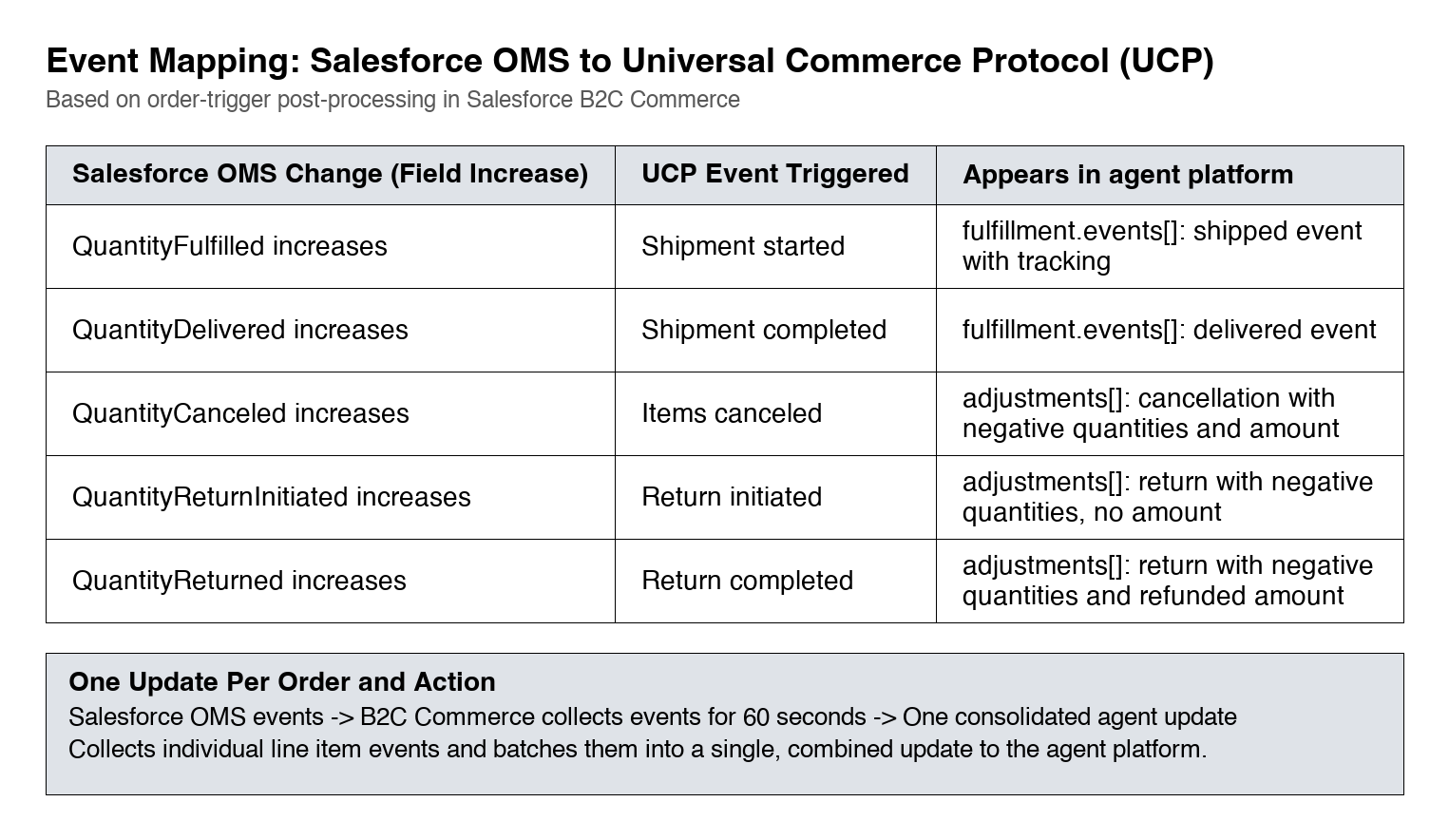
| Salesforce OMS change | UCP update | Where it appears |
|---|---|---|
QuantityFulfilled increases | Shipment started | fulfillment.events[]: shipped event with tracking |
QuantityDelivered increases | Shipment completed | fulfillment.events[]: delivered event |
QuantityCanceled increases | Items canceled | adjustments[]: cancellation with negative quantities and amount |
QuantityReturnInitiated increases | Return initiated | adjustments[]: return with negative quantities and no amount |
QuantityReturned increases | Return completed | adjustments[]: return with negative quantities and refunded amount |
All other changes to an order in Salesforce OMS don’t trigger a UCP update. For example, other fulfillment processing, such as creating a fulfillment order, changes the order item summary’s Status to Allocated in Salesforce OMS. That change sends no UCP update.
The changes follow the order lifecycle in Salesforce OMS, which doesn’t allow them to overlap:
- Units can be canceled only before their fulfillment starts.
- After fulfillment has started, it must be completed.
- After fulfillment is completed, only returns are possible.
Shipment started marks the dispatch of the items of a fulfillment order. Don’t set QuantityFulfilled manually. Salesforce OMS updates it automatically for all items of a fulfillment order when the fulfillment order’s status changes to Fulfilled.
An order can be split into several fulfillment orders, for example, when items ship from different locations. Each fulfillment order covers specific line items and quantities. When a fulfillment order changes to Fulfilled, Salesforce OMS raises QuantityFulfilled only on its own line items, by the quantities it manages. Each fulfillment order therefore triggers its own shipment started update. B2C Commerce combines fulfillment orders that change to Fulfilled within the same 60 seconds into one update. See Event Batching and Timing.
Shipment completed completes the fulfillment when the shopper receives the items.
Don’t set QuantityDelivered manually. Salesforce OMS updates it automatically for the items of a shipment when the shipment’s status changes to Delivered.
Shipment completed updates aren’t available yet. B2C Commerce is already prepared to react to QuantityDelivered changes. Automatic management of this field in Salesforce OMS is in development. After that Salesforce OMS release, shipment completed updates start automatically, with no change on your side, if you model each delivery with a Shipment and its ShipmentItem records and set the shipment status to Delivered.
The quantity change signals a shipment. The corresponding Shipment and ShipmentItem records in Salesforce OMS provide the fulfillment details for the shipped items. For each update, B2C Commerce reads the order’s shipments and builds the UCP fulfillment data from them: the shipped and delivered events, their line items and tracking, and the line items’ fulfilled quantities. Where the Growing Data Comes From describes how each field is mapped.
Model every delivery in Salesforce OMS with a Shipment and its ShipmentItem records. If Salesforce OMS doesn’t use Shipment records, then the agent platform receives no fulfillment data. B2C Commerce sends the update, but the update contains no shipped event, no tracking, and no fulfilled quantities.
A shopper can cancel an order with a Shopper Orders API request (cancelOmsOrder, POST /orders/{orderNo}/actions/oms-cancel-order). That request always cancels the complete order: QuantityCanceled increases on every line item, and B2C Commerce sends one cancellation adjustment that covers all line items and the full order amount.
A service rep can also cancel in Salesforce OMS, including partial cancellations of single items or units. The adjustment then covers only the canceled items and their amount.
A return is reported in two steps, and each step sends its own update:
- Return initiated. The shopper starts the return, for example, with a Shopper Orders API request (
returnOmsOrder,POST /orders/{orderNo}/actions/oms-return-order), or a service rep starts it in Salesforce OMS.QuantityReturnInitiatedincreases. B2C Commerce sends areturnadjustment with the returned units. The adjustment has no amount, because the shopper receives no refund at this step. The return is pending until the shopper sends the items back. - Return completed. When the returned items are received, Salesforce OMS completes the return and
QuantityReturnedincreases. B2C Commerce sends a secondreturnadjustment, now with the refunded amount.
Salesforce OMS sends one event per line item. When a fulfillment order with three line items changes to Fulfilled, B2C Commerce receives three events. To send the agent platform one update for that action, B2C Commerce collects the order’s events for 60 seconds after the first event arrives and then sends one update.
An order change can span several transactions in Salesforce OMS. For example, cancel one item at a time. If all changes happen within the 60 seconds, then the agent platform receives one update. A change after the 60 seconds sends the UCP order again.
- Order Post-Processing Events in the UCP Order Lifecycle—how shipment, cancellation, and return updates reach the agent platform
- How the UCP Order Is Built from the Shopper Order Document—how each update is assembled from the order document