


 j
jClienteling SPI for CRM
Clienteling SPI Field Mapping
SPI Customer Search Layout
Bulk APIs for Creating & Updating Store Associates
Create Distribution Certificate and Resign Development IPA
Implementing the Clienteling SPI allows merchants to use their own system as the system of record for managing customer profiles, configuring Point of Sale to create, update, search, and retrieve customer profiles from the merchant system. This approach provides an alternative to using one of our standard connectors to a CRM (for example, Agentforce Service or Netsuite).
The Clienteling SPI has three prerequisites:
Merchant builds the SPI service for the endpoints (that is, for each clienteling operation to be supported)
Merchant configures the connector in CMS, specifying the details of the integration between Retail Cloud and the SPI endpoint you’ve built
Merchant configures the layouts in CMS. Layouts allow you to define a custom form for the POS that will take associate inputs and pass them as parameters in requests to the SPI endpoint
The Clienteling SPI supports four endpoints. See Clienteling SPI for detailed specifications for each endpoint.
| Endpoint Name | Sample Endpoint | Method | Description |
|---|---|---|---|
| CREATE_CUSTOMER | /endpoint/sa/customers | POST | Create new customer profile based on customer data entered in POS. |
| UPDATE_CUSTOMER | /endpoint/sa/customers | PUT | Update existing customer by specifying values for the parameters passed. Customer parameters not provided in the request will be left unchanged. The specific customer to update is identified by customer ID. |
| SEARCH_CUSTOMERS | /endpoint/sa/customers | GET | Search and retrieve customers previously created based on input parameters passed from POS. |
| GET_CUSTOMER | /endpoint/sa/customers/{customerId} | GET | Retrieve customer data based on provided customer ID. |
Merchants can define which customer attributes are passed from the POS to the Clienteling SPI, specifying only the data they wish to track and maintain. For each clienteling operation, the data the associate collects are determined by the fields configured on the corresponding layout.
To better understand the Clienteling SPI, let’s consider each endpoint, the specific associate journey that invokes it, the layout used to capture the customer information, and the presentation of data from the SPI response in the POS app.
When a store associate searches for a customer, whether to add them to the cart during checkout or to view their profile during clienteling activities, the associate’s inputs in the Customer Search layout are passed to the SEARCH_CUSTOMERS endpoint.
See the below example of a Customer Search layout, presented as a full-page form when the associate taps the clienteling CTA (the “person” icon) in the top right corner of the home screen. Results retrieved from the SEARCH_CUSTOMERS endpoint’s response are presented in a list view below the search form.
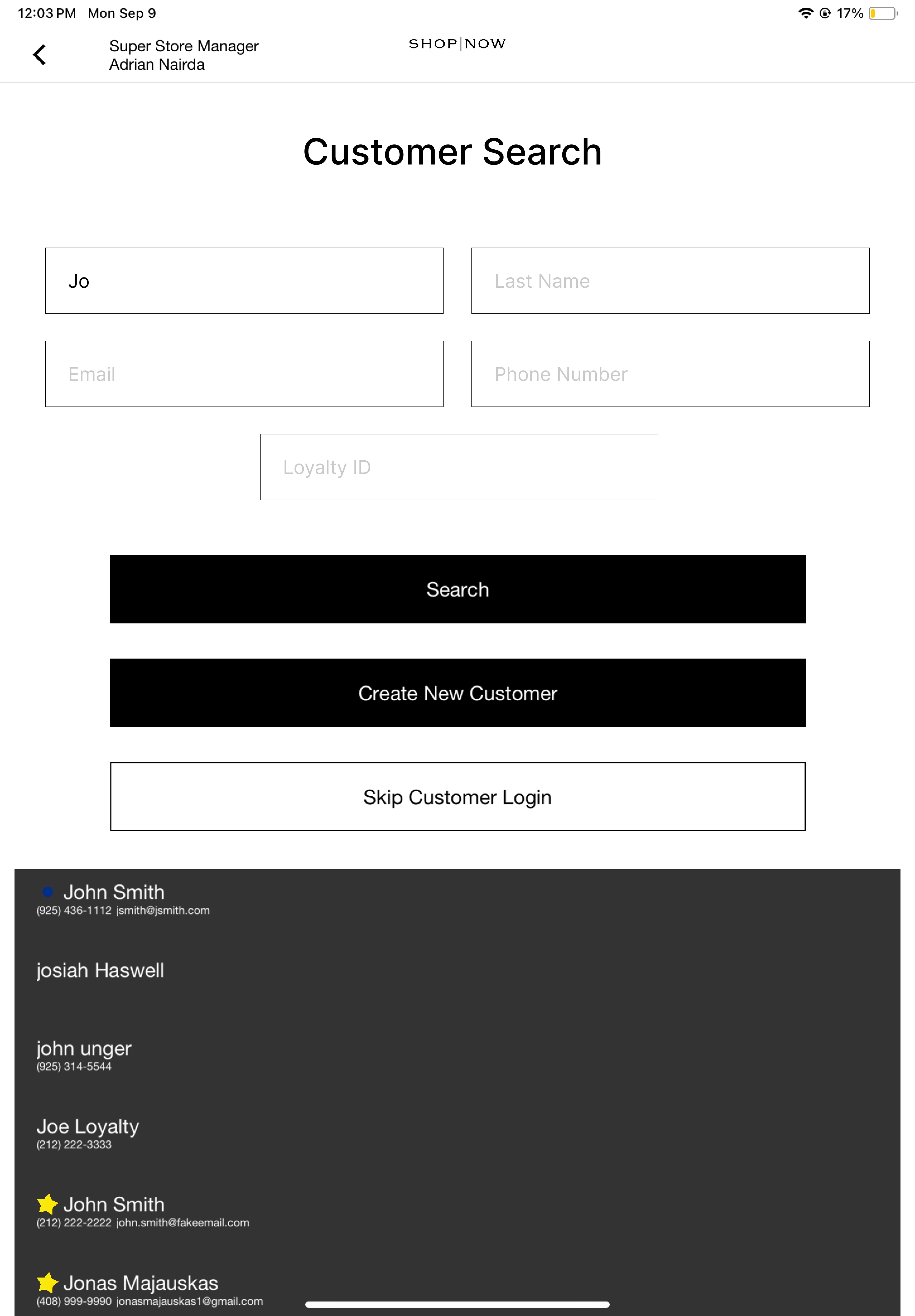
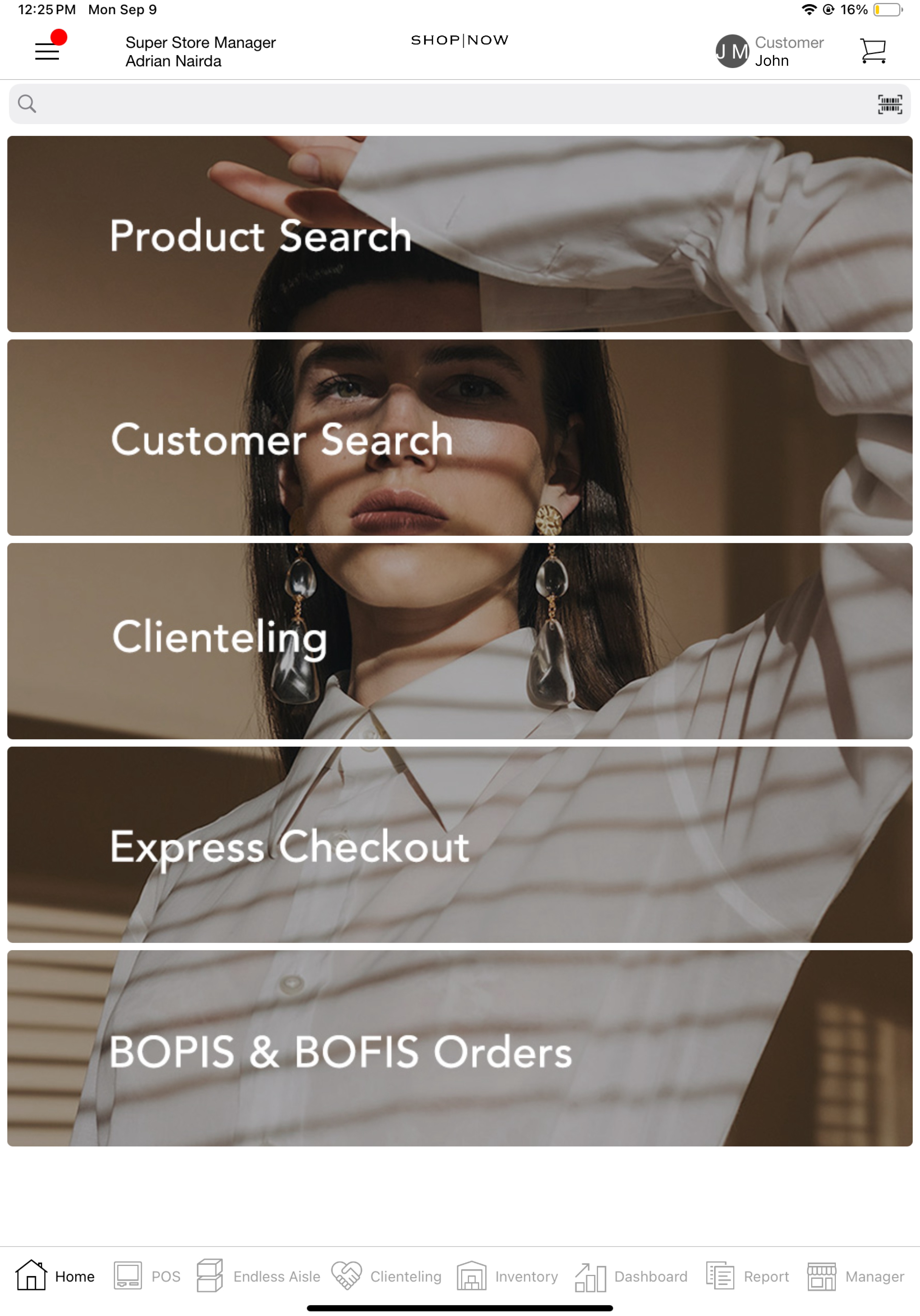
Selecting one of the profiles in the list will login that customer. When a customer is logged in, the customer’s first name and profile photo are shown in the top right corner of the home screen.
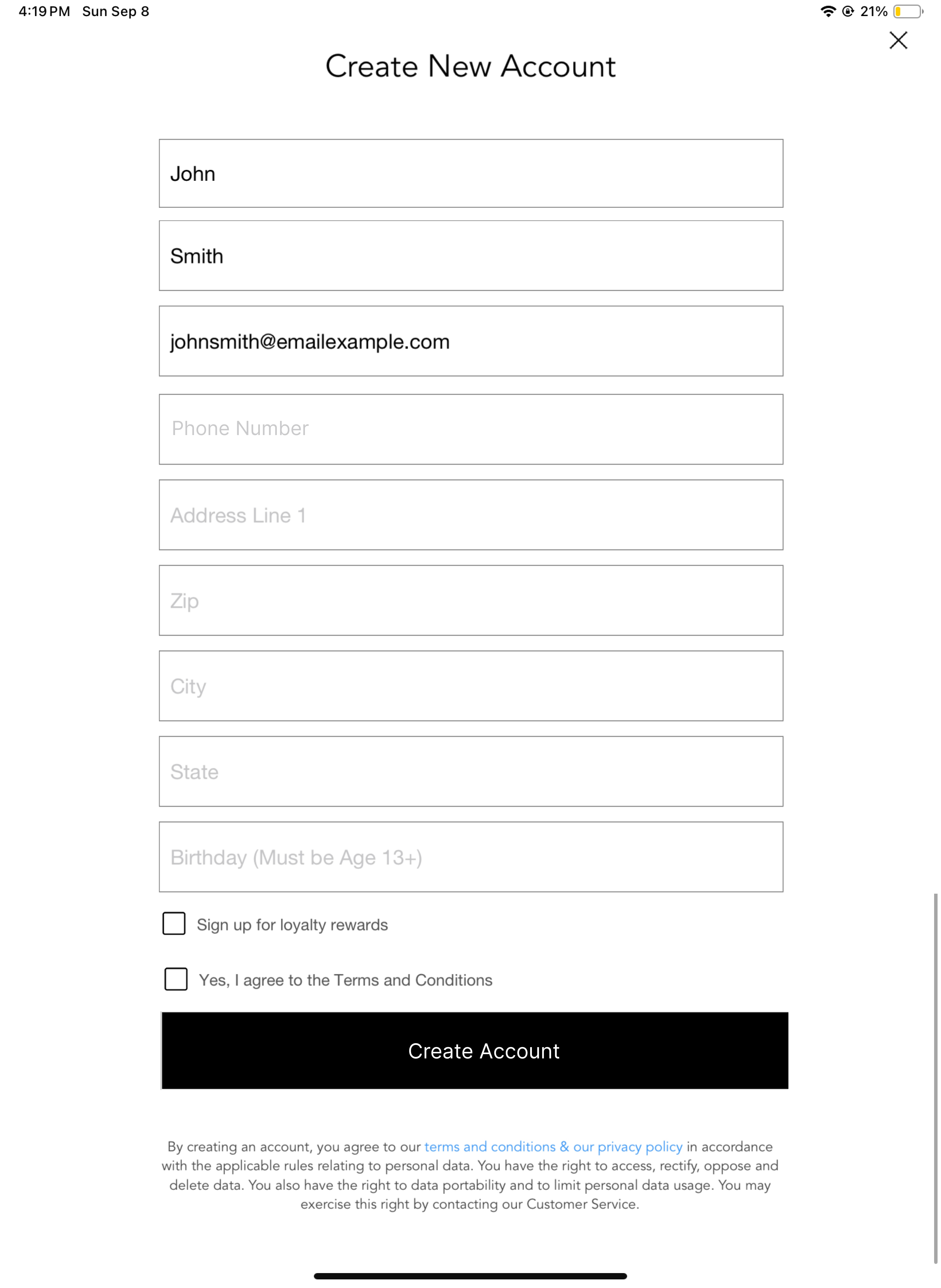
When a store associate creates a new customer profile, the fields in the Customer Signup layout are passed in a request to the CREATE_CUSTOMER endpoint. See the below example of a Customer Signup layout. Associates typically will access this layout when searching for a customer and finding no results or during checkout if they have not already logged a customer in for the cart.
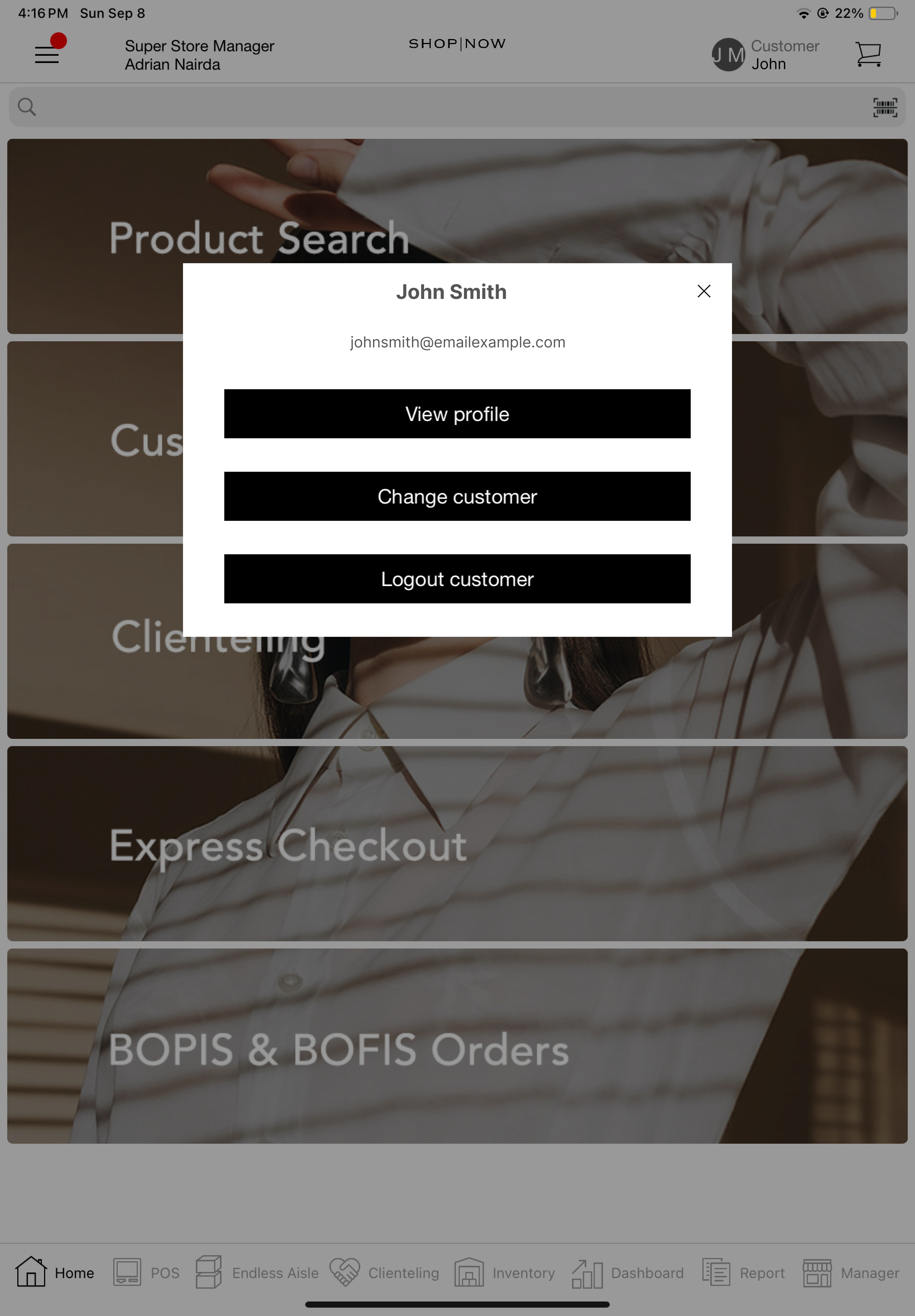
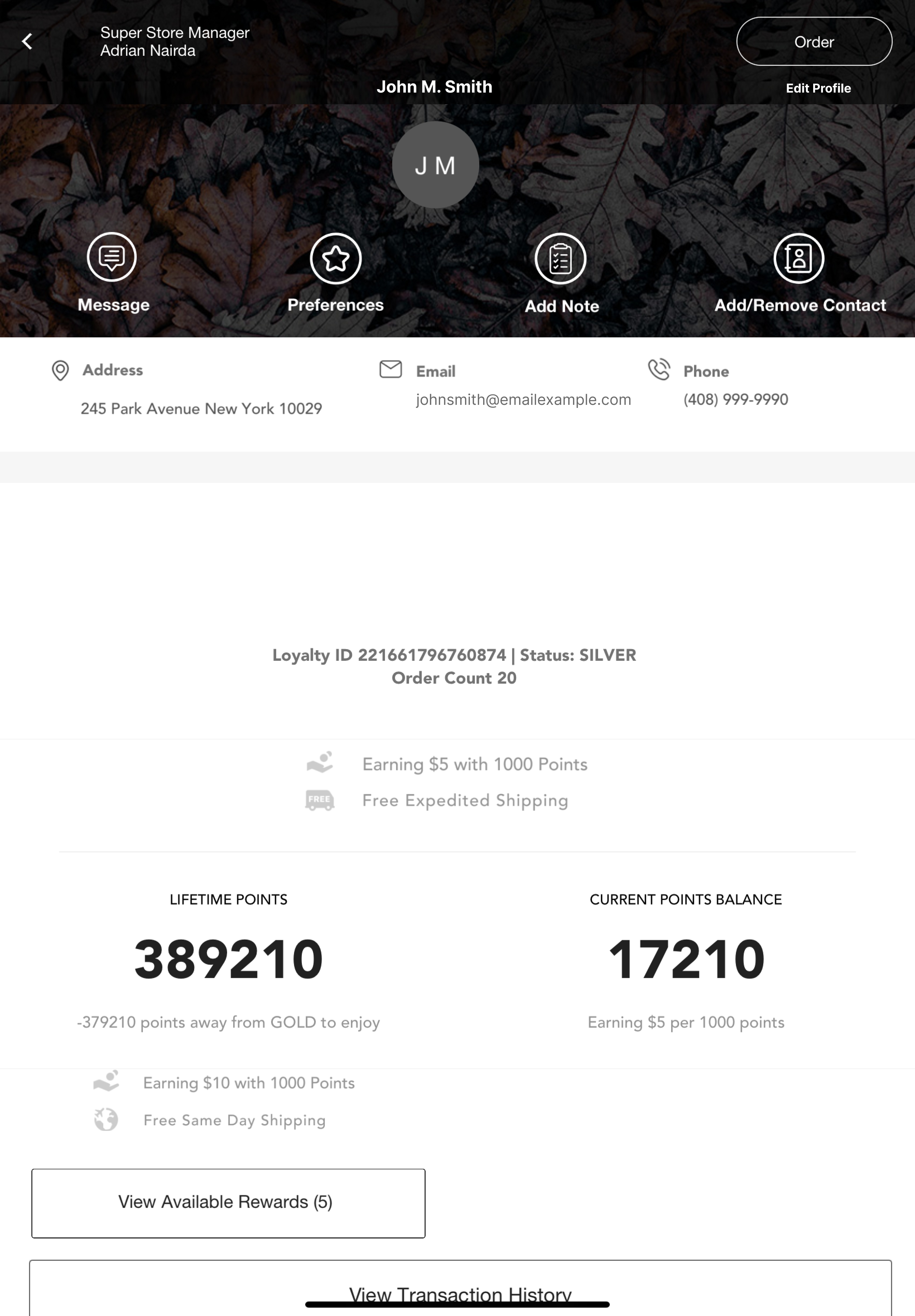
After logging in a customer, the associate can view the customer’s profile, and, as needed, make edits to the profile, which result in calls to the GET_CUSTOMER and UPDATE_CUSTOMER endpoints, respectively. The View profile CTA in the below screenshot will take the associate to the customer’s profile.
Below is an example of a Customer 360 layout, the customer’s profile rendered with the details from the GET_CUSTOMER response. For more detail on setting up this layout, see: Understanding & Configuring Customer 360°.
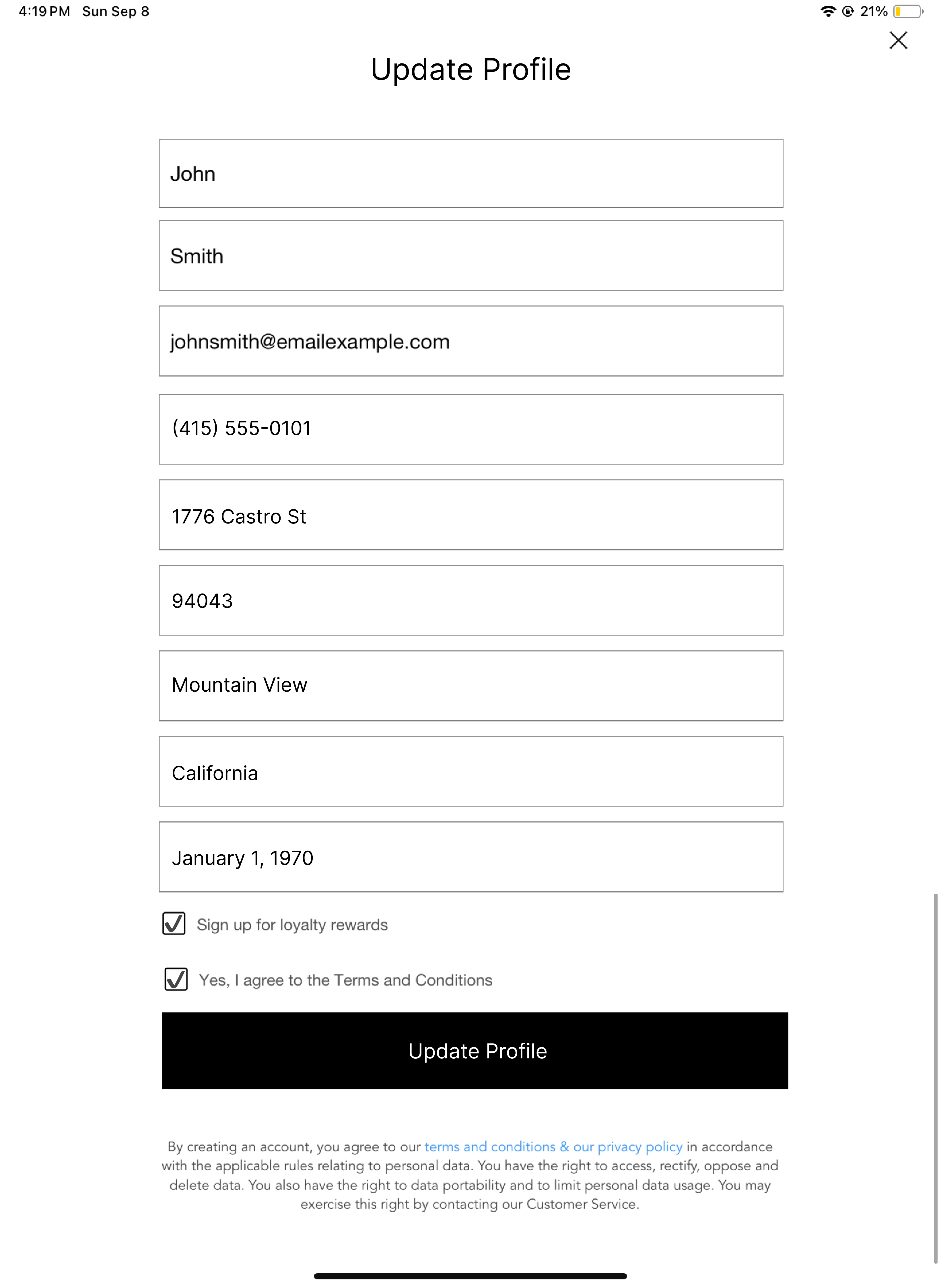
An associate might update a customer’s profile when acquiring new or updated information about a customer’s preferences, location, contact details, and personal attributes. The Update Customer layout is typically a form with the same fields as the Customer Signup layout, pre-filled with the existing values against each customer profile attribute. The form is accessed via a deep link configured on the customer’s profile. Upon making and submitting the desired edits, the associate will trigger a request to the UPDATE_CUSTOMER endpoint, and result in the specified changes to the customer’s profile.
To summarize, the clienteling endpoints are invoked in the following POS flows:
| Endpoint Name | Associate Journey on POS | Layout |
|---|---|---|
| SEARCH_CUSTOMERS | Associate performs a customer search to find an existing profile: - Whether customer already logged in and changing to another profile, or none logged in - Whether during checkout or clienteling activities | Customer Search |
| CREATE_CUSTOMER | Create customer profile using New Customer Sign-up | Customer Signup |
| GET_CUSTOMER | Selecting a customer’s profile from the customer search results | Retrieving a customer’s details does not require a layout, but it’s important to have a clienteling profile layout so associates can view key attributes, order history, and loyalty status of a customer. |
| UPDATE_CUSTOMER | Edit customer profile, for example, with Edit layout accessed from Customer 360 | Customer Signup |
When creating layouts for the above Clienteling operations, refer to Clienteling SPI Field Mapping for a complete mapping between the template tags you configure on the layout and the corresponding attributes of the objects exchanged with the SPI endpoint.
Note
In general, the core resource being exchanged in Clienteling workflows is the customer object, which comprises addresses, consents, customer profiles, and loyalty profiles.
1{
2   addressList: [...],
3   consents: [...],
4   profile: [...],
5   customerLoyaltyProfile: [...],
6   storeAttribution: [...]
7}
This object represents a shopper–their name and contact information, their addresses for billing and shipping, and many other attributes, including, whether they’ve consented to terms and conditions, marketing communications, and loyalty program enrollment.
For each parameter of the customer object, see the below for a summary overview:
| Parameter | Type | Description |
|---|---|---|
| addressList | Array of dictionaries | Customer’s list of Addresses used for billing and shipping. The Address object represents a customer address, typically for shipping, but also for billing, when applicable. It is passed as part of the Clienteling SPI endpoints’ addressList parameter, which is all shipping and billing addresses associated to a customer. It is also part of the Customer object, in profile.address and customerLoyaltyProfile.address. |
| consents | Dictionary of booleans | Customer consents. Child attributes: • consents.agreeToTC • consents.directMailSignUp • consents.eReceipt • consents.loyaltySignUp • consents.newsLetterSignUp • consents.phoneSignUp • consents.smsSignUp |
| profile | Dictionary | Customer profile object. Some of its child attributes are: • address • customerId • firstName • postalCode • customerGroup • loyaltyId • preferredLanguage • country • allowSmsNotifications It encapsulates a customer’s personal and contact information, their loyalty ID, and other attributes. For order-related SPIs and webhooks, the profile object is used to exchange customer information associated with a sale. |
| customerLoyaltyProfile | Dictionary | This object represents the customer loyalty profile, which is used if you are managing a customer loyalty program in Point of Sale. Some of its child attributes are: • accountNumber • address • cashRewards • currentPoints • currentStoreCredit • currentTier • customLoyaltyAttributes • firstName • lastName |
| storeAttribution | Dictionary | This captures the store ID and ID of the associate who creates the customer account and completes the transaction. |
In this scenario, a store associate completes and submits the Customer Signup layout for the shopper, triggering a POST request to the merchant’s CREATE_CUSTOMER SPI endpoint. A response with the new customer object is provided to the POS.
Request
1{
2  "profile": {
3    "email": "timothy@gmail.com",
4    "firstName": "timothy",
5    "lastName": "smith",
6    "address": {
7      "addressLine1": "111 Wilshire Boulevard",
8      "addressLine2": "",
9      "city": "Santa Monica",
10      "state": "CA",
11      "postalCode": "90401",
12      "countryCode": "US",
13      "preferred": false
14    },
15    "phoneMobile": ""
16  },
17  "consents": {
18    "newsLetterSignUp": true,
19    "loyaltySignUp": true
20  },
21  "storeAttribution": {
22    "storeAssociateId": "as1",
23    "storeId": "1920"
24  }
25}
Response
Note that the customer’s identifying attributes (name, email, etc.) and address are added to the customer profile object under customer.profile and customer.profile.address, respectively. The customer’s address is also added to customer.loyaltyProfile.address (because the customer consented to participating in the merchant’s loyalty program) and to customer.addressList.
1{
2  "loyaltyProfile": {
3    "accountNumber": "12344",
4    "address": {
5      "addressId": "09999",
6      "addressLine1": "111 Wilshire Boulevard",
7      "city": "Santa Monica",
8      "countryCode": "US",
9      "firstName": "Timothy",
10      "lastName": "Smith",
11      "postalCode": "90401",
12      "state": "CA",
13      "storeId": "1920"
14    },
15    "currentTier": {
16      "display": "https://acme.com/loyalty/image/upload/star-silver.png",
17      "name": "SILVER"
18    },
19    "loyaltyId": "1",
20    "nextTier": {},
21    "rewards": [],
22    "tierLevelCode": "SILVER"
23  },
24  "profile": {
25    "address": {
26      "addressId": "09999",
27      "addressLine1": "111 Wilshire Boulevard",
28      "city": "Santa Monica",
29      "countryCode": "US",
30      "firstName": "Timothy",
31      "lastName": "Smith",
32      "postalCode": "90401",
33      "state": "CA",
34      "storeId": "1920",
35      "emailAddress": "timothy@gmail.com"
36    },
37    "customerId": "234900",
38    "email": "timothy@gmail.com",
39    "firstName": "Timothy",
40    "lastName": "Smith",
41    "postalCode": "90401",
42    "customerGroup": "SILVER"
43  },
44  "addressList": [
45    {
46      "addressId": "09999",
47      "addressLine1": "111 Wilshire Boulevard",
48      "city": "Santa Monica",
49      "countryCode": "US",
50      "firstName": "Timothy",
51      "lastName": "Smith",
52      "postalCode": "90401",
53      "state": "CA",
54      "storeId": "1920"
55    }
56  ],
57  "consents": {
58    "agreeToTC": true,
59    "directMailSignUp": true,
60    "eReceipt": true,
61    "loyaltySignUp": true,
62    "newsLetterSignUp": true,
63    "phoneSignUp": true,
64    "smsSignUp": true
65  }
66}In this scenario, a store associate is placing an order for a customer. The associate searches and retrieves the customer’s profile, logging them in on the POS. Then, when selecting a shipping address for the order, the associate enters a new address for the customer instead of the existing address on file. The option to “Save this address to profile” is toggled on. After adding the new shipping address, a PUT request is sent to the merchant’s UPDATE_CUSTOMER SPI endpoint. As a result, the new address is added to the addressList array in the Customer object, customer.addressList.
Request
1{
2  "customerId": "234900",
3  "address": {
4    "addressName": "Timothy Smith",
5    "firstName": "Timothy",
6    "lastName": "Smith",
7    "addressLine1": "1100 Van Ness Avenue",
8    "addressLine2": "",
9    "addressLine3": "",
10    "addressLine4": "",
11    "city": "San Francisco",
12    "state": "CA",
13    "postalCode": "94109",
14    "countryCode": "US",
15    "isDefaultBilling": false,
16    "isDefaultShipping": false,
17    "preferred": false,
18    "emailAddress": "timothy@gmail.com"
19  }
20}
Response
1{
2  "loyaltyProfile": {
3    "accountNumber": "12344",
4    "address": {
5      "addressId": "09999",
6      "addressLine1": "111 Wilshire Boulevard",
7      "city": "Santa Monica",
8      "countryCode": "US",
9      "firstName": "Timothy",
10      "lastName": "Smith",
11      "postalCode": "90401",
12      "state": "CA",
13      "storeId": "1920"
14    },
15    "currentTier": {
16      "display": "https://acme.com/loyalty/image/upload/star-silver.png",
17      "name": "SILVER"
18    },
19    "loyaltyId": "1",
20    "nextTier": {},
21    "rewards": [],
22    "tierLevelCode": "SILVER"
23  },
24  "profile": {
25    "address": {
26      "addressId": "09999",
27      "addressLine1": "111 Wilshire Boulevard",
28      "city": "Santa Monica",
29      "countryCode": "US",
30      "firstName": "Timothy",
31      "lastName": "Smith",
32      "postalCode": "90401",
33      "state": "CA",
34      "storeId": "1920",
35      "emailAddress": "timothy@gmail.com"
36    },
37    "customerId": "234900",
38    "email": "timothy@gmail.com",
39    "firstName": "Timothy",
40    "lastName": "Smith",
41    "postalCode": "94109",
42    "customerGroup": "SILVER"
43  },
44  "addressList": [
45    {
46      "addressId": "10000",
47      "addressLine1": "1100 Van Ness Avenue",
48      "city": "San Francisco",
49      "countryCode": "US",
50      "firstName": "Timothy",
51      "lastName": "Smith",
52      "postalCode": "94109",
53      "state": "CA",
54      "storeId": "1920"
55    },
56    {
57      "addressId": "09999",
58      "addressLine1": "111 Wilshire Boulevard",
59      "city": "Santa Monica",
60      "countryCode": "US",
61      "firstName": "Timothy",
62      "lastName": "Smith",
63      "postalCode": "90401",
64      "state": "CA",
65      "storeId": "1920"
66    }
67  ],
68  "consents": {
69    "agreeToTC": true,
70    "directMailSignUp": true,
71    "eReceipt": true,
72    "loyaltySignUp": true,
73    "newsLetterSignUp": true,
74    "phoneSignUp": true,
75    "smsSignUp": true
76  }
77}In this scenario, a store associate searches and retrieves an existing customer, logging them in on the POS. Then the associate uses a deep link on that customer’s clienteling profile to edit the profile information. The associate edits the customer’s profile address. When the edits on the customer layout are submitted, a PUT request is sent to the merchant’s UPDATE_CUSTOMER SPI endpoint.
Below you can see the request and response payloads for that operation. Notice that, in the response, there are three changes:
Request
1{
2  "profile": {
3    "email": "timothy@gmail.com",
4    "firstName": "Timothy",
5    "lastName": "Smith",
6    "address": {
7      "firstName": "Timothy",
8      "lastName": "Smith",
9      "addressLine1": "241 West 107th Street",
10      "addressLine2": "",
11      "city": "New York",
12      "state": "NY",
13      "postalCode": "10025",
14      "countryCode": "US",
15      "storeId": "1920",
16      "preferred": true
17    },
18    "phoneMobile": ""
19  },
20  "addressList": [],
21  "consents": {
22    "smsSignUp": true,
23    "newsLetterSignUp": true,
24    "agreeToTC": true,
25    "directMailSignUp": true,
26    "phoneSignUp": true,
27    "loyaltySignUp": true,
28    "eReceipt": true
29  },
30  "storeAttribution": {
31    "storeAssociateId": "as1",
32    "storeId": "1920"
33  }
34}
Response
1{
2  "loyaltyProfile": {
3    "accountNumber": "12344",
4    "address": {
5      "addressId": "10003697201",
6      "addressLine1": "241 West 107th Street",
7      "city": "New York",
8      "countryCode": "US",
9      "firstName": "Timothy",
10      "lastName": "Smith",
11      "postalCode": "10025",
12      "state": "NY",
13      "storeId": "1920"
14    },
15    "currentTier": {
16      "display": "https://acme.com/loyalty/image/upload/star-silver.png",
17      "name": "SILVER"
18    },
19    "loyaltyId": "1",
20    "nextTier": {},
21    "rewards": [],
22    "tierLevelCode": "SILVER"
23  },
24  "profile": {
25    "address": {
26      "addressId": "10001",
27      "addressLine1": "241 West 107th Street",
28      "city": "New York",
29      "countryCode": "US",
30      "firstName": "Timothy",
31      "lastName": "Smith",
32      "postalCode": "10025",
33      "state": "NY",
34      "storeId": "1920",
35      "emailAddress": "timothy@gmail.com"
36    },
37    "customerId": "234900",
38    "email": "timothy@gmail.com",
39    "firstName": "Timothy",
40    "lastName": "Smith",
41    "postalCode": "90401",
42    "customerGroup": "SILVER"
43  },
44  "addressList": [
45    {
46      "addressId": "09999",
47      "addressLine1": "111 Wilshire Boulevard",
48      "city": "Santa Monica",
49      "countryCode": "US",
50      "firstName": "Timothy",
51      "lastName": "Smith",
52      "postalCode": "90401",
53      "state": "CA",
54      "storeId": "1920"
55    },
56    {
57      "addressId": "10000",
58      "addressLine1": "1100 Van Ness Avenue",
59      "city": "San Francisco",
60      "countryCode": "US",
61      "firstName": "Timothy",
62      "lastName": "Smith",
63      "postalCode": "94109",
64      "state": "CA",
65      "storeId": "1920"
66    },
67    {
68      "addressId": "10001",
69      "addressLine1": "241 West 107th Street",
70      "city": "New York",
71      "countryCode": "US",
72      "firstName": "Timothy",
73      "lastName": "Smith",
74      "postalCode": "10025",
75      "state": "NY",
76      "storeId": "1920"
77    }
78  ],
79  "consents": {
80    "agreeToTC": true,
81    "directMailSignUp": true,
82    "eReceipt": true,
83    "loyaltySignUp": true,
84    "newsLetterSignUp": true,
85    "phoneSignUp": true,
86    "smsSignUp": true
87  }
88}