


Point of Sale Developer Guide for Non Hyperforce Users
Invoking Point of Sale APIs is a two-step process. This topic describes the steps and includes sample responses.
For a comprehensive list of APIs and SPIs, see Point of Sale API Specifications.
In 2024, Salesforce acquired PredictSpring, a provider of modern retail point-of-sale (POS) software built natively in the cloud. PredictSpring was renamed Retail Cloud and is now called Point of Sale. You may still see references to PredictSpring or Retail Cloud in the Point of Sale app and in our documentation (for example, in API header names).
Note
API Keys
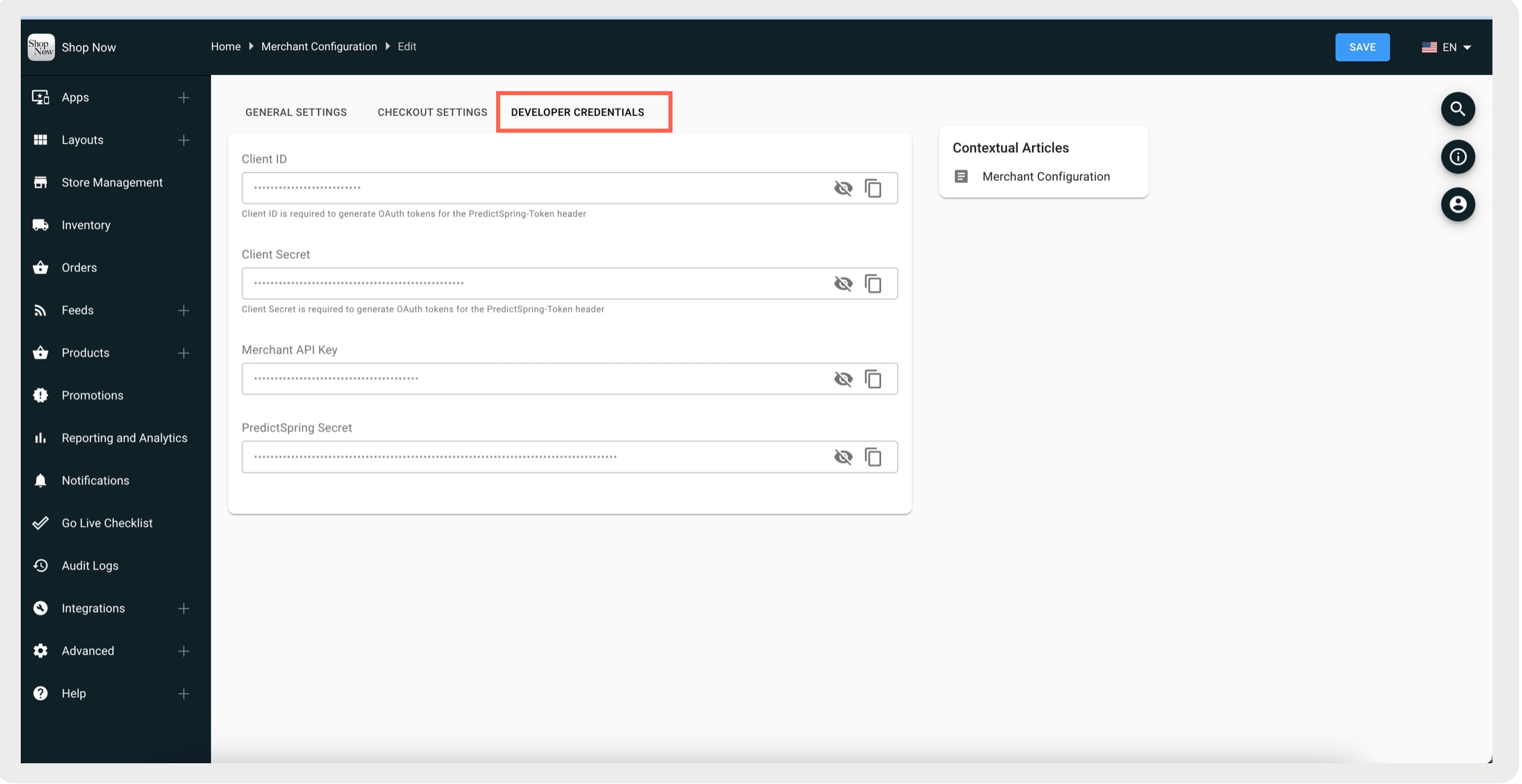
Find the keys needed to use Point of Sale APIs in CMS by going to Advanced > Merchant Configuration > Developer Credentials.
Base URL
- Staging API Base URL: https://api.predictspring.com/staging/service
- Production API Base URL: https://api.predictspring.com/prod/service
- Staging OAuth2 URL: https://staging-oauth2.predictspring.com/oauth2/token
- Production OAuth2 URL: https://prod-oauth2.predictspring.com/oauth2/token
API Inbound Rate Limits
- Production: 10 requests per second and 100,000 requests per month.
- Staging: 10,000 requests per month.
For additional API volume, contact Salesforce Customer Support.
Configuration and Setup
To use Point of Sale APIs, complete a two-step authentication process. First, obtain an OAuth token. Then, use that token to make API calls.
Step 1: Get OAuth token
1curl -X POST \
2  '<OAuth2 URL>?grant_type=client_credentials' \
3  -H 'Accept: */*' \
4  -H 'Accept-Encoding: gzip, deflate' \
5  -H 'Authorization: Basic <BASE64 ENCODED ClientID:ClientSecret>' \
6  -H 'Cache-Control: no-cache' \
7  -H 'Connection: keep-alive' \
8  -H 'Content-Length: ' \
9  -H 'Content-Type: application/x-www-form-urlencoded' \
10  -H 'cache-control: no-cache'
Sample Response:
1{
2  "access_token": "<access token>",
3  "expires_in": 3600,
4  "token_type": "Bearer"
5}
Extract the access token value. This token is required for Step 2 to invoke the Point of Sale API.
The token is valid for the expiry period as specified in expired_in in seconds.
Pass the access token as PredictSpring-Token when invoking the Point of Sale API.
Step 2: Invoke API
Make sure that Content-Type is set to application/json in all the requests.
Note
Invoke Point of Sale API with the below headers:
- PredictSpring-Secret (this is an encrypted string you get from Point of Sale)
- PredictSpring-Token
- X-api-key
- Content-Type: application/json
x-api-key is the Merchant API Key in the UI.
Note
Here’s a sample request to create promotions in a staging environment.
1curl -X POST \
2 https://api.predictspring.com/staging/service/merchant/v1/promotions \
3 -H 'Content-Type: application/json' \
4 -H 'PredictSpring-Secret: <PredictSpring-Secret>' \
5 -H 'PredictSpring-Token: <Access-Token>' \
6 -H 'x-api-key: <x-api-key>' \
7 -d '{
8 "hasSingleUsePromoCodes": false,
9 "active": true,
10 "promotionType": "ORDER_AMOUNT_OFF",
11 "name": "Special Promo",
12 "amountOff": 0.99,
13 "title": "Special Promo for you!",
14 "description": "Special promo test",
15 "imageUrl": "<image url>",
16 "startTimeStamp": 1567321200000,
17 "endTimeStamp": 1567494000000,
18 "merchantPromotionId": "ext-special-promo-1",
19 "auto": true,
20 "redemptionLimit": 1,
21 "rules": [
22 {
23 "promotionRuleType": "PRODUCT",
24 "operator": "INCLUSIVE",
25 "value": [
26 "1366160159739842"
27 ]
28 },
29 {
30 "promotionRuleType": "CATEGORY",
31 "operator": "INCLUSIVE",
32 "value": [
33 "Clothing"
34 ]
35 },
36 {
37 "promotionRuleType": "PRODUCT",
38 "operator": "EXCLUSIVE",
39 "value": [
40 "1366160159794742"
41 ]
42 }
43 ],
44 "channel": [
45 "APP",
46 "STORE",
47 "OUTLET"
48 ],
49 "combinationTypes": [
50 "ORDER_PERCENT_OFF",
51 "ORDER_AMOUNT_OFF",
52 "FREE_SHIPPING",
53 "BOGO",
54 "FREE_SAMPLES",
55 "PRODUCT_FIXED_AMOUNT",
56 "X_FOR_Y"
57 ]
58}' j
j