Set Up Tax Integration Using SPI
Retail Cloud SPIs empower merchants to calculate taxes according to their own system’s rules. Retrieve tax rates for offline transactions and access a list of supported tax exemptions. Also finalize the taxes applied to sales transactions.
- Modern POS App Build: 10.0.1 or greater
- Platform Support: iPad & iPhone
- Offline Support: No
For details on this SPI, see Tax Calculation SPI in the Point of Sale reference documentation.
For a comprehensive list of Point of Sale APIs and SPIs, see Point of Sale API, SPI, and Webhook Overview.
- Calculate Tax - Calculates the tax based on the rules defined in the merchant’s system. The request includes a list of products, applicable tax exemptions, and the originating and destination addresses to apply the correct tax rates.
POST/merchant/spi/sample/endpoint/taxEngine/calculateTax
- Download Tax Rates - Retrieves a list of tax or VAT rates for offline transactions. The request can include optional parameters like country code, state, city, and postal code. The response is provided in CSV format. The first line contains the column headers and subsequent lines include the corresponding tax or VAT rate values. For attributes and a sample file, refer to the “Tax Feed Specification section in Tax Rates Feed & Setup in Salesforce Help.
GET/merchant/spi/sample/endpoint/taxEngine/downloadTaxRates
- Finalize Tax Submission - This optional SPI finalizes the taxes applied to sale transactions. It sends a list of products, the applied taxes, and the associated order ID to the tax engine.
POST/merchant/spi/sample/endpoint/taxEngine/finalizeTaxSubmission
- Retrieve Tax Exemptions - Retrieves a list of tax exemptions supported by the merchant. The request can include optional parameters such as country code, state, city, and postal code.
GET/merchant/spi/sample/endpoint/taxEngine/getTaxExemptions
- Verify Tax Engine - Verifies that the SPI Tax Engine is available and that requests can be sent. If this API is implemented, it’s checked when verifying the feed source for offline taxes. If it is not implemented, it will be allowed to pass through and attempt to download tax rates.
GET/merchant/spi/sample/endpoint/taxEngine/verify
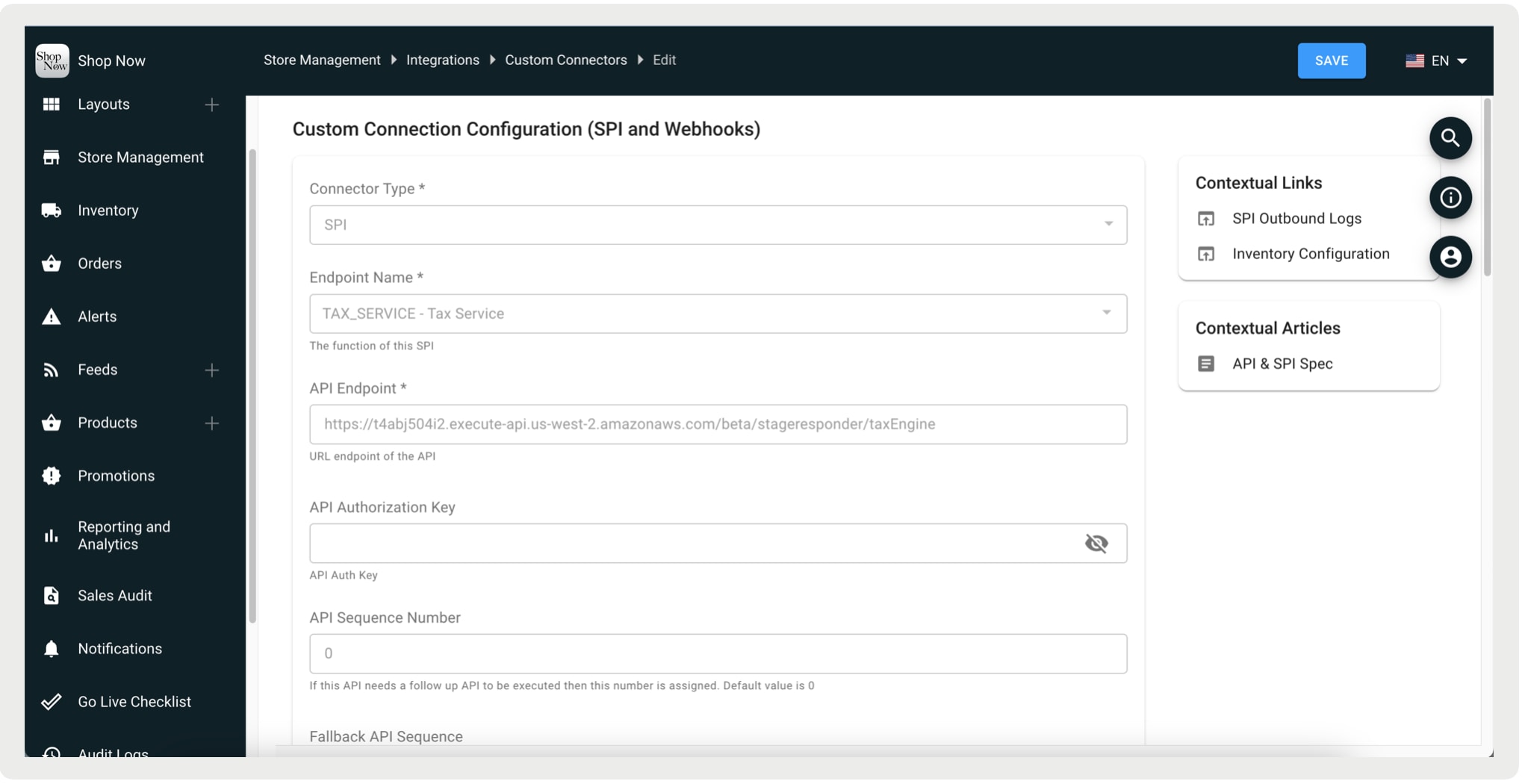
Create a custom connector SPI named TAX_SERVICE with the endpoint and other relevant details. This automatically generates the Tax Engine as an SPI. This configuration can be edited to set the shipping tax configuration. No additional details are required here; all other specifics should be included in the SPI.
-
In CMS, go to Integrations | Custom Connectors.
-
Click Create.
-
For Connector Type, select SPI.
-
For Endpoint Name, select TAX_SERVICE.
-
For API Endpoint, enter the common endpoint\URL base in the configuration. Implement the following methods with the exact ending keywords as specified:
-
/calculateTax -
/downloadTaxRates(for offline transactions) -
/getTaxExemptions -
/finalizeTaxSubmission(if the store setting flag finalizeTaxOnOrderSubmission is enabled under Store Management | Store Settings | Tax)
-
These are examples of the request payload and the response for the Calculate Tax SPI.
Request
Response
For GET tax exemption, is this expected to be called once for any new tax exempt value (For example, Government, Military, etc.)?
Yes, the call is made this each time a tax exemption is applied through the app.
For POST tax, is this call made every time an item is added to the cart?
Yes, the call is made each time a product is added to the cart.
For GET download rates, do merchants run this every 24 hours like we do with Avalara?
Yes, similar to Avalara, a job is set up to call the API and download the tax rates every 24 hours.
For POST tax submission, when is this triggered? On order submission for every order?
Yes, this is triggered during order submission for each order. This is optional for the merchant to implement.
What do the following attributes mean?
Total tax amount with high precision: High precision means storing detailed tax amounts in our database and Tlog for reconciliation purposes. Generally, values are rounded to two decimal places (for example, 5.37 from 5.368125).OrderItemId: This is the sequence number of an item within the cart. For example, if it’s the third item out of 5 total items, Point of Sale passes 3, and we expect the same value back. If it does not match, it won’t fail, but we expect theorderItemIdto be returned along with the appropriate tax rate.
Is there a tax bucket for each delivery group and its “to” shipping address?
No, a separate tax calculation request is sent for each delivery group and shipping method/address. Each request is processed individually, meaning there aren’t multiple tax buckets combined in a single request. The tax calculation SPI is called for each delivery group separately.
Will each tax bucket contain only one item in the products array with productId = "shipping"?
Yes.
How does Point of Sale know which items in the delivery group the shipping tax is applied to when sending the response? Does the request contain a comma-separated list of all orderItemIds in the delivery group?
The tax calculation request for shipping isn’t tied to specific orderItemIds. Instead, the shipping price and shipping tax class apply to all items in that delivery group. The request is based solely on the shipping cost and tax class, without referencing individual order items.
How does the app handle tax exemptions?
When a tax exemption is applied through the app, a tax calculation request is sent to the SPI with the exemption details. The SPI responds with updated tax information, including:
taxExempt=true: Indicates that the exemption has been applied.taxExemptionAmount: Specifies the exemption amount applied.
These fields are used to recalculate and display the adjusted tax amount in the app.
The totalExemptionAmount and itemTax.taxExemptionAmount in the SPI response are expected to be negative (-ve) values to properly reflect the tax reduction.