


Query: Retrieve Campaign Engagement Records
Business Goal: Perform a comprehensive audit of data ingestion, verify data integrity, and analyze user activity related to customer interactions. This data examination ensures regulatory compliance and enables reliable, data-driven decisions regarding customer strategy.
Use Case: A data specialist needs to retrieve all campaign engagement records since January 1, 2025, from the CampaignEngagement__dll Data Lake Object (DLO). The total number of records is expected to be very large, for example, 100,000 records.
The Query Connect API is designed to make this kind of massive data retrieval manageable and efficient. First, submit the query, then check its status as it processes, and finally retrieve the full results by using pagination.
For limit information, see Data 360 Limits and Guidelines.
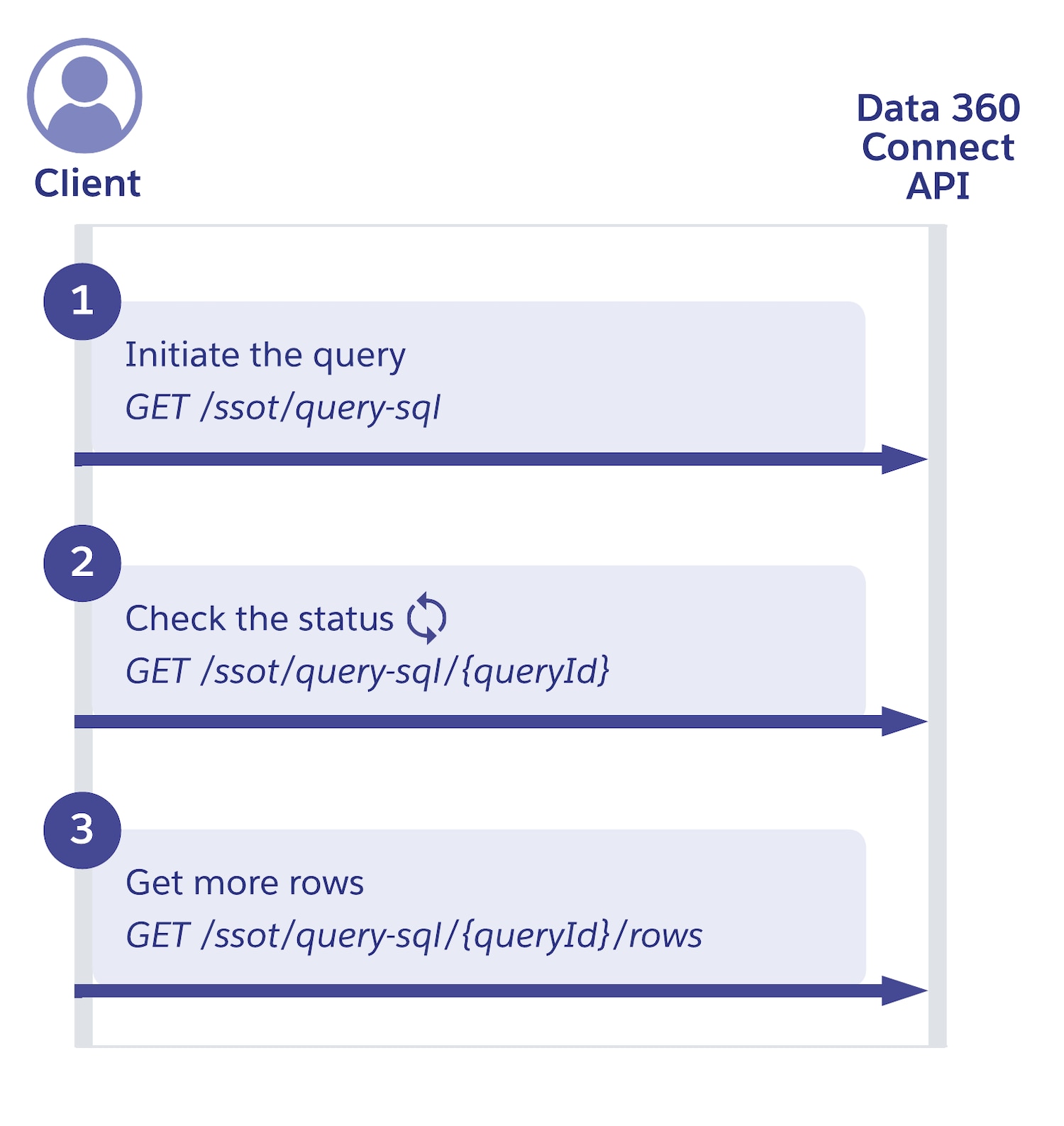
Step 1: Submit the query request
Use the create SQL query endpoint to initiate the query execution in Data 360.
Query parameters:
dataspace=default: The data space where the query is to be executed.workloadName=connect-engagement-records: A description of the scenario, task, or application name that the query handles. Set this value to help Salesforce Customer Support assist with debugging issues.
Request
In the body of the request, pass the sqlParameters array for parameterized queries. In the query, :startDate is a placeholder for the actual date value from the parameters. See Data 360 SQL Syntax for more information on SQL statements.
1POST https://{dne_cdpInstanceUrl}/services/data/v65.0/ssot/query-sql?dataspace=default&workloadName=connect-engagement-records1{
2 "sql": "select UnifiedIndividualId, ModifiedDateTime__c, EngagementType__c, CampaignName__c, Channel__c from CampaignEngagement__dll where _DataLakeModifiedDateTime__c >= :startDate orderBy ModifiedDateTime__c ASC",
3 "sqlParameters": [
4 {
5 "type": "date",
6 "name": "startDate",
7 "value": "2025-01-01"
8 }
9 ]
10}Response
The API call immediately returns a queryId to track the query’s progress, metadata about the result columns, and the first chunk of data (for example, 2000 rows). The completionStatus is Running because the first chunk is ready, but rowCount indicates that more data is available.
Query results are subject to results caching, which serves identical queries submitted within a specific timeframe much faster. Cached results have a 24-hour expiration time, ensuring that they remain available for repeated access and optimized performance for frequently run queries.
1{
2  "returnedRows": 2000,
3  "status": {
4    "chunkCount": 1,
5    "completionStatus": "Running",
6    "expirationTime": "2025-06-05T08:11:00Z",
7    "progress": 0.02,
8    "queryId": "MTAuMjIuMTQ4LjE4MTo3NDg0%2Fe1025a17-0ff7-bcb9-204c-656ec276b188",
9    "rowCount": 100000
10  },
11  "metadata": [
12    {
13      "name": "UnifiedIndividualId",
14      "nullable": false,
15      "type": "varchar"
16    },
17    {
18      "name": "ModifiedDateTime__c",
19      "nullable": false,
20      "type": "varchar"
21    },
22    {
23      "name": "EngagementType__c",
24      "nullable": false,
25      "type": "varchar"
26    },
27    {
28      "name": "CampaignName__c",
29      "nullable": false,
30      "type": "varchar"
31    },
32    {
33      "name": "Channel__c",
34      "nullable": false,
35      "type": "varchar"
36    }
37  ],
38  "data": [
39    ["CUST_SYNC_001", "2025-05-01T08:00:00Z", "Email Open", "May Newsletter", "Email"],
40    ["CUST_SYNC_002", "2025-05-01T08:05:00Z", "Website Visit", "Spring Collection", "Web"]
41  ]
42}
Step 2: Check the query status
Because the initial response indicated that the rowCount is 100,000 but only 2,000 rows were returned, the query is still running in the background. You need to periodically check its status using the get SQL query endpoint.
Query parameters:
dataspace=default: The data space where the query is to be executed.workloadName=connect-engagement-records: A description of the scenario, task, or application name that the query handles. Set this value to help Salesforce Customer Support assist with debugging issues.waitTimeMs: This parameter allows you to perform long polling. The request blocks for up towaitTimeMs(for example, 10,000 ms = 10 seconds) if the status hasn’t changed or return immediately if it has. Adjust this number as needed if you encounter Apex resource limit issues.
Request
The client polls every five seconds until the query completionStatus is Finished. Pass the queryId obtained in the previous response as part of the URL for this status check.
1GET https://{dne_cdpInstanceUrl}/services/data/v65.0/ssot/query-sql/MTAuMjIuMTQ4LjE4MTo3NDg0%2Fe1025a17-0ff7-bcb9-204c-656ec276b188?dataspace=default&workloadName=connect-engagement-records&waitTimeMs=5000Response 1
The progress field indicates how much of the query has been processed.
1{
2  "queryId": "MTAuMjIuMTQ4LjE4MTo3NDg0%2Fe1025a17-0ff7-bcb9-204c-656ec276b188",
3  "completionStatus": "Running",
4  "chunkCount": 5,
5  "rowCount": 100000,
6  "expirationTime": "2025-06-05T08:11:00Z",
7  "progress": 0.5
8}
Response 2
When completionStatus is Finished (or progress is 1.0), all data is ready for retrieval.
1{
2  "queryId": "MTAuMjIuMTQ4LjE4MTo3NDg0%2Fe1025a17-0ff7-bcb9-204c-656ec276b188",
3  "completionStatus": "Finished",
4  "chunkCount": 50,
5  "rowCount": 100000,
6  "expirationTime": "2025-06-05T08:11:00Z",
7  "progress": 1.0
8}
Step 3: Get additional rows (row-based pagination)
After confirming that the initial query is complete, you fetch the remaining 98,000 rows by using the get SQL query rows endpoint.
Query parameters:
rowLimit: The maximum number of rows to return in this chunk (for example, 2000).offset: The row number at which to start retrieving the next chunk of query results.omitSchema=true: This parameter, when set totrue, tells the request not to return the metadata (metadataarray) with each subsequent chunk. Omitting the metadata reduces the amount of data returned for faster performance.
Request
Get the next 2000 rows, starting from row 2000 (since you already received the first 2000 rows).
1GET https://{dne_cdpInstanceUrl}/services/data/v65.0/ssot/query-sql/MTAuMjIuMTQ4LjE4MTo3NDg0%2Fe1025a17-0ff7-bcb9-204c-656ec276b188/rows?rowLimit=2000&offset=2000&omitSchema=trueResponse
The response contains the next chunk of data.
1{
2  "returnedRows": 2000,
3  "data": [
4    ["CUST_SYNC_003", "2025-05-01T08:10:00Z", "Email Click", "Spring Sale", "Email"]
5    // ... (1999 more rows)
6  ]
7}
Step 4: Delete a long-running query (optional)
For queries that are no longer needed due to user cancellation or to cancel a long-running query, use the cancel SQL query endpoint.
 j
j