


 j
jGet Started with Communications, Media, and Energy (CME) Common APIs
Documentation Changelog
Introduction
FAQ
Troubleshooting
Diagnostic Tool for Standard Cart APIs
Users can invoke the diagnostic tool for Standard Cart APIs remotely. The TelcoAdminConsoleController supports following types of remote calls for diagnostic APIs.
getDiagnosticDetailsreturns a list of string (name of diagnostics to be performed). No parameter is required.executeDiagnostics executes the diagnostic and returns the result of diagnostic in output. Requires name of the diagnostic as diagnosticName parameter.Below is a sample code, which performs the diagnostic remotely and generates the output in apex debug log files.
1vlocity_cmt.TelcoAdminConsoleController controller = new vlocity_cmt.TelcoAdminConsoleController();
2
3// get list of all diagnostics
4Map<String, Object> output = controller.invokeMethod('getDiagnosticDetails', new Map<String, String>());
5
6
7List<Object> diagnosticNames = (List<Object>) output.get('result');
8
9List<Map<String, Object>> results = new List<Map<String, Object>>();
10
11// iterate over the diagnostic list and execute each one
12for(Object diagnosticName: diagnosticNames) {
13
14    Map<String, Object> diagOutput = controller.invokeMethod('executeDiagnostics', new Map<String, String>{'diagnosticName'=> (String) diagnosticName});
15
16    Map<String, Object> result = (Map<String, Object>) diagOutput.get('result');
17
18    if(result != null) {
19        // if there's a validationMessage, collect the diagnostic result and print in the end
20        if(result.get('validationMessage') != null) {
21            results.add(result);
22        }
23    }
24}
25
26for(Map<String, Object> result: results) {
27    System.debug('--------');
28    System.debug('Validation Type: ' + result.get('validationType'));
29    System.debug(result.get('validationMessage'));
30    System.debug(result.get('howToFix'));
31    System.debug('--------');
32}
Sample Output:

To add pre/post hook logic on the diagnostic APIs, create an interface record with name StdCartDiagnosticHook and create an interface implementation with a custom class as the implementation.
Sample Custom Class:
1public with sharing class CustomDiagClass implements vlocity_cmt.VlocityOpenInterface {
2
3    public Boolean invokeMethod(String methodName, Map<String, Object> input, Map<String, Object> output, Map<String, Object> options) {
4
5        if(methodName.equals('getDiagnosticDetails.PostInvoke')) {
6
7            List<Object> diagnosticList = (List<Object>) output.get('result');
8
9            // add the name of custom diagnostic to the list of diagnostics to be performed
10            if(diagnosticList != null)
11            {
12                diagnosticList.add('customDataValidation');
13            }
14        }
15        else if(methodName.equals('executeDiagnostic.PostInvoke') && 'customDataValidation'.equals(input.get('diagnosticName')))
16        {
17
18            Map<String, Object> result = new Map<String, Object>();
19            result.put('validationType', 'customDataValidation');
20
21            boolean error = true;
22
23            // perform diagnostic here.
24
25            if(error)
26            {
27                result.put('validationMessage', '<Add validation message here>');
28                result.put('howToFix', '<Mention steps on how to fix the issue.>');
29                result.put('records', '<Mention record name or ids for which issue happens>');
30            }
31            output.put('result', result);
32        }
33
34        return true;
35    }
36}
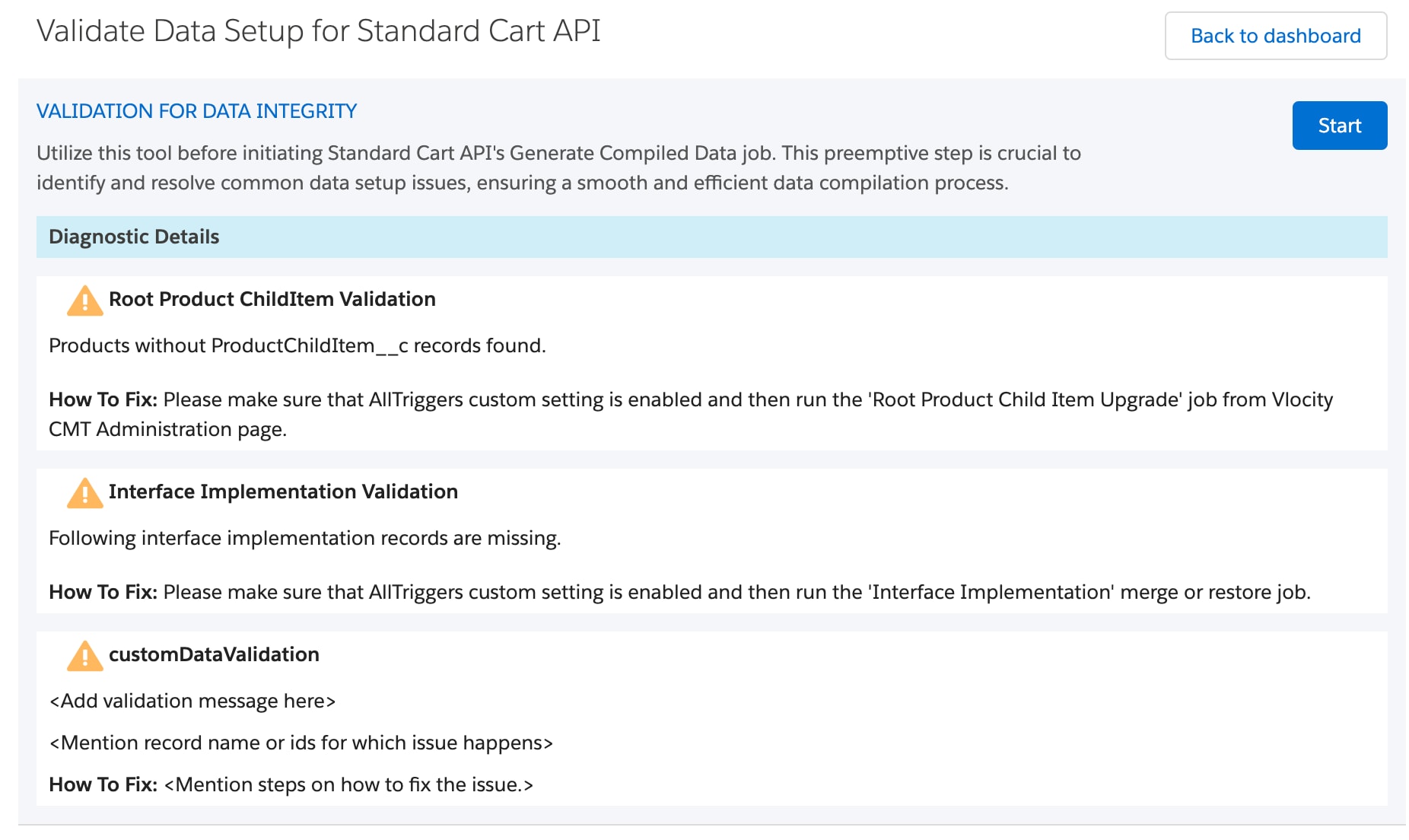
In the Vlocity CMT Administration UI, diagnostic details are displayed as follows.
Sample Output:
j