Overview
- The TMF629 API provides a standardized mechanism for customer and customer account management, such as creation, update, retrieval, and deletion of customers.
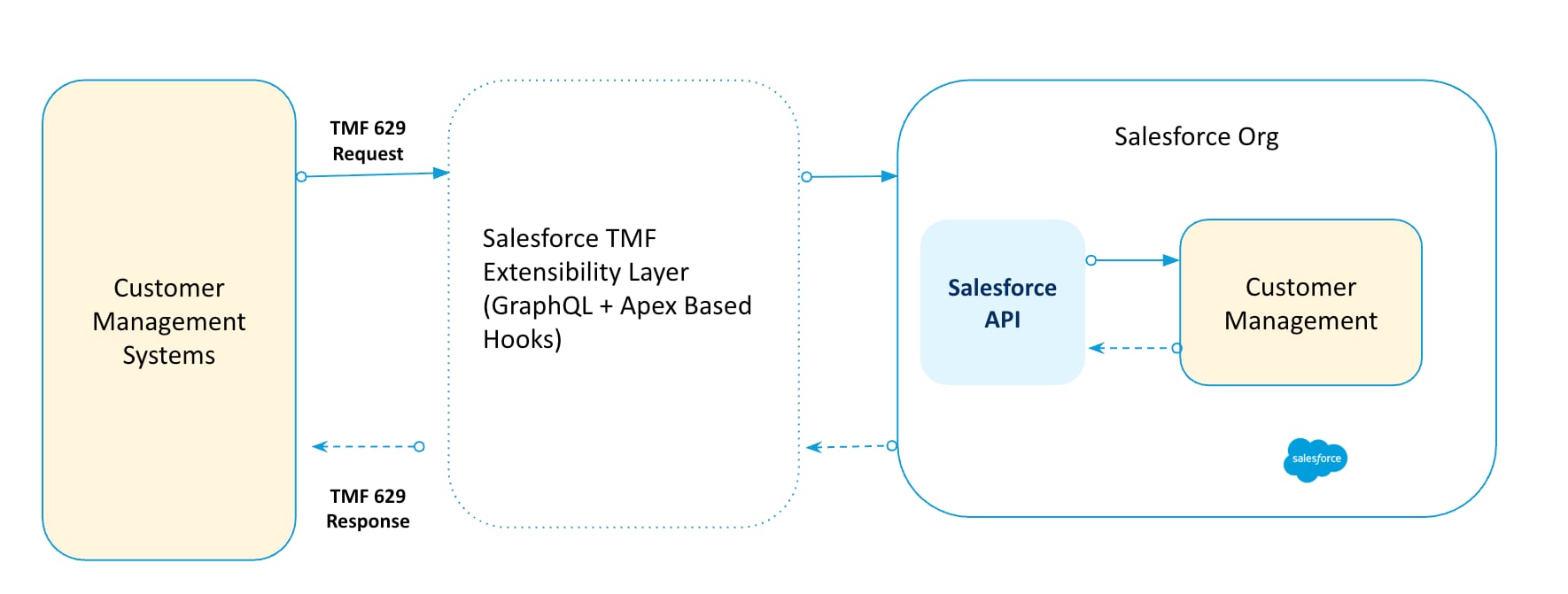
- For the TMF629 API, extensibility is enabled through Apex lifecycle hooks and customizable GraphQL queries, allowing customers to adjust request and response payloads without compromising TMF compliance.
- Following block diagram provides a high-level overview of how the various components are involved in handling TMF 629 API operations (GET, POST, PATCH, and DELETE).
- Using TMF629 API you can perform the following operations on customer account.
- Retrieve the list of customer accounts from the system
- Get the customer account details
- Create a customer account
- Update an existing customer account
- Delete an existing customer account.
In general, we can consider the various use cases listed based on the operation you want to perform.
- Ensure that the required licenses and data packs are installed.
Following block diagram provides a sequence of operations involved.

NOTE:
- For mandatory fields and resource mappings, refer TMF629 Resource Mappings.
| I want to | Request Type | Example URL |
|---|---|---|
| Retrieve and display details of a particular customer account. | GET by ID | {{orgendpoint}}/services/data/{{version}}/connect/comms/tmf-ext/customermanagement/v4/customer/{ID} NOTE: For invalid customer ID, you will receive HTTP 404 error. |
| Based on the provided field values, retrieve and display details of customer accounts. | GET with Fields | {{orgendpoint}}/services/data/{{version}}/connect/comms/tmf-ext/customermanagement/v4/customer?fields=name NOTE: The requested fields will be part of output, if they have value. |
| List all the customer accounts present in the system. | GET List | {{orgendpoint}}/services/data/{{version}}/connect/comms/tmf-ext/customermanagement/v4/customer |
| List customer account details present in the system based on the filter applied. | GET List with Filtering | {{orgendpoint}}/services/data/{{version}}/connect/comms/tmf-ext/customermanagement/v4/customer?name=Edge Communications NOTE: The requested fields will be part of output, if they have value. |
| List customer accounts based on the name, limit the number of customer accounts to a maximum of specified limit, and starts the results display from page specified by offset. | GET List by limit and offset | {{orgendpoint}}/services/data/{{version}}/connect/comms/tmf-ext/customermanagement/v4/customer?fields=name&pageLimit=2&offset=70 |
| Create a new customer account by providing the required details. | POST | {{orgendpoint}}/services/data/{{version}}/connect/comms/tmf-ext/customermanagement/v4/customer NOTE: A new customer account gets created based on the values mentioned for the mandatory fields. |
| Update details of particular customer account. | PATCH | {{orgendpoint}}/services/data/{{version}}/connect/comms/tmf-ext/customermanagement/v4/customer/{ID} |
| Delete a customer account. | DELETE | {{orgendpoint}}/services/data/{{version}}/connect/comms/tmf-ext/customermanagement/v4/customer/{ID} |
Consider you want to retrieve details of a particular customer account details.
https://vlocity-1f5-dev-ed.develop.my.salesforce.com/services/data/v66.0/connect/comms/tmf-ext/customermanagement/v4/customer/001xx000003GYdLAAW
Consider you want to retrieve details of the customer account and get the following details in the output.
- id
- name
https://vlocity-1f5-dev-ed.develop.my.salesforce.com/services/data/v60.0/connect/comms/customermanagement/v4/customer?fields=name
Consider there are multiple customer accounts in the system and you want to list all of them.
https://vlocity-1f5-dev-ed.develop.my.salesforce.com/services/data/v66.0/connect/comms/tmf-ext/customermanagement/v4/customer
Consider you want to retrieve all the customer accounts present in the system with applied filter values.
https://vlocity-1f5-dev-ed.develop.my.salesforce.com/services/data/v66.0/connect/comms/tmf-ext/customermanagement/v4/customer?name=Edge Communications
Consider you want to
- Retrieve a list of customer accounts
- Limit the number of customers to a maximum of specified limit
- Start the results display from page specified by offset
https://vlocity-1f5-dev-ed.develop.my.salesforce.com/services/data/v66.0/connect/comms/tmf-ext/customermanagement/v4/customer?fields=name&pageLimit=2&offset=70
NOTE: If there are multiple quotes, the above pagination query - limit=2&offset=70 will start display from page 70 and will have 2 records.
Consider you want to create a new customer account with full payload.
https://vlocity-1f5-dev-ed.develop.my.salesforce.com/services/data/v66.0/connect/comms/tmf-ext/customermanagement/v4/customer
Consider you want to update details of a particular customer account.
https://vlocity-1f5-dev-ed.develop.my.salesforce.com/services/data/v66.0/connect/comms/tmf-ext/customermanagement/v4/customer/001xx000003GabvAAC
Request body will have fields that need to be updated.
Consider you want to delete details of a particular customer account.
https://vlocity-1f5-dev-ed.develop.my.salesforce.com/services/data/v66.0/connect/comms/tmf-ext/customermanagement/v4/customer/001xx000003GabvAAC
No request body.
Status code 204 with no response body