TMF632 v4 Party Management - Outbound Notification
Use TMF632 Outbound Notification API for party management tasks such as creation, update, and event notification.
Party can be an individual or an organization that has any kind of relation with the enterprise. Party is created to record individual or organization information before the assignment of any role.
Party API manages the data resources such as Individual and Organization.
Currently, the API is used to manage Individual resource that represents a single human being (man, woman, or child). This can include customers, employees, or any other person the organization needs to store information about.
Outbound notifications can be configured to be triggered for change events on the parent entity (Contact) as well as for relevant sub-resources, see Supported Sub-Resources for TMF Outbound Notifications for the list of supported sub-resources in scope.
The user must configure the notification framework to detect CDC events and invoke the relevant TMF Open API implementations that generate the event payloads and forward them to the target systems configured within the API.
This API has been tested with an external system using TMF-aligned customizations. It may not include all optional fields and may not work out-of-the-box with your system. Customizations will likely be required. We recommend a thorough evaluation to ensure it meets your specific needs.
Note
Available In
This API is available in the managed package and Salesforce platform.
Prerequisites
MuleSoft License required: MuleSoft Direct for Communications Cloud (add-on for Communications Cloud) or MuleSoft Anypoint Base Subscription.
The notification uses a fire-and-forget approach. Salesforce does not process or store the response in any objects. MuleSoft logs and tracks all received notifications.
In alignment with TMF v4 standards for event notifications, the system sends the same payload, which includes the full individual resource and the supported related sub-resources, for all events.
Access to the target system is authenticated using the OAuth 2.0 Client Credentials grant type.
In the case of a failure when invoking the target system endpoint, the request is retried up to three times, with a two second interval between attempts.
TMF632 v4 Inbound API response may include optional fields. According to TMF specifications, if the outbound Event Notification payload contains unsupported optional parameters, the downstream system may reject it with a 4xx error. To avoid this, tailor the payload to include only the optional fields supported by the client.
For the POST payload sent to the external system, ensure that generated response includes only the optional parameters that are supported to prevent a 4xx error response.
Salesforce and MuleSoft do not have a centralized event hub configured by default. Customers are responsible for setting up their own event hub to manage subscribers. Outbound notifications are generated and sent directly to a single, client-defined target endpoint.
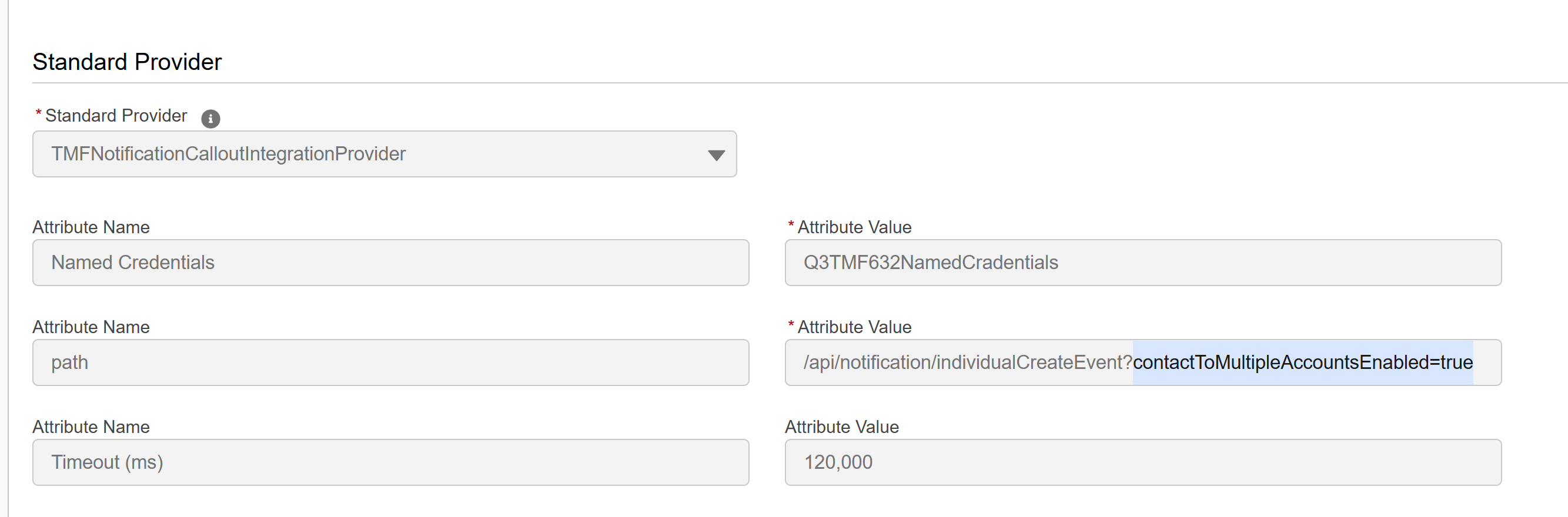
The Allow users to relate a contact to multiple accounts feature enables a single contact to be associated with multiple accounts through the AccountContactRelation object in Salesforce. Since this feature is disabled by default, the contactToMultipleAccountsEnabled query parameter must only be set to true when the feature is enabled, and only during the creation of integration definitions.
The following table summarizes the change events supported for the Contact entity, along with the required configurations to trigger them through the Notification Framework.
When configuring Object Integration Definitions, ensure you use the exact RelatedFieldName values provided in the table below.
The core entity does not include a dedicated status field. This API is designed for the core model (not the managed package), so the status is set to “initialized”. To enable event notifications based on a custom status, a custom status field must be created and maintained. Additionally, the Salesforce Notification Framework subscription should be configured, and the Mule API updated to include this field in the outbound notification payload.
Note
Sample Outbound Notification Request
This is a sample payload sent to the target system endpoint for the event Type: IndividualCreateEvent.
The event notification payload is same for all three events (IndividualCreateEvent, IndividualStateChangeEvent, IndividualAttributeValueChangeEvent). The eventType value will differ between the three events.
”IndividualCreateEvent” or “IndividualAttributeValueChangeEvent” or “IndividualStateChangeEvent “
correlationId
string
No
TRUE
inputPayload.correlationId
timeOccurred
string
No
TRUE
inputPayload.commitTimestamp as UTC
event.individual
object
Yes
TRUE
The mappings details for the Individual resource.
Supported Sub-Resources for TMF Outbound Notifications
This section outlines the sub-resources within TMF632 for which outbound notifications can be configured for create, update, and delete operations.
Refer to Assumptions section for essential configuration guidelines and design assumptions required to enable TMF outbound notifications on these sub-resources.
The TMF sub-resource ContactMedium is mapped to attributes of the parent Salesforce Contact entity. To enable notifications for changes to ContactMedium attributes, create the corresponding Object Integration Definition on the Contact entity. Set the RelatedFieldName to Id to reference the Contact entity’s identifier.
For each sub-resource listed below, use the RelatedFieldName specified in the table to configure the Object Integration Definition mappings. This ensures that the Salesforce Notification Framework triggers notifications accurately for the corresponding change events.
Note
For each sub-resource listed below, use the RelatedFieldName specified in the table to configure the Object Integration Definition mappings. This ensures the Salesforce Notification Framework triggers notifications accurately for the corresponding change events.
TMF Sub-resource: RelatedParty
Salesforce entity: AccountContactRelation (applicable when the Allow users to relate a contact to multiple accounts feature is enabled).
TMF Resource
Salesforce Entity
Scenario
changeEventType Supported
NotificationEvent Path
RelatedFieldName
relatedParty
AccountContactRelation
A new account is linked to an existing contact record.
When the Allow users to relate a contact to multiple accounts feature is disabled, changes to a contact’s associated account must be captured by configuring the Object Integration Definitions to listen for update events on the Contact.AccountId field.


 j
j