BuildOptionList()
Creates a set of <option> tags that you can integrate into an HTML form on webpage.
| Marketing Cloud Engagement | ✅ Yes |
| Marketing Cloud Next | ❌ No |
The BuildOptionList() function has three parameters:
defaultSelection(string or number): Required. The option that is selected by default.option1Value(string): Required. An identifier for the first option. The function sets thevalueparameter in the<option>tag to this value.option1Text(string): Required. The display text for the option tag.
Each option in the list requires a value and a display text. You can create as many options as you need by appending them to the end of the function (option2Value, option2Text…).
To use this function, specify a default selection, and a value and display name for each option that you want to generate.
This example creates a short list of options, and embeds it in an HTML form that asks the user to choose one:
The example outputs this HTML code.
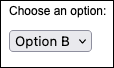
In a web browser, the generated code resembles this example.