# Creating a Triggered Email Campaign Workflow

This page contains conceptual and procedural information about creating a triggered send email campaign using SOAP API.

## Why Create a Triggered Send Email Campaign

A triggered send email campaign takes a previously created email message and sends that message out in response to an outside request, such as a subscriber opting in to receive the message.

## How To Create a Triggered Send Email Campaign

Use the flow chart and sample code as an example of how to create and order the processes necessary for the triggered email send campaign.

### Triggered Send Email Campaign Workflow Process
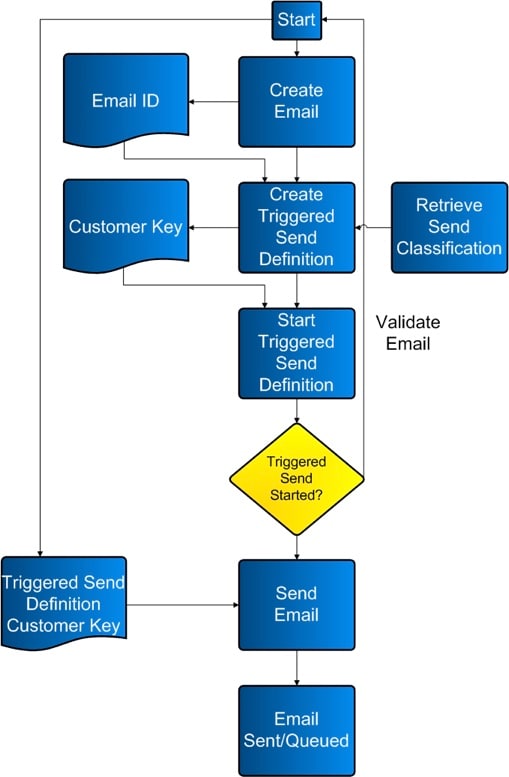
![triggeredsendemailcampaign.jpg](https://a.sfdcstatic.com/developer-website/sfdocs/marketing-cloud/media/images/triggeredsendemailcampaign.jpg)

### Sample Code

This section contains sample code you can use to conduct your triggered sends.

#### Sample .NET Code

```
using System;
using System.Configuration;
using System.Data;
using System.Linq;
using System.Web;
using System.Web.Security;
using System.Web.UI;
using System.Web.UI.HtmlControls;
using System.Web.UI.WebControls;
using System.Web.UI.WebControls.WebParts;
using System.Xml.Linq;
using etAPI;
public partial class ETTriggeredSend : System.Web.UI.Page
{
    //Global Variables
    private SoapClient client = new SoapClient();
    protected void Page_Load(object sender, EventArgs e)
    {
        //Authenticate
        client.ClientCredentials.UserName.UserName = System.Configuration.ConfigurationSettings.AppSettings["wsUserName"];
        client.ClientCredentials.UserName.Password = System.Configuration.ConfigurationSettings.AppSettings["wsPassword"];
        if (!IsPostBack)
        {
        }
    }
    protected void btnSubmit_Click(object sender, EventArgs e)
    {
        try
        {
            //Create a GUID for ESD to ensure a unique name and customer key
            string strGUID = System.Guid.NewGuid().ToString();
            //Create TriggeredSendDefinition object [Messages > Email > Triggered]
            TriggeredSendDefinition tsd = new TriggeredSendDefinition();
            tsd.Name = "TSD_Name_" + strGUID;//required
            tsd.CustomerKey = strGUID;//recommended or the application assigns a number
            tsd.Description = "TSD_Description_" + strGUID;//recommended or the Description defaults to the Name
            //Set to delivery both Text and HTML versions.
            tsd.IsMultipart = true;//recommended as a best practice
            tsd.IsMultipartSpecified = true;//required
            //Set to track the links found in the email
            tsd.IsWrapped = true; //Enables tracking
            tsd.IsWrappedSpecified = true;//required
            //Create Email object to refer to pre-create Email
            Email em = new Email();
            em.ID = 620046; //required -- can be found at Content > My Emails > Properties
            em.IDSpecified = true;//required
            //Apply Email object to the TriggeredSendDefinition object
            tsd.Email = em;//required
            //Create SendClassification
            tsd.SendClassification = new SendClassification();
            tsd.SendClassification.CustomerKey = "4201";//required -- can be found at Setup > Send Management > Send Classifications > Edit Item > External Key
            //tsd.TriggeredSendType = TriggeredSendTypeEnum.Continuous;
            //tsd.TriggeredSendTypeSpecified = true;
            //tsd.TriggeredSendStatus = TriggeredSendStatusEnum.New;
            //tsd.TriggeredSendStatusSpecified = true;
            //tsd.BatchInterval = 1;
            //tsd.BatchIntervalSpecified = true;
            //tsd.AutoAddSubscribers = true;
            //tsd.AutoAddSubscribersSpecified = true;
            //tsd.AutoUpdateSubscribers = true;
            //tsd.AutoUpdateSubscribersSpecified = true;
            //tsd.List = list;
            string cRequestID = String.Empty;
            string cStatus = String.Empty;
            try
            {
                //Call the Create method on the TriggeredSendDefinition object
                CreateResult[] cResults = client.Create(new CreateOptions(), new APIObject[] { tsd }, out cRequestID, out cStatus);
                //Display Results
                lblMessage.Text += "Overall Create Status: " + cStatus;
                lblMessage.Text += "<br/>";
                lblMessage.Text += "Number of Results: " + cResults.Length;
                lblMessage.Text += "<br/>";
                //Loop through each object returned and display the StatusMessage
                foreach (CreateResult cr in cResults)
                {
                    lblMessage.Text += "Status Message: " + cr.StatusMessage;
                    lblMessage.Text += "<br/>";
                }
            }
            catch (Exception exCreate)
            {
                //Set Message
                lblMessage.Text += "<br/><br/>CREATE TSD ERROR:<br/>" + exCreate.Message;
            }
            //Preceed if the above Create call was successful
            if (cStatus == "OK")
            {
                // *** MAKE TRIGGERED SEND DEFINITION ACTIVE
                tsd = new TriggeredSendDefinition();
                tsd.CustomerKey = strGUID;//required
                tsd.TriggeredSendStatus = TriggeredSendStatusEnum.Active;//necessary to set the TriggeredSendDefinition to "Running"
                tsd.TriggeredSendStatusSpecified = true;//required
                string uRequestID = String.Empty;
                string uStatus = String.Empty;
                try
                {
                    //Call the Create method on the EmailSendDefinition object
                    UpdateResult[] uResults = client.Update(new UpdateOptions(), new APIObject[] { tsd }, out uRequestID, out uStatus);
                    //Display Results
                    lblMessage.Text += "Overall Update Status: " + uStatus;
                    lblMessage.Text += "<br/>";
                    lblMessage.Text += "Number of Results: " + uResults.Length;
                    lblMessage.Text += "<br/>";
                    //Loop through each object returned and display the StatusMessage
                    foreach (UpdateResult ur in uResults)
                    {
                        lblMessage.Text += "Status Message: " + ur.StatusMessage;
                        lblMessage.Text += "<br/>";
                    }
                }
                catch (Exception exCreate)
                {
                    //Set Message
                    lblMessage.Text += "<br/><br/>UPDATE TSD ERROR:<br/>" + exCreate.Message;
                }
                //Preceed if the above Update call was successful
                if (uStatus == "OK")
                {
                    // *** SEND THE TRIGGER EMAIL
                    //Create a new Subscriber to send the Trigger to
                    Subscriber newSub = new Subscriber();
                    newSub.EmailAddress = "acruz@exaple.com";
                    newSub.SubscriberKey = "acruz@exaple.com";
                    //Create Subscriber Attributes
                    newSub.Attributes = new etAPI.Attribute[2]; //Can be found at Subscribers > Profile Management
                    //1
                    newSub.Attributes[0] = new etAPI.Attribute();
                    newSub.Attributes[0].Name = "FromName";//Account Specific
                    newSub.Attributes[0].Value = "From John Doe";//Subscriber Specific
                    //2
                    newSub.Attributes[1] = new etAPI.Attribute();
                    newSub.Attributes[1].Name = "HTML__Content";//Account Specific
                    newSub.Attributes[1].Value = "This is a test <a href=\"httpgetwrap|http://google.com\" alias=\"Google Link\">link</a>"; //httpgetwrap| must be before the http for tracking to work
                    //Create a new Subscriber to send the Trigger to
                    Subscriber newSub2 = new Subscriber();
                    newSub2.EmailAddress = "jdoe@example.com";
                    newSub2.SubscriberKey = "jdoe@example.com";
                    //Create Subscriber Attributes
                    newSub2.Attributes = new etAPI.Attribute[2];//Can be found at Subscribers > Profile Management
                    //1
                    newSub2.Attributes[0] = new etAPI.Attribute();
                    newSub2.Attributes[0].Name = "FromName";//Account Specific
                    newSub2.Attributes[0].Value = "From Angela Cruz";//Subscriber Specific
                    //2
                    newSub2.Attributes[1] = new etAPI.Attribute();
                    newSub2.Attributes[1].Name = "HTML__Content";//Account Specific
                    newSub2.Attributes[1].Value = "This is a test <a href=\"httpgetwrap|http://example.com\" alias=\"ET Link\">link</a>"; //httpgetwrap| must be before the http for tracking to work
                    //Create a TriggeredSend object to referrence the earlier created TriggeredSendDefinition
                    TriggeredSend ts = new TriggeredSend();
                    ts.TriggeredSendDefinition = new TriggeredSendDefinition();
                    ts.TriggeredSendDefinition.CustomerKey = strGUID;//This is the External Key from the UI
                    ts.Subscribers = new Subscriber[] { newSub, newSub2 };//Add the Subscriber objects to the TriggeredSend object
                    string tsRequestID = "";
                    string tsStatus = "";
                    try
                    {
                        //Call the Create method on the TriggeredSend object
                        CreateResult[] tsResults = client.Create(new CreateOptions(), new APIObject[] { ts }, out tsRequestID, out tsStatus);
                        //Display Results
                        lblMessage.Text += "Overall Update Status: " + tsStatus;
                        lblMessage.Text += "<br/>";
                        lblMessage.Text += "Number of Results: " + tsResults.Length;
                        lblMessage.Text += "<br/>";
                        //Loop through each object returned and display the StatusMessage
                        foreach (CreateResult tscr in tsResults)
                        {
                            lblMessage.Text += "Status Message: " + tscr.StatusMessage;
                            lblMessage.Text += "<br/>";
                        }
                    }
                    catch (Exception exCreate)
                    {
                        //Set Message
                        lblMessage.Text += "<br/><br/>CREATE TS ERROR:<br/>" + exCreate.Message;
                    }
                }

        }
        catch (Exception exc)
        {
            //Set Message
            lblMessage.Text += "<br/><br/>###ERROR<br/>" + exc.Message;
        }
    }
}
```

#### SOAP Envelopes to Interact with Emails and Triggered Send Definitions

This section includes sample code you can use to create a triggered email send using the SOAP API.

**SOAP Request to Retrieve Email**

```
<soapenv:Body>
    <RetrieveRequestMsg xmlns="http://exacttarget.com/wsdl/partnerAPI">
        <RetrieveRequest>
            <ObjectType>Email</ObjectType>
            <Properties>ID</Properties>
            <Properties>CreatedDate</Properties>
            <Properties>Name</Properties>
            <Properties>Folder</Properties>
            <Properties>CategoryID</Properties>
            <Properties>HTMLBody</Properties>
            <Properties>TextBody</Properties>
            <Properties>Subject</Properties>
            <Properties>IsActive</Properties>
            <Properties>IsHTMLPaste</Properties>
            <Properties>Status</Properties>
            <Properties>EmailType</Properties>
            <Properties>CharacterSet</Properties>
            <Properties>HasDynamicSubjectLine</Properties>
            <Properties>ContentCheckStatus</Properties>
            <Properties>Client.PartnerClientKey</Properties>
            <Filter xsi:type="ns1:SimpleFilterPart" xmlns:ns1="http://exacttarget.com/wsdl/partnerAPI">
                <Property>Name</Property>
                <SimpleOperator>equals</SimpleOperator>
                <Value>Client1_Email_1</Value>
            </Filter>
        </RetrieveRequest>
    </RetrieveRequestMsg>
</soapenv:Body>
```

**SOAP Response to Retrieve Email**

```
<soap:Body>
    <RetrieveResponseMsg xmlns="http://exacttarget.com/wsdl/partnerAPI">
        <OverallStatus>OK</OverallStatus>
        <RequestID>af86580f-0c4e-4a0c-91ee-c21928bc198b</RequestID>
        <Results xsi:type="Email">
            <Client>
                <ID>123</ID>
            </Client>
            <CreatedDate>2009-08-07T10:57:24.943</CreatedDate>
            <ID>123</ID>
            <ObjectID xsi:nil="true"/>
            <Name>Client1_Email_1</Name>
            <Folder>Client1</Folder>
            <CategoryID>123</CategoryID>
            <HTMLBody>Welcome to Client1 emails.</HTMLBody>
            <TextBody/>
            <Subject>Client1_Email_1_Sub</Subject>
            <IsActive>true</IsActive>
            <IsHTMLPaste>true</IsHTMLPaste>
            <Status>New</Status>
            <EmailType>Normal</EmailType>
            <CharacterSet>us-ascii</CharacterSet>
            <HasDynamicSubjectLine>false</HasDynamicSubjectLine>
            <ContentCheckStatus>Not Checked</ContentCheckStatus>
        </Results>
    </RetrieveResponseMsg>
</soap:Body>
```

**SOAP Request to Retrieve SendClassification**

```
<soapenv:Body>
    <RetrieveRequestMsg xmlns="http://exacttarget.com/wsdl/partnerAPI">
        <RetrieveRequest>
            <ObjectType>SendClassification</ObjectType>
            <Properties>ObjectID</Properties> -- Use ObjectID to Create TE Definition
            <Properties>Client.ID</Properties>
            <Properties>Name</Properties>
            <Properties>CustomerKey</Properties>
            <Filter xsi:type="ns1:SimpleFilterPart"xmlns:ns1="http://exacttarget.com/wsdl/partnerAPI">
                <Property>Name</Property>
                <SimpleOperator>equals</SimpleOperator> -- Use filter if you know Name
                <Value>Default Commercial</Value>
            </Filter>
        </RetrieveRequest>
    </RetrieveRequestMsg>
</soapenv:Body>
```

**SOAP Response to Retrieve SendClassification**

```
<soap:Body>
    <RetrieveResponseMsg xmlns="http://exacttarget.com/wsdl/partnerAPI">
        <OverallStatus>OK</OverallStatus>
        <RequestID>c462d15d-70eb-47f0-8805-7ad8fb400f26</RequestID>
        <Results xsi:type="SendClassification">
            <Client>
                <ID>75741</ID>
            </Client>
            <ObjectID>4819efef-4527-dd11-8126-001a4be9433a</ObjectID>
            <CustomerKey>123</CustomerKey>
            <Name>Default Commercial</Name>
        </Results>
        <Results xsi:type="SendClassification">
            <Client>
                <ID>123</ID>
            </Client>
            <ObjectID>4919efef-4527-dd11-8126-001a4be9433a</ObjectID>
            <CustomerKey>123</CustomerKey>
            <Name>Default Transactional</Name>
        </Results>
        <Results xsi:type="SendClassification">
            <Client>
                <ID>123</ID>
            </Client>
            <ObjectID>86acfc8f-ad7b-de11-9ca2-00215adeb818</ObjectID>
            <CustomerKey>FromAndReply_Key</CustomerKey>
            <Name>FromAndReply</Name>
        </Results>
        <Results xsi:type="SendClassification">
            <Client>
                <ID>123</ID>
            </Client>
            <ObjectID>fe9a4e34-63d4-de11-8e63-00215adeb896</ObjectID>
            <CustomerKey>FromName _From_List_Key</CustomerKey>
            <Name>FromName _From_List</Name>
        </Results>
    </RetrieveResponseMsg>
</soap:Body>
```

**SOAP Request to Create Triggered Send Defintion**

```
<soap:Body>
    <CreateRequest xmlns="http://exacttarget.com/wsdl/partnerAPI">
        <Options/>
        <Objects xsi:type="TriggeredSendDefinition">
            <CustomerKey>TriggeredSendDefinition_75741_1</CustomerKey>
            <Name>TriggeredSendDefinition_75741_1</Name> - Name of TriggeredSend Definition
            <SendClassification>
                <ObjectID>4819efef-4527-dd11-8126-001a4be9433a</ObjectID>
                <SenderProfile>
                    <ObjectID xsi:nil="true"/>
                    <CustomerKey>123</CustomerKey>
                </SenderProfile>
            </SendClassification>
            <Email>
                <ID>123</ID>
                <ObjectID xsi:nil="true"/>
            </Email>
            <IsMultipart>true</IsMultipart>
            <AutoAddSubscribers>false</AutoAddSubscribers>
        </Objects>
    </CreateRequest>
</soap:Body>
```

**SOAP Response to Create Triggered Send Defintion**

```
<soap:Body>
    <CreateResponse xmlns="http://exacttarget.com/wsdl/partnerAPI">
        <Results>
            <StatusCode>OK</StatusCode>
            <StatusMessage>TriggeredSendDefinition created</StatusMessage>
            <OrdinalID>0</OrdinalID>
            <NewID>0</NewID>
            <NewObjectID>a7f8c057-cbdd-de11-8e63-00215adeb896</NewObjectID>
            <Object xsi:type="TriggeredSendDefinition">
                <ObjectID>a7f8c057-cbdd-de11-8e63-00215adeb896</ObjectID>
                <CustomerKey>TriggeredSendDefinition_75741_1</CustomerKey>
                <Name>TriggeredSendDefinition_75741_1</Name>
                <SendClassification>
                    <ObjectID>4819efef-4527-dd11-8126-001a4be9433a</ObjectID>
                    <SenderProfile>
                        <ObjectID xsi:nil="true"/>
                        <CustomerKey>1973</CustomerKey>
                    </SenderProfile>
                </SendClassification>
                <Email>
                    <ID>123</ID>
                    <ObjectID xsi:nil="true"/>
                </Email>
                <AutoAddSubscribers>false</AutoAddSubscribers>
                <EmailSubject>Tracking Check with iso-8859-1</EmailSubject>
                <IsMultipart>true</IsMultipart>
            </Object>
        </Results>
        <RequestID>3950934f-17a5-4c4a-b45a-6cb72a7410e8</RequestID>
        <OverallStatus>OK</OverallStatus>
    </CreateResponse>
</soap:Body>
```

**SOAP Request to Start Triggered Send Definition (Update Call)**

```
<soap:Body>
    <UpdateRequest xmlns="http://exacttarget.com/wsdl/partnerAPI">
        <Options/>
        <Objects xsi:type="TriggeredSendDefinition">
            <ObjectID xsi:nil="true"/>
            <CustomerKey>TriggeredSendDefinition_75741_2</CustomerKey>
            <TriggeredSendStatus>Active</TriggeredSendStatus> - Set status to Active
        </Objects>
    </UpdateRequest>
</soap:Body>
```

**SOAP Response to Start Triggered Send Definition**

```
<soap:Body>
    <UpdateResponse xmlns="http://exacttarget.com/wsdl/partnerAPI">
        <Results>
            <StatusCode>OK</StatusCode>
            <StatusMessage>TriggeredSendDefinition updated</StatusMessage>
            <OrdinalID>0</OrdinalID>
            <Object xsi:type="TriggeredSendDefinition">
                <ObjectID xsi:nil="true"/>
                <CustomerKey>TriggeredSendDefinition_75741_2</CustomerKey>
                <TriggeredSendStatus>Active</TriggeredSendStatus>
            </Object>
        </Results>
        <RequestID>3ca8d0e2-8909-452c-ab14-75c3c54edb03</RequestID>
        <OverallStatus>OK</OverallStatus> //If status is not OK, something is wrong
    </UpdateResponse>
</soap:Body>
```

**SOAP Request to Send Triggered Email to Subscriber**

```
<soapenv:Body>
    <CreateRequest xmlns="http://exacttarget.com/wsdl/partnerAPI">
        <Options/>
        <Objects xsi:type="ns1:TriggeredSend"xmlns:ns1="http://exacttarget.com/wsdl/partnerAPI">
        <TriggeredSendDefinition>
            <CustomerKey>TriggeredSendDefinition_75741_2</CustomerKey>
        </TriggeredSendDefinition>
            <Subscribers>
                <Attributes>
                    <Name>Sample_PHP</Name> - Replaceable Attributes in Email
                    <Value><![CDATA[<html><body><div align='center'><table border='1'cellspacing='0' cellpadding=0 width='95%' style='width:95.0%'><tr><td>Welcome, You are sending Email using TriggeredSend definition</td></tr></table></div><br>Testing API</body></html>]]></Value>
                </Attributes>
                <Attributes>
                    <Name>first_name</Name> - Replaceable Attributes in Email
                    <Value>John</Value>
                </Attributes>
                <SubscriberKey>johndoe_email_key</SubscriberKey>
                <EmailAddress>johndoe@example.com</EmailAddress>
            </Subscribers>
        </Objects>
    </CreateRequest>
</soapenv:Body>
```

**SOAP Response to Send Triggered Email to Subscriber**

```
<soap:Body>
    <CreateResponse xmlns="http://exacttarget.com/wsdl/partnerAPI">
        <Results xsi:type="TriggeredSendCreateResult">
            <StatusCode>OK</StatusCode>
            <StatusMessage>Created TriggeredSend</StatusMessage>
            <OrdinalID>0</OrdinalID>
            <NewID>0</NewID>
        </Results>
        <RequestID>2ea4bfb7-37dd-48d2-848d-cdb11e898097</RequestID>
        <OverallStatus>OK</OverallStatus>
    </CreateResponse>
</soap:Body>
```
