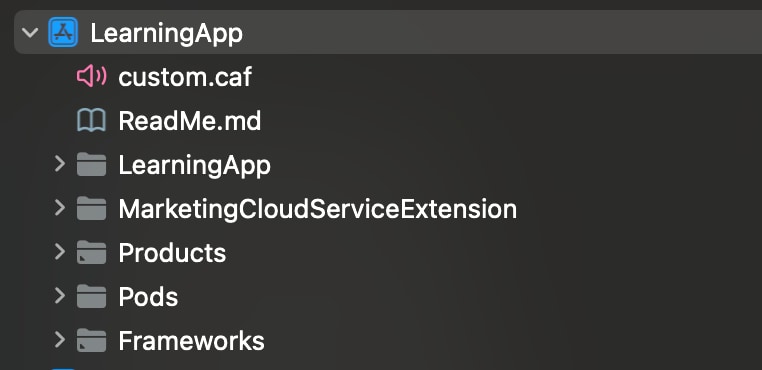
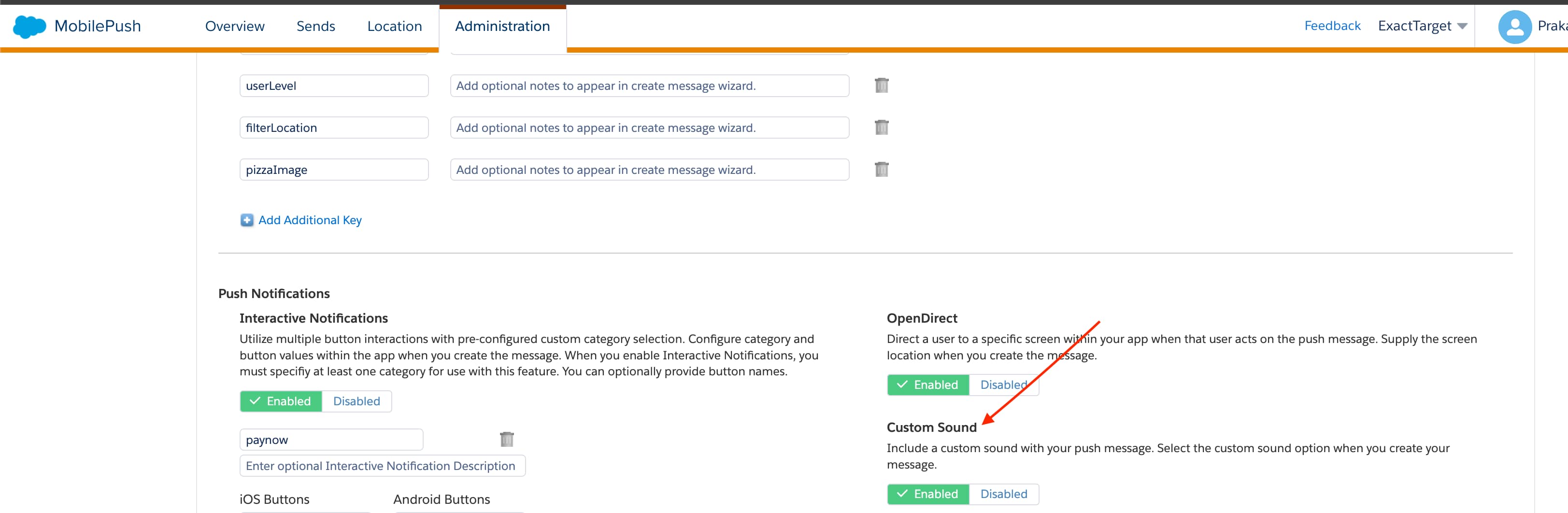
This feature uses a sound included in your mobile app as a custom audio signal when a push message arrives on the mobile device.
Add a file named custom.caf to your project. The cloud push payload looks for a file named custom.caf.
Add the custom.caf audio file to the Copy Bundle Resources folder in Xcode for your app.
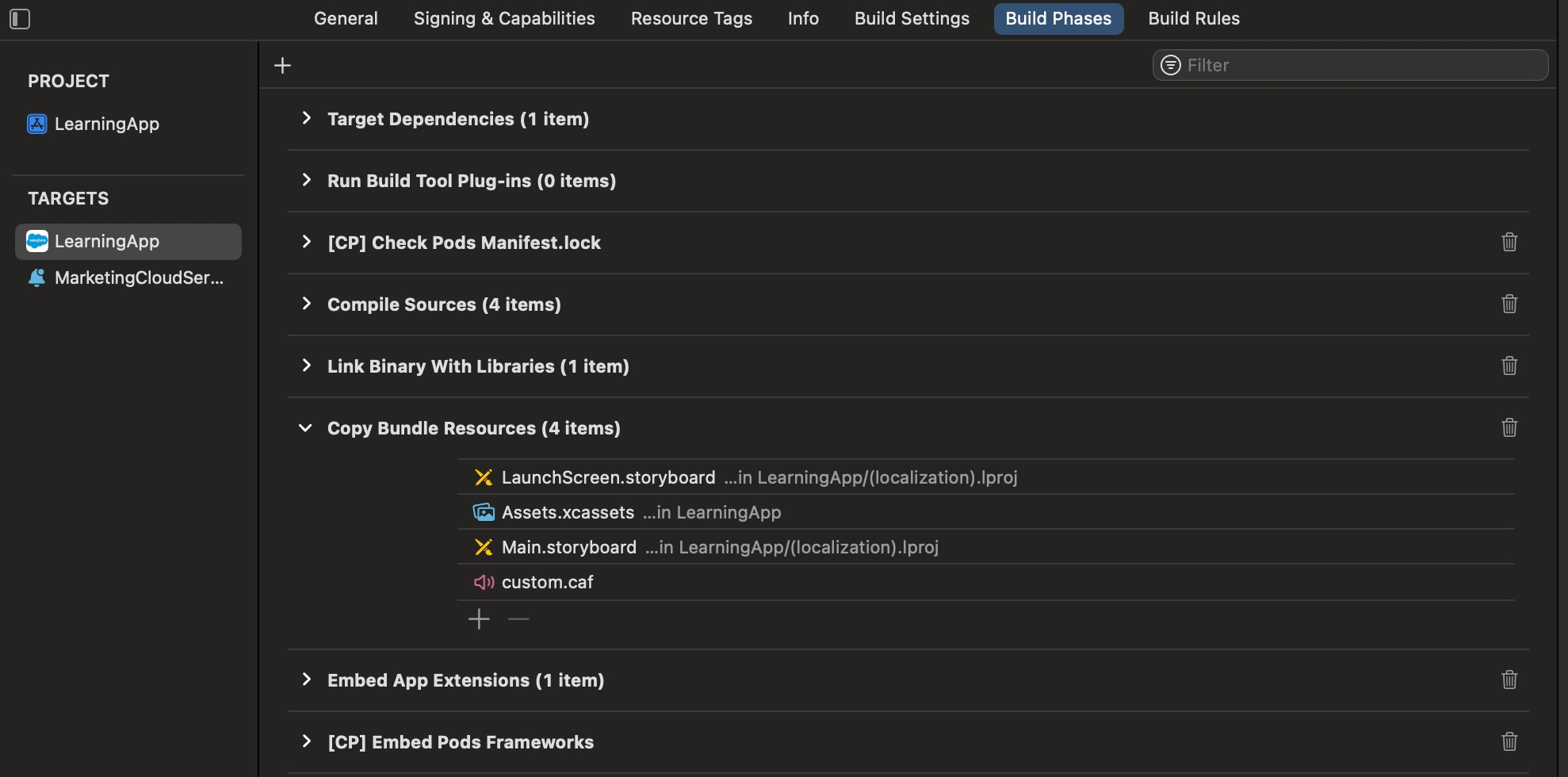
To prevent Xcode from using cached files, perform a clean build folder in Xcode. In the Product menu, hold the Option key and select Clean Build Folder.
Enable the custom sound option on the MobilePush Administration page. You might need to work with a Marketing Cloud Engagement admin to enable this option.
Display Interactive Notifications
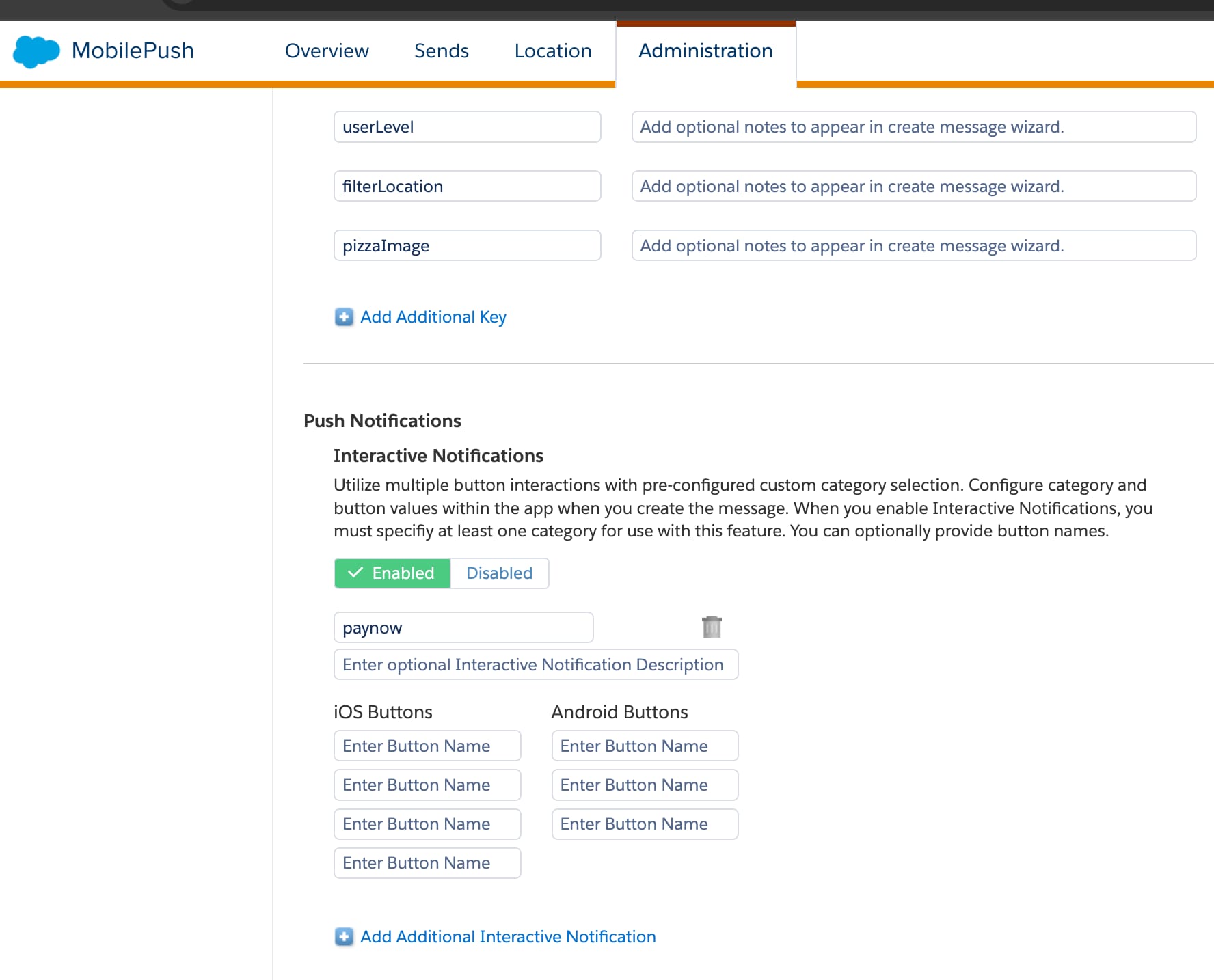
Use interactive notifications to add buttons to push notifications from your mobile app. Engagement sends the category name for these interactive notifications in the message payload.
To set up interactive notifications for your app, use the sample code in the Example Implementation section as a reference and adapt it to your specific requirements.
The sample code applies to the AppDelegate.mdidFinishLaunchingWithOptions application delegate method. The sample code shows how to create a category named Example. When you send this category with the payload from Engagement, the notification displays in the notification center with buttons for user interaction.
Note
To check if your action triggered and your app performed the necessary response, examine the push notification’s payload in your push handler. Use the sample code in the Example: Handle Actions section as a reference and adapt it to your specific requirements.
After setup, ask your Engagement admin to enable interactive notifications on the MobilePush Administration page.
Example Implementation
This code example shows how to customize push notifications for iOS apps that use SDK version 10 and later.
SDK for iOS, version 10
1func configureSdk() ->Bool{23 // Enable logging for debugging early on. Debug level is not recommended for4 // production apps, because a large amount of data is logged to the console.56 #if DEBUG7 SFMCSdk.setLogger(logLevel: .debug)8 #endif910 // Use the `MarketingCloudSdkConfigBuilder` to configure the MarketingCloud11 // SDK. This gives you the maximum flexibility in SDK configuration.12 // The builder lets you configure the module parameters at runtime.1314 let engagementConfiguration = MarketingCloudSdkConfigBuilder(appId: appId)15 .setAccessToken(accessToken)16 .setMarketingCloudServerUrl(URL(string: appEndpoint)!)17 .setMid(mid)18 .setInboxEnabled(inbox)19 .setLocationEnabled(location)20 .setAnalyticsEnabled(pushAnalytics)21 .build()2223 // Set the completion handler to take action when all modules initialization24 // is completed. Setting the completion handler is optional.2526 let completionHandler: ((_ status: [ModuleInitStatus]) ->Void) = {[weak self] status in27 DispatchQueue.main.async{28 self?.handleSDKInitializationCompletion(status: status)29}30}3132 SFMCSdk.initializeSdk(33 ConfigBuilder().setEngagement(config: engagementConfiguration).build(),34 completion: completionHandler35)3637 return true38}3940// MARK: - SDK Initialization Completion Handler4142private func handleSDKInitializationCompletion(status: [ModuleInitStatus]){43 var allSuccessful = true4445 for moduleStatus in status {46 print("Module: \(moduleStatus.moduleName.rawValue), Status: \(moduleStatus.initStatus.rawValue)")4748 if moduleStatus.initStatus == .success {49 // Handle successful initialization for each module50 switch moduleStatus.moduleName {51 case .engagement:52 setupEngagement()53 default:54 break55}56}else if moduleStatus.initStatus == .error{57 allSuccessful = false58 // module failed to initialize, check logs for more details59}else if moduleStatus.initStatus == .cancelled {60 allSuccessful = false61 // module initialization was cancelled (for example due to62 // re-configuration triggered before init was completed)63}else if moduleStatus.initStatus == .timeout {64 allSuccessful = false65 // module failed to initialize due to timeout, check logs for more details66}67}68 if allSuccessful {69 print("SDK initialization completed successfully")70}else{71 print("SDK initialization completed with errors - check logs above")72}73}7475func setupEngagement(){7677 // Get the LocationDelegate to a class adhering to the protocol.78 // In this example, the AppDelegate class adheres to the protocol (see below)79 // and handles URLs passed back from the SDK.80 // For more information, see8182 MarketingCloudSdk.requestSdk{ mc in83 mc?.addTag("Hiking Supplies")84}8586 // Make sure to dispatch this to the main thread. UNUserNotificationCenter87 // causes the app to show UI elements.88 DispatchQueue.main.async{8990 // Set the delegate if needed, request authorization. If you use a91 //delegate, set it here.92 UNUserNotificationCenter.current().delegate = self9394 UNUserNotificationCenter.current().requestAuthorization(95 options: [.alert, .sound, .badge],96 completionHandler: {(_ granted: Bool, _ error: Error?) ->Void in97 if error == nil{98(if granted == true{99 // If app is authorized to use notifications, request a100 //device token.101 DispatchQueue.main.async{102 UIApplication.shared.registerForRemoteNotifications()103}104105 // Support notification categories106 let exampleAction = UNNotificationAction(107 identifier: "App",108 title: "Example",109 options: []110)111 let appCategory = UNNotificationCategory(112 identifier: "Example",113 actions: [exampleAction],114 intentIdentifiers: [] as? [String] ?? [String](),115 options: []116)117 let categories = Set<AnyHashable>([appCategory])118 UNUserNotificationCenter.current().setNotificationCategories(119 categories as? Set<UNNotificationCategory> ?? Set<UNNotificationCategory>()120)121})122}123})124}125}126127func application(128 _ application: UIApplication,129 didFinishLaunchingWithOptions launchOptions: [UIApplication.LaunchOptionsKey: Any]?) ->Bool{130 // Override point for customization after application launch.131 self.configureSdk()132 return true133}
For version 8 of the SDK, use this code.
8.x
1func configureSdk() ->Bool{2 #if DEBUG3 SFMCSdk.setLogger(logLevel: .debug)4 #endif56 let mobilePushConfiguration = PushConfigBuilder(appId: appId)7 .setAccessToken(accessToken)8 .setMarketingCloudServerUrl(appEndpoint)9 .setMid(mid)10 .setInboxEnabled(inbox)11 .setLocationEnabled(location)12 .setAnalyticsEnabled(pushAnalytics)13 .build()1415 let completionHandler: (OperationResult) ->() = { result in16 if result == .success {17 // This is a good place to set the contact key, tags, and attributes,18 // because we know the SDK is ready.19 self.setupMobilePush()20}else{21 os_log("The SDK configuration failed. Current status: %@", result.rawValue)22}23}2425 SFMCSdk.initializeSdk(ConfigBuilder().setPush(config: mobilePushConfiguration, onCompletion: completionHandler).build())2627 return true28}2930func setupMobilePush(){3132 SFMCSdk.identity.setProfileId("user@example.com")33 SFMCSdk.identity.setProfileAttributes([["FavoriteTeamName": "favoriteTeamName"]])34 SFMCSdk.requestPushSdk{ mp in35 mp.addTag("Hiking Supplies")36}3738 DispatchQueue.main.async{3940 // Set the delegate if needed. Then, ask if we're authorized - the delegate must be set here if used41 UNUserNotificationCenter.current().delegate = self4243 UNUserNotificationCenter.current().requestAuthorization(options: [.alert, .sound, .badge], completionHandler: {(_ granted: Bool, _ error: Error?) ->Void in44 if error == nil{45 if granted == true{46 // we are authorized to use notifications, request a device token for remote notifications47 DispatchQueue.main.async{48 UIApplication.shared.registerForRemoteNotifications()49}5051 // Support notification categories52 let exampleAction = UNNotificationAction(identifier: "App", title: "Example", options: [])53 let appCategory = UNNotificationCategory(identifier: "Example", actions: [exampleAction], intentIdentifiers: [] as? [String] ?? [String](), options: [])54 let categories = Set<AnyHashable>([appCategory])55 UNUserNotificationCenter.current().setNotificationCategories(categories as? Set<UNNotificationCategory> ?? Set<UNNotificationCategory>())56}57}58})59}60}6162// MobilePush SDK: REQUIRED IMPLEMENTATION63func application(_ application: UIApplication, didFinishLaunchingWithOptions launchOptions: [UIApplication.LaunchOptionsKey: Any]?) ->Bool{64 return self.configureSdk()65}
For version 7 of the SDK, use this code.
7.x
1func application(_ application: UIApplication, didFinishLaunchingWithOptions launchOptions: [UIApplication.LaunchOptionsKey: Any]?) ->Bool{23 var error: NSError?4 let success: Bool = MarketingCloudSDK.sharedInstance().sfmc_configure(&error)5 if success == true{6 // The SDK has been fully configured and is ready for use!78 // Turn on logging for debugging. Not recommended for production apps.9 MarketingCloudSDK.sharedInstance().sfmc_setDebugLoggingEnabled(true)1011 // Great place for setting the contact key, tags and attributes since you know the SDK is setup and ready.12 MarketingCloudSDK.sharedInstance().sfmc_setContactKey("user@example.com")13 MarketingCloudSDK.sharedInstance().sfmc_addTag("Hiking Supplies")14 MarketingCloudSDK.sharedInstance().sfmc_setAttributeNamed("FavoriteTeamName", value: "favoriteTeamName")1516 DispatchQueue.main.async{17 if #available(iOS 10.0, *){18 // Set the delegate, if needed. Then, ask if we're authorized - the delegate must be set here if used19 UNUserNotificationCenter.current().delegate = self20 UNUserNotificationCenter.current().requestAuthorization(options: [.alert, .sound, .badge], completionHandler: {(_ granted: Bool, _ error: Error?) ->Void in21 if error == nil{22 if granted == true{23 // we are authorized to use notifications, request a device token for remote notifications24 DispatchQueue.main.async{25 UIApplication.shared.registerForRemoteNotifications()26}2728 // Support notification categories29 let exampleAction = UNNotificationAction(identifier: "App", title: "Example", options: [])30 let appCategory = UNNotificationCategory(identifier: "Example", actions: [exampleAction], intentIdentifiers: [] as? [String] ?? [String](), options: [])31 let categories = Set<AnyHashable>([appCategory])32 UNUserNotificationCenter.current().setNotificationCategories(categories as? Set<UNNotificationCategory> ?? Set<UNNotificationCategory>())33}34}35})36}37 else{38 let type: UIUserNotificationType = [UIUserNotificationType.badge, UIUserNotificationType.alert, UIUserNotificationType.sound]39 let setting = UIUserNotificationSettings(types: type, categories: nil)40 UIApplication.shared.registerUserNotificationSettings(setting)41 UIApplication.shared.registerForRemoteNotifications()42}43}44}45 else{46 // MarketingCloudSDK sfmc_configure failed47 if #available(iOS 10.0, *){48 os_log("MarketingCloudSDK sfmc_configure failed with error = %@", error!)49}else{50 // Fallback on earlier versions51 NSLog("MarketingCloudSDK sfmc_configure failed with error = %@", error!)52}53}5455 return success56}
Example: Handle Actions
In your push handler, examine the push notification’s payload to see if your action is triggered and if your application performed the action.
This code example shows how to handle actions using version 10 of the SDK.
SDK for iOS, version 10
1// The method is called on the delegate when the user responds to the2// notification by opening the app, dismissing the notification, or choosing a3// UNNotificationAction. Set the delegate before the app returns from4// applicationDidFinishLaunching:.5func userNotificationCenter(6 _ center: UNUserNotificationCenter,7 didReceive response: UNNotificationResponse,8 withCompletionHandler completionHandler: @escaping() ->Void9){10 // Tell the SDK about the notification11 PushFeature.requestSdk{ pushFeature in12 pushFeature?.setNotificationResponse(response)13}14 // Check your notification custom actions15 if(response.actionIdentifier == "App"){16 // Handle your notification’s custom action here17}18}
For version 8.1 of the SDK, use this code.
SDK for iOS, version 8.1
1// The method is called on the delegate when the user responds to the2// notification by opening the app, dismissing the notification, or choosing a3// UNNotificationAction. Set the delegate before the app returns from4// applicationDidFinishLaunching:.5func userNotificationCenter(6 _ center: UNUserNotificationCenter,7 didReceive response: UNNotificationResponse,8 withCompletionHandler completionHandler: @escaping() ->Void9){10 // tell the SDK about the notification11 SFMCSdk.requestPushSdk{ mp in12 mp.setNotificationRequest(response.notification.request)13}14 // Check your notification custom actions15 if(response.actionIdentifier == "App"){16 // Handle your notification’s custom action here17}18}
For version 8.0 of the SDK, use this code.
SDK for iOS, version 8.0
1// The method is called on the delegate when the user responds to the2// notification by opening the app, dismissing the notification, or choosing a3// UNNotificationAction. Set the delegate before the app returns from4// applicationDidFinishLaunching:.5func userNotificationCenter(6 _ center: UNUserNotificationCenter,7 didReceive response: UNNotificationResponse,8 withCompletionHandler completionHandler: @escaping() ->Void9){10 // tell the SDK about the notification11 // See Step 5: Capture Notifications on Launch only for 8.0.x under Migrate to12 // Mobile Push SDK Version 8.x for iOS to capture the notification request.13 SFMCSdk.mp.setNotificationRequest(response.notification.request)1415 // Check your notification custom actions16 if(response.actionIdentifier == "App"){17 // Handle your notification’s custom action here18}19}
For version 7 of the SDK, use this code.
SDK for iOS, version 7
1// The method is called on the delegate when the user responds to the2// notification by opening the app, dismissing the notification, or choosing a3// UNNotificationAction. Set the delegate before the app returns from4// applicationDidFinishLaunching:.5func userNotificationCenter(6 _ center: UNUserNotificationCenter,7 didReceive response: UNNotificationResponse,8 withCompletionHandler completionHandler: @escaping() ->Void9){10 // tell the MarketingCloudSDK about the notification11 MarketingCloudSDK.sharedInstance().sfmc_setNotificationRequest(12 response.notification.request13)14 // Check your notification custom actions15 if(response.actionIdentifier == "App"){16 // Handle your notification’s custom action here17}18}
Send Rich Notifications
Rich notifications include images, videos, titles, and subtitles from the MobilePush app and mutable content. Mutable content can include personalization in the title, subtitle, or body of your message.
Prerequisites
Make sure that your app is built for iOS version 10 .
Include a service extension for your app that can handle mutable content. For information on adding a service app extension, see Modifying and Presenting Notifications.
Make sure that your app is registered for push notifications via the MobilePush SDK.
In your project target’s General settings, confirm that the new extension is listed in the Frameworks, Libraries, and Embedded Content section. If not, add it.
The Notification Target must be signed with the same Xcode Managed Profile as the main project.
Important
This service extension checks for a _mediaUrl element in request.content.userInfo. If found, the extension attempts to download the media from the URL, creates a thumbnail-size version, and then adds the attachment. The service extension also checks for a _mediaAlt element in request.content.userInfo. If found, the service extension uses the element for the body text if there are any problems downloading or creating the media attachment.
A service extension can timeout if it’s unable to download. In this code sample, the service extension delivers the original content with the body text changed to the value in _mediaAlt.
Without Extension SDK Integration
1import UserNotifications2import CoreGraphics34class MyNotificationService: UNNotificationServiceExtension {56 var contentHandler: ((UNNotificationContent) ->Void)?7 var bestAttemptContent: UNMutableNotificationContent?89 override func didReceive(_ request: UNNotificationRequest, withContentHandler contentHandler: @escaping(UNNotificationContent) ->Void){10 self.contentHandler = contentHandler11 self.bestAttemptContent = (request.content.mutableCopy() as? UNMutableNotificationContent)1213 self.addMedia(request){14 self.contentHandler!(self.bestAttemptContent!)15}16}1718 override func serviceExtensionTimeWillExpire(){19 // Called just before the extension is terminated by the system.20 // Use this as an opportunity to deliver your "best attempt" at modified content. Otherwise, the original push payload will be used.21 // We took too long to download the media URL. Use the alternate text if provided.22 self.useAltText()2324 // Tell the OS that the process is complete and the content is ready to be presented.25 self.contentHandler!(self.bestAttemptContent!)26}2728 private func useAltText(){29 if let mediaAltText = self.bestAttemptContent?.userInfo["_mediaAlt"] as? String{30 // alternative text to display if there are any issues loading the media URL31 if mediaAltText.isEmpty == false{32 self.bestAttemptContent?.body = mediaAltText33}34}35}3637 private func addMedia(_ request: UNNotificationRequest, completion: @escaping() ->Void){38 guard let mediaUrlString = request.content.userInfo["_mediaUrl"] as? String,39 !mediaUrlString.isEmpty else{40 useAltText()41 completion()42 return43}4445 guard let mediaUrl = URL(string: mediaUrlString)else{46 useAltText()47 completion()48 return49}5051 let session = URLSession(configuration: URLSessionConfiguration.default)52 let downloadTask = session.downloadTask(with: mediaUrl){[weak self]53 location, response, error in54 if let _ = error {55 self?.useAltText()56 completion()57 return58}5960 guard let theLocation = location else{61 self?.useAltText()62 completion()63 return64}6566 guard let theResponse = response as? HTTPURLResponse else{67 self?.useAltText()68 completion()69 return70}7172 let statusCode = theResponse.statusCode73 guard(statusCode >= 200 && statusCode <= 299)else{74 self?.useAltText()75 completion()76 return77}7879 let localMediaUrl = URL.init(fileURLWithPath: theLocation.path + mediaUrl.lastPathComponent)8081 // Remove any existing file with the same name82 try? FileManager.default.removeItem(at: localMediaUrl)8384 do{85 try FileManager.default.moveItem(at: theLocation, to: localMediaUrl)86}catch{87 self?.useAltText()88 completion()89 return90}9192 guard let mediaAttachment = try? UNNotificationAttachment(identifier: "SomeAttachmentId",93 url: localMediaUrl)else{94 self?.useAltText()95 completion()96 return;97}9899 guard let theContent = self?.bestAttemptContent else{100 self?.useAltText()101 completion()102 return103}104105 theContent.attachments = [mediaAttachment]106 completion()107}108109 downloadTask.resume()110}111}
With Extension SDK Integration
1//2// NotificationService.swift3// MyServiceExtension4//5//67import UserNotifications8import MCExtensionSDK910class NotificationService: SFMCNotificationService {1112 // Use this method to enable logging, change logging levels, etc. , if required.13 override func sfmcProvideConfig() -> SFNotificationServiceConfig {14 var logLevel: LogLevel = .none15#if DEBUG16 logLevel = .debug17#endif18 return SFNotificationServiceConfig(logLevel: logLevel)19}2021 // Use this method only if you need to perform any custom processing for images, video downloads, inserting custom keys in notification userInfo, and so on.22 // Don’t modify `mutableContent.request.content.userInfo` directly. Doing so may trigger an exception.23 // To add any custom key in notification userInfo, return a dictionary in the completion handler.242526 // Like the `UNNotificationServiceExtension` method - func didReceive(_ request: UNNotificationRequest, withContentHandler contentHandler: @escaping (UNNotificationContent) → Void), you'll only have limited time from the system for processing.27 override func sfmcDidReceive(_ request: UNNotificationRequest, mutableContent: UNMutableNotificationContent, withContentHandler contentHandler: @escaping([AnyHashable : Any]?) ->Void){28 // Your custom code here29 //...30 self.addMedia(mutableContent){31 // To add any custom key:value pair(s) in notifications userInfo object, then32 var customUserInfo: [AnyHashable : Any] = [:]33 customUserInfo["MyCustomKey"] = "MyCustomValue"3435 // Finally, call the content handler to signal the end of your processing operation.36 //37 contentHandler(customUserInfo)38}39}4041 private func addMedia(_ mutableContent: UNMutableNotificationContent, completion: @escaping() ->Void){42 guard let mediaUrlString = mutableContent.userInfo["_mediaUrl"] as? String,43 !mediaUrlString.isEmpty else{44 completion()45 return46}4748 guard let mediaUrl = URL(string: mediaUrlString)else{49 completion()50 return51}5253 let session = URLSession(configuration: URLSessionConfiguration.default)54 let downloadTask = session.downloadTask(with: mediaUrl){[weak self]55 location, response, error in56 if let _ = error {57 completion()58 return59}6061 guard let theLocation = location else{62 completion()63 return64}6566 guard let theResponse = response as? HTTPURLResponse else{67 completion()68 return69}7071 let statusCode = theResponse.statusCode72 guard(statusCode >= 200 && statusCode <= 299)else{73 completion()74 return75}7677 let localMediaUrl = URL.init(fileURLWithPath: theLocation.path + mediaUrl.lastPathComponent)7879 // Remove any existing file with the same name80 try? FileManager.default.removeItem(at: localMediaUrl)8182 do{83 try FileManager.default.moveItem(at: theLocation, to: localMediaUrl)84}catch{85 completion()86 return87}8889 guard let mediaAttachment = try? UNNotificationAttachment(identifier: "SomeAttachmentId",90 url: localMediaUrl)else{91 completion()92 return;93}9495 mutableContent.attachments = [mediaAttachment]96 completion()97}9899 downloadTask.resume()100}101}
Handle Custom Keys Sent with Message Payload
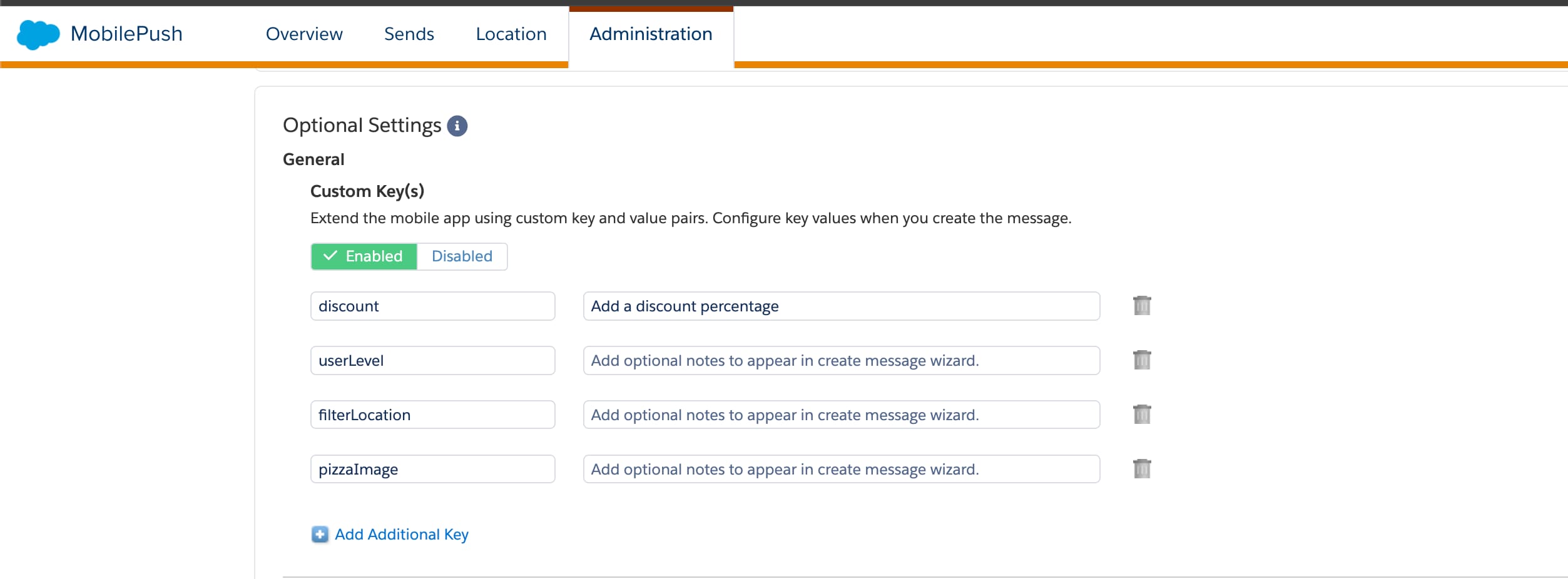
Use custom keys to send extra data along with a push notification. You can use custom keys to add tracking or additional functionality to your app. For example, you can define a custom key that allows a third-party application to provide custom tracking information regarding customer usage on your mobile app. This data can include an ID value used by the app to retrieve additional data or other function.
You must enable this feature in the Administration page on the Engagement UI.
Note
To implement custom key support in your app, extend your push notification handler to extract the push’s userInfo dictionary and the values contained in it.
This code example shows how to handle custom keys using version 10 of the SDK.
SDK for iOS, version 10
1// The method is called on the delegate when the user responds to the2// notification by opening the app, dismissing the notification, or choosing a3// UNNotificationAction. Set the delegate before the application returns from4// applicationDidFinishLaunching:.5func userNotificationCenter(6 _ center: UNUserNotificationCenter,7 didReceive response: UNNotificationResponse,8 withCompletionHandler completionHandler: @escaping() ->Void9){10 // tell the SDK about the notification11 PushFeature.requestSdk{ pushFeature in12 pushFeature?.setNotificationResponse(response)13}14 // the dictionary containing custom keys15 let userInfo = response.notification.request.content.userInfo16 let someValue = userInfo["someKey"] as? String17 // App-specific usage18 print(someValue ?? "someValue is nil")19 completionHandler()20}
For version 9 of the SDK, use this code.
SDK for iOS, version 9
1// The method will be called on the delegate when the user responded to the notification by opening the application, dismissing the notification or choosing a UNNotificationAction. The delegate must be set before the application returns from applicationDidFinishLaunching:.2func userNotificationCenter(_ center: UNUserNotificationCenter, didReceive response: UNNotificationResponse, withCompletionHandler completionHandler: @escaping() ->Void){3 // tell the SDK about the notification4 SFMCSdk.requestPushSdk{ mp in5 mp.setNotificationResponse(response)6}7 // the dictionary containing custom keys8 let userInfo = response.notification.request.content.userInfo9 let someValue = userInfo["someKey"] as? String10 // application-specific usage follows11 print(someValue ?? "someValue is nil")12 completionHandler()13}
For version 8.1 of the SDK, use this code.
SDK for iOS, version 8.1
1// The method will be called on the delegate when the user responded to the notification by opening the application, dismissing the notification or choosing a UNNotificationAction. The delegate must be set before the application returns from applicationDidFinishLaunching:.2func userNotificationCenter(_ center: UNUserNotificationCenter, didReceive response: UNNotificationResponse, withCompletionHandler completionHandler: @escaping() ->Void){3 // tell the SDK about the notification4 SFMCSdk.requestPushSdk{ mp in5 mp.setNotificationRequest(response.notification.request)6}7 // the dictionary containing custom keys8 let userInfo = response.notification.request.content.userInfo9 let someValue = userInfo["someKey"] as? String10 // application-specific usage follows11 print(someValue ?? "someValue is nil")12 completionHandler()13}
For version 8.0 of the SDK, use this code.
SDK for iOS, version 8.0
1// The method will be called on the delegate when the user responded to the notification by opening the application, dismissing the notification or choosing a UNNotificationAction. The delegate must be set before the application returns from applicationDidFinishLaunching:.2func userNotificationCenter(_ center: UNUserNotificationCenter, didReceive response: UNNotificationResponse, withCompletionHandler completionHandler: @escaping() ->Void){3 // Tell the SDK about the notification4 // See Step 5: Capture Notifications on Launch only for 8.0.x under Migrate to Mobile Push SDK Version 8.x for iOS to capture the notification request.5 mp.setNotificationRequest(response.notification.request)67 // the dictionary containing custom keys8 let userInfo = response.notification.request.content.userInfo9 let someValue = userInfo["someKey"] as? String10 // application-specific usage follows11 print(someValue ?? "someValue is nil")12 completionHandler()13}
For version 7 of the SDK, use this code.
SDK for iOS, version 7
1// The method will be called on the delegate when the user responded to the notification by opening the application, dismissing the notification or choosing a UNNotificationAction. The delegate must be set before the application returns from applicationDidFinishLaunching:.2func userNotificationCenter(_ center: UNUserNotificationCenter, didReceive response: UNNotificationResponse, withCompletionHandler completionHandler: @escaping() ->Void){3 // tell the MarketingCloudSDK about the notification4 MarketingCloudSDK.sharedInstance().sfmc_setNotificationRequest(response.notification.request)5 // the dictionary containing custom keys6 let userInfo = response.notification.request.content.userInfo7 let someValue = userInfo["someKey"] as? String8 // application-specific usage follows9 print(someValue ?? "someValue is nil")10 completionHandler()11}
Messages with an OpenDirect URL
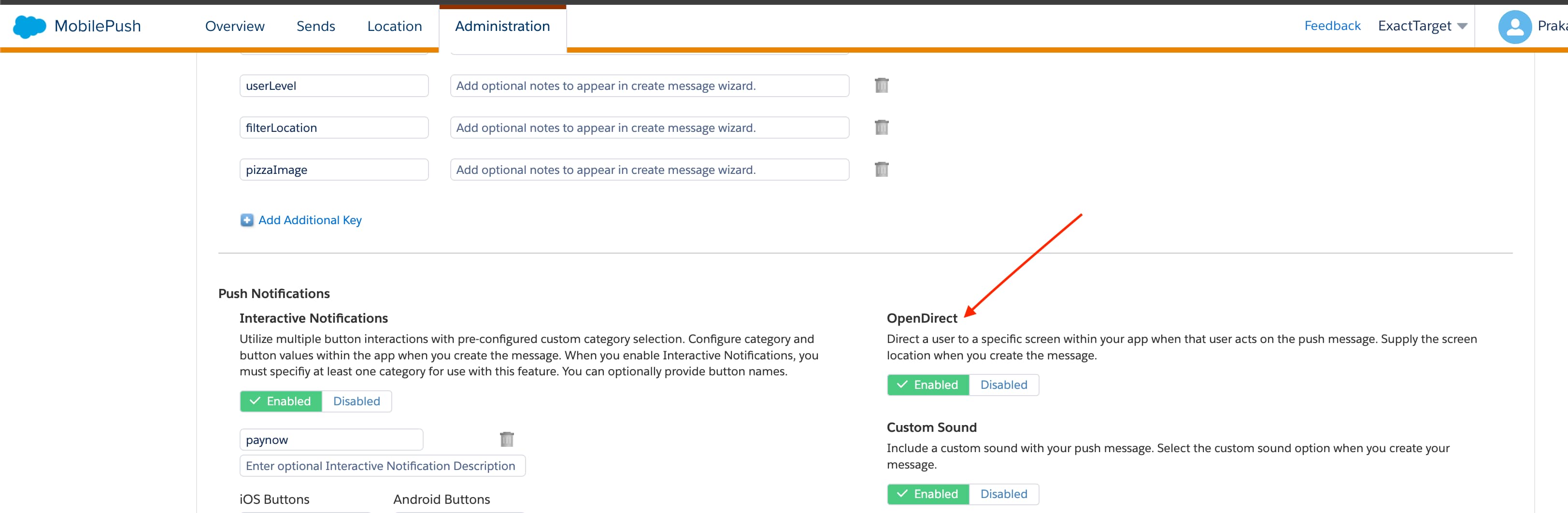
OpenDirect customized push messages contain a URL in the payload. The MobilePush SDK can pass this URL to your application to handle. For information about handling URLs from push notifications that use OpenDirect, see Handle URLs.
A marketing admin can enable OpenDirect on the MobilePush Administration page in Marketing Cloud Engagement.
Handle URLs
The SDK doesn’t automatically present URLs from these sources:
CloudPages URLs from push notifications
OpenDirect URLs from push notifications
CloudPages URLs from inbox messages using the built-in UITableView delegate
To handle URLs from these sources, follow these steps.
Implement the URLHandlingDelegate (v8.x) or MarketingCloudSDKURLHandlingDelegate (v7.x) protocol in your app.
Use setURLHandlingDelegate (v8.x) or sfmc_setURLHandlingDelegate: method to set a delegate for the protocol.
Next, you’re prompted to implement the protocol method sfmc_handleURL:type:
When an OpenDirect or CloudPages push notification is received, the SDK passes a NSURL value to sfmc_handleURL:type:. This value contains the push notification or inbox message, and includes the URL. A type value also reflects the source of the URL, which is either SFMCURLTypeCloudPages or SFMCURLTypeOpenDirect.
If the development language is Swift, the class that implements the URLHandlingDelegate (in version 8 or later) or MarketingCloudSDKURLHandlingDelegate (in version 7) delegate must be Objective-C compatible. This means that you must prefix the class with @objc and extend NSObject, as shown in this example.
Important
Example
This code example shows how to handle URLs using version 10 of the SDK.
SDK for iOS, version 10
1// Framework import2import SFMCSDK3import MarketingCloudSDK4import PushFeatureSDK56// Make sure your class adopts the protocol7@objc class MyClass: NSObject, URLHandlingDelegate89...10// Set the delegate somewhere in your application code after configuring the SDK11 PushFeature.requestSdk { pushFeature in12 pushFeature?.setURLHandlingDelegate(self)13}14...1516// EXAMPLE IMPLEMENTATIONS17// Implement the protocol method and have iOS handle the URL itself18func sfmc_handleURL(_ url: URL, type: String){19 if UIApplication.shared.canOpenURL(url) == true{20 if #available(iOS 10.0, *){21 UIApplication.shared.open(url, options: [:], completionHandler: { success in22 if success {23 print("url \(url) opened successfully")24}else{25 print("url \(url) could not be opened")26}27})28}else{29 if UIApplication.shared.openURL(url) == true{30 print("URL \(url) opened successfully")31}else{32 print("Couldn't open URL \(url)")33}34}35}36}3738// Implement the protocol method and use SFSafariViewController to present the39// URL within your app40func sfmc_handleURL(_ url: URL, type: String){41 let safariViewController = SFSafariViewController(url: url)42 window?.topViewController()?.present(safariViewController, animated: true){}43}4445// Implement the protocol method and take app-specific actions based on the URL46func sfmc_handleURL(_ url: URL, type: String){47 let queryItems = URLComponents(string: url.absoluteString)?.queryItems48 for item: URLQueryItem? in queryItems ?? []{49 // do something in your application based on the parameters in the URL50}51}
For version 8.1 of the SDK, use this code.
SDK for iOS, version 8.1
1// Framework import2import SFMCSDK3import MarketingCloudSDK45// Make sure your class adopts the protocol6@objc class MyClass: NSObject, URLHandlingDelegate78...9// Set the delegate somewhere in your application code after configuring the SDK10SFMCSdk.requestPushSdk { mp in11 mp.setURLHandlingDelegate(self)12}13...1415// EXAMPLE IMPLEMENTATIONS16// Implement the protocol method and have iOS handle the URL itself17func sfmc_handleURL(_ url: URL, type: String){18 if UIApplication.shared.canOpenURL(url) == true{19 if #available(iOS 10.0, *){20 UIApplication.shared.open(url, options: [:], completionHandler: { success in21 if success {22 print("url \(url) opened successfully")23}else{24 print("url \(url) could not be opened")25}26})27}else{28 if UIApplication.shared.openURL(url) == true{29 print("url \(url) opened successfully")30}else{31 print("url \(url) could not be opened")32}33}34}35}3637// Implement the protocol method and use SFSafariViewController to present the38// URL within your app39func sfmc_handleURL(_ url: URL, type: String){40 let safariViewController = SFSafariViewController(url: url)41 window?.topViewController()?.present(safariViewController, animated: true){42}43}4445// Implement the protocol method and take app-specific actions based on the URL46func sfmc_handleURL(_ url: URL, type: String){47 let queryItems = URLComponents(string: url.absoluteString)?.queryItems48 for item: URLQueryItem? in queryItems ?? []{49 // do something interesting in your application based on the pararmeters in the URL50}51}
For version 8.0 of the SDK, use this code.
SDK for iOS, version 8.0
1// Framework import2import SFMCSDK3import MarketingCloudSDK45// Make sure your class adopts the protocol6@objc class MyClass: NSObject, URLHandlingDelegate78...9// Set the delegate somewhere in your application code after configuring the SDK10// and confirming that the SDK is operational11 mp.setURLHandlingDelegate(self)12...13// EXAMPLE IMPLEMENTATIONS14// Implement the protocol method and have iOS handle the URL itself15func sfmc_handleURL(_ url: URL, type: String){16 if UIApplication.shared.canOpenURL(url) == true{17 if #available(iOS 10.0, *){18 UIApplication.shared.open(url, options: [:], completionHandler: { success in19 if success {20 print("url \(url) opened successfully")21}else{22 print("url \(url) could not be opened")23}24})25}else{26 if UIApplication.shared.openURL(url) == true{27 print("url \(url) opened successfully")28}else{29 print("url \(url) could not be opened")30}31}32}33}3435// Implement the protocol method and use SFSafariViewController to present the36// URL within your app37func sfmc_handleURL(_ url: URL, type: String){38 let safariViewController = SFSafariViewController(url: url)39 window?.topViewController()?.present(safariViewController, animated: true){40}41}4243// Implement the protocol method and take app-specific actions based on the URL44func sfmc_handleURL(_ url: URL, type: String){45 let queryItems = URLComponents(string: url.absoluteString)?.queryItems46 for item: URLQueryItem? in queryItems ?? []{47 // do something in the app based on the parameters in the URL48}49}
For version 7 of the SDK, use this code.
SDK for iOS, version 7
1// Framework import2import MarketingCloudSDK34// Make sure your class adopts the protocol5@objc class MyClass: NSObject, MarketingCloudSDKURLHandlingDelegate67...8// Set the delegate somewhere in your application code after configuring the SDK9MarketingCloudSDK.sharedInstance().sfmc_setURLHandlingDelegate(self)10...11// EXAMPLE IMPLEMENTATIONS12// Implement the protocol method and have iOS handle the URL itself13func sfmc_handleURL(_ url: URL, type: String){14 if UIApplication.shared.canOpenURL(url) == true{15 if #available(iOS 10.0, *){16 UIApplication.shared.open(url, options: [:], completionHandler: { success in17 if success {18 print("url \(url) opened successfully")19}else{20 print("url \(url) could not be opened")21}22})23}else{24 if UIApplication.shared.openURL(url) == true{25 print("url \(url) opened successfully")26}else{27 print("url \(url) could not be opened")28}29}30}31}3233// Implement the protocol method and use SFSafariViewController to present the34// URL within your app35func sfmc_handleURL(_ url: URL, type: String){36 let safariViewController = SFSafariViewController(url: url)37 window?.topViewController()?.present(safariViewController, animated: true){38}39}4041// Implement the protocol method and take app-specific actions based on the URL42func sfmc_handleURL(_ url: URL, type: String){43 let queryItems = URLComponents(string: url.absoluteString)?.queryItems44 for item: URLQueryItem? in queryItems ?? []{45 // do something in the app based on the parameters in the URL46}47}
Push Delivery Analytics
Starting with version 9.0.0, the MobilePush iOS SDK tracks successful delivery of push notifications to the SDK. To enable this feature, contact your Engagement admin.