User and Device Registration
Before you can send messages to your users, you must register devices and users with Marketing Cloud Next. Registration is the most important step in your entire implementation.
User and device registration is a critical process managed by the SDK, which plays a pivotal role in establishing a reliable framework for communication with your users. By managing this registration, the SDK ensures your application integrates smoothly with all Mobile Messaging features, from targeted messaging to analytics, all designed to enhance user engagement and provide valuable insights into user interactions.
The SDK simplifies the registration process, allowing developers to concentrate on creating engaging user experiences. With the SDK managing the registration, you can ensure effectiveness without getting bogged down in complexity.
Registering users and devices with Marketing Cloud Next is shown in steps 3 and 4 of this diagram. Although this diagram is specific to push notifications, these two registration steps are the same for all message types. For more information, see How Mobile App Messaging SDK Works.
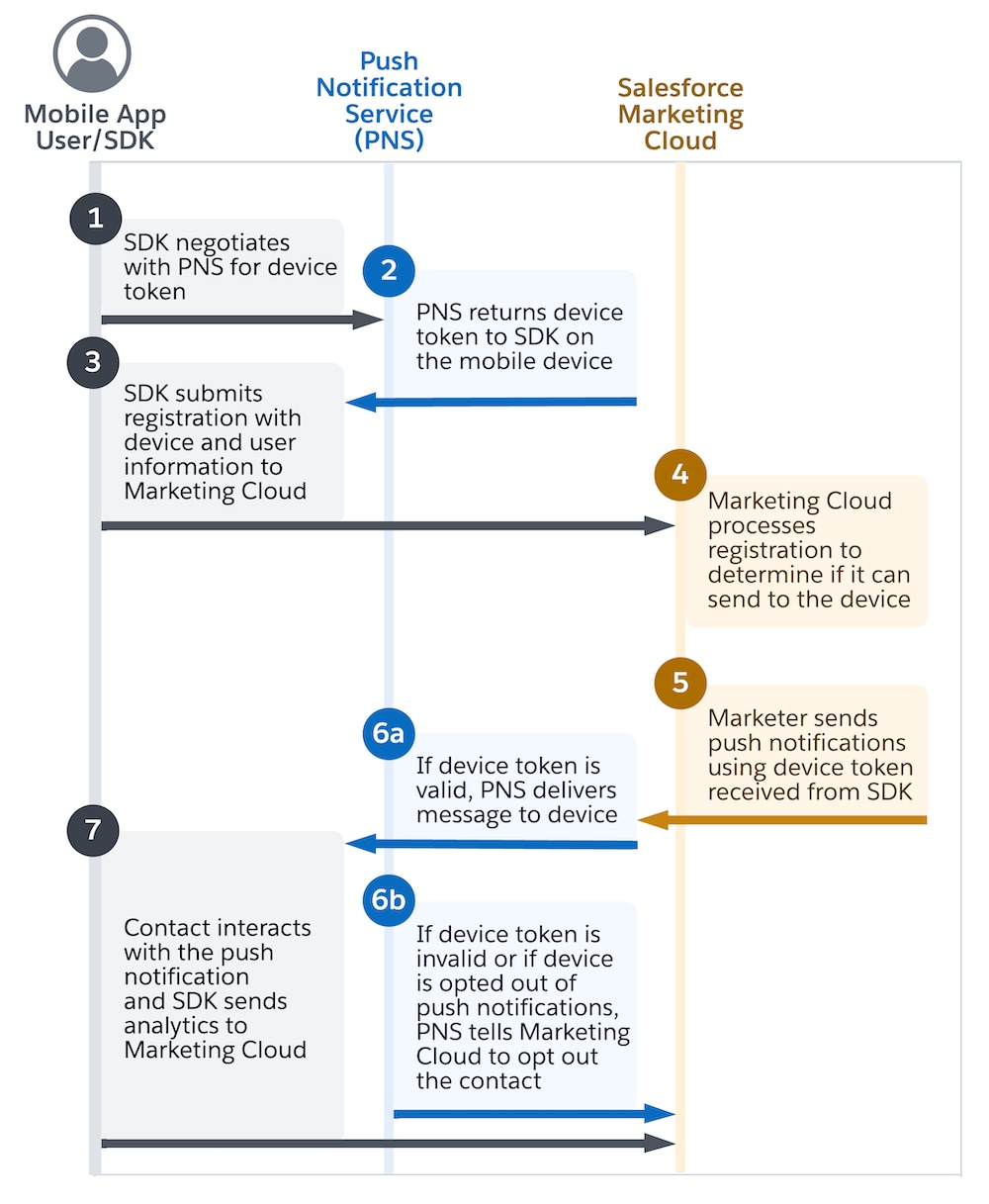
First, the app initializes the SDK. For push notifications, the SDK negotiates with the Push Notification Service (PNS) for a device token. Then, regardless of the message type, the SDK asynchronously attempts to register and update information, such as the device token, device ID, individual ID, attributes, and push opt-in status, with Marketing Cloud Next.
By default, when a user installs and launches an app for the first time, the SDK immediately submits a registration after a successful SDK initialization. When there’s a change to the Individual record that SDK stores locally, it triggers a registration update. The SDK sends these subsequent registrations to Marketing Cloud Next within one minute of the first change to the locally stored Individual record.
Registrations are asynchronous. While the SDK can receive a successful 201 response from the server indicating that it received the registration, the response doesn't indicate whether it successfully processed the request.
The SDK limits registration requests to one per minute. When your app changes any user record in its dataset, the SDK triggers a registration update. These changes encompass changes to individual IDs, custom attributes or tags, and system-related attributes, including time zone, device locale, and app version.
The SDK is a source of truth for an individual’s device registration. The SDK sends registration data asynchronously in one direction to Marketing Cloud Next. After Marketing Cloud Next receives the SDK’s REST request, it takes a few minutes to fully process the updated registration data.
If a registration fails because Marketing Cloud Next is unavailable, the SDK uses a back-off algorithm with increasing retry intervals up to a maximum delay of one day. At that point, the SDK retries daily until registration is successful.