How the Mobile App Messaging SDK Works
The following sections provide flow charts and high-level explanations of how the SDK interacts with Marketing Cloud Next.
-
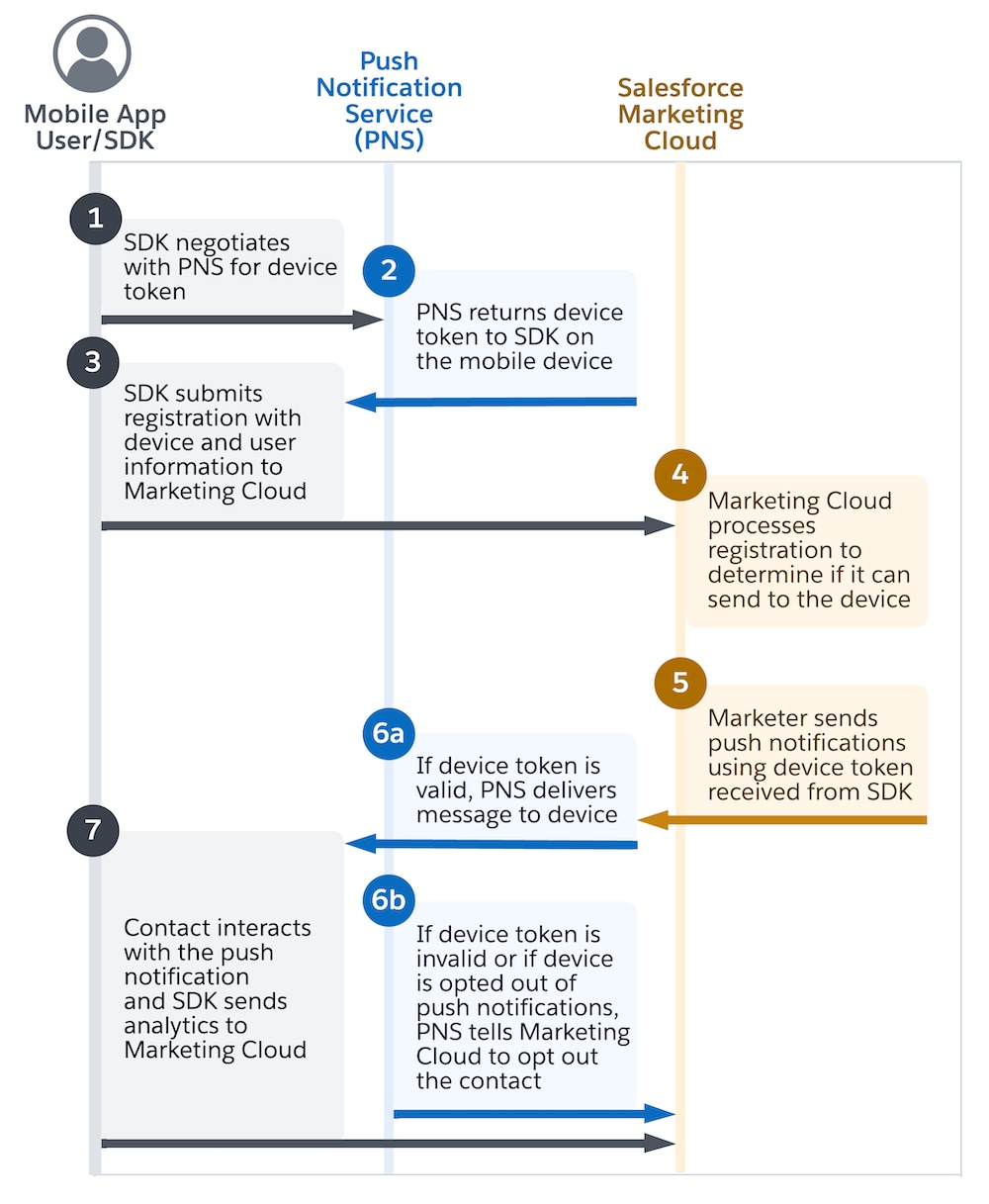
When a mobile app opens and successfully initializes the SDK, the SDK communicates with the Push Notification Service (PNS) to obtain a device token.
A PNS is a service such as Apple Push Notification service (APNs) or Firebase Cloud Messaging (FCM) that manages push notifications for a device.
-
The PNS returns a unique device token to the SDK, but only if the device has opted in to receive push notifications.
-
After it receives the device token, the SDK registers the device with Marketing Cloud Next and submits critical information such as the device token, device ID, push opt-in status, party identifier, and any relevant attributes or tags. This registration process occurs asynchronously.
-
Marketing Cloud Next processes the registration to determine whether it can send push notifications to the device. This process includes checking whether the device is opted in our out of receiving push notifications. If the user isn’t registered in Marketing Cloud Next, it creates an Individual record. If the user is an existing Individual, Marketing Cloud Next updates the existing Individual record with the latest information, such as the user’s most recent app open time.
-
After Marketing Cloud Next processes the registration, a marketer sends push notifications using the device token received from the SDK.
-
The PNS validates the device token and attempts to deliver the message to the device.
a. If the device token is valid, the PNS delivers the message to the device.
b. If the device token is invalid or if the device is opted out, the PNS notifies Marketing Cloud Next to opt out the user’s device. The user also doesn’t receive the push notification. Opt-outs also occur if the device token is malformed or if the auth key is incorrect.
-
After the user opens and interacts with the push notification, the SDK records the event and sends analytics data to Marketing Cloud Next. The SDK transmits analytics data after the application moves into the background or comes back into the foreground. If a user force-closes the app, the SDK stores the analytics data and sends it to Marketing Cloud Next the next time the user opens the app.
-
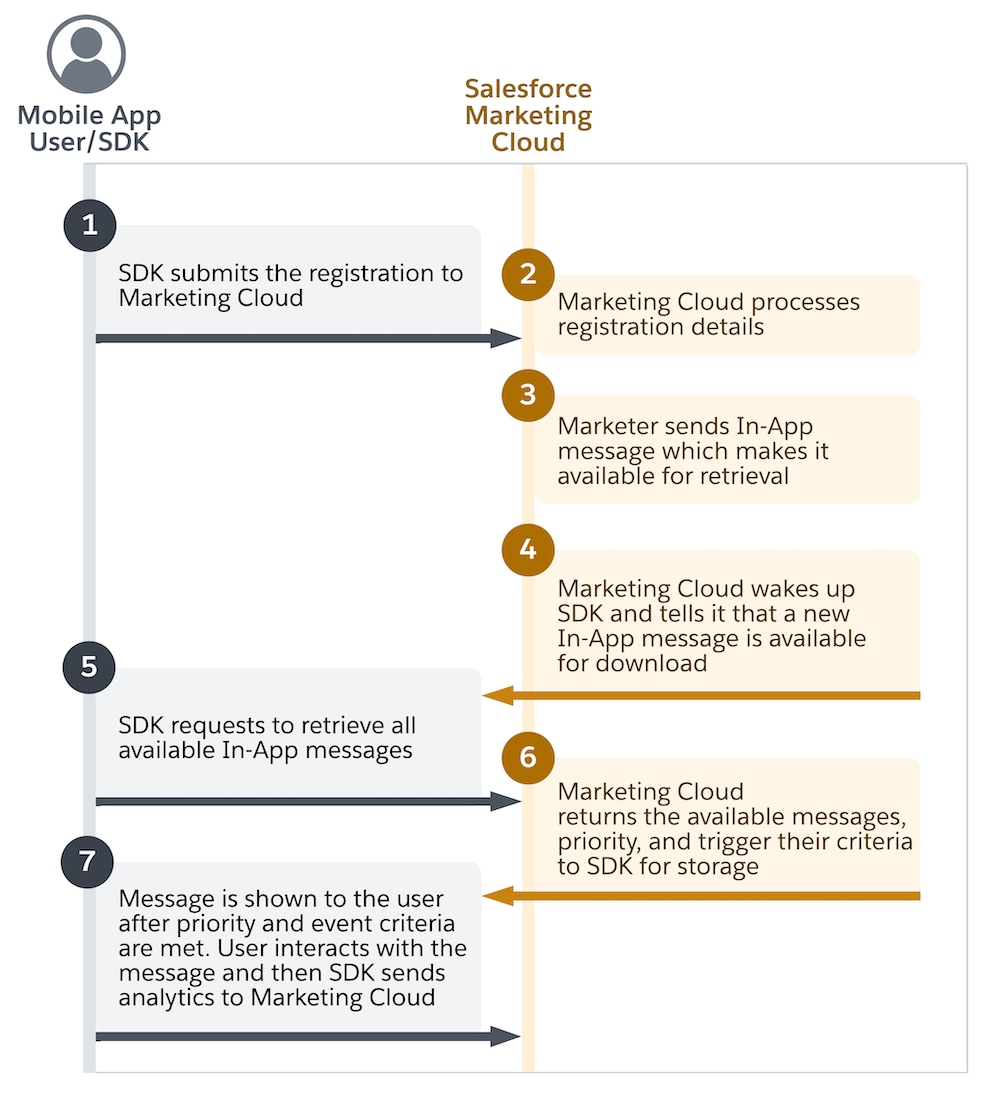
The SDK registers the device with Engagement and asynchronously submits critical information such as the device token, device ID, push opt-in status, contact key, and any relevant attributes or tags.
-
Engagement processes the registration to determine whether it can send in-app messages to the device.
The registration process can take up to 15 minutes, after which updated information is visible on the contact’s profile in Contact Builder.
-
Engagement publishes the rendered in-app message, specifying the message’s trigger criteria, and makes the message available for the device to download.
-
Engagement notifies the SDK that a new in-app message is available via a silent push notification. Silent push notifications wake up the SDK without alerting users and are only sent to devices that are opted-in to receive push notifications.
-
On receiving the silent push notification, the SDK downloads the new in-app messages, along with their priority and trigger criteria. Additionally, in-app messages are synced with the device at the start of the next session. This sync ensures that even if the app misses silent push notifications, it can still download available messages when it’s next opened or brought to the foreground. If you edit an in-app message and reactive the journey, the updated version of the in-app message is downloaded, replacing the older one.
-
After the in-app message is downloaded, it’s displayed on the device after the specified trigger criteria are met and evaluated by the SDK. After the contact opens and interacts with the message, the SDK records the event and sends analytics to Engagement. The SDK sends analytics data after the application moves into the background or comes back into the foreground. If a user force-closes the app, the SDK stores the analytics data and sends it to Engagement the next time the user opens the app.
-
If you delete the in-app activity or journey after messages are downloaded to a device, messages that are still on the device remain functional. However, any devices that haven’t yet downloaded the message don’t receive it.