Working with Action Links
An action link is a button on a feed element. Clicking an action link can take a user to a Web page, initiate a file download, or invoke an API call to Salesforce or to an external server. An action link includes a URL and an HTTP method, and can include a request body and header information, such as an OAuth token for authentication. Use action links to integrate Salesforce and third-party services into the feed so that users can drive productivity and accelerate innovation.
This feed item contains one action link group with one visible action link, Join.
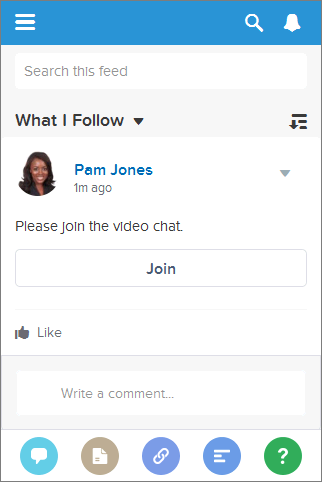
The workflow to create and post action links with a feed element:
- (Optional) Create an action link template.
- Call
ConnectApi.ActionLinks.createActionLinkGroupDefinition(communityId, actionLinkGroup)to define an action link group that contains at least one action link. - Call
ConnectApi.ChatterFeeds.postFeedElement(communityId, feedElement)to post a feed element and associate the action link with it.
Use these methods to work with action links.
| ConnectApi Method | Task |
|---|---|
ActionLinks.createActionLinkGroupDefinition(communityId, actionLinkGroup)ActionLinks.deleteActionLinkGroupDefinition(communityId, actionLinkGroupId)ActionLinks.getActionLinkGroupDefinition(communityId, actionLinkGroupId) | Create an action link group definition. To associate an action link group with a feed element, first create an action link group definition. Then post a feed element with an associated actions capability. |
ChatterFeeds.postFeedElement(communityId, feedElement) | Post a feed element with an associated actions capability. Associate up to 10 action link groups with a feed element. |
ActionLinks.getActionLink(communityId, actionLinkId) | Get information about an action link, including state for the context user. |
ActionLinks.getActionLinkGroup(communityId, actionLinkGroupId) | Get information about an action link group including state for the context user. |
ActionLinks.getActionLinkDiagnosticInfo(communityId, actionLinkId) | Get diagnostic information returned when an action link executes. Diagnostic information is given only for users who can access the action link. |
ChatterFeeds.getFeedElementsFromFeed() | Get the feed elements from a specified feed type. If a feed element has action links associated with it, the action links data is returned in the feed element’s associated actions capability. |
-
Action Links Overview, Authentication, and Security
Learn about Apex action links security, authentication, labels, and errors.
-
Use action links to integrate Salesforce and third-party services with a feed. An action link can make an HTTP request to a Salesforce or third-party API. An action link can also download a file or open a web page. This topic contains an example use case.
See Also