Recommendations Class
Get and reject Chatter, custom, and static recommendations. Create, get, update, and delete custom recommendation audiences, custom recommendation definitions, and scheduled custom recommendations.
For Next Best Action recommendations, see NextBestAction Class.
These methods are for Recommendations. All methods are static.
All methods in this class require Chatter and are subject to the per user, per namespace, per hour rate limit.
-
createRecommendationAudience(communityId, recommendationAudience)
Create an audience for a custom recommendation.
-
createRecommendationAudience(communityId, name)
Create an audience for a custom recommendation.
-
createRecommendationDefinition(communityId, recommendationDefinition)
Create a custom recommendation definition.
-
createRecommendationDefinition(communityId, name, title, actionUrl, actionUrlName, explanation)
Create a custom recommendation definition with the specified parameters.
-
createScheduledRecommendation(communityId, scheduledRecommendation)
Create a scheduled custom recommendation.
-
Create a scheduled custom recommendation with the specified parameters.
-
deleteRecommendationAudience(communityId, recommendationAudienceId)
Delete a custom recommendation audience.
-
deleteRecommendationDefinition(communityId, recommendationDefinitionId)
Delete a custom recommendation definition.
-
deleteRecommendationDefinitionPhoto(communityId, recommendationDefinitionId)
Delete a custom recommendation definition photo.
-
deleteScheduledRecommendation(communityId, scheduledRecommendationId, deleteDefinitionIfLast)
Delete a scheduled custom recommendation.
-
getRecommendationAudience(communityId, recommendationAudienceId)
Get information about a custom recommendation audience.
-
getRecommendationAudienceMembership(communityId, recommendationAudienceId)
Get the members of a custom recommendation audience.
-
getRecommendationAudienceMembership(communityId, recommendationAudienceId, pageParam, pageSize)
Get a page of custom recommendation audience members.
-
getRecommendationAudiences(communityId)
Get custom recommendation audiences.
-
getRecommendationAudiences(communityId, pageParam, pageSize)
Get a page of custom recommendation audiences.
-
getRecommendationDefinition(communityId, recommendationDefinitionId)
Get a custom recommendation definition.
-
getRecommendationDefinitionPhoto(communityId, recommendationDefinitionId)
Get a custom recommendation definition photo.
-
getRecommendationDefinitions(communityId)
Get custom recommendation definitions.
-
getRecommendationForUser(communityId, userId, action, objectId)
Get the Chatter, custom, or static recommendation for the context user for the specified action and object ID.
-
getRecommendationsForUser(communityId, userId, contextAction, contextObjectId, channel, maxResults)
Get the Chatter recommendations, such as user, group, file, article, record, and topic recommendations for the context user. Get the custom and static recommendations for the context user.
-
Get the Chatter, custom, and static recommendations for the context user for the specified action.
-
Get the Chatter, custom, and static recommendations for the context user for the specified action and object category.
-
getScheduledRecommendation(communityId, scheduledRecommendationId)
Get a scheduled custom recommendation.
-
getScheduledRecommendations(communityId, channel)
Get scheduled custom recommendations.
-
rejectRecommendationForUser(communityId, userId, action, objectId)
Reject a Chatter, custom, or static recommendation for the context user for the specified action and object ID.
-
rejectRecommendationForUser(communityId, userId, action, objectEnum)
Reject a static recommendation for the context user.
-
updateRecommendationAudience(communityId, recommendationAudienceId, recommendationAudience)
Update a custom recommendation audience.
-
Update a custom recommendation definition with the specified parameters.
-
updateRecommendationDefinition(communityId, recommendationDefinitionId, recommendationDefinition)
Update a custom recommendation definition.
-
updateRecommendationDefinitionPhoto(communityId, recommendationDefinitionId, fileUpload)
Update a custom recommendation definition photo with a file that hasn’t been uploaded.
-
updateRecommendationDefinitionPhoto(communityId, recommendationDefinitionId, fileId, versionNumber)
Update a custom recommendation definition photo with an uploaded file.
-
updateRecommendationDefinitionPhotoWithAttributes(communityId, recommendationDefinitionId, photo)
Update a custom recommendation definition photo with an uploaded file that requires cropping.
-
Update a custom recommendation definition photo with a file that hasn’t been uploaded and requires cropping.
-
updateScheduledRecommendation(communityId, scheduledRecommendationId, scheduledRecommendation)
Update a scheduled custom recommendation.
-
Update a scheduled custom recommendation with the specified parameters.
Create an audience for a custom recommendation.
35.0
Yes
public static ConnectApi.RecommendationAudience createRecommendationAudience(String communityId, ConnectApi.RecommendationAudienceInput recommendationAudience)
- communityId
Type: String
ID for an Experience Cloud site,
internal, ornull.- recommendationAudience
Type:
ConnectApi.RecommendationAudienceInputA
ConnectApi.RecommendationAudienceInputobject.
Type: ConnectApi.RecommendationAudience
Community managers can access, create, and delete audiences, definitions, and schedules for custom recommendations. (Community managers are users with the Create and Set Up Experiences or Manage Experiences permission.) Users with the Modify All Data permission can also access, create, and delete custom recommendation audiences, custom recommendation definitions, and scheduled custom recommendations.
Create an audience for a custom recommendation.
35.0
Yes
public static ConnectApi.RecommendationAudience createRecommendationAudience(String communityId, String name)
- communityId
Type: String
ID for an Experience Cloud site,
internal, ornull.- name
Type: String
Name of the audience.
Type: ConnectApi.RecommendationAudience
Community managers can access, create, and delete audiences, definitions, and schedules for custom recommendations. (Community managers are users with the Create and Set Up Experiences or Manage Experiences permission.) Users with the Modify All Data permission can also access, create, and delete custom recommendation audiences, custom recommendation definitions, and scheduled custom recommendations.
Create a custom recommendation definition.
35.0
Yes
public static ConnectApi.RecommendationDefinition createRecommendationDefinition(String communityId, ConnectApi.RecommendationDefinitionInput recommendationDefinition)
- communityId
Type: String
ID for an Experience Cloud site,
internal, ornull.- recommendationDefinition
Type:
ConnectApi.RecommendationDefinitionInputA
ConnectApi.RecommendationDefinitionInputobject.
Type: ConnectApi.RecommendationDefinition
Recommendation definitions allow you to create custom recommendations that appear in Experience Cloud sites, encouraging users to watch videos, take training and more.
Community managers can access, create, and delete audiences, definitions, and schedules for custom recommendations. (Community managers are users with the Create and Set Up Experiences or Manage Experiences permission.) Users with the Modify All Data permission can also access, create, and delete custom recommendation audiences, custom recommendation definitions, and scheduled custom recommendations.
These recommendations appear by default on the Customer Service template. They appear on the home and question detail pages and in the feed in Salesforce mobile web. They also appear anywhere community managers add recommendations using Experience Builder in the Customer Service template.
So that users don’t see the same recommendations all the time, Salesforce periodically removes and brings back custom recommendations that haven’t been accepted or dismissed.
Create a custom recommendation definition with the specified parameters.
35.0
Yes
public static ConnectApi.RecommendationDefinition createRecommendationDefinition(String communityId, String name, String title, String actionUrl, String actionUrlName, String explanation)
- communityId
Type: String
ID for an Experience Cloud site,
internal, ornull.- name
Type: String
Name of the custom recommendation definition. The name is displayed in Setup.
- title
Type: String
Title of the custom recommendation definition.
- actionUrl
Type: String
URL for acting on the custom recommendation, for example, the URL to join a group.
- actionUrlName
Type: String
Text label for the action URL in the user interface, for example, “Launch.”
- explanation
Type: String
Explanation, or body, of the custom recommendation.
Type: ConnectApi.RecommendationDefinition
Recommendation definitions allow you to create custom recommendations that appear in Experience Cloud sites, encouraging users to watch videos, take training and more.
Community managers can access, create, and delete audiences, definitions, and schedules for custom recommendations. (Community managers are users with the Create and Set Up Experiences or Manage Experiences permission.) Users with the Modify All Data permission can also access, create, and delete custom recommendation audiences, custom recommendation definitions, and scheduled custom recommendations.
These recommendations appear by default on the Customer Service template. They appear on the home and question detail pages and in the feed in Salesforce mobile web. They also appear anywhere community managers add recommendations using Experience Builder in the Customer Service template.
So that users don’t see the same recommendations all the time, Salesforce periodically removes and brings back custom recommendations that haven’t been accepted or dismissed.
Create a scheduled custom recommendation.
35.0
Yes
public static ConnectApi.ScheduledRecommendation createScheduledRecommendation(String communityId, ConnectApi.ScheduledRecommendationInput scheduledRecommendation)
- communityId
Type: String
ID for an Experience Cloud site,
internal, ornull.- scheduledRecommendation
Type:
ConnectApi.ScheduledRecommendationInputA
ConnectApi.ScheduledRecommendationInputobject.
Type: ConnectApi.ScheduledRecommendation
Community managers can access, create, and delete audiences, definitions, and schedules for custom recommendations. (Community managers are users with the Create and Set Up Experiences or Manage Experiences permission.) Users with the Modify All Data permission can also access, create, and delete custom recommendation audiences, custom recommendation definitions, and scheduled custom recommendations.
Create a scheduled custom recommendation with the specified parameters.
36.0
Yes
public static ConnectApi.ScheduledRecommendation createScheduledRecommendation(String communityId, String recommendationDefinitionId, Integer rank, Boolean enabled, String recommendationAudienceId, ConnectApi.RecommendationChannel channel)
- communityId
Type: String
ID for an Experience Cloud site,
internal, ornull.- recommendationDefinitionId
Type: String
ID of the custom recommendation definition.
- rank
Type: Integer
Relative rank of the scheduled custom recommendation indicated by ascending whole numbers starting with 1.
Setting the rank is comparable to an insertion into an ordered list. The scheduled custom recommendation is inserted into the position specified by the
rank. Therankof all the scheduled custom recommendations after it is pushed down. See Ranking scheduled custom recommendations example.If the specified
rankis larger than the size of the list, the scheduled custom recommendation is put at the end of the list. Therankof the scheduled custom recommendation is the size of the list, instead of the one specified.If a
rankis not specified, the scheduled custom recommendation is put at the end of the list.- enabled
Type: Boolean
Indicates whether scheduling is enabled. If
true, the custom recommendation is enabled and appears in Experience Cloud sites. Iffalse, custom recommendations in feeds in Salesforce mobile web aren’t removed, but no new custom recommendations appear. In Customer Service and Partner Central sites, disabled custom recommendations no longer appear.- recommendationAudienceId
Type: String
ID of the custom recommendation definition that this scheduled recommendation schedules.
- channel
Type:
ConnectApi.RecommendationChannelA way to tie custom recommendations together. For example, display recommendations in specific places in the UI or show recommendations based on time of day or geographic locations. Values are:
CustomChannel1—Custom recommendation channel. Not used by default. Work with your community manager to define custom channels. For example, community managers can use Experience Builder to determine where recommendations appear.CustomChannel2—Custom recommendation channel. Not used by default. Work with your community manager to define custom channels.CustomChannel3—Custom recommendation channel. Not used by default. Work with your community manager to define custom channels.CustomChannel4—Custom recommendation channel. Not used by default. Work with your community manager to define custom channels.CustomChannel5—Custom recommendation channel. Not used by default. Work with your community manager to define custom channels.DefaultChannel—Default recommendation channel. Recommendations appear by default on the Home and Question Detail pages of Customer Service and Partner Central Experience Builder templates. They also appear in the feed in the Salesforce mobile web and anywhere community managers add recommendations using Experience Builder.
Use these channel values; you can’t rename or create other channels.
Type: ConnectApi.ScheduledRecommendation
Community managers can access, create, and delete audiences, definitions, and schedules for custom recommendations. (Community managers are users with the Create and Set Up Experiences or Manage Experiences permission.) Users with the Modify All Data permission can also access, create, and delete custom recommendation audiences, custom recommendation definitions, and scheduled custom recommendations.
Ranking scheduled custom recommendations example
If you have these scheduled custom recommendations:
| Scheduled Recommendations | Rank |
|---|---|
| ScheduledRecommendationA | 1 |
| ScheduledRecommendationB | 2 |
| ScheduledRecommendationC | 3 |
And you include this information in the Scheduled Custom Recommendation Input:
| Scheduled Recommendation | Rank |
|---|---|
| ScheduledRecommendationD | 2 |
The result is:
| Scheduled Recommendation | Rank |
|---|---|
| ScheduledRecommendationA | 1 |
| ScheduledRecommendationD | 2 |
| ScheduledRecommendationB | 3 |
| ScheduledRecommendationC | 4 |
Delete a custom recommendation audience.
35.0
Yes
public static Void deleteRecommendationAudience(String communityId, String recommendationAudienceId)
- communityId
Type: String
ID for an Experience Cloud site,
internal, ornull.- recommendationAudienceId
Type: String
ID of the custom recommendation audience.
Type: Void
Community managers can access, create, and delete audiences, definitions, and schedules for custom recommendations. (Community managers are users with the Create and Set Up Experiences or Manage Experiences permission.) Users with the Modify All Data permission can also access, create, and delete custom recommendation audiences, custom recommendation definitions, and scheduled custom recommendations.
Delete a custom recommendation definition.
35.0
Yes
public static Void deleteRecommendationDefinition(String communityId, String recommendationDefinitionId)
- communityId
Type: String
ID for an Experience Cloud site,
internal, ornull.- recommendationDefinitionId
Type: String
ID of the custom recommendation definition.
Type: Void
Community managers can access, create, and delete audiences, definitions, and schedules for custom recommendations. (Community managers are users with the Create and Set Up Experiences or Manage Experiences permission.) Users with the Modify All Data permission can also access, create, and delete custom recommendation audiences, custom recommendation definitions, and scheduled custom recommendations.
Delete a custom recommendation definition photo.
35.0
Yes
public static Void deleteRecommendationDefinitionPhoto(String communityId, String recommendationDefinitionId)
- communityId
Type: String
ID for an Experience Cloud site,
internal, ornull.- recommendationDefinitionId
Type: String
ID of the custom recommendation definition.
Type: Void
Community managers can access, create, and delete audiences, definitions, and schedules for custom recommendations. (Community managers are users with the Create and Set Up Experiences or Manage Experiences permission.) Users with the Modify All Data permission can also access, create, and delete custom recommendation audiences, custom recommendation definitions, and scheduled custom recommendations.
Delete a scheduled custom recommendation.
35.0
Yes
public static Void deleteScheduledRecommendation(String communityId, String scheduledRecommendationId, Boolean deleteDefinitionIfLast)
- communityId
Type: String
ID for an Experience Cloud site,
internal, ornull.- scheduledRecommendationId
Type: String
ID of the scheduled custom recommendation.
- deleteDefinitionIfLast
Type: Boolean
If
trueand if this is the last scheduled custom recommendation of a custom recommendation definition, deletes the custom recommendation definition. Default isfalse.
Type: Void
Community managers can access, create, and delete audiences, definitions, and schedules for custom recommendations. (Community managers are users with the Create and Set Up Experiences or Manage Experiences permission.) Users with the Modify All Data permission can also access, create, and delete custom recommendation audiences, custom recommendation definitions, and scheduled custom recommendations.
Deleting a scheduled custom recommendation is comparable to a deletion in an ordered list. All scheduled custom recommendations after the deleted scheduled custom recommendation receive a new, higher rank automatically.
Get information about a custom recommendation audience.
35.0
Yes
public static ConnectApi.RecommendationAudience getRecommendationAudience(String communityId, String recommendationAudienceId)
- communityId
Type: String
ID for an Experience Cloud site,
internal, ornull.- recommendationAudienceId
Type: String
ID of the custom recommendation audience.
Type: ConnectApi.RecommendationAudience
Community managers can access, create, and delete audiences, definitions, and schedules for custom recommendations. (Community managers are users with the Create and Set Up Experiences or Manage Experiences permission.) Users with the Modify All Data permission can also access, create, and delete custom recommendation audiences, custom recommendation definitions, and scheduled custom recommendations.
Get the members of a custom recommendation audience.
35.0
Yes
public static ConnectApi.UserReferencePage getRecommendationAudienceMembership(String communityId, String recommendationAudienceId)
- communityId
Type: String
ID for an Experience Cloud site,
internal, ornull.- recommendationAudienceId
Type: String
ID of the custom recommendation audience.
Type: ConnectApi.UserReferencePage
Community managers can access, create, and delete audiences, definitions, and schedules for custom recommendations. (Community managers are users with the Create and Set Up Experiences or Manage Experiences permission.) Users with the Modify All Data permission can also access, create, and delete custom recommendation audiences, custom recommendation definitions, and scheduled custom recommendations.
Get a page of custom recommendation audience members.
35.0
Yes
public static ConnectApi.UserReferencePage getRecommendationAudienceMembership(String communityId, String recommendationAudienceId, Integer pageParam, Integer pageSize)
- communityId
Type: String
ID for an Experience Cloud site,
internal, ornull.- recommendationAudienceId
Type: String
ID of the custom recommendation audience.
- pageParam
Type: Integer
Number of the page you want returned. Starts at 0. If you pass in
nullor 0, the first page is returned.- pageSize
Type: Integer
Specifies the number of members per page.
Type: ConnectApi.UserReferencePage
Community managers can access, create, and delete audiences, definitions, and schedules for custom recommendations. (Community managers are users with the Create and Set Up Experiences or Manage Experiences permission.) Users with the Modify All Data permission can also access, create, and delete custom recommendation audiences, custom recommendation definitions, and scheduled custom recommendations.
Get custom recommendation audiences.
35.0
Yes
public static ConnectApi.RecommendationAudiencePage getRecommendationAudiences(String communityId)
- communityId
Type: String
ID for an Experience Cloud site,
internal, ornull.
Type: ConnectApi.RecommendationAudiencePage
Community managers can access, create, and delete audiences, definitions, and schedules for custom recommendations. (Community managers are users with the Create and Set Up Experiences or Manage Experiences permission.) Users with the Modify All Data permission can also access, create, and delete custom recommendation audiences, custom recommendation definitions, and scheduled custom recommendations.
Get a page of custom recommendation audiences.
35.0
Yes
public static ConnectApi.RecommendationAudiencePage getRecommendationAudiences(String communityId, Integer pageParam, Integer pageSize)
- communityId
Type: String
ID for an Experience Cloud site,
internal, ornull.- pageParam
Type: Integer
Number of the page you want returned. Starts at 0. If you pass in
nullor 0, the first page is returned.- pageSize
Type: Integer
Specifies the number of audiences per page.
Type: ConnectApi.RecommendationAudiencePage
Community managers can access, create, and delete audiences, definitions, and schedules for custom recommendations. (Community managers are users with the Create and Set Up Experiences or Manage Experiences permission.) Users with the Modify All Data permission can also access, create, and delete custom recommendation audiences, custom recommendation definitions, and scheduled custom recommendations.
Get a custom recommendation definition.
35.0
Yes
public static ConnectApi.RecommendationDefinition getRecommendationDefinition(String communityId, String recommendationDefinitionId)
- communityId
Type: String
ID for an Experience Cloud site,
internal, ornull.- recommendationDefinitionId
Type: String
ID of the custom recommendation definition.
Type: ConnectApi.RecommendationDefinition
Community managers can access, create, and delete audiences, definitions, and schedules for custom recommendations. (Community managers are users with the Create and Set Up Experiences or Manage Experiences permission.) Users with the Modify All Data permission can also access, create, and delete custom recommendation audiences, custom recommendation definitions, and scheduled custom recommendations.
Get a custom recommendation definition photo.
35.0
Yes
public static ConnectApi.Photo getRecommendationDefinitionPhoto(String communityId, String recommendationDefinitionId)
- communityId
Type: String
ID for an Experience Cloud site,
internal, ornull.- recommendationDefinitionId
Type: String
ID of the custom recommendation definition.
Type: ConnectApi.Photo
Community managers can access, create, and delete audiences, definitions, and schedules for custom recommendations. (Community managers are users with the Create and Set Up Experiences or Manage Experiences permission.) Users with the Modify All Data permission can also access, create, and delete custom recommendation audiences, custom recommendation definitions, and scheduled custom recommendations.
Get custom recommendation definitions.
35.0
Yes
public static ConnectApi.RecommendationDefinitionPage getRecommendationDefinitions(String communityId)
- communityId
Type: String
ID for an Experience Cloud site,
internal, ornull.
Type: ConnectApi.RecommendationDefinitionPage
Community managers can access, create, and delete audiences, definitions, and schedules for custom recommendations. (Community managers are users with the Create and Set Up Experiences or Manage Experiences permission.) Users with the Modify All Data permission can also access, create, and delete custom recommendation audiences, custom recommendation definitions, and scheduled custom recommendations.
Get the Chatter, custom, or static recommendation for the context user for the specified action and object ID.
33.0
Yes
public static ConnectApi.RecommendationCollection getRecommendationForUser(String communityId, String userId, ConnectApi.RecommendationActionType action, String objectId)
communityId
Type: String
ID for an Experience Cloud site, internal, or null.
userId
Type: String
ID for the context user or the keyword me.
action
Type: ConnectApi.RecommendationActionType
Specifies the action to take on a recommendation.
follow—Follow a file, record, topic, or user.join—Join a group.view—View a file, group, article, record, user, custom, or static recommendation.
objectId
Type: String
Specifies the object to act on.
- If action is
follow, objectId is a user ID, file ID, record ID, or topic ID (version 36.0 and later). - If action is
join, objectId is a group ID. - If action is
view, objectId is a user ID, file ID, group ID, record ID, custom recommendation ID (version 34.0 and later), the enumTodayfor static recommendations (version 35.0 and later), or an article ID (version 37.0 and later).
Type: ConnectApi.RecommendationCollection
To test code that uses this method, use the matching set test method (prefix the method name with setTest). Use the set test method with the same parameters or the code throws an exception.
See Also
- setTestGetRecommendationForUser(communityId, userId, action, objectId, result)
- Apex Developer Guide: Testing ConnectApi Code
Get the Chatter recommendations, such as user, group, file, article, record, and topic recommendations for the context user. Get the custom and static recommendations for the context user.
36.0
38.0
Only article and file recommendations are available to guest users.
Yes
public static ConnectApi.RecommendationCollection getRecommendationsForUser(String communityId, String userId, ConnectApi.RecommendationActionType contextAction, String contextObjectId, ConnectApi.RecommendationChannel channel, Integer maxResults)
communityId
Type: String
ID for an Experience Cloud site, internal, or null.
userId
Type: String
ID for the context user or the keyword me.
contextAction
Type: ConnectApi.RecommendationActionType
Action that the context user just performed. Supported values are:
followview
Use contextAction and contextObjectId together to get new recommendations based on the action just performed. If you don’t want recommendations based on a recent action, specify null.
contextObjectId
Type: String
ID of the object that the context user just performed an action on.
- If contextAction is
follow, contextObjectId is a user ID, file ID, record ID, or topic ID. - If contextAction is
view, contextObjectId is a user ID, file ID, group ID, record ID, or article ID (version 37.0 and later).
Use contextAction and contextObjectId together to get new recommendations based on the action just performed. If you don’t want recommendations based on a recent action, specify null.
channel
Type: ConnectApi.RecommendationChannel
A way to tie custom recommendations together. For example, display recommendations in specific places in the UI or show recommendations based on time of day or geographic locations. Values are:
CustomChannel1—Custom recommendation channel. Not used by default. Work with your community manager to define custom channels. For example, community managers can use Experience Builder to determine where recommendations appear.CustomChannel2—Custom recommendation channel. Not used by default. Work with your community manager to define custom channels.CustomChannel3—Custom recommendation channel. Not used by default. Work with your community manager to define custom channels.CustomChannel4—Custom recommendation channel. Not used by default. Work with your community manager to define custom channels.CustomChannel5—Custom recommendation channel. Not used by default. Work with your community manager to define custom channels.DefaultChannel—Default recommendation channel. Recommendations appear by default on the Home and Question Detail pages of Customer Service and Partner Central Experience Builder templates. They also appear in the feed in the Salesforce mobile web and anywhere community managers add recommendations using Experience Builder.
maxResults
Type: Integer
Maximum number of recommendation results; default is 10. Values must be from 1 to 99.
Type: ConnectApi.RecommendationCollection
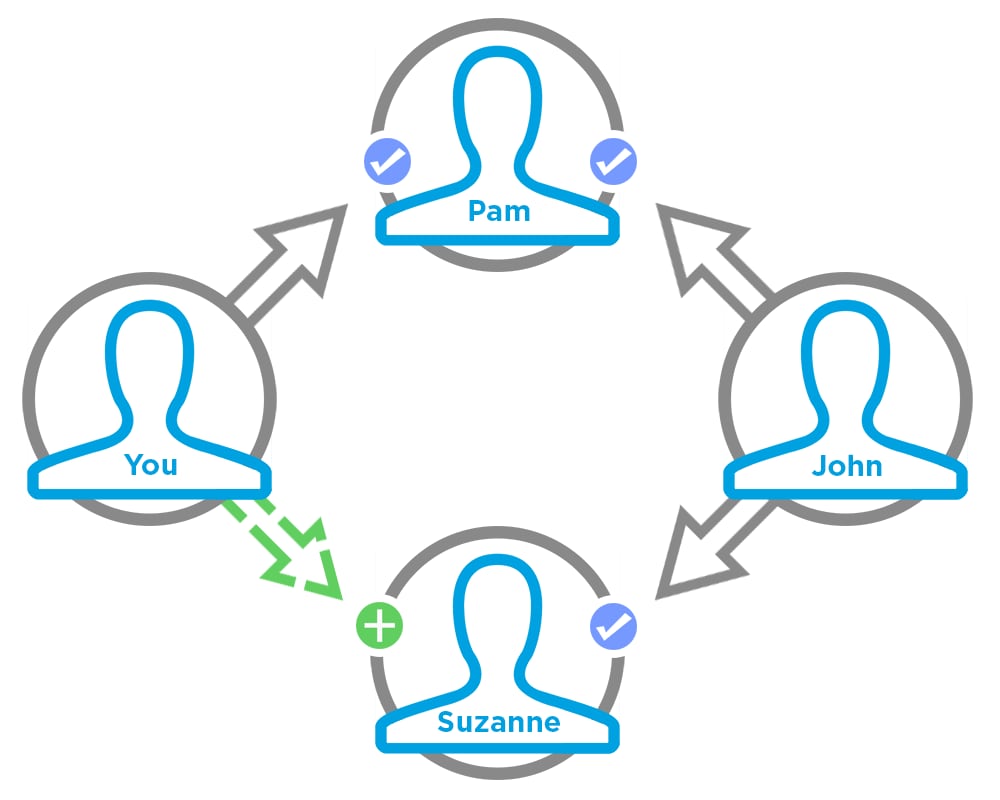
If you want to get recommendations based on a recent action performed, such as following a user, use contextAction and contextObjectId together. For example, if you just followed Pam, you specify follow for contextAction and Pam’s user ID for contextObjectId.
This method only recommends users who are followed by people who follow Pam. In this example, John follows Pam so the method returns a recommendation for you to follow Suzanne since John also follows Suzanne.
To test code that uses this method, use the matching set test method (prefix the method name with setTest). Use the set test method with the same parameters or the code throws an exception.
See Also
- setTestGetRecommendationsForUser(communityId, userId, contextAction, contextObjectId, channel, maxResults, result)
- Apex Developer Guide: Testing ConnectApi Code
Get the Chatter, custom, and static recommendations for the context user for the specified action.
36.0
38.0
Only article and file recommendations are available to guest users.
Yes
public static ConnectApi.RecommendationCollection getRecommendationsForUser(String communityId, String userId, ConnectApi.RecommendationActionType action, ConnectApi.RecommendationActionType contextAction, String contextObjectId, ConnectApi.RecommendationChannel channel, Integer maxResults)
communityId
Type: String
ID for an Experience Cloud site, internal, or null.
userId
Type: String
ID for the context user or the keyword me.
action
Type: ConnectApi.RecommendationActionType
Specifies the action to take on a recommendation.
follow—Follow a file, record, topic, or user.join—Join a group.view—View a file, group, article, record, user, custom, or static recommendation.
contextAction
Type: ConnectApi.RecommendationActionType
Action that the context user just performed. Supported values are:
followview
Use contextAction and contextObjectId together to get new recommendations based on the action just performed. If you don’t want recommendations based on a recent action, specify null.
contextObjectId
Type: String
ID of the object that the context user just performed an action on.
- If contextAction is
follow, contextObjectId is a user ID, file ID, record ID, or topic ID. - If contextAction is
view, contextObjectId is a user ID, file ID, group ID, record ID, or article ID (version 37.0 and later).
Use contextAction and contextObjectId together to get new recommendations based on the action just performed. If you don’t want recommendations based on a recent action, specify null.
channel
Type: ConnectApi.RecommendationChannel
A way to tie custom recommendations together. For example, display recommendations in specific places in the UI or show recommendations based on time of day or geographic locations. Values are:
CustomChannel1—Custom recommendation channel. Not used by default. Work with your community manager to define custom channels. For example, community managers can use Experience Builder to determine where recommendations appear.CustomChannel2—Custom recommendation channel. Not used by default. Work with your community manager to define custom channels.CustomChannel3—Custom recommendation channel. Not used by default. Work with your community manager to define custom channels.CustomChannel4—Custom recommendation channel. Not used by default. Work with your community manager to define custom channels.CustomChannel5—Custom recommendation channel. Not used by default. Work with your community manager to define custom channels.DefaultChannel—Default recommendation channel. Recommendations appear by default on the Home and Question Detail pages of Customer Service and Partner Central Experience Builder templates. They also appear in the feed in the Salesforce mobile web and anywhere community managers add recommendations using Experience Builder.
maxResults
Type: Integer
Maximum number of recommendation results; default is 10. Values must be from 1 to 99.
Type: ConnectApi.RecommendationCollection
If you want to get recommendations based on a recent action performed, such as following a user, use contextAction and contextObjectId together. For example, if you just followed Pam, you specify follow for contextAction and Pam’s user ID for contextObjectId.
This method only recommends users who are followed by people who follow Pam. In this example, John follows Pam so the method returns a recommendation for you to follow Suzanne since John also follows Suzanne.
To test code that uses this method, use the matching set test method (prefix the method name with setTest). Use the set test method with the same parameters or the code throws an exception.
See Also
- setTestGetRecommendationsForUser(communityId, userId, action, contextAction, contextObjectId, channel, maxResults, result)
- Apex Developer Guide: Testing ConnectApi Code
Get the Chatter, custom, and static recommendations for the context user for the specified action and object category.
36.0
38.0
Only article and file recommendations are available to guest users.
Yes
public static ConnectApi.RecommendationCollection getRecommendationsForUser(String communityId, String userId, ConnectApi.RecommendationActionType action, String objectCategory, ConnectApi.RecommendationActionType contextAction, String contextObjectId, ConnectApi.RecommendationChannel channel, Integer maxResults)
communityId
Type: String
ID for an Experience Cloud site, internal, or null.
userId
Type: String
ID for the context user or the keyword me.
action
Type: ConnectApi.RecommendationActionType
Specifies the action to take on a recommendation.
follow—Follow a file, record, topic, or user.join—Join a group.view—View a file, group, article, record, user, custom, or static recommendation.
objectCategory
Type: String
- If action is
follow, objectCategory isusers,files,topics, orrecords. - If action is
join, objectCategory isgroups. - If action is
view, objectCategory isusers,files,groups,records,custom,apps, orarticles(version 37.0 and later).
You can also specify a key prefix, the first three characters of the object ID, as the objectCategory. Valid values are:
- If action is
follow, objectCategory is005(users),069(files),0TO(topics), or001(accounts), for example. - If action is
join, objectCategory is0F9(groups). - If action is
view, objectCategory is005(users),069(files),0F9(groups),0RD(custom recommendations),T(static recommendations),001(accounts), orkA0(articles), for example, (version 370 and later).
contextAction
Type: ConnectApi.RecommendationActionType
Action that the context user just performed. Supported values are:
followview
Use contextAction and contextObjectId together to get new recommendations based on the action just performed. If you don’t want recommendations based on a recent action, specify null.
contextObjectId
Type: String
ID of the object that the context user just performed an action on.
- If contextAction is
follow, contextObjectId is a user ID, file ID, record ID, or topic ID. - If contextAction is
view, contextObjectId is a user ID, file ID, group ID, record ID, or article ID (version 37.0 and later).
Use contextAction and contextObjectId together to get new recommendations based on the action just performed. If you don’t want recommendations based on a recent action, specify null.
channel
Type: ConnectApi.RecommendationChannel
A way to tie custom recommendations together. For example, display recommendations in specific places in the UI or show recommendations based on time of day or geographic locations. Values are:
CustomChannel1—Custom recommendation channel. Not used by default. Work with your community manager to define custom channels. For example, community managers can use Experience Builder to determine where recommendations appear.CustomChannel2—Custom recommendation channel. Not used by default. Work with your community manager to define custom channels.CustomChannel3—Custom recommendation channel. Not used by default. Work with your community manager to define custom channels.CustomChannel4—Custom recommendation channel. Not used by default. Work with your community manager to define custom channels.CustomChannel5—Custom recommendation channel. Not used by default. Work with your community manager to define custom channels.DefaultChannel—Default recommendation channel. Recommendations appear by default on the Home and Question Detail pages of Customer Service and Partner Central Experience Builder templates. They also appear in the feed in the Salesforce mobile web and anywhere community managers add recommendations using Experience Builder.
maxResults
Type: Integer
Maximum number of recommendation results; default is 10. Values must be from 1 to 99.
Type: ConnectApi.RecommendationCollection
If you want to get recommendations based on a recent action performed, such as following a user, use contextAction and contextObjectId together. For example, if you just followed Pam, you specify follow for contextAction and Pam’s user ID for contextObjectId.
This method only recommends users who are followed by people who follow Pam. In this example, John follows Pam so the method returns a recommendation for you to follow Suzanne since John also follows Suzanne.
To test code that uses this method, use the matching set test method (prefix the method name with setTest). Use the set test method with the same parameters or the code throws an exception.
See Also
- setTestGetRecommendationsForUser(communityId, userId, action, objectCategory, contextAction, contextObjectId, channel, maxResults, result)
- Apex Developer Guide: Testing ConnectApi Code
Get a scheduled custom recommendation.
35.0
Yes
public static ConnectApi.ScheduledRecommendation getScheduledRecommendation(String communityId, String scheduledRecommendationId)
- communityId
Type: String
ID for an Experience Cloud site,
internal, ornull.- scheduledRecommendationId
Type: String
ID of the scheduled custom recommendation.
Type: ConnectApi.ScheduledRecommendation
Community managers can access, create, and delete audiences, definitions, and schedules for custom recommendations. (Community managers are users with the Create and Set Up Experiences or Manage Experiences permission.) Users with the Modify All Data permission can also access, create, and delete custom recommendation audiences, custom recommendation definitions, and scheduled custom recommendations.
Get scheduled custom recommendations.
36.0
Yes
public static ConnectApi.ScheduledRecommendationPage getScheduledRecommendations(String communityId, ConnectApi.RecommendationChannel channel)
communityId
Type: String
ID for an Experience Cloud site, internal, or null.
channel
Type: ConnectApi.RecommendationChannel
A way to tie custom recommendations together. For example, display recommendations in specific places in the UI or show recommendations based on time of day or geographic locations. Values are:
CustomChannel1—Custom recommendation channel. Not used by default. Work with your community manager to define custom channels. For example, community managers can use Experience Builder to determine where recommendations appear.CustomChannel2—Custom recommendation channel. Not used by default. Work with your community manager to define custom channels.CustomChannel3—Custom recommendation channel. Not used by default. Work with your community manager to define custom channels.CustomChannel4—Custom recommendation channel. Not used by default. Work with your community manager to define custom channels.CustomChannel5—Custom recommendation channel. Not used by default. Work with your community manager to define custom channels.DefaultChannel—Default recommendation channel. Recommendations appear by default on the Home and Question Detail pages of Customer Service and Partner Central Experience Builder templates. They also appear in the feed in the Salesforce mobile web and anywhere community managers add recommendations using Experience Builder.
Type: ConnectApi.ScheduledRecommendationPage
Community managers can access, create, and delete audiences, definitions, and schedules for custom recommendations. (Community managers are users with the Create and Set Up Experiences or Manage Experiences permission.) Users with the Modify All Data permission can also access, create, and delete custom recommendation audiences, custom recommendation definitions, and scheduled custom recommendations.
Reject a Chatter, custom, or static recommendation for the context user for the specified action and object ID.
33.0
Yes
public static rejectRecommendationForUser(String communityId, String userId, ConnectApi.RecommendationActionType action, String objectId)
communityId
Type: String
ID for an Experience Cloud site, internal, or null.
userId
Type: String
ID for the context user or the keyword me.
action
Type: ConnectApi.RecommendationActionType
Specifies the action to take on a recommendation. Supported values are:
follow—Follow a file, record, topic, or user.join—Join a group.view—View a file, group, article, record, user, custom, or static recommendation.
objectId
Type: String
Specifies the object to take action on.
- If action is
follow, objectId is a user ID, file ID, record ID, or topic ID (version 36.0 and later). - If action is
join, objectId is a group ID. - If action is
view, objectId is a custom recommendation ID, the enumTodayfor static recommendations, or an article ID (version 37.0 and later).
Type: Void
Reject a static recommendation for the context user.
34.0
Yes
public static rejectRecommendationForUser(String communityId, String userId, ConnectApi.RecommendationActionType action, ConnectApi.RecommendedObjectType objectEnum)
communityId
Type: String
ID for an Experience Cloud site, internal, or null.
userId
Type: String
ID for the context user or the keyword me.
action
Type: ConnectApi.RecommendationActionType
Specifies the action to take on a recommendation. Supported values are:
view—View a static recommendation.
objectEnum
Type: ConnectApi.RecommendedObjectType
Specifies the object type to take action on.
Today—Static recommendations that don’t have an ID, for example, the Today app recommendation.
Type: Void
Update a custom recommendation audience.
35.0
Yes
public static ConnectApi.RecommendationAudience updateRecommendationAudience(String communityId, String recommendationAudienceId, ConnectApi.RecommendationAudienceInput recommendationAudience)
- communityId
Type: String
ID for an Experience Cloud site,
internal, ornull.- recommendationAudienceId
Type: String
ID of the custom recommendation audience.
- recommendationAudience
Type:
ConnectApi.RecommendationAudienceInputA
ConnectApi.RecommendationAudienceInputobject.
Type: ConnectApi.RecommendationAudience
Community managers can access, create, and delete audiences, definitions, and schedules for custom recommendations. (Community managers are users with the Create and Set Up Experiences or Manage Experiences permission.) Users with the Modify All Data permission can also access, create, and delete custom recommendation audiences, custom recommendation definitions, and scheduled custom recommendations.
Update a custom recommendation definition with the specified parameters.
35.0
Yes
public static ConnectApi.RecommendationDefinition updateRecommendationDefinition(String communityId, String recommendationDefinitionId, String name, String title, String actionUrl, String actionUrlName, String explanation recommendationDefinition)
- communityId
Type: String
ID for an Experience Cloud site,
internal, ornull.- recommendationDefinitionId
Type: String
ID of the custom recommendation definition.
- name
Type: String
Name of the custom recommendation definition. The name is displayed in Setup.
- title
Type: String
Title of the custom recommendation definition.
- actionUrl
Type: String
URL for acting on the custom recommendation, for example, the URL to join a group.
- actionUrlName
Type: String
Text label for the action URL in the user interface, for example, “Launch.”
- explanation
Type: String
Explanation, or body, of the custom recommendation.
Type: ConnectApi.RecommendationDefinition
Community managers can access, create, and delete audiences, definitions, and schedules for custom recommendations. (Community managers are users with the Create and Set Up Experiences or Manage Experiences permission.) Users with the Modify All Data permission can also access, create, and delete custom recommendation audiences, custom recommendation definitions, and scheduled custom recommendations.
Update a custom recommendation definition.
35.0
Yes
public static ConnectApi.RecommendationDefinition updateRecommendationDefinition(String communityId, String recommendationDefinitionId, ConnectApi.RecommendationDefinitionInput recommendationDefinition)
- communityId
Type: String
ID for an Experience Cloud site,
internal, ornull.- recommendationDefinitionId
Type: String
ID of the custom recommendation definition.
- recommendationDefinition
Type:
ConnectApi.RecommendationDefinitionInputA
ConnectApi.RecommendationDefinitionInputobject containing the properties to update.
Type: ConnectApi.RecommendationDefinition
Community managers can access, create, and delete audiences, definitions, and schedules for custom recommendations. (Community managers are users with the Create and Set Up Experiences or Manage Experiences permission.) Users with the Modify All Data permission can also access, create, and delete custom recommendation audiences, custom recommendation definitions, and scheduled custom recommendations.
Update a custom recommendation definition photo with a file that hasn’t been uploaded.
35.0
Yes
public static ConnectApi.Photo updateRecommendationDefinitionPhoto(String communityId, String recommendationDefinitionId, ConnectApi.BinaryInput fileUpload)
- communityId
Type: String
ID for an Experience Cloud site,
internal, ornull.- recommendationDefinitionId
Type: String
ID of the custom recommendation definition.
- fileUpload
Type:
ConnectApi.BinaryInputFile to use as the photo. The content type must be usable as an image.
Type: ConnectApi.Photo
Community managers can access, create, and delete audiences, definitions, and schedules for custom recommendations. (Community managers are users with the Create and Set Up Experiences or Manage Experiences permission.) Users with the Modify All Data permission can also access, create, and delete custom recommendation audiences, custom recommendation definitions, and scheduled custom recommendations.
Update a custom recommendation definition photo with an uploaded file.
35.0
Yes
public static ConnectApi.Photo updateRecommendationDefinitionPhoto(String communityId, String recommendationDefinitionId, String fileId, Integer versionNumber)
- communityId
Type: String
ID for an Experience Cloud site,
internal, ornull.- recommendationDefinitionId
Type: String
ID of the custom recommendation definition.
- fileId
Type: String
ID of a file already uploaded. The file must be an image, and be smaller than 2 GB.
- versionNumber
Type: Integer
Version number of the existing file. Specify either an existing version number, or
nullto get the latest version.
Type: ConnectApi.Photo
Community managers can access, create, and delete audiences, definitions, and schedules for custom recommendations. (Community managers are users with the Create and Set Up Experiences or Manage Experiences permission.) Users with the Modify All Data permission can also access, create, and delete custom recommendation audiences, custom recommendation definitions, and scheduled custom recommendations.
Update a custom recommendation definition photo with an uploaded file that requires cropping.
35.0
Yes
public static ConnectApi.Photo updateRecommendationDefinitionPhotoWithAttributes(String communityId, String recommendationDefinitionId, ConnectApi.PhotoInput photo)
- communityId
Type: String
ID for an Experience Cloud site,
internal, ornull.- recommendationDefinitionId
Type: String
ID of the custom recommendation definition.
- photo
Type:
ConnectApi.PhotoInputA
ConnectApi.PhotoInputobject specifying the file ID, version number, and cropping parameters.
Type: ConnectApi.Photo
Community managers can access, create, and delete audiences, definitions, and schedules for custom recommendations. (Community managers are users with the Create and Set Up Experiences or Manage Experiences permission.) Users with the Modify All Data permission can also access, create, and delete custom recommendation audiences, custom recommendation definitions, and scheduled custom recommendations.
Update a custom recommendation definition photo with a file that hasn’t been uploaded and requires cropping.
35.0
Yes
public static ConnectApi.Photo updateRecommendationDefinitionPhotoWithAttributes(String communityId, String recommendationDefinitionId, ConnectApi.PhotoInput photo, ConnectApi.BinaryInput fileUpload)
- communityId
Type: String
ID for an Experience Cloud site,
internal, ornull.- recommendationDefinitionId
Type: String
ID of the custom recommendation definition.
- photo
Type:
ConnectApi.PhotoInputA
ConnectApi.PhotoInputobject specifying the cropping parameters.- fileUpload
Type:
ConnectApi.BinaryInputFile to use as the photo. The content type must be usable as an image.
Type: ConnectApi.Photo
Community managers can access, create, and delete audiences, definitions, and schedules for custom recommendations. (Community managers are users with the Create and Set Up Experiences or Manage Experiences permission.) Users with the Modify All Data permission can also access, create, and delete custom recommendation audiences, custom recommendation definitions, and scheduled custom recommendations.
Update a scheduled custom recommendation.
35.0
Yes
public static ConnectApi.ScheduledRecommendation updateScheduledRecommendation(String communityId, String scheduledRecommendationId, ConnectApi.ScheduledRecommendationInput scheduledRecommendation)
- communityId
Type: String
ID for an Experience Cloud site,
internal, ornull.- scheduledRecommendationId
Type: String
ID of the scheduled custom recommendation.
- scheduledRecommendation
Type:
ConnectApi.ScheduledRecommendationInputA
ConnectApi.ScheduledRecommendationInputobject containing the properties to update.
Type: ConnectApi.ScheduledRecommendation
Community managers can access, create, and delete audiences, definitions, and schedules for custom recommendations. (Community managers are users with the Create and Set Up Experiences or Manage Experiences permission.) Users with the Modify All Data permission can also access, create, and delete custom recommendation audiences, custom recommendation definitions, and scheduled custom recommendations.
Ranking scheduled custom recommendations example
If you have these scheduled custom recommendations:
| Scheduled Recommendations | Rank |
|---|---|
| ScheduledRecommendationA | 1 |
| ScheduledRecommendationB | 2 |
| ScheduledRecommendationC | 3 |
And you include this information in the Scheduled Custom Recommendation Input:
| Scheduled Recommendation | Rank |
|---|---|
| ScheduledRecommendationD | 2 |
The result is:
| Scheduled Recommendation | Rank |
|---|---|
| ScheduledRecommendationA | 1 |
| ScheduledRecommendationD | 2 |
| ScheduledRecommendationB | 3 |
| ScheduledRecommendationC | 4 |
Update a scheduled custom recommendation with the specified parameters.
35.0
Yes
public static ConnectApi.ScheduledRecommendation updateScheduledRecommendation(String communityId, String scheduledRecommendationId, Integer rank, Boolean enabled, String recommendationAudienceId)
- communityId
Type: String
ID for an Experience Cloud site,
internal, ornull.- scheduledRecommendationId
Type: String
ID of the scheduled custom recommendation.
- rank
Type: Integer
Relative rank of the scheduled custom recommendation indicated by ascending whole numbers starting with 1.
Setting the rank is comparable to an insertion into an ordered list. The scheduled custom recommendation is inserted into the position specified by the
rank. Therankof all the scheduled custom recommendations after it is pushed down. See Ranking scheduled custom recommendations example.If the specified
rankis larger than the size of the list, the scheduled custom recommendation is put at the end of the list. Therankof the scheduled custom recommendation is the size of the list, instead of the one specified.If a
rankis not specified, the scheduled custom recommendation is put at the end of the list.- enabled
Type: Boolean
Indicates whether scheduling is enabled. If
true, the custom recommendation is enabled and appears in Experience Cloud sites. Iffalse, custom recommendations in feeds in Salesforce mobile web aren’t removed, but no new custom recommendations appear. In Customer Service and Partner Central sites, disabled custom recommendations no longer appear.- recommendationAudienceId
Type: String
ID of the custom recommendation definition that this scheduled recommendation schedules.
Type: ConnectApi.ScheduledRecommendation
Community managers can access, create, and delete audiences, definitions, and schedules for custom recommendations. (Community managers are users with the Create and Set Up Experiences or Manage Experiences permission.) Users with the Modify All Data permission can also access, create, and delete custom recommendation audiences, custom recommendation definitions, and scheduled custom recommendations.
Ranking scheduled custom recommendations example
If you have these scheduled custom recommendations:
| Scheduled Recommendations | Rank |
|---|---|
| ScheduledRecommendationA | 1 |
| ScheduledRecommendationB | 2 |
| ScheduledRecommendationC | 3 |
And you include this information in the Scheduled Custom Recommendation Input:
| Scheduled Recommendation | Rank |
|---|---|
| ScheduledRecommendationD | 2 |
The result is:
| Scheduled Recommendation | Rank |
|---|---|
| ScheduledRecommendationA | 1 |
| ScheduledRecommendationD | 2 |
| ScheduledRecommendationB | 3 |
| ScheduledRecommendationC | 4 |
These test methods are for Recommendations. All methods are static.
For information about using these methods to test your ConnectApi code, see Testing ConnectApi Code.
-
setTestGetRecommendationForUser(communityId, userId, action, objectId, result)
Register a
ConnectApi.RecommendationCollectionobject to be returned whengetRecommendationForUseris called with matching parameters in a test context. Use the method with the same parameters or the code throws an exception. -
Register a
ConnectApi.RecommendationCollectionobject to be returned whengetRecommendationsForUseris called with matching parameters in a test context. Use the method with the same parameters or the code throws an exception. -
Register a
ConnectApi.RecommendationCollectionobject to be returned whengetRecommendationsForUseris called with matching parameters in a test context. Use the method with the same parameters or the code throws an exception. -
Register a
ConnectApi.RecommendationCollectionobject to be returned whengetRecommendationsForUseris called with matching parameters in a test context. Use the method with the same parameters or the code throws an exception.
Register a ConnectApi.RecommendationCollection object to be returned when getRecommendationForUser is called with matching parameters in a test context. Use the method with the same parameters or the code throws an exception.
33.0
Yes
public static Void setTestGetRecommendationForUser(String communityId, String userId, ConnectApi.RecommendationActionType action, String objectId, ConnectApi.RecommendationCollection result)
communityId
Type: String
ID for an Experience Cloud site, internal, or null.
userId
Type: String
ID for the context user or the keyword me.
action
Type: ConnectApi.RecommendationActionType
Specifies the action to take on a recommendation.
follow—Follow a file, record, topic, or user.join—Join a group.view—View a file, group, article, record, user, custom, or static recommendation.
objectId
Type: String
Specifies the object to take action on.
- If action is
follow, objectId is a user ID, file ID, record ID, or topic ID (version 36.0 and later). - If action is
join, objectId is a group ID. - If action is
view, objectId is a user ID, file ID, group ID, record ID, custom recommendation ID, the enumTodayfor static recommendations, or an article ID (version 37.0 and later).
result
Type: ConnectApi.RecommendationCollection
Object containing test data.
Type: Void
See Also
- getRecommendationForUser(communityId, userId, action, objectId)
- Apex Developer Guide: Testing ConnectApi Code
Register a ConnectApi.RecommendationCollection object to be returned when getRecommendationsForUser is called with matching parameters in a test context. Use the method with the same parameters or the code throws an exception.
36.0
Yes
public static Void setTestGetRecommendationsForUser(String communityId, String userId, ConnectApi.RecommendationActionType contextAction, String contextObjectId, ConnectApi.RecommendationChannel channel, Integer maxResults, ConnectApi.RecommendationCollection result)
communityId
Type: String
ID for an Experience Cloud site, internal, or null.
userId
Type: String
ID for the context user or the keyword me.
contextAction
Type: ConnectApi.RecommendationActionType
Action that the context user just performed. Supported values are:
followview
Use contextAction and contextObjectId together to get new recommendations based on the action just performed. If you don’t want recommendations based on a recent action, specify null.
contextObjectId
Type: String
ID of the object that the context user just performed an action on.
- If contextAction is
follow, contextObjectId is a user ID, file ID, record ID, or topic ID. - If contextAction is
view, contextObjectId is a user ID, file ID, group ID, record ID, or article ID (version 37.0 and later).
Use contextAction and contextObjectId together to get new recommendations based on the action just performed. If you don’t want recommendations based on a recent action, specify null.
channel
Type: ConnectApi.RecommendationChannel
A way to tie custom recommendations together. For example, display recommendations in specific places in the UI or show recommendations based on time of day or geographic locations. Values are:
CustomChannel1—Custom recommendation channel. Not used by default. Work with your community manager to define custom channels. For example, community managers can use Experience Builder to determine where recommendations appear.CustomChannel2—Custom recommendation channel. Not used by default. Work with your community manager to define custom channels.CustomChannel3—Custom recommendation channel. Not used by default. Work with your community manager to define custom channels.CustomChannel4—Custom recommendation channel. Not used by default. Work with your community manager to define custom channels.CustomChannel5—Custom recommendation channel. Not used by default. Work with your community manager to define custom channels.DefaultChannel—Default recommendation channel. Recommendations appear by default on the Home and Question Detail pages of Customer Service and Partner Central Experience Builder templates. They also appear in the feed in the Salesforce mobile web and anywhere community managers add recommendations using Experience Builder.
maxResults
Type: Integer
Maximum number of recommendation results; default is 10. Values must be from 1 to 99.
result
Type: ConnectApi.RecommendationCollection
Object containing test data.
Type: Void
See Also
- getRecommendationsForUser(communityId, userId, contextAction, contextObjectId, channel, maxResults)
- Apex Developer Guide: Testing ConnectApi Code
Register a ConnectApi.RecommendationCollection object to be returned when getRecommendationsForUser is called with matching parameters in a test context. Use the method with the same parameters or the code throws an exception.
36.0
Yes
public static Void setTestGetRecommendationsForUser(String communityId, String userId, ConnectApi.RecommendationActionType action, ConnectApi.RecommendationActionType contextAction, String contextObjectId, ConnectApi.RecommendationChannel channel, Integer maxResults, ConnectApi.RecommendationCollection result)
communityId
Type: String
ID for an Experience Cloud site, internal, or null.
userId
Type: String
ID for the context user or the keyword me.
action
Type: ConnectApi.RecommendationActionType
Specifies the action to take on a recommendation.
follow—Follow a file, record, topic, or user.join—Join a group.view—View a file, group, article, record, user, custom, or static recommendation.
contextAction
Type: ConnectApi.RecommendationActionType
Action that the context user just performed. Supported values are:
followview
Use contextAction and contextObjectId together to get new recommendations based on the action just performed. If you don’t want recommendations based on a recent action, specify null.
contextObjectId
Type: String
ID of the object that the context user just performed an action on.
- If contextAction is
follow, contextObjectId is a user ID, file ID, record ID, or topic ID. - If contextAction is
view, contextObjectId is a user ID, file ID, group ID, record ID, or article ID (version 37.0 and later).
Use contextAction and contextObjectId together to get new recommendations based on the action just performed. If you don’t want recommendations based on a recent action, specify null.
channel
Type: ConnectApi.RecommendationChannel
A way to tie custom recommendations together. For example, display recommendations in specific places in the UI or show recommendations based on time of day or geographic locations. Values are:
CustomChannel1—Custom recommendation channel. Not used by default. Work with your community manager to define custom channels. For example, community managers can use Experience Builder to determine where recommendations appear.CustomChannel2—Custom recommendation channel. Not used by default. Work with your community manager to define custom channels.CustomChannel3—Custom recommendation channel. Not used by default. Work with your community manager to define custom channels.CustomChannel4—Custom recommendation channel. Not used by default. Work with your community manager to define custom channels.CustomChannel5—Custom recommendation channel. Not used by default. Work with your community manager to define custom channels.DefaultChannel—Default recommendation channel. Recommendations appear by default on the Home and Question Detail pages of Customer Service and Partner Central Experience Builder templates. They also appear in the feed in the Salesforce mobile web and anywhere community managers add recommendations using Experience Builder.
maxResults
Type: Integer
Maximum number of recommendation results; default is 10. Values must be from 1 to 99.
result
Type: ConnectApi.RecommendationCollection
Object containing test data.
Type: Void
See Also
- getRecommendationsForUser(communityId, userId, action, contextAction, contextObjectId, channel, maxResults)
- Apex Developer Guide: Testing ConnectApi Code
Register a ConnectApi.RecommendationCollection object to be returned when getRecommendationsForUser is called with matching parameters in a test context. Use the method with the same parameters or the code throws an exception.
36.0
Yes
public static Void setTestGetRecommendationsForUser(String communityId, String userId, ConnectApi.RecommendationActionType action, String objectCategory, ConnectApi.RecommendationActionType contextAction, String contextObjectId, ConnectApi.RecommendationChannel channel, Integer maxResults, ConnectApi.RecommendationCollection result)
communityId
Type: String
ID for an Experience Cloud site, internal, or null.
userId
Type: String
ID for the context user or the keyword me.
action
Type: ConnectApi.RecommendationActionType
Specifies the action to take on a recommendation.
follow—Follow a file, record, topic, or user.join—Join a group.view—View a file, group, article, record, user, custom, or static recommendation.
objectCategory
Type: String
- If action is
follow, objectCategory isusers,files,records, ortopics. - If action is
join, objectCategory isgroups. - If action is
view, objectCategory isusers,files,groups,records,custom,apps, orarticles(version 37.0 and later).
You can also specify a key prefix, the first three characters of the object ID, as the objectCategory. Valid values are:
- If action is
follow, objectCategory is005(users),069(files),0TO(topics), or001(accounts), for example. - If action is
join, objectCategory is0F9(groups). - If action is
view, objectCategory is005(users),069(files),0F9(groups),0RD(custom recommendations),T(static recommendations),001(accounts), orkA0(articles), for example, (version 370 and later).
contextAction
Type: ConnectApi.RecommendationActionType
Action that the context user just performed. Supported values are:
followview
Use contextAction and contextObjectId together to get new recommendations based on the action just performed. If you don’t want recommendations based on a recent action, specify null.
contextObjectId
Type: String
ID of the object that the context user just performed an action on.
- If contextAction is
follow, contextObjectId is a user ID, file ID, record ID, or topic ID. - If contextAction is
view, contextObjectId is a user ID, file ID, group ID, record ID, or article ID (version 37.0 and later).
Use contextAction and contextObjectId together to get new recommendations based on the action just performed. If you don’t want recommendations based on a recent action, specify null.
channel
Type: ConnectApi.RecommendationChannel
A way to tie custom recommendations together. For example, display recommendations in specific places in the UI or show recommendations based on time of day or geographic locations. Values are:
CustomChannel1—Custom recommendation channel. Not used by default. Work with your community manager to define custom channels. For example, community managers can use Experience Builder to determine where recommendations appear.CustomChannel2—Custom recommendation channel. Not used by default. Work with your community manager to define custom channels.CustomChannel3—Custom recommendation channel. Not used by default. Work with your community manager to define custom channels.CustomChannel4—Custom recommendation channel. Not used by default. Work with your community manager to define custom channels.CustomChannel5—Custom recommendation channel. Not used by default. Work with your community manager to define custom channels.DefaultChannel—Default recommendation channel. Recommendations appear by default on the Home and Question Detail pages of Customer Service and Partner Central Experience Builder templates. They also appear in the feed in the Salesforce mobile web and anywhere community managers add recommendations using Experience Builder.
maxResults
Type: Integer
Maximum number of recommendation results; default is 10. Values must be from 1 to 99.
result
Type: ConnectApi.RecommendationCollection
Object containing test data.
Type: Void
See Also
- getRecommendationsForUser(communityId, userId, action, objectCategory, contextAction, contextObjectId, channel, maxResults)
- Apex Developer Guide: Testing ConnectApi Code
These methods for Recommendations are retired.
-
Create a scheduled custom recommendation with the specified parameters.
-
getRecommendationsForUser(communityId, userId, contextAction, contextObjectId, maxResults)
Get the Chatter recommendations, such as user, group, file, and record recommendations for the context user. Get the custom and static recommendations for the context user.
-
getRecommendationsForUser(communityId, userId, action, contextAction, contextObjectId, maxResults)
Get the Chatter, custom, and static recommendations for the context user for the specified action.
-
Get the Chatter, custom, and static recommendations for the context user for the specified action and object category.
-
getScheduledRecommendations(communityId)
Get scheduled custom recommendations.
-
Register a
ConnectApi.RecommendationCollectionobject to be returned whengetRecommendationsForUseris called with matching parameters in a test context. Use the method with the same parameters or the code throws an exception. -
Register a
ConnectApi.RecommendationCollectionobject to be returned whengetRecommendationsForUseris called with matching parameters in a test context. Use the method with the same parameters or the code throws an exception. -
Register a
ConnectApi.RecommendationCollectionobject to be returned whengetRecommendationsForUseris called with matching parameters in a test context. Use the method with the same parameters or the code throws an exception.
Create a scheduled custom recommendation with the specified parameters.
35.0 only
In version 36.0 and later, use createScheduledRecommendation(communityId, recommendationDefinitionId, rank, enabled, recommendationAudienceId, channel).
Yes
public static ConnectApi.ScheduledRecommendation createScheduledRecommendation(String communityId, String recommendationDefinitionId, Integer rank, Boolean enabled, String recommendationAudienceId)
- communityId
Type: String
ID for an Experience Cloud site,
internal, ornull.- recommendationDefinitionId
Type: String
ID of the custom recommendation definition.
- rank
Type: Integer
Relative rank of the scheduled custom recommendation indicated by ascending whole numbers starting with 1.
Setting the rank is comparable to an insertion into an ordered list. The scheduled custom recommendation is inserted into the position specified by the
rank. Therankof all the scheduled custom recommendations after it is pushed down. See Ranking scheduled custom recommendations example.If the specified
rankis larger than the size of the list, the scheduled custom recommendation is put at the end of the list. Therankof the scheduled custom recommendation is the size of the list, instead of the one specified.If a
rankis not specified, the scheduled custom recommendation is put at the end of the list.- enabled
Type: Boolean
Indicates whether scheduling is enabled. If
true, the custom recommendation is enabled and appears in Experience Cloud sites. Iffalse, custom recommendations in feeds in Salesforce mobile web aren’t removed, but no new custom recommendations appear. In Customer Service and Partner Central sites, disabled custom recommendations no longer appear.- recommendationAudienceId
Type: String
ID of the custom recommendation definition that this scheduled recommendation schedules.
Type: ConnectApi.ScheduledRecommendation
Community managers can access, create, and delete audiences, definitions, and schedules for custom recommendations. (Community managers are users with the Create and Set Up Experiences or Manage Experiences permission.) Users with the Modify All Data permission can also access, create, and delete custom recommendation audiences, custom recommendation definitions, and scheduled custom recommendations.
Ranking scheduled custom recommendations example
If you have these scheduled custom recommendations:
| Scheduled Recommendations | Rank |
|---|---|
| ScheduledRecommendationA | 1 |
| ScheduledRecommendationB | 2 |
| ScheduledRecommendationC | 3 |
And you include this information in the Scheduled Custom Recommendation Input:
| Scheduled Recommendation | Rank |
|---|---|
| ScheduledRecommendationD | 2 |
The result is:
| Scheduled Recommendation | Rank |
|---|---|
| ScheduledRecommendationA | 1 |
| ScheduledRecommendationD | 2 |
| ScheduledRecommendationB | 3 |
| ScheduledRecommendationC | 4 |
Get the Chatter recommendations, such as user, group, file, and record recommendations for the context user. Get the custom and static recommendations for the context user.
33.0–35.0
In version 36.0 and later, use getRecommendationsForUser(communityId, userId, contextAction, contextObjectId, channel, maxResults).
Yes
public static ConnectApi.RecommendationCollection getRecommendationsForUser(String communityId, String userId, ConnectApi.RecommendationActionType contextAction, String contextObjectId, Integer maxResults)
- communityId
Type: String
ID for an Experience Cloud site,
internal, ornull.- userId
Type: String
ID for the context user or the keyword
me.- contextAction
Type:
ConnectApi.RecommendationActionTypeAction that the context user just performed. Supported values are:
followview
Use contextAction and contextObjectId together to get new recommendations based on the action just performed. If you don’t want recommendations based on a recent action, specify
null.- contextObjectId
Type: String
ID of the object that the context user just performed an action on.
- If contextAction is
follow, contextObjectId is a user ID, file ID, or record ID. - If contextAction is
view, contextObjectId is a user ID, file ID, group ID, or record ID.
Use contextAction and contextObjectId together to get new recommendations based on the action just performed. If you don’t want recommendations based on a recent action, specify
null.- If contextAction is
- maxResults
Type: Integer
Maximum number of recommendation results; default is 10. Values must be from 1 to 99.
Type: ConnectApi.RecommendationCollection
If you want to get recommendations based on a recent action performed, such as following a user, use contextAction and contextObjectId together. For example, if you just followed Pam, you specify follow for contextAction and Pam’s user ID for contextObjectId.
This method only recommends users who are followed by people who follow Pam. In this example, John follows Pam so the method returns a recommendation for you to follow Suzanne since John also follows Suzanne.
To test code that uses this method, use the matching set test method (prefix the method name with setTest). Use the set test method with the same parameters or the code throws an exception.
See Also
- setTestGetRecommendationsForUser(communityId, userId, contextAction, contextObjectId, maxResults, result)
- Apex Developer Guide: Testing ConnectApi Code
Get the Chatter, custom, and static recommendations for the context user for the specified action.
33.0–35.0
In version 36.0 and later, use getRecommendationsForUser(communityId, userId, action, contextAction, contextObjectId, channel, maxResults).
Yes
public static ConnectApi.RecommendationCollection getRecommendationsForUser(String communityId, String userId, ConnectApi.RecommendationActionType action, ConnectApi.RecommendationActionType contextAction, String contextObjectId, Integer maxResults)
communityId
Type: String
ID for an Experience Cloud site, internal, or null.
userId
Type: String
ID for the context user or the keyword me.
action
Type: ConnectApi.RecommendationActionType
Specifies the action to take on a recommendation.
follow—Follow a file, record, topic, or user.join—Join a group.view—View a file, group, article, record, user, custom, or static recommendation.
contextAction
Type: ConnectApi.RecommendationActionType
Action that the context user just performed. Supported values are:
followview
Use contextAction and contextObjectId together to get new recommendations based on the action just performed. If you don’t want recommendations based on a recent action, specify null.
contextObjectId
Type: String
ID of the object that the context user just performed an action on.
- If contextAction is
follow, contextObjectId is a user ID, file ID, or record ID. - If contextAction is
view, contextObjectId is a user ID, file ID, group ID, or record ID.
Use contextAction and contextObjectId together to get new recommendations based on the action just performed. If you don’t want recommendations based on a recent action, specify null.
maxResults
Type: Integer
Maximum number of recommendation results; default is 10. Values must be from 1 to 99.
Type: ConnectApi.RecommendationCollection
If you want to get recommendations based on a recent action performed, such as following a user, use contextAction and contextObjectId together. For example, if you just followed Pam, you specify follow for contextAction and Pam’s user ID for contextObjectId.
This method only recommends users who are followed by people who follow Pam. In this example, John follows Pam so the method returns a recommendation for you to follow Suzanne since John also follows Suzanne.
To test code that uses this method, use the matching set test method (prefix the method name with setTest). Use the set test method with the same parameters or the code throws an exception.
See Also
- setTestGetRecommendationsForUser(communityId, userId, action, contextAction, contextObjectId, maxResults, result)
- Apex Developer Guide: Testing ConnectApi Code
Get the Chatter, custom, and static recommendations for the context user for the specified action and object category.
33.0–35.0
In version 36.0 and later, use getRecommendationsForUser(communityId, userId, action, objectCategory, contextAction, contextObjectId, channel, maxResults).
Yes
public static ConnectApi.RecommendationCollection getRecommendationsForUser(String communityId, String userId, ConnectApi.RecommendationActionType action, String objectCategory, ConnectApi.RecommendationActionType contextAction, String contextObjectId, Integer maxResults)
communityId
Type: String
ID for an Experience Cloud site, internal, or null.
userId
Type: String
ID for the context user or the keyword me.
action
Type: ConnectApi.RecommendationActionType
Specifies the action to take on a recommendation.
follow—Follow a file, record, topic, or user.join—Join a group.view—View a file, group, article, record, user, custom, or static recommendation.
objectCategory
Type: String
- If action is
follow, objectCategory isusers,files, orrecords. - If action is
join, objectCategory isgroups. - If action is
view, objectCategory isusers,files,groups,records,custom, orapps.
You can also specify a key prefix, the first three characters of the object ID, as the objectCategory. Valid values are:
- If action is
follow, objectCategory is005(users),069(files), or001(accounts), for example. - If action is
join, objectCategory is0F9(groups). - If action is
view, objectCategory is005(users),069(files),0F9(groups),0RD(custom recommendations),T(static recommendations), or001(accounts), for example.
contextAction
Type: ConnectApi.RecommendationActionType
Action that the context user just performed. Supported values are:
followview
Use contextAction and contextObjectId together to get new recommendations based on the action just performed. If you don’t want recommendations based on a recent action, specify null.
contextObjectId
Type: String
ID of the object that the context user just performed an action on.
- If contextAction is
follow, contextObjectId is a user ID, file ID, or record ID. - If contextAction is
view, contextObjectId is a user ID, file ID, group ID, or record ID.
Use contextAction and contextObjectId together to get new recommendations based on the action just performed. If you don’t want recommendations based on a recent action, specify null.
maxResults
Type: Integer
Maximum number of recommendation results; default is 10. Values must be from 1 to 99.
Type: ConnectApi.RecommendationCollection
If you want to get recommendations based on a recent action performed, such as following a user, use contextAction and contextObjectId together. For example, if you just followed Pam, you specify follow for contextAction and Pam’s user ID for contextObjectId.
This method only recommends users who are followed by people who follow Pam. In this example, John follows Pam so the method returns a recommendation for you to follow Suzanne since John also follows Suzanne.
To test code that uses this method, use the matching set test method (prefix the method name with setTest). Use the set test method with the same parameters or the code throws an exception.
See Also
- setTestGetRecommendationsForUser(communityId, userId, action, objectCategory, contextAction, contextObjectId, maxResults, result)
- Apex Developer Guide: Testing ConnectApi Code
Get scheduled custom recommendations.
35.0 only
In version 36.0 and later, use getScheduledRecommendations(communityId, channel).
Yes
public static ConnectApi.ScheduledRecommendationPage getScheduledRecommendations(String communityId)
- communityId
Type: String
ID for an Experience Cloud site,
internal, ornull.
Type: ConnectApi.ScheduledRecommendationPage
Community managers can access, create, and delete audiences, definitions, and schedules for custom recommendations. (Community managers are users with the Create and Set Up Experiences or Manage Experiences permission.) Users with the Modify All Data permission can also access, create, and delete custom recommendation audiences, custom recommendation definitions, and scheduled custom recommendations.
Register a ConnectApi.RecommendationCollection object to be returned when getRecommendationsForUser is called with matching parameters in a test context. Use the method with the same parameters or the code throws an exception.
33.0–35.0
Yes
public static Void setTestGetRecommendationsForUser(String communityId, String userId, ConnectApi.RecommendationActionType contextAction, String contextObjectId, Integer maxResults, ConnectApi.RecommendationCollection result)
- communityId
Type: String
ID for an Experience Cloud site,
internal, ornull.- userId
Type: String
ID for the context user or the keyword
me.- contextAction
Type:
ConnectApi.RecommendationActionTypeAction that the context user just performed. Supported values are:
followview
Use contextAction and contextObjectId together to get new recommendations based on the action just performed. If you don’t want recommendations based on a recent action, specify
null.- contextObjectId
Type: String
ID of the object that the context user just performed an action on.
- If contextAction is
follow, contextObjectId is a user ID, file ID, or record ID. - If contextAction is
view, contextObjectId is a user ID, file ID, group ID, or record ID.
Use contextAction and contextObjectId together to get new recommendations based on the action just performed. If you don’t want recommendations based on a recent action, specify
null.- If contextAction is
- maxResults
Type: Integer
Maximum number of recommendation results; default is 10. Values must be from 1 to 99.
- result
Type:
ConnectApi.RecommendationCollectionObject containing test data.
Type: Void
See Also
- getRecommendationsForUser(communityId, userId, contextAction, contextObjectId, maxResults)
- Apex Developer Guide: Testing ConnectApi Code
Register a ConnectApi.RecommendationCollection object to be returned when getRecommendationsForUser is called with matching parameters in a test context. Use the method with the same parameters or the code throws an exception.
33.0–35.0
Yes
public static Void setTestGetRecommendationsForUser(String communityId, String userId, ConnectApi.RecommendationActionType action, ConnectApi.RecommendationActionType contextAction, String contextObjectId, Integer maxResults, ConnectApi.RecommendationCollection result)
communityId
Type: String
ID for an Experience Cloud site, internal, or null.
userId
Type: String
ID for the context user or the keyword me.
action
Type: ConnectApi.RecommendationActionType
Specifies the action to take on a recommendation.
follow—Follow a file, record, topic, or user.join—Join a group.view—View a file, group, article, record, user, custom, or static recommendation.
contextAction
Type: ConnectApi.RecommendationActionType
Action that the context user just performed. Supported values are:
followview
Use contextAction and contextObjectId together to get new recommendations based on the action just performed. If you don’t want recommendations based on a recent action, specify null.
contextObjectId
Type: String
ID of the object that the context user just performed an action on.
- If contextAction is
follow, contextObjectId is a user ID, file ID, or record ID. - If contextAction is
view, contextObjectId is a user ID, file ID, group ID, or record ID.
Use contextAction and contextObjectId together to get new recommendations based on the action just performed. If you don’t want recommendations based on a recent action, specify null.
maxResults
Type: Integer
Maximum number of recommendation results; default is 10. Values must be from 1 to 99.
result
Type: ConnectApi.RecommendationCollection
Object containing test data.
Type: Void
See Also
- getRecommendationsForUser(communityId, userId, action, contextAction, contextObjectId, maxResults)
- Apex Developer Guide: Testing ConnectApi Code
Register a ConnectApi.RecommendationCollection object to be returned when getRecommendationsForUser is called with matching parameters in a test context. Use the method with the same parameters or the code throws an exception.
33.0–35.0
Yes
public static Void setTestGetRecommendationsForUser(String communityId, String userId, ConnectApi.RecommendationActionType action, String objectCategory, ConnectApi.RecommendationActionType contextAction, String contextObjectId, Integer maxResults, ConnectApi.RecommendationCollection result)
communityId
Type: String
ID for an Experience Cloud site, internal, or null.
userId
Type: String
ID for the context user or the keyword me.
action
Type: ConnectApi.RecommendationActionType
Specifies the action to take on a recommendation.
follow—Follow a file, record, topic, or user.join—Join a group.view—View a file, group, article, record, user, custom, or static recommendation.
objectCategory
Type: String
- If action is
follow, objectCategory isusers,files, orrecords. - If action is
join, objectCategory isgroups. - If action is
view, objectCategory isusers,files,groups,records,custom, orapps.
You can also specify a key prefix, the first three characters of the object ID, as the objectCategory. Valid values are:
- If action is
follow, objectCategory is005(users),069(files), or001(accounts), for example. - If action is
join, objectCategory is0F9(groups). - If action is
view, objectCategory is005(users),069(files),0F9(groups),0RD(custom recommendations),T(static recommendations), or001(accounts), for example.
contextAction
Type: ConnectApi.RecommendationActionType
Action that the context user just performed. Supported values are:
followview
Use contextAction and contextObjectId together to get new recommendations based on the action just performed. If you don’t want recommendations based on a recent action, specify null.
contextObjectId
Type: String
ID of the object that the context user just performed an action on.
- If contextAction is
follow, contextObjectId is a user ID, file ID, or record ID. - If contextAction is
view, contextObjectId is a user ID, file ID, group ID, or record ID.
Use contextAction and contextObjectId together to get new recommendations based on the action just performed. If you don’t want recommendations based on a recent action, specify null.
maxResults
Type: Integer
Maximum number of recommendation results; default is 10. Values must be from 1 to 99.
result
Type: ConnectApi.RecommendationCollection
Object containing test data.
Type: Void
See Also