# Dynamically Update a Flow Screen with an Aura Component

To conditionally display a field on your screen, build an Aura component that uses `aura:if` to check when parts of the component should appear.

In this example, this component (`c:flowDynamicScreen`) displays a custom script component and a group of radio buttons. The component gets the contact's existing phone number from the flow, and uses that value to fill in the script.
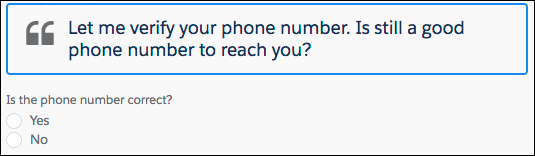
![A flow screen that shows a script and a radio button field.](https://a.sfdcstatic.com/developer-website/sfdocs/platform/media/aura-platform/flow_dynamicform1.png)

If the user selects the No radio button, the component displays an input, where the user can enter the new phone number.
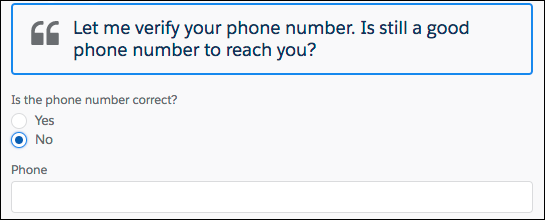
![When No is selected, the Phone field displays.](https://a.sfdcstatic.com/developer-website/sfdocs/platform/media/aura-platform/flow_dynamicform2.png)

## c:flowDynamicScreen Component

```nolang
<aura:component access="global" implements="lightning:availableForFlowScreens">
   <aura:attribute name="oldPhone" type="String" />
   <aura:attribute name="newPhone" type="String" />
   <aura:attribute name="radioOptions" type="List" default="[
      {'label': 'Yes', 'value': 'false'},
      {'label': 'No', 'value': 'true'} ]"/>
   <aura:attribute name="radioValue" type="Boolean" />

   <!-- Displays script to guide the agent's call -->
   <div class="script-container">
      <div class="slds-card__header slds-grid slds-p-bottom_small slds-m-bottom_none">
         <div class="slds-media slds-media_center slds-has-flexi-truncate" >
            <div class="slds-media__figure slds-align-top">
               <h2><lightning:icon iconName="utility:quotation_marks"
                  title="Suggested script" /></h2>
            </div>
            <div class="slds-media__body">
               <!-- Inserts the user’s current number, pulled from the flow, into the script -->
               <ui:outputRichText class="script" value="{!'Let me verify your phone number.
                  Is ' + v.oldPhone + ' still a good phone number to reach you?'}"/>
            </div>
         </div>
      </div>
   </div>
   <!-- Displays a radio button group to enter the customer’s response -->
   <div class="slds-p-top_medium slds-p-bottom_medium">
      <lightning:radioGroup aura:id="rbg_correct" name="rbg_correct"
         label="Is the phone number correct?"
         options="{! v.radioOptions }" value="{! v.radioValue }" />
      <!-- If the current number is wrong,
         displays a field to enter the correct number -->
      <aura:if isTrue="{!v.radioValue}">
         <lightning:input type="tel" aura:id="phone_updated" label="Phone"
            onblur="{!c.handleNewPhone}" class="slds-p-top_small"/>
      </aura:if>
   </div>
</aura:component>
```

## c:flowDynamicScreen Style

```nolang
.THIS.script-container {
   border: t(borderWidthThick) solid t(colorBorderBrand);
   border-radius: t(borderRadiusMedium);
}

.THIS .script {
   font-size: 1.125rem; /*t(fontSizeTextLarge)*/
   font-weight: t(fontWeightRegular);
   line-height: t(lineHeightHeading);
}
```

## c:flowDynamicScreen Controller

When the user tabs out, or otherwise removes focus from the Phone input, the controller sets the `newPhone` attribute to the input value, so that you can reference the new number in the flow.

```javascript
({
  handleNewPhone: function (cmp, event, helper) {
    cmp.set("v.newPhone", cmp.find("phone_updated").get("v.value"));
  },
});
```

## defaultTokens.tokens

The script in `c:flowDynamicScreen` uses tokens to stay in sync with the Salesforce Lightning Design System styles.

```nolang
<aura:tokens extends="force:base" >
</aura:tokens>
```

**See Also**

- [Customize the Flow Header with an Aura Component](/docs/platform/aura-platform/guide/components-config-for-flow-screens-replace-header.md)
- [Customize the Flow Footer with an Aura Component](/docs/platform/aura-platform/guide/components-config-for-flow-screens-replace-footer.md)
- [*Component Library*: lightning:availableForFlowScreens Interface](https://developer.salesforce.com/docs/component-library/bundle/lightning\:availableForFlowScreens/documentation)
