# Component IDs
A component has two types of IDs: a local ID and a global ID. You can retrieve a component using its local ID in your JavaScript code. A global ID can be useful to differentiate between multiple instances of a component or for debugging purposes.
## Local IDs
A local ID is an ID that is only scoped to the component. A local ID is often unique but it’s not required to be unique.
Create a local ID by using the `aura:id` attribute. For example:
```nolang
```
:::note
`aura:id` doesn't support expressions. You can only assign literal string values to `aura:id`.
:::
Find the button component by calling `cmp.find("button1")` in your client-side controller, where `cmp` is a reference to the component containing the button.
`find()` returns different types depending on the result.
- If the local ID is unique, `find()` returns the component.
- If there are multiple components with the same local ID, `find()` returns an array of the components.
- If there is no matching local ID, `find()` returns `undefined`.
To find the local ID for a component in JavaScript, use `cmp.getLocalId()`.
## Global IDs
Every component has a unique `globalId`, which is the generated runtime-unique ID of the component instance. A global ID (1) is not guaranteed to be the same beyond the lifetime of a component, so it should never be relied on. A global ID can be useful to differentiate between multiple instances of a component or for debugging purposes.
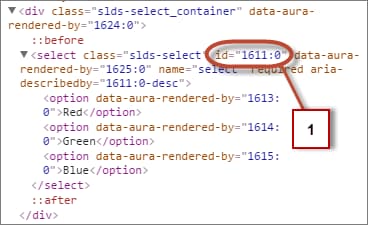
To create a unique ID for an HTML element, you can use the `globalId` as a prefix or suffix for your element. For example:
```nolang
```
In your browser’s developer console, retrieve the element using `document.getElementById("_footer")`, where `` is the generated runtime-unique ID.
To retrieve a component’s global ID in JavaScript, use the `getGlobalId()` function.
```javascript
var globalId = cmp.getGlobalId();
```
**See Also**
- [Finding Components by ID](/docs/platform/aura-platform/guide/js-cb-find-by-id.md)
- [Which Button Was Pressed?](/docs/platform/aura-platform/guide/js-cb-which-button-pressed.md)