


 j
jSupported Editions
Web Versus Desktop
Release Notes
Known Issues and FAQ
Feedback
Project Explorer
Extensions
Org Browser
Default Org
Command Palette
Create Projects
Agentforce Vibes IDE looks familiar if you’ve ever used VS Code. Agentforce Vibes IDE includes Salesforce-specific development tools through the expanded Salesforce Extension pack that speeds up your development. Let’s take a quick tour of the UI.
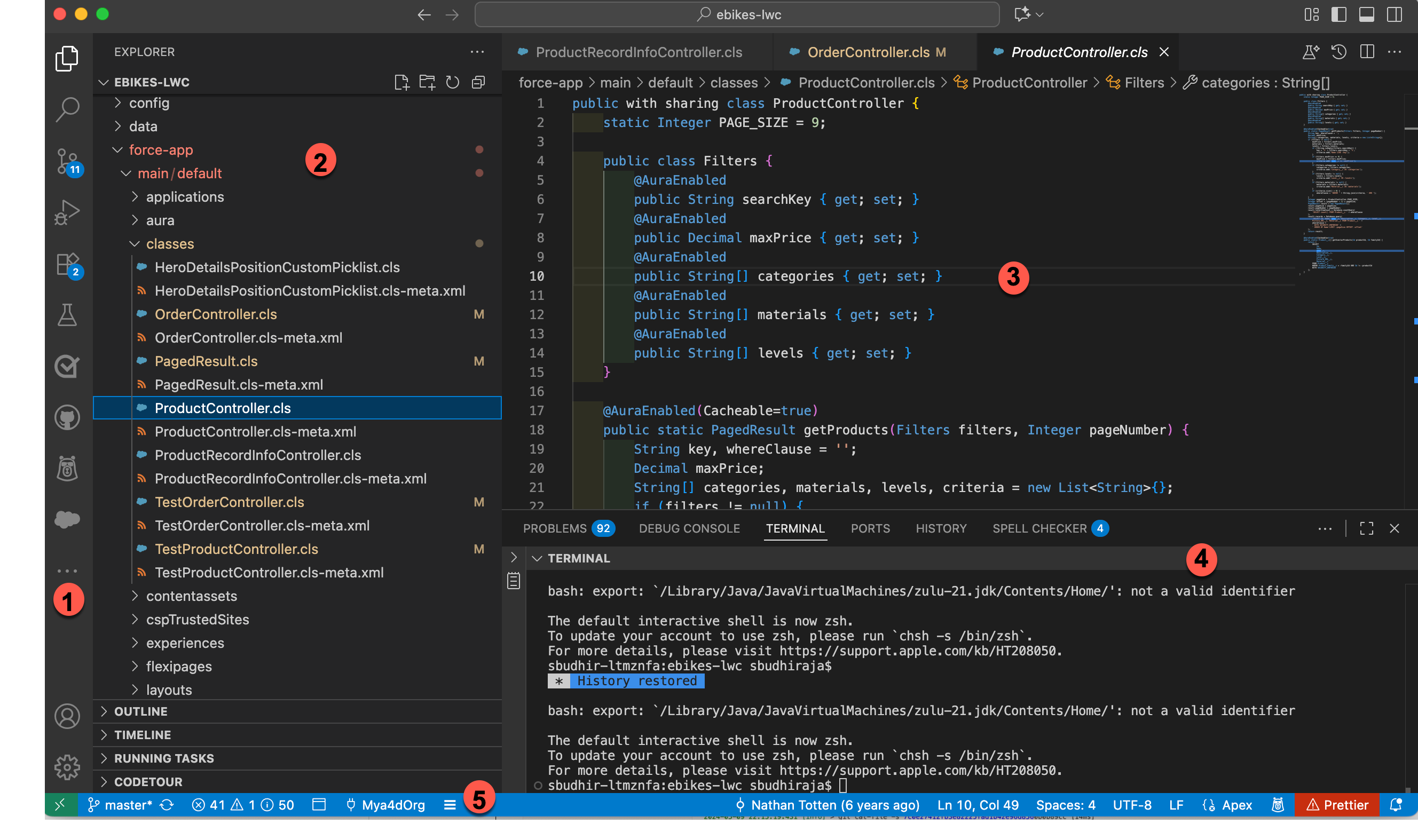
The Agentforce Vibes IDE user interface is divided into five main areas.
Activity Bar: Contains icons to switch between different views (1). In our example, the Explorer view is active.
Side Bar: Contains different views to assist you while working on your project (2). For example, you can see the Explorer view in our example. It lists the files in a DX project structure.
Editors: The main areas to edit your files (3). You can open as many editors as you like side by side, vertically and horizontally.
Output Panel: Shows output or debug information, errors and warnings, or an integrated terminal. You can choose the output to display (4).
Status Bar: Shows information about the opened project and the files you’re editing. The Status Bar displays the org that you’re connected to (5).
j