# Secure Wrappers

For security, Lightning Locker restricts the use of global objects by hiding an object or by wrapping it in a secure version of the object. For example, the secure version of `window` is `SecureWindow`. Locker intercepts calls to `window` and uses `SecureWindow` instead.

To see which APIs are supported by the `SecureWindow`, `SecureDocument`, and `SecureElement` wrappers, use the [Locker API Viewer](https://developer.salesforce.com/tools/locker-service-viewer) tool.

:::important
Under Legacy Locker (Aura), `Secure` wrappers wrap DOM elements with a curated allowlist of [supported APIs](https://developer.salesforce.com/tools/locker-service-viewer) per element type. Reading any property outside that list across a namespace boundary returns `undefined`. Use `data-*` attributes for custom values.
:::

## Types of Secure Wrappers

- `SecureWindow`

  - : Available: Lightning Web Components and Aura Components

    Secure wrapper for the `window` object, which represents a window containing a DOM document.

    If a Lightning web component and an Aura component belong to the same namespace, they share the same `SecureWindow` instance.

- `SecureDocument`

  - : Available: Lightning Web Components and Aura Components

    Secure wrapper for the `document` object, which represents the root node of the HTML document or page. The `document` object is the entry point into the page’s content, which is the DOM tree.

    If a Lightning web component and an Aura component belong to the same namespace, they share the same `SecureDocument` instance.

- `SecureObject`

  - : Available: Lightning Web Components and Aura Components

    Secure wrapper for an object that is wrapped by Lightning Locker. When you see a `SecureObject`, it typically means that you don’t have access to the underlying object and its properties aren’t available.

- `SecureElement`

  - : Available: Lightning Web Components and Aura Components

    Secure wrapper for the `element` object, which represents various HTML elements.

    If a Lightning web component and an Aura component belong to the same namespace, they share the same `SecureElement` instance.

    Lightning web components additionally use the `SecureLightningElement` wrapper.

- `SecureLightningElement`

  - : Available: Lightning Web Components

    Secure wrapper for the `LightningElement` base class. Lightning web components extend the `LightningElement` base class, and at runtime Locker switches the class with `SecureLightningElement`. When you create a Lightning web component, do not extend `SecureLightningElement` directly.

    These APIs are not supported.

    - [`Element.attachShadow()`](https://developer.mozilla.org/en-US/docs/Web/API/Element/attachShadow)
    - [`Element.shadowRoot`](https://developer.mozilla.org/en-US/docs/Web/API/Element/shadowRoot)—use `this.template` instead
    - [`Element.slot`](https://developer.mozilla.org/en-US/docs/Web/API/Element/slot)

- `SecureTemplate`

  - : Available: Lightning Web Components

    Secure wrapper for the `template` object, which represents a `shadowRoot` node.

    These APIs are not supported.

    - [`Node.localName`](https://developer.mozilla.org/en-US/docs/Web/API/Node/localName)
    - [`Node.namespaceURI`](https://developer.mozilla.org/en-US/docs/Web/API/Node/namespaceURI)
    - [`Node.nodeValue`](https://developer.mozilla.org/en-US/docs/Web/API/Node/nodeValue)
    - [`Node.nextSibling`](https://developer.mozilla.org/en-US/docs/Web/API/Node/nextSibling)
    - [`Node.previousSibling`](https://developer.mozilla.org/en-US/docs/Web/API/Node/previousSibling)
    - [`Node.parentElement`](https://developer.mozilla.org/en-US/docs/Web/API/Node/parentElement)
    - [`Node.parentNode`](https://developer.mozilla.org/en-US/docs/Web/API/Node/parentNode)
    - [`Node.prefix`](https://developer.mozilla.org/en-US/docs/Web/API/Node/prefix)
    - [`NonDocumentTypeChildNode.nextElementSibling`](https://developer.mozilla.org/en-US/docs/Web/API/NonDocumentTypeChildNode/nextElementSibling)
    - [`NonDocumentTypeChildNode.previousElementSibling`](https://developer.mozilla.org/en-US/docs/Web/API/NonDocumentTypeChildNode/previousElementSibling)
    - [`DocumentOrShadowRoot.getSelection()`](https://developer.mozilla.org/en-US/docs/Web/API/DocumentOrShadowRoot/getSelection)
    - [`DocumentOrShadowRoot.pictureInPictureElement`](https://developer.mozilla.org/en-US/docs/Web/API/DocumentOrShadowRoot/pictureInPictureElement)
    - [`DocumentOrShadowRoot.styleSheets`](https://developer.mozilla.org/en-US/docs/Web/API/DocumentOrShadowRoot/styleSheets)
    - [`DocumentOrShadowRoot.pointerLockElement`](https://developer.mozilla.org/en-US/docs/Web/API/DocumentOrShadowRoot/pointerLockElement)
    - [`DocumentFragment.getElementById()`](https://developer.mozilla.org/en-US/docs/Web/API/DocumentFragment/getElementById)
    - [`ParentNode.append`](https://developer.mozilla.org/en-US/docs/Web/API/ParentNode/append)
    - [`ParentNode.prepend`](https://developer.mozilla.org/en-US/docs/Web/API/ParentNode/prepend)
    - [`constructor`](https://developer.mozilla.org/en-US/docs/Web/JavaScript/Reference/Classes/constructor)
    - [`EventTarget.dispatchEvent`](https://developer.mozilla.org/en-US/docs/Web/API/EventTarget/dispatchEvent)

:::note
[Lightning Web Security](/docs/platform/lightning-components-security/guide/lws-intro.md) doesn't use wrappers. It uses API distortions in JavaScript sandboxes to selectively modify APIs that enable non-secure behaviors.
:::

## Aura Component Example

Let’s look at a sample Aura component that demonstrates some of the secure wrappers.

```
<!--c:secureWrappers-->
<aura:component >
    <div id="myDiv" aura:id="div1">
        <p>See how Lightning Locker uses secure wrappers</p>
    </div>
    <lightning:button name="myButton" label="Peek in DOM"
        aura:id="button1" onclick="{!c.peekInDom}"/>
</aura:component>
```

The `c:secureWrappers` component creates a `<div>` HTML element and a `lightning:button` component.

Here’s the client-side controller that peeks around in the DOM.

```javascript
/* secureWrappersController.js */
({
  peekInDom: function (cmp, event, helper) {
    console.log("div1: ", cmp.find("div1").getElement());
    console.log("button1: ", cmp.find("button1"));
    console.log("button name: ", event.getSource().get("v.name"));
    // add debugger statement for inspection
    // always remove this from production code
    debugger;
  },
});
```

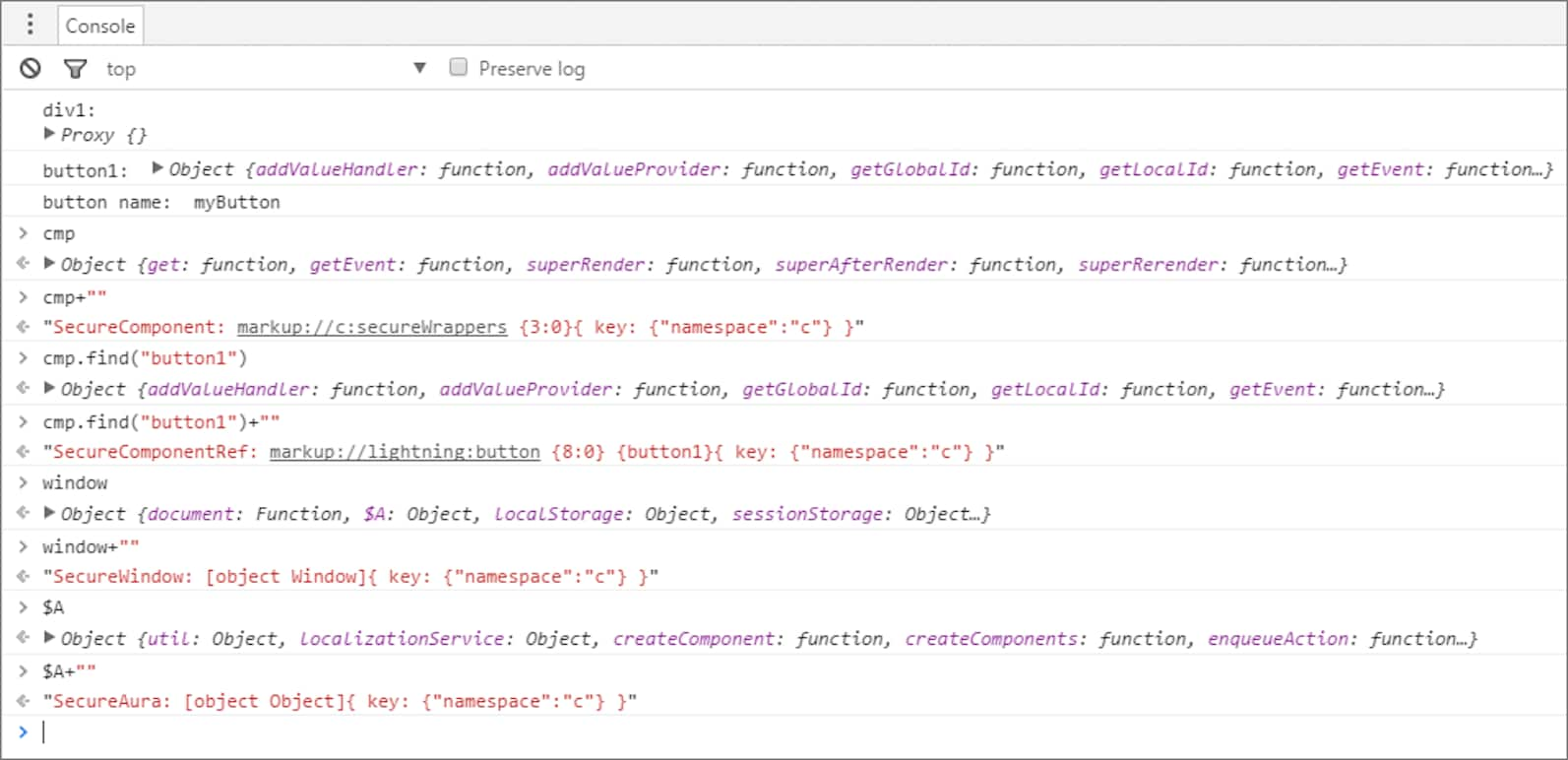
We use `console.log()` to look at the `<div>` element and the button. The `<div>` SecureElement is wrapped in a Proxy object as a performance optimization so that its data can be lazily filtered when it’s accessed.

We put a debugger statement in the code so that we could inspect the elements in the browser console.

Type these expressions into the browser console and look at the results.

```javascript
/* Browser console */
cmp;
cmp + "";
cmp.find("button1");
cmp.find("button1") + "";
window;
window + "";
$A;
$A + "";
```

Here’s the output.
![The console output of an Aura component that demonstrates how Lightning Locker uses secure wrappers](https://a.sfdcstatic.com/developer-website/sfdocs/lwc/media/locker_wrapper_example.png)

Let’s examine some of the output.

- `cmp+""` returns a `SecureComponent` object for `cmp`, which represents the `c:secureWrappers` component.
- `cmp.find("button1")+""` returns a `SecureComponentRef`, which represents the external API for a component in a different namespace. In this example, the component is `lightning:button`.
- `window+""` returns a`SecureWindow` object.
- `$A+""` returns a `SecureAura` object.

**See Also**

- [Lightning Locker API Viewer Overview](/docs/platform/lightning-components-security/guide/locker-api-viewer.md)
- [How Lightning Locker Uses the Proxy Object](/docs/platform/lightning-components-security/guide/locker-proxy.md)
