To read Salesforce data, Lightning web components use a reactive wire service. Use @wire in a component’s JavaScript class to specify an Apex method. You can @wire a property or a function to receive the data. To operate on the returned data, @wire a function.
To use @wire to call an Apex method, annotate the Apex method with @AuraEnabled(cacheable=true). A client-side Lightning Data Service cache is checked before issuing the network call to invoke the Apex method on the server. To refresh stale data, call refreshApex(), because Lightning Data Service doesn’t manage data provisioned by Apex.
Use this syntax to import an Apex method and wire it to a component.
1import apexMethodName from '@salesforce/apex/namespace.classname.apexMethodReference';2@wire(apexMethodName, {apexMethodParams})3propertyOrFunction;
apexMethodName—A symbol that identifies the Apex method.
apexMethodReference—The name of the Apex method to import.
classname—The name of the Apex class.
namespace—The namespace of the Salesforce organization. Specify a namespace unless the organization uses the default namespace (c), in which case don’t specify it.
apexMethodParams—An object with properties that match the parameters of the apexMethod, if needed. If a parameter value is null, the method is called. If a parameter value is undefined, the method isn’t called. If the Apex method is overloaded, the choice of what method to call is non-deterministic (effectively random), and the parameters passed may cause errors now or in the future. Don’t overload @AuraEnabled Apex methods.
apexMethodParams is an object. To pass parameter values to an Apex method, pass an object whose properties match the parameters of the Apex method. For example, if the Apex method takes a string parameter, don’t pass a string directly. Instead, pass an object that contains a property whose value is a string. Using maps isn’t supported for both imperative and wired Apex calls. See Pass Values to Apex.
Important
propertyOrFunction—A private property or function that receives the stream of data from the wire service. If a property is decorated with @wire, the results are returned to the property’s data property or error property. If a function is decorated with @wire, the results are returned in an object with a data property or an error property.
The data property and the error property are hardcoded values in the API. You must use these values.
Note
The return value from Apex is serialized if it contains a decimal value. If the decimal value has more than 15 digits of precision, the value is serialized as a JSON string to preserve exact precision. Otherwise, the value is serialized as a JSON number literal. This serialization prevents precision loss for high-precision decimal values that exceed JavaScript’s double precision limits. You can handle these values as strings in JavaScript and convert the values as needed.
Wire an Apex Method to a Property
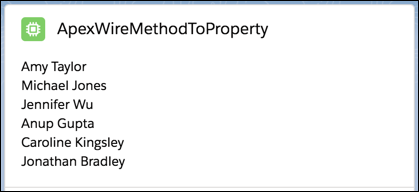
Let’s look at the apexWireMethodToProperty component from the lwc-recipes repo. This component prints a list of contacts returned by an Apex method.
To get its data, the component wires an Apex method. The Apex method makes a SOQL query that returns a list of contacts that each have a picture. (This component doesn’t render the pictures, but other sample components do.) As we’ve learned, to return a simple list of contacts, it’s best to use getListUi. But to use a SOQL query to select certain records, we must use an Apex method.
Remember that the method must be static, and global or public. The method must be decorated with @AuraEnabled(cacheable=true).
1public with sharing class ContactController{2 @AuraEnabled(cacheable=true)3 public static List<Contact>getContactList(){4 return[5 SELECT Id, Name, Title, Phone, Email, Picture__c6 FROM Contact7 WHERE Picture__c != null8 WITH SECURITY_ENFORCED9 LIMIT 1010];11}12}
The component’s JavaScript code imports the Apex method and invokes it via the wire service. The wire service either provisions the list of contacts to the contacts.data property, or returns an error to the contacts.error property.
1import{LightningElement, wire}from 'lwc';2import getContactList from '@salesforce/apex/ContactController.getContactList';34export default class ApexWireMethodToProperty extends LightningElement{5 @wire(getContactList)contacts;6}
The template uses the lwc:if directive to check whether the contacts.data property is truthy. If it is, it iterates over it and renders the name of each contact. If contacts.error is truthy, the component renders <c-error-panel>.
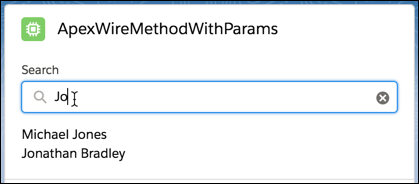
Now let’s wire an Apex method that takes a parameter. This component is also in the lwc-recipes repo.
The Apex method takes a string parameter called searchKey, and returns a list of contacts whose name contains the string.
1// ContactController.cls2public with sharing class ContactController{3 @AuraEnabled(cacheable=true)4 public static List<Contact>findContacts(String searchKey){5 String key = '%' + searchKey + '%';6 return[7 SELECT Id, Name, Title, Phone, Email, Picture__c8 FROM Contact9 WHERE Name LIKE :key AND Picture__c != null10 WITH USER_MODE11 LIMIT 1012];13}14}
The component’s JavaScript prefaces the value of the searchKey parameter with $ to indicate that it’s dynamic and reactive. It references a property of the component instance. If its value changes, the template rerenders.
To @wire the component to the Apex method, the first parameter is a string, which is the name of the Apex method—in this case, findContacts. The second @wire parameter is an object that contains the parameters to pass to the Apex method. So, for example, even though findContacts takes a string, we don’t pass a string as the second @wire parameter. Instead, we pass an object that contains a property whose value is a string: { searchKey: '$searchKey' }. (If the Apex method took another parameter, we would add another property to the object.)
1import{LightningElement, wire}from 'lwc';2import findContacts from '@salesforce/apex/ContactController.findContacts';34/** The delay used when debouncing event handlers before invoking Apex. */5const DELAY = 300;67export default class ApexWireMethodWithParams extends LightningElement{8 searchKey = '';910 @wire(findContacts, {searchKey: '$searchKey'})11 contacts;1213 handleKeyChange(event){14 // Debouncing this method: Do not update the reactive property as long as this function is15 // being called within a delay of DELAY. This is to avoid a very large number of Apex method calls.16 window.clearTimeout(this.delayTimeout);17 const searchKey = event.target.value;18 // eslint-disable-next-line @lwc/lwc/no-async-operation19 this.delayTimeout = setTimeout(()=>{20 this.searchKey = searchKey;21}, DELAY);22}23}
The template uses searchKey as the value of the <lightning-input> field.
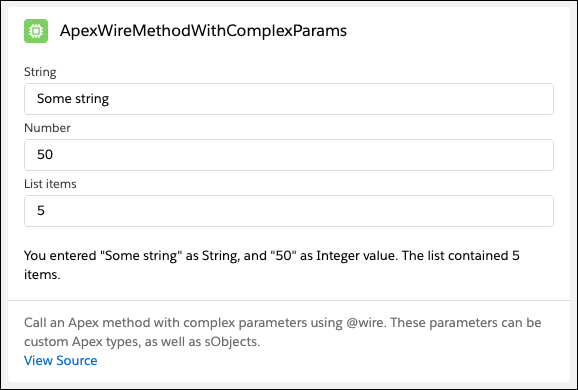
This example demonstrates how to call an Apex method that takes an object as a parameter. The @wire syntax is the same for any Apex method, but this example shows a pattern for building and passing an object.
The component has three input fields that take a string, a number, and a number of list items that the component uses to generate a list. The Apex method simply concatenates and returns a string based on the values. When an input value changes, the @wire calls the Apex method and provisions new data.
1public with sharing class ApexTypesController{2 @AuraEnabled(cacheable=true)3 public static String checkApexTypes(CustomWrapper wrapper){4 // Using System.debug() isn't good practice for production applications.5 // It's used here to showcase how the received data looks like in Apex.6 System.debug(wrapper);7 // The values are based on the data that is defined in the8 // apexImperativeMethodWithComplexParams Lightning web component.9 String response =10 'You entered "' +11 wrapper.someString +12 '" as String, and "' +13 wrapper.someInteger +14 '" as Integer value. The list contained ' +15 wrapper.someList.size() +16 ' items.';17 return response;18}19}
1/**2 * Wrapper class used to demonstrate how we can pass complex paramters from LWC.3 */4public with sharing class CustomWrapper{5 @AuraEnabled6 public Integer someInteger{get; set; }7 @AuraEnabled8 public String someString{get; set; }9 @AuraEnabled10 public List<String>someList{get; set; }11}
To pass parameter values from a component to an Apex method, use an object. In this example, the Apex method takes an object, CustomWrapper, so the component builds a matching object to pass in the @wire.
Now let’s look at the apexWireMethodToFunction component from the lwc-recipes repo. This component wires an Apex method call to a function. Because the results are provisioned to a function, the JavaScript can operate on the results. Also, the template accesses the data a bit differently than if results were provisioned to a property.
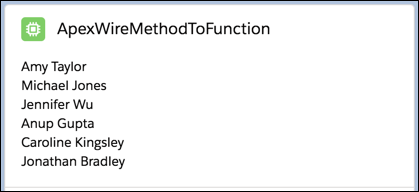
The rendered component is the same as apexWireMethodToProperty (except for the header).
This component calls the same Apex method as apexWireMethodToProperty. The method must be static, and global or public. The method must be decorated with @AuraEnabled(cacheable=true).
1// ContactController.cls2public with sharing class ContactController{3 @AuraEnabled(cacheable=true)4 public static List<Contact>getContactList(){5 return[6 SELECT Id, Name, Title, Phone, Email, Picture__c7 FROM Contact8 WHERE Picture__c != null9 WITH USER_MODE10 LIMIT 1011];12}13}
The component’s JavaScript code imports the Apex method and invokes it via the wire service. The wire service provisions the results to the wiredContacts() function via an object with either an error or data property. If the wire service provisions data, it’s assigned to this.contacts, which is used in the template. If it provisions error, it’s assigned to this.error, which is also used in the template. If the value of these properties change, the template rerenders.
The template uses the lwc:if directive to check for the JavaScript contacts property. If it exists, it iterates over it and renders the name of each contact. If the error property exists, the component renders <c-error-panel>.
To execute multiple wires consecutively, retrieve data from the first wire and use that data to retrieve more data from the second wire. To ensure that the wires execute consecutively, wait until the first wire completes before you set the required parameters for the second wire. For example, pass a property into the first wire, and then use that property with a second property for the second wire. Then use both properties in a separate function.
1property1;2property2;3@wire(myApexMethod1, {})4method1result({data, error}){5 if(data){6 this.property1 = data;7 // call another function8 // to do something with property1 and property29}10}11@wire(myApexMethod2, {})12method2result({data, error}){13 if(data){14 this.property2 = data;15 // call another function16 // do something with property1 and property217}18}
To pass in a property value that’s dependent on a previous wire call, make the property reactive so that the wire provisions new data when the property’s value changes. For an example, see getPicklistValues.
To work with multiple Apex method calls and then process the results when the component loads, you can call a common function when both property values are available.


 j
j