1// myDatatableWrapper.js
2
3import { LightningElement } from 'lwc';
4export default class MyDatatableWrapper extends LightningElement {
5    COLS = [
6        { label: 'Account', type: 'text', fieldName: 'account', editable: false, displayReadOnlyIcon: true},
7        { label: 'Stage', type: 'text', fieldName: 'stage', editable: false, displayReadOnlyIcon: true},
8        { label: 'Amount', type: 'customNumber', fieldName: 'amount', editable: true,
9            typeAttributes: {
10                status: {fieldName: 'status'},
11                step: {fieldName: 'step'}
12            }
13        },
14        { label: 'Due Date', type: 'date', fieldName: 'date', editable: false, displayReadOnlyIcon: true}
15    ];
16
17    data = [
18        {account: 'Acme Corp.', amount: '200.00', status: 'action:user',
19            step: '0.01', stage:'Value Proposition', date: '2022-02-10T00:00:00Z'},
20        {account: 'Norwood Inc.', amount: '500000.00', status: 'action:user',
21            step: '0.01', stage:'Closed Won', date: '2022-01-20T00:00:00Z'},
22        {account: 'Edge Communications', amount: '800000.00', status: 'action:user',
23            step: '0.01', stage:'Closed Won', date: '2022-02-18T00:00:00Z'},
24        {account: 'Pyramid Construction Inc.', amount: '50000.00', status: 'action:user',
25            step: '0.01', stage:'Closed ', date: '2022-03-10T00:00:00Z'},
26        {account: 'GenePoint', amount: '30000', status: 'action:user',
27            step: '0.01', stage:'Negotiation/Review	', date: '2022-05-28T00:00:00Z'},
28        {account: 'Dickenson plc', amount: '1550000.00', status: 'action:user',
29            step: '0.01', stage:'Closed Won', date: '2022-03-16T00:00:00Z'}
30    ]


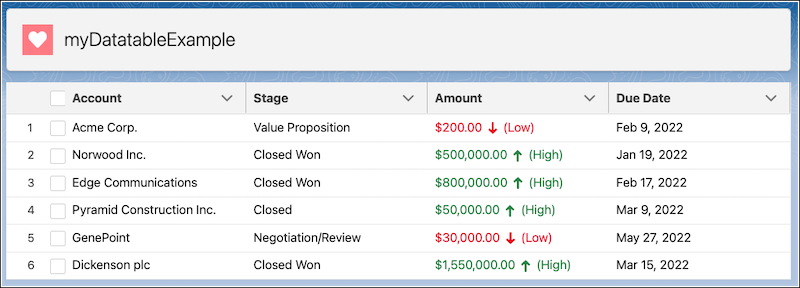
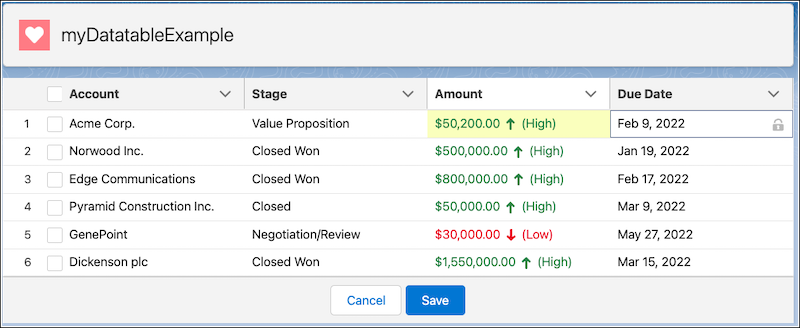
 j
j