# Alert Modals
Use an alert modal to halt users and communicate an urgent error that’s affecting their system, feature, or page. The alert is displayed in a dialog on top of the page content using an overlay.
To display an alert modal in Lightning Experience, import `LightningAlert` from the `lightning/alert` module, and call `LightningAlert.open()` with your desired attributes.
`LightningAlert` is an alternative to the native `window.alert()` function, which isn’t supported for cross-origin iframes in Chrome and Safari. Unlike the native alert function, `LightningAlert.open()` doesn't halt execution on the page, it returns a promise. Use `async`/`await` or `.then()` for any code you want to execute after the alert window is closed.
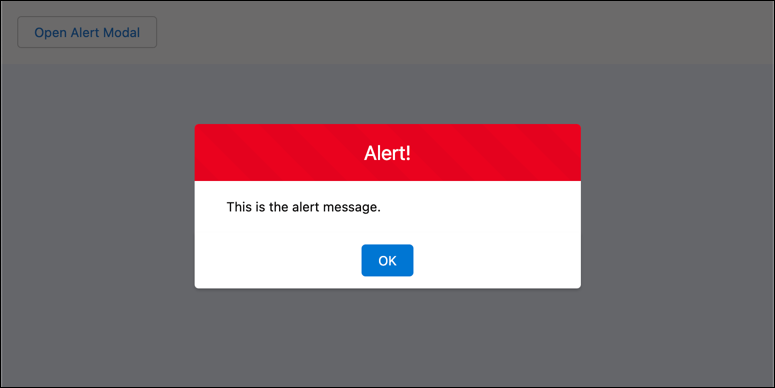
This example component creates a button that opens the alert modal that you see in the screenshot. Typically, an error condition would trigger display of the alert modal.
```html
```
Import `LightningAlert` from `lightning/alert` in the JavaScript file of the component that opens the alert modal. Create and dispatch a `LightningAlert` event with `message`, `theme`, and `label` attributes. The `.open()` function returns a promise that resolves when you click **OK**.
```javascript
// c/myApp.js
import { LightningElement } from "lwc";
import LightningAlert from "lightning/alert";
export default class MyApp extends LightningElement {
async handleAlertClick() {
await LightningAlert.open({
message: "This is the alert message.",
theme: "error", // a red theme intended for error states
label: "Error!", // this is the header text
});
// alert notification has been closed
}
}
```
:::tip
The [lwc-recipes](https://github.com/trailheadapps/lwc-recipes) repo has a [miscNotificationModules](https://github.com/trailheadapps/lwc-recipes/tree/main/force-app/main/default/lwc/miscNotificationModules) component that demonstrates alert notifications.
:::
For information about the attributes for `LightningAlert`, see the \[Component Reference]\(.
**See Also**
- [Component Reference: `lightning/alert`](https://developer.salesforce.com/docs/platform/lightning-component-reference/guide/lightning-alert)