# Refreshing Chart Data Using JavaScript Remoting
Update a Visualforce chart periodically, or in response to a user’s actions, using custom JavaScript. JavaScript code can respond to complex user activity or timer events, and use JavaScript remoting to retrieve new chart data whenever required.
The following markup displays a pie chart that can be updated by choosing a new year from a menu next to the chart:
```visualforce
2013
2012
2011
2010
```
This markup attaches a chart component to its data source by setting the chart’s `data` attribute to the name of a JavaScript function, `retrieveChartData`, which returns the data. The name of the function is provided as a string.
A static HTML `` menu displays the years available to chart. The menu is not associated with a form element of any kind, and its value is never submitted directly back to the controller. Instead, the `` menu’s `onChange` attribute calls a JavaScript function, `refreshRemoteChart()`, whenever the menu changes. There are two additional static HTML elements: two `` tags with IDs. The `` tags are empty when the page loads, and are updated via JavaScript to display status and error messages when necessary.
The two JavaScript functions that precede the Visualforce markup are the glue between the Visualforce chart and the `@RemoteAction` controller method that provides the data. There are three links between the functions and the chart component:
1. The chart component’s `data` attribute is set to “retrieveChartData”, the name of the first JavaScript function. This tells the chart component to use the JavaScript function to load its data. The chart component invokes `retrieveChartData()` **directly** only once, when the chart is first created and the data is initially loaded.
2. Reloading happens when the second JavaScript function, `refreshRemoteChart()`, is called. This is the second link, from the `theYear` menu. When the year menu changes, `refreshRemoteChart()` is invoked, and it re-invokes the `retrieveChartData()` function to load a new set of data.
3. When `refreshRemoteChart()` invokes `retrieveChartData()`, it provides an anonymous function as a callback, which handles the result of the `@RemoteAction` call when it returns. This callback updates the chart by calling `RemotingPieChart.reload(data)`. The chart itself is `RemotingPieChart`, named by setting the `name` attribute, and `reload()` is a JavaScript function available on Visualforce charts once created, which accepts new data and then redraws the chart.
This diagram illustrates these links between the different components of the page:
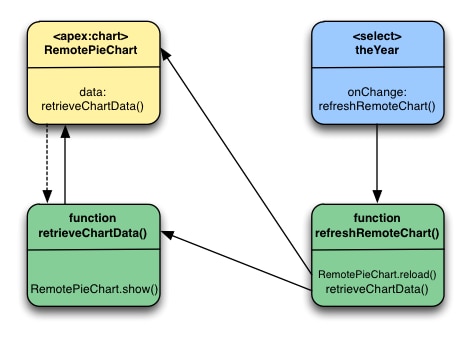
The sequence for the initial loading of the chart is simple: the `` named `RemotePieChart` calls `retrieveChartData()` to get its initial data, and `retrieveChartData()` calls `RemotePieChart.show()` when it has the data. And, the chart appears.
Updates are more complicated. When a new year is chosen from the `theYear` menu, the menu’s `onChange` event fires, which calls the `refreshRemoteChart()` function. `refreshRemoteChart()` in turn calls the `retrieveChartData()` function, and when the `@RemoteAction` returns new data, `retrieveChartData()` (via the callback provided by `refreshRemoteChart()`) calls `RemotePieChart.reload()`. And, the chart updates.
Here are a couple of other items to note:
- The `` uses the `hidden="true"` attribute to prevent the chart from displaying before there’s data to display. The `retrieveChartData()` function calls `RemotingPieChart.show()` to display the chart once the chart data is loaded. This and `RemotingPieChart.reload()` provide for much smoother chart animations than can be achieved using ``.
- The `refreshRemoteData()` function sets the `statusElement` HTML `` to a “loading…” message before it attempts to update the data by calling `retrieveChartData()`, and then the anonymous callback function sets it to an empty string to hide the message once the data is returned and the chart updated. It’s a bit more work than using ``, for basically the same effect. You can easily show a “busy” animation or graphic using the same technique.
## `PieChartRemoteController`
The controller for this page is an expansion of the pie chart controller used in [A Simple Charting Example](/docs/platform/salesforce-pages-developers-guide/guide/pages-charting-overview-simple-example.md).
```controller
public class PieChartRemoteController {
// The year to be charted
public String chartYear {
get {
if (chartYear == Null) chartYear = '2013';
return chartYear;
}
set;
}
// Years available to be charted, for
public static List getChartYearOptions() {
List years = new List();
years.add(new SelectOption('2013','2013'));
years.add(new SelectOption('2012','2012'));
years.add(new SelectOption('2011','2011'));
years.add(new SelectOption('2010','2010'));
return years;
}
public List getPieData() {
// Visualforce expressions can't pass parameters, so get from property
return PieChartRemoteController.generatePieData(this.chartYear);
}
@RemoteAction
public static List getRemotePieData(String year) {
// Remoting calls can send parameters with the call
return PieChartRemoteController.generatePieData(year);
}
// Private data "generator"
private static List generatePieData(String year) {
List data = new List();
if(year.equals('2013')) {
// These numbers are absolute quantities, not percentages
// The chart component will calculate the percentages
data.add(new PieWedgeData('Jan', 30));
data.add(new PieWedgeData('Feb', 15));
data.add(new PieWedgeData('Mar', 10));
data.add(new PieWedgeData('Apr', 20));
data.add(new PieWedgeData('May', 20));
data.add(new PieWedgeData('Jun', 5));
}
else {
data.add(new PieWedgeData('Jan', 20));
data.add(new PieWedgeData('Feb', 35));
data.add(new PieWedgeData('Mar', 30));
data.add(new PieWedgeData('Apr', 40));
data.add(new PieWedgeData('May', 5));
data.add(new PieWedgeData('Jun', 10));
}
return data;
}
// Wrapper class
public class PieWedgeData {
public String name { get; set; }
public Integer data { get; set; }
public PieWedgeData(String name, Integer data) {
this.name = name;
this.data = data;
}
}
}
```
This controller supports providing data to a Visualforce chart two different ways:
- Using a Visualforce expression, `{!pieData}`, which calls the instance method `getPieData()`.
- Using JavaScript remoting, by calling the `@RemoteAction` static method `getRemotePieData()` from a JavaScript method.
**See Also**
- [Refreshing Chart Data Using \](/docs/platform/salesforce-pages-developers-guide/guide/pages-charting-refreshing-data-actionsupport.md)
- [Providing Chart Data Using a JavaScript Function](/docs/platform/salesforce-pages-developers-guide/guide/pages-charting-overview-providing-data-javascript-function.md)
- [JavaScript Remoting for Apex Controllers](/docs/platform/salesforce-pages-developers-guide/guide/pages-js-remoting.md)