# Defining Getter Methods
One of the primary tasks for a Visualforce controller class is to give developers a way of displaying database and other computed values in page markup. Methods that enable this type of functionality are called getter methods, and are typically named `getIdentifier`, where *Identifier* is the name for the records or primitive values returned by the method.
For example, the following controller has a getter method for returning the name of the controller as a string:
```controller
public class MyController {
public String getName() {
return 'MyController';
}
}
```
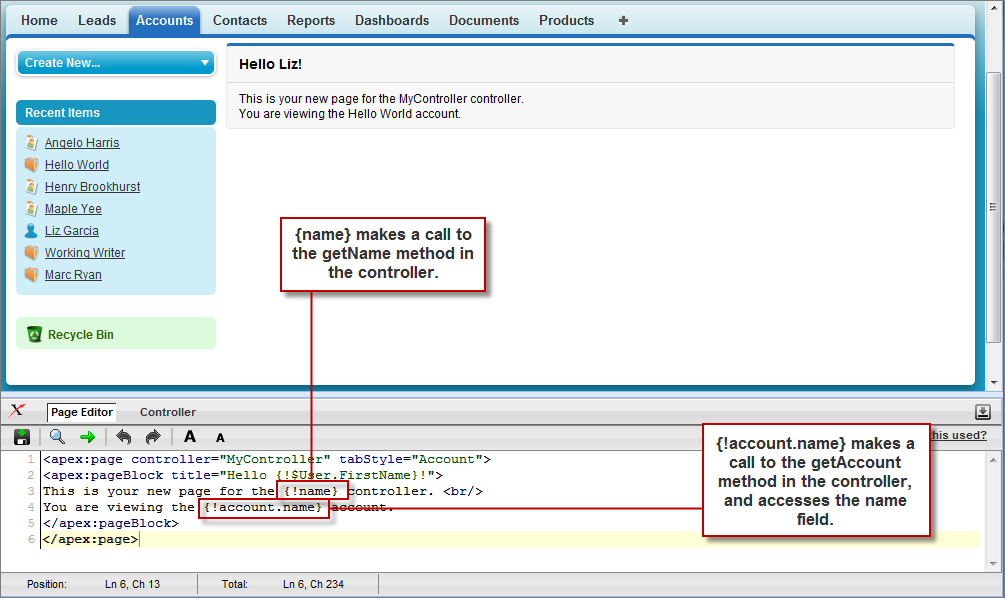
To display the results of a getter method in a page, use the name of the getter method without the `get` prefix in an expression. For example, to display the result of the `getName` method in page markup, use `{!name}`:
```markup
This is your new page for the {!name} controller.
```
In earlier examples that used the standard Account controller, the pages displayed values from an account record specified in the URL (with the `id` query string parameter) by using an `{!account.}` expression. This was possible because the Account standard controller includes a getter method named `getAccount` that returns the specified account record. We can mimic this functionality in a custom controller with the following code:
```controller
public class MyController {
public String getName() {
return 'MyController';
}
public Account getAccount() {
return [select id, name from Account
where id = :ApexPages.currentPage().getParameters().get('id')];
}
}
```
:::note
For this example to render properly, you must associate the Visualforce page with a valid account record in the URL. For example, if `001D000000IRt53` is the account ID, the resulting URL should be:
```nolang
https://MyDomain_login_URL/apex/MyFirstPage?id=001D000000IRt53
```
:::
The `getAccount` method uses an embedded SOQL query to return the account specified by the `id` parameter in the URL of the page. To access `id`, the `getAccount` method uses the `ApexPages` namespace:
- First the `currentPage` method returns the `PageReference` instance for the current page. `PageReference` returns a reference to a Visualforce page, including its query string parameters.
- Using the page reference, use the `getParameters` method to return a map of the specified query string parameter names and values.
- Then a call to the `get` method specifying `id` returns the value of the `id` parameter itself.
A page that uses the MyController controller can display either the account `name` or `id` fields with an `{!account.name}` or `{!account.id}` expression, respectively. Only those fields are available to the page because those were the only fields returned by the SOQL query in the controller.
To more closely mimic the standard Account controller, we can add the `tabStyle` attribute to the `` tag to give the page the same styling as other account pages. The markup for the page now looks like this:
```markup
This is your new page for the {!name} controller.
You are viewing the {!account.name} account.
```