


Linting
UTAM provides the ability to statically analyze JSON files to prevent common bad practices, such as duplication of page objects or violations of the encapsulation pattern.
We encourage you not to disable any linting rules and to make sure that your page objects comply with recommended best practices.
This documentation is relevant for UTAM Java versions after 2.0.4 and UTAM JavaScript versions after 2.1.2. Prior to these versions UTAM also produced console output from the linter, this is no longer the case.
Note
Run linting
Linting is run during the page object compilation process. All warnings and errors are printed into a Static Analysis Results Interchange Format (SARIF) report generated after compilation.
SARIF is a common format to store linting results. UTAM creates utam-lint.sarif in the SARIF JSON format, which looks like this:
1{
2  "$schema": "https://json.schemastore.org/sarif-2.1.0.json",
3  "version": "2.1.0",
4  "runs": [
5    {
6      "tool": {
7        "driver": {
8          "name": "UTAM",
9          "semanticVersion": "2.1.0",
10          "informationUri": "https://github.com/salesforce/utam-java",
11          "rules": [
12            {
13              "id": "ULR01",
14              "name": "Unique local selectors",
15              "shortDescription": {
16                "text": "Check for unique selectors inside the same file. By default, this is a warning because a list element can have the same selector."
17              }
18            }
19            // other rules
20          ]
21        }
22      },
23      // all page objects being analyzed
24      "artifacts": [
25        {
26          "description": {
27            "text": "page object utam/pageObjects/test"
28          },
29          "location": {
30            "uri": "src/test/resources/lint/changeDefaultConfig/test.utam.json",
31            "uriBaseId": "%srcroot%",
32            "index": 0
33          }
34        }
35      ],
36      // violations
37      "results": [
38        {
39          "ruleId": "ULR02",
40          "message": {
41            "text": "root description is missing",
42            "id": "2002"
43          },
44          "locations": [
45            {
46              "physicalLocation": {
47                "artifactLocation": {
48                  "uri": "src/test/resources/lint/changeDefaultConfig/test.utam.json",
49                  "uriBaseId": "%srcroot%",
50                  "index": 0
51                },
52                "region": {
53                  "startLine": 2
54                }
55              }
56            }
57          ],
58          "fixes": [
59            {
60              "description": {
61                "text": "add \"author\" property to the root description"
62              }
63            }
64          ]
65        }
66      ]
67    }
68  ]
69}
Linting report
The SARIF file is in JSON format. To view (pretty print) SARIF files in a terminal or in your IDE, use available tools, such as sarif-fmt or Sarif VSCode extension.
If at least one linting violation of level error occurs and the throwError configuration parameter is set to true (see the next section), the page object compiler throws an exception.
A file in SARIF format can be integrated with development tools such as GitHub to show linting rule violations:
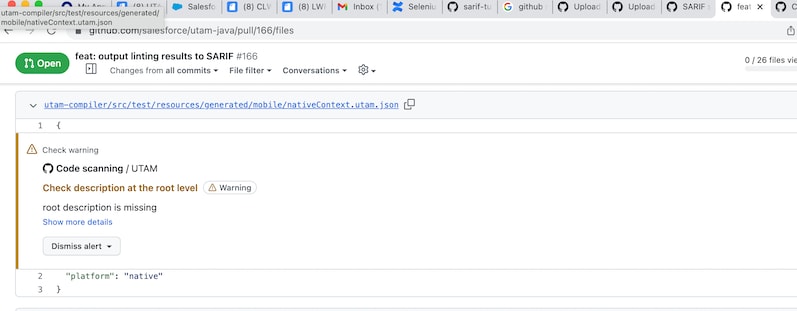
GitHub documentation is here.
Configuring linting rules and violations
All linting rules and violation types (error or warning) are configurable as lint properties in the compiler configuration.
If a compiler configuration doesn’t have a lint section, default values are applied.
1{
2  "lint": {
3    "lintingOutputFile": "utam-lint.sarif",
4    "disable": false,
5    "throwError": false,
6    "<name of the rule>": {
7      "violation": "error",
8      "exclude": []
9    },
10    "<name of the rule>": {
11      "violation": "error",
12      "exclude": ["my/test/component1", "my/test/component2"]
13    },
14    "<name of the rule>": {
15      "violation": "warning"
16    }
17  }
18}-
lintingOutputFileString, default is"utam-lint.sarif". This parameter sets the path for a SARIF log file generated by the UTAM linter. The path is relative to the root of the project. -
disableBoolean, default isfalse. If set totrue, linting rules are not applied after the compilation. -
throwErrorBoolean, default isfalse. If set totrue, the linting process throws an error after reporting errors to the log. -
<name of the rule>is one of the rules listed in the next section.violationThe violation type. Possible values are:warning,error, ordisabled(disable the rule). Starting from compiler versions 2.0.3 (utam-js) and 2.0.2 (utam-java), the default is alwayswarning.excludeIs an array of strings that are excluded from the rule. Each string value is a page object URI.additionalConfigurationIs an object containing additional configuration data for the rule, if any applies. See the rule description for information about what additional configuration the rule supports.
Linting rules
Rules with error codes that start with 2 are applicable for one page object only. Rules with error codes that start with 3 are relevant for multiple page objects only, such as detecting duplicates from the earlier example.
Note
duplicateSelectors
- Rule: page object elements in the same scope (with the same immediate parent) can’t have duplicate selectors except if one of the elements is a list.
- How to fix: remove one or more duplicate elements.
- Error code: 2001
- Default violation type:
warning
Example:
1{
2  "elements": [
3    {
4      "name": "element1",
5      "selector": {
6        "css": "css"
7      }
8    },
9    {
10      // violation - same selector as element1
11      "name": "element2",
12      "selector": {
13        "css": "css"
14      },
15      "elements": [
16        {
17          // not a violation - element has a different parent
18          "name": "element3",
19          "selector": {
20            "css": "css"
21          }
22        },
23        {
24          // not a violation - element is a list
25          "name": "element4",
26          "selector": {
27            "css": "css",
28            "returnAll": true
29          }
30        }
31      ]
32    }
33  ]
34}
requiredRootDescription
- Rule: it’s a good practice to provide a description at the page object root level to explain the intended usage of the page object.
- How to fix: add a page object description.
- Error code: 2002
- Default violation type:
warning
Example:
1{
2  // violation - description is empty
3  "elements": []
4}
requiredAuthor
- Rule: The page object description should include an author.
- How to fix: add an author property to the description.
- Error code: 2005
- Default violation type:
warning
Example:
1{
2  // violation - description has no author
3  "description": "description is a string"
4}1{
2 // not a violation - author is provided
3 "description": {
4 "text": ["description is a string"],
5 "author": "myTeam"
6 }
7}requiredMethodDescription
- Rule: it’s a good practice to provide a description at the method level that explains the use cases. This rule isn’t applied to elements; it’s for compose methods only.
- How to fix: add a method description.
- Error code: 2003
- Default violation type:
warning
Example:
1{
2  "description": "root description here",
3  "methods": [
4    {
5      // violation - description is empty
6      "name": "doSomething",
7      "compose": []
8    }
9  ]
10}
duplicateRootSelectors
- Rule: two page objects with the same root selector usually means a violation of the encapsulation rule (1:1 mapping between a component and a page object).
- How to fix: remove the duplicate page object. Make sure that you keep all functionality.
- Error code: 3001
- Default violation type:
warning
Example:
1{
2  // first page object
3  "root": true,
4  "selector": {
5    "css": "my-root"
6  }
7}1{
2 // second page object
3 "root": true,
4 "selector": {
5 // violation - same root selector
6 "css": "my-root"
7 }
8}elementCantHaveRootSelector
- Rule: if an element has the same selector as the root selector of a different page object, it should have the same type as the given page object.
- How to fix: add the proper type, which is the type of the page object with the root selector.
- Error code: 3002
- Default violation type:
warning
Example:
1{
2  // first page object my/test/Component
3  "root": true,
4  "selector": {
5    "css": "my-root"
6  }
7}1{
2 // second page object
3 "elements": [
4 {
5 // violation - element should have the proper type
6 "name": "element1",
7 "selector": {
8 "css": "my-root"
9 }
10 },
11 {
12 // not a violation - element has the proper type
13 "name": "element2",
14 "type": "my/test/Component",
15 "selector": {
16 "css": "my-root"
17 }
18 }
19 ]
20}duplicateCustomSelectors
- Rule: if an element in one page object has a custom type and a custom selector (with ”-”), any element with the same selector in a different page object should have the same custom type.
- How to fix: change the element type to custom.
- Error code: 3003
- Default violation type:
warning
Example:
1{
2  // first page object
3  "elements": [
4    {
5      "name": "customElement",
6      "type": "my/test/Component",
7      "selector": {
8        "css": "my-test-component"
9      }
10    },
11    {
12      "name": "basicElement",
13      "selector": {
14        "css": ".myClass"
15      }
16    }
17  ]
18}1{
2 // second page object
3 "elements": [
4 {
5 // violation - set type to "my/test/Component"
6 "name": "basicElement1",
7 "selector": {
8 "css": "my-test-component"
9 }
10 },
11 {
12 // not a violation - basic elements can have the same selectors
13 "name": "basicElement2",
14 "selector": {
15 "css": ".myClass"
16 }
17 }
18 ]
19}requiredMetadata
- Rule: if a page object does not contain a
metadataproperty, or the object value of themetadataproperty does not contain the specified values. - How to fix: add a metadata object containing mandatory fields (if any) to the page object.
- Error code: 2006
- Default violation type:
disabled - Note:
additionalConfigurationshould contain arequiredPropertiesarray, which will contain objects defining the required properties in the metadata.
Example:
1{
2  // Compiler configuration lint section
3  "lint": {
4    "lintingOutputFile": "utam-lint.sarif",
5    "disable": false,
6    "throwError": false,
7    "requiredMetadata": {
8      "violation": "warning",
9      "exclude": [],
10      "additionalConfiguration": {
11        "requiredProperties": [
12          {
13            "name": "firstRequiredProperty"
14          },
15          {
16            "name": "secondRequiredProperty",
17            "values": ["allowedValue1", "allowedValue2", "allowedValue3"]
18          }
19        ]
20      }
21    }
22  }
23}1{
2 // violation: page object has no metadata property
3 "elements": [
4 {
5 "name": "basicElement1",
6 "selector": {
7 "css": ".my-test-component"
8 }
9 }
10 ]
11}1{
2 "metadata": {
3 // violation: metadata object does not contain "firstRequiredProperty"
4 // property with a non-empty value
5
6 // violation: "secondRequiredProperty" value is not one of the acceptable
7 // values for the property
8 "secondRequiredProperty": "invalidValue"
9 },
10 "elements": [
11 {
12 "name": "basicElement1",
13 "selector": {
14 "css": ".my-test-component"
15 }
16 }
17 ]
18} j
j