Recommended Products Plugin
Use the Recommended Products plugin to recommend related products based on the existing products on a quote.
| Required Editions |
|---|
| Available in: Salesforce CPQ Winter ‘21 and later |
The Recommended Products plugin lets customers use their own product recommendation service in Salesforce CPQ, together with product search, search filters, favorites, and guided selling.
With the Recommended Products plugin, sales reps can see a list of recommended products while they are creating their quote. By making relevant products easier to find, the quoting process is more efficient, and sales reps can sell more products.
Sample use cases of the Recommended Products plugin include:
- You can help sales reps close more deals by enabling them to create quotes with the ideal mix of products that anticipate their customers’ needs.
- Sales reps can upsell more products by adding recommended products that are frequently sold with the products on their quotes.
Complete these steps to implement the Recommended Products plugin:
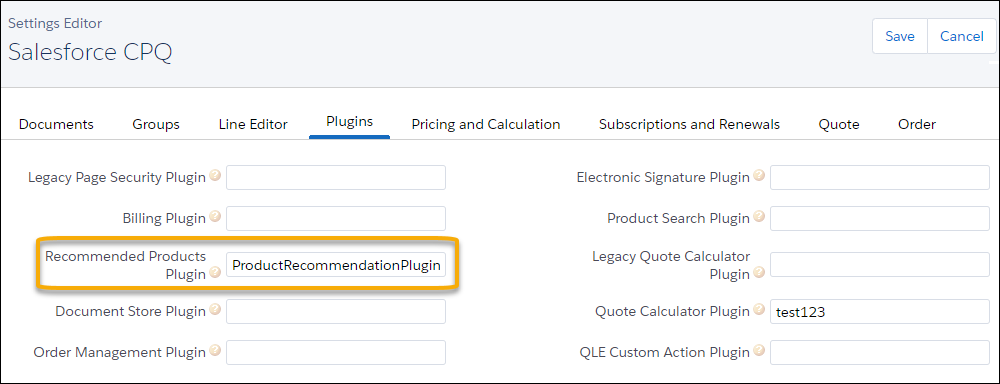
- On the Plugins tab in the Settings Editor, enable the Recommended Products Plugin.
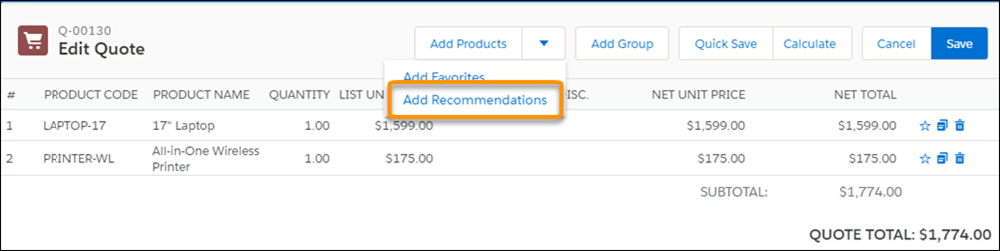
- To add the Add Recommendations button to the quote line editor, activate the Add Recommendations custom action record. See Custom Actions.
- To fully enable the Recommended Products feature, you must provide your own implementation of the plugin interface. You can use your recommendation engine or a third-party service. Your plugin interface must implement the recommend() method in the global ProductRecommendationPlugin interface:
This method takes quote and quote lines as arguments, and it outputs an ordered list of recommended price book entries. If at runtime the plugin input is missing a field required for your implementation, add it to the ReferencedFields field set on the corresponding object.
Add your plugin’s class name on the Plugins tab in Settings.
- A maximum of 2,000 price book entries are shown on the Recommended Products page, similar to the limit on the Product Lookup page. Your implementation class can return up to your top 2,000 recommendations. If you have more, you can use a recommendation score to sort and choose your top 2,000 products.
- The Recommended Products plugin doesn’t support the Large Quote Threshold setting.
- Salesforce CPQ prioritizes field-level security over Recommended Product plugins. If your plugin includes fields that your users don’t have permission to view, those fields aren’t displayed on the Recommended Products page.
- The Product Recommendation page uses the same field set as the Product Lookup page.
-
Add products to a quote and click the Add Recommendations custom action.
-
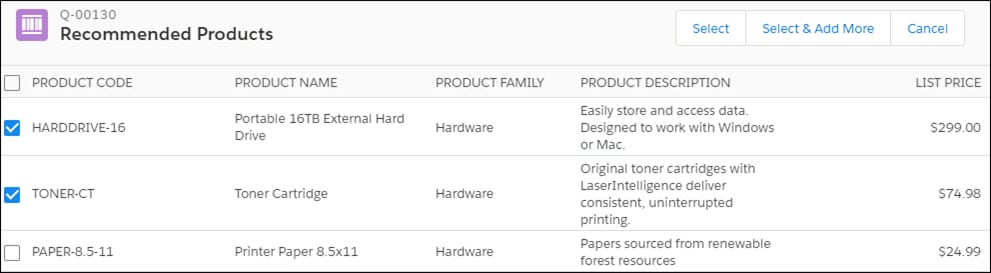
Salesforce calls your plugin implementation class and obtains an ordered list of PricebookEntry sObjects. These sObjects are then displayed on the Recommended Products page.
recommend()
Description
Returns the product recommendations.
Parameters
| Param | Type | Description |
|---|---|---|
| quote | SBQQ__Quote__c | Current quote object |
| quoteLines | List<SBQQ__QuoteLine__c> | Current quote lines of the quote. |
Return Values
PricebookEntry[ ] : Ordered list of PricebookEntry SObjects.
If your plugin throws an exception, the error shows on the Recommendations Lookup page. To show that the plugin implementation throws the error, the error message shows “Plugin Error:” as a prefix followed by the message from the exception.
When you implement the Recommended Products plugin, you can create your own recommendation engine or use a third-party recommendation service. Store the product recommendations in your org in a custom object. Then, query the recommendations in the custom object from in the recommend() method of your plugin.
In this example, the name of the custom object that stores recommendations is ProductRecommendation__c.