Have you ever tried creating a composable storefront and found yourself scratching your head because everything is new? Building a composable storefront can be a time-consuming experience, requiring you to research the technology, understand the architecture, hunt down the docs, and figure out the development process. Now, the new PWA Kit Model Context Protocol (MCP) Server makes these development tasks easier and faster.
In this blog post, we’ll take a deep dive into the new PWA Kit MCP Server, which is currently in Developer Preview, and walk you through how to create a storefront, add a category list component to a new page, and then view the results in the browser.
Overview of the PWA Kit MCP Server
With the PWA Kit MCP Server, you can create a composable storefront, customize it with a page and a component, discover API hooks, figure out how to use APIs, and more. This server offers step-by-step guidance and hands-on support directly in your workspace, so you can confidently build your first component without getting lost before you even begin.
You can use the PWA Kit MCP Server with an agentic integrated development environment (IDE), such as Cursor, AI agents, or agentic platforms, such as Claude, Codex, and Google Antigravity.
Composable storefronts are based on the Progressive Web App (PWA) Kit for web development. When building a storefront, the PWA Kit MCP Server provides you with a range of benefits, including:
- Reduced time-to-market: By standardizing development workflows and providing AI-assisted code generation, development teams can accelerate storefront deployment cycles and get products to market faster
- Lower development costs: The automated testing, best practice guidance, and code generation capabilities can reduce the need for extensive manual testing, code reviews, and troubleshooting, potentially lowering overall development expenses
- Enhanced code quality and compliance: Automated accessibility and performance testing, combined with standardized development patterns, can improve overall code quality and help ensure compliance with web standards and accessibility requirements
Example use case
One of our partners wanted to generate an FAQ page using Cursor with the PWA Kit MCP Server configured. After they specified the requirements, the Cursor agent ran various MCP tools to generate the entire code for their new page.
Here’s how they described their experience:
“The tools we have used since release, the create component and create page tools of the PWA Kit MCP Server, are very helpful. They are able to identify the correct props and capture requirements as per prompt. We have tried very different components with the component tool, and it was able to give most things that are necessary. Those two tools really help with development. ”
– Karan Rajpara, Software Developer, The Commerce Team Global (a Salesforce Partner)
Before we dive deeper into the PWA Kit MCP Server, let’s first establish a quick understanding of the basics.
What is MCP, and how is it used with an agentic IDE?
MCP, or Model Context Protocol, is an open, standardized protocol that expands what a large language model (LLM) can do by giving it domain-specific knowledge and real, actionable capabilities beyond the LLM’s default capabilities. When integrated with an AI agent, an MCP server allows the AI to connect to data sources, tools, and workflows, enabling the AI agent to access key information and perform domain specific tasks. This transforms the AI agent into an intelligent copilot with knowledge and capabilities of a specific external system.
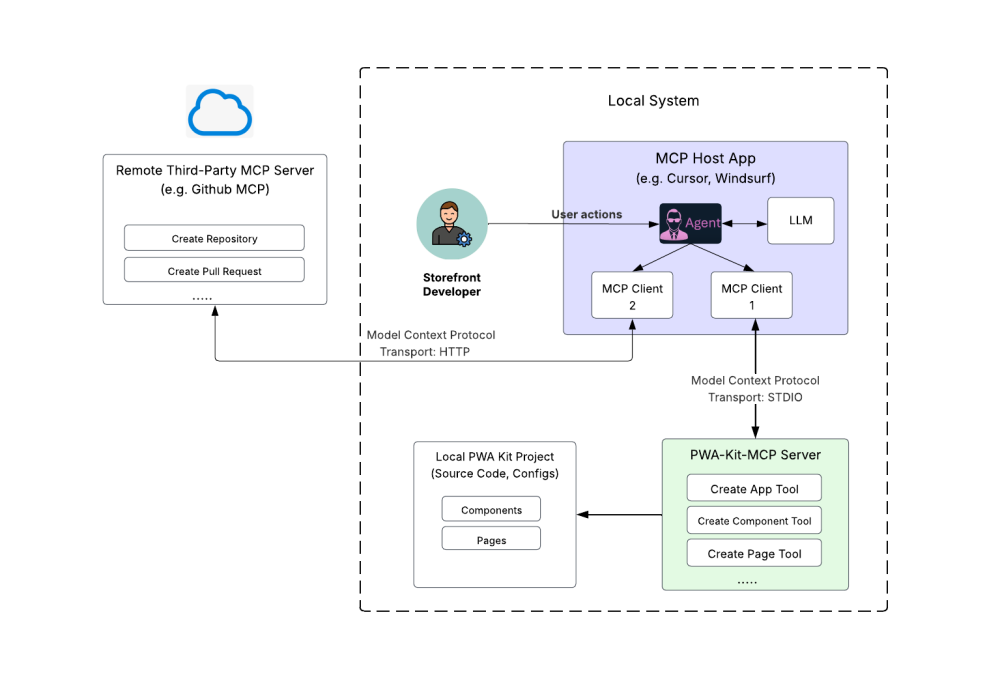
The PWA Kit MCP Server is a local Standard Input/Output (STDIO) MCP server that runs within a developer’s local IDE and uses the local machine’s standard input and output streams. It offers intelligent tools that optimize your storefront developer experience and reduce development time and complexity.
The PWA Kit MCP Server provides AI-assisted code generation and assistance, built-in best practices, and performance and accessibility testing — all within your development environment. Out of the box, it provides a set of MCP tools designed to streamline and optimize composable storefront development, helping you to quickly create, customize, and manage your storefront apps with confidence.
PWA Kit MCP Server tools: Overview and capabilities
The PWA Kit MCP Server offers intelligent tools that are tailored to composable storefront development.
| MCP Tool Name | Description |
| pwakit_create_storefront | Guides agents and developers in creating a PWA Kit project with @salesforce/pwa-kit-create-app. |
| pwakit_create_page | Generates a new composable storefront page with custom routing and components. |
| pwakit_create_component | Generates a new React component for the composable storefront. |
| pwakit_get_dev_guidelines | Provides best practices and guidance for building composable storefronts. |
| pwakit_recommend_hooks | Identifies and integrates hooks that solve specific use cases. |
| pwakit_run_site_test | Runs performance and accessibility audits on a provided site URL. Example: https://pwa-kit.mobify-storefront.com. |
| pwakit_install_agent_rules | Adds an agent guidelines rule file to your project that enables AI to make better use of the PWA Kit MCP Server. |
| pwakit_explore_scapi_shop_api | Explores and documents the B2C Salesforce Commerce API (SCAPI) endpoints, parameters, and usage examples. |
| scapi_custom_api_discovery | Discovers custom SCAPI APIs registered in Business Manager, and fetches the schema of those APIs. Requires that you set up credentials. |
GitHub repo for the PWA Kit MCP Server source code
If you want to inspect the source code of the PWA Kit MCP Server, or to customize the server, check out the pwa-kit-mcp folder in GitHub. To point to the local PWA Kit MCP Server, update your MCP settings as outlined in the Development section of the GitHub ReadMe.
End-to-end demo: Create a storefront and add a page and a component
Ready? Let’s explore the power of using generative AI to accelerate your storefront development. We’ll use the PWA Kit MCP Server to create a storefront, add a category list component to a new page, and then view the results in the browser.
Configure PWA Kit MCP Server settings in Cursor
First, let’s configure the MCP settings in Cursor to add the PWA Kit MCP Server. The setting’s JSON definition looks as follows.
1{
2  "mcpServers": {
3    "pwa-kit": {
4      "command": "npx",
5      "args": ["-y", "@salesforce/pwa-kit-mcp"],
6      "env": {
7        "PWA_STOREFRONT_APP_PATH": "{{path-to-app-directory}}"
8      }
9    }
10  }
11}
The {{path-to-app-directory}} value is a placeholder for the app subfolder path, which we can fill after creating the storefront.
After the MCP server settings are saved, Cursor performs these actions:
- Launches the PWA Kit MCP Server
- Connects to the PWA Kit MCP Server as a client
- Displays the available tools in the UI and how you can invoke them
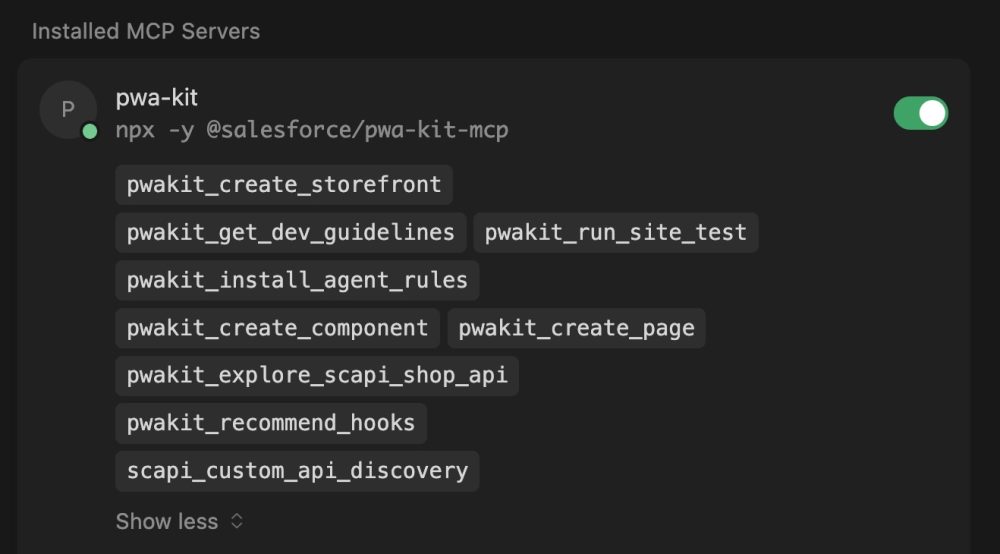
You can return to the MCP tools in Cursor anytime to enable or disable specific tools or servers.
Create a storefront with the PWA Kit MCP Server
Now that the MCP settings are set up, let’s get started with using the PWA Kit MCP Server to create a storefront. In a new chat window, we’ll type this prompt:
Using the pwa-kit MCP server, create a storefront
It gives us the option of creating a storefront using the demo Commerce Cloud instance or a custom instance. We’ll choose the demo instance to speed things up. Cursor creates a new storefront project in our workspace with all the files based on the Retail React App template.
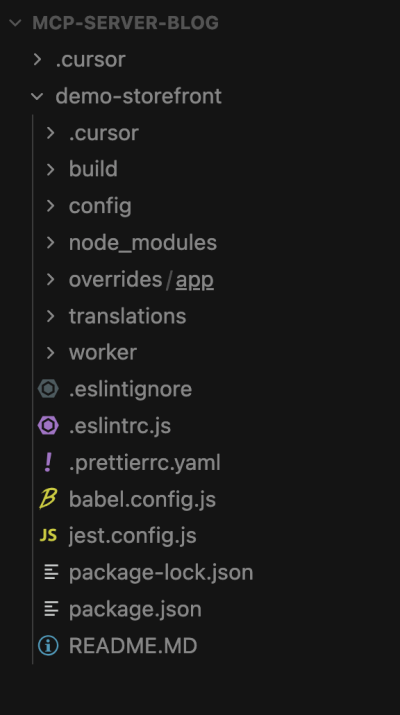
Remember the MCP settings earlier that contain a placeholder for the app path? We’ll replace the {{path-to-app-directory}} placeholder with the app subfolder’s path, which in our case, looks like this:
/Users/<username>/project-folder/demo-storefront/overrides/app
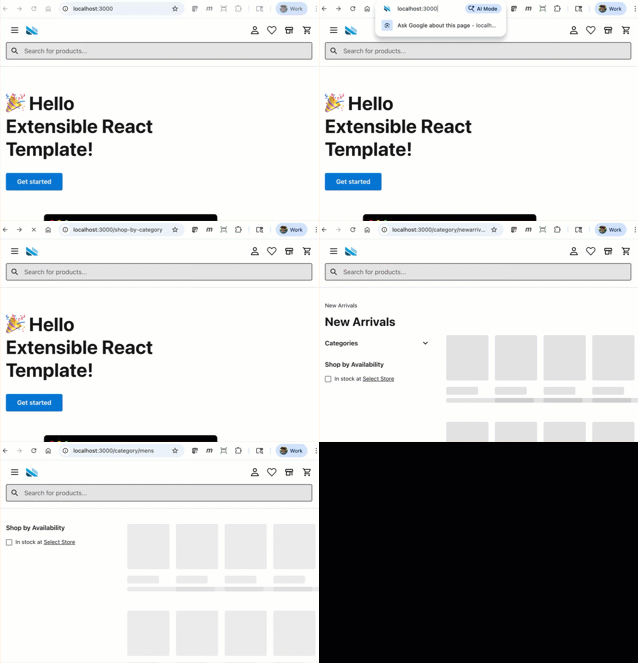
Next, let’s run and view the storefront in the browser. We’ll type these commands in the chat and run them:
1cd /demo-storefront && npm startA browser window opens and shows our storefront at the default address of http://localhost:3000/.
Now, we’ve finished creating the storefront. Yay!
Create a component for product categories
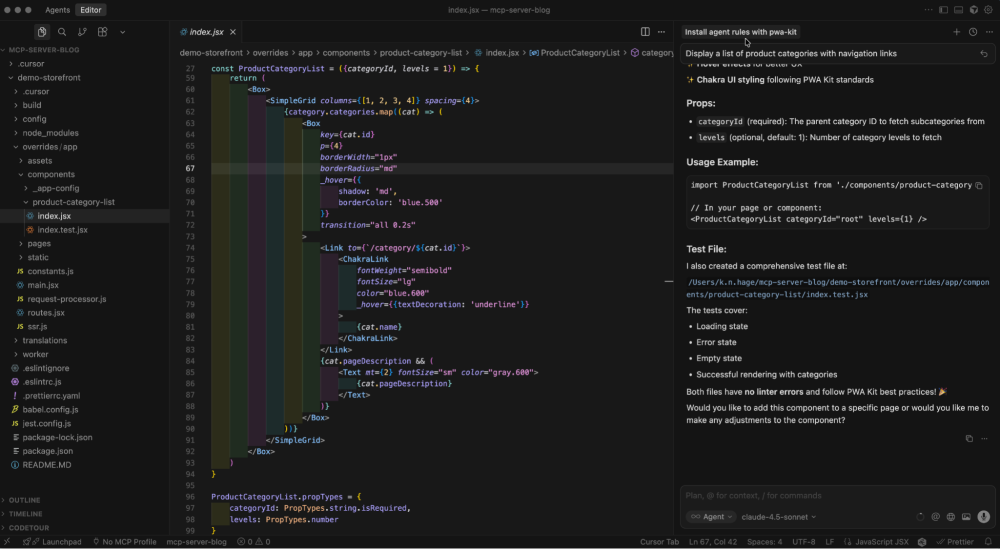
The storefront shows merchandise from the demo instance. Let’s now customize it by adding a new page and a component that displays categories for products. We’ll first tell Cursor to create the component.
Create a component for displaying a list of product categories
Using the MCP tools, Cursor does some research to find the hook that gets product categories in the commerce-sdk-react package. It then creates the ProductCategoryList component and a test for it.
Create a page that displays the new component
Next, we’ll instruct Cursor to create a new page and add the component to it.
Create a new page called shop-by-category with the title “Shop By Category”. Add the ProductCategoryList component to it.
Using the MCP tool, Cursor creates a new page and automatically adds a route — /shop-by-category — for the new page. Let’s view the new page and component in the browser. Navigate to http://localhost:3000/shop-by-category, and tada! We can now browse products by categories using the tiles on that new page.
Conclusion
With the PWA Kit MCP Server, you can tackle many storefront development tasks by writing just a few prompts. In addition, you can use Cursor’s AI capabilities to troubleshoot issues with your storefront code, add tests, and use MCP tools to explore hooks and the Salesforce B2C Commerce API (SCAPI), among other things. The MCP server is your friend for your composable storefront development projects!
Important Note: The PWA Kit MCP Server is currently available as a Developer Preview. Salesforce will announce its General Availability in documentation, press releases, or other public statements. All commands, parameters, and other features are subject to change or deprecation any time, with or without notice. As such, we recommend that you do not implement functionality in production with these commands or tools.
Resources
- GitHub Repository: pwa-kit-mcp
- Developer Guide: Composable Storefront Developer Guide: Get Started with Composable Storefront
- Developer Guide: Composable Storefront Developer Guide: Accelerate PWA Kit Development with the PWA Kit MCP Server (Developer Preview)
- npm documentation: npmjs.com: @salesforce/pwa-kit-mcp
About the authors
Wei Liu is a Principal Engineer at Salesforce specializing in innovative storefront development solutions for Commerce Cloud. She focuses on elevating developer experience, building scalable architectures, and advancing next-generation commerce tooling. You can follow Wei on LinkedIn.
Katia Hage is a Lead Technical Writer at Salesforce. Katia writes documentation for storefront solutions for Commerce Cloud. Previously, Katia also covered documentation and Trailhead for the Salesforce Platform and Data Cloud.