In our video series, Data Cloud Fundamentals: A Guided Tour, the team at Coral Cloud Resorts, a fictional hotel, leverages Data 360 (formerly known as Data Cloud) to unify their data and unlock valuable guest insights. This series has been a big hit, and we have already recorded videos demonstrating how we helped Coral Cloud link key data, calculate customer lifetime value, and surface insights.
Now, we want to extend the series to cover more use cases, so we’re tackling the next level of guest experience: a personalized website.
In this blog post, we’ll walk you through a clear and concise use case showcasing how Data 360 helps to bring in website data to drive and act upon data in real time.
Where does Data 360 fit into a new future systems landscape?
With the new goal of adding personalization to its website, Coral Cloud has a new set of requirements for its use of Data 360:
- The website team needs a way to track website engagement (like what spa days or adventure weekends that guests are clicking on) in near real time, with compliance, and at scale
- The marketing team wants to use that data to instantly personalize the images presented to each guest, all while keeping changes to the existing website minimal
To accomplish this, Coral Cloud is evolving its current systems landscape (which is missing this crucial interaction data) to a future state systems landscape powered by Data 360.
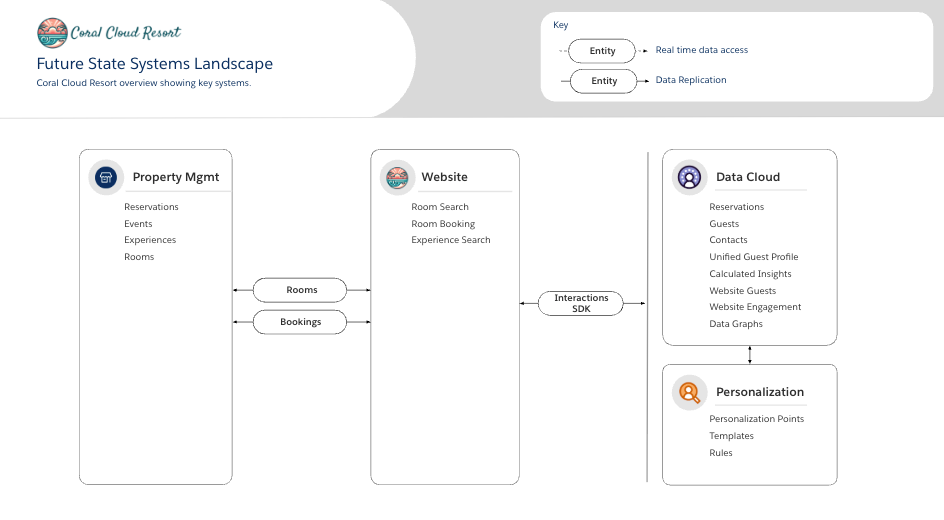
Chapter 6 in our video series introduces a four-phase plan to integrate personalized data into the Coral Cloud website.
- Connect their website to Data 360: Using the Website Connector and Interactions SDK
- Implement the Interactions SDK on their existing website: Capturing consent and implementing identity resolution
- Track website interactions: Capturing website clicks and scaling real-time data access for a guest using data graphs
- Elevate the website with dynamic content: Using Salesforce Personalization and the Interactions SDK to change their website in real time
Let’s take a deeper look at each of the phases of website personalization. Be sure to watch their respective chapters in our video series for full details.
1. Connect the Coral Cloud website to Data 360
Bringing in data from a website can be challenging. By nature, a website may not have a structured data source, and visitors don’t always identify themselves by logging in. This makes it tricky to know which guests are browsing and what they are clicking on.
In this phase, the Coral Cloud website team uses the Data 360 Website Connector and Interactions SDK to create bespoke schemas that represent key data points on the website.
Chapter 7 in our video series walks through this process, including:
- Using data mappings to track guest consent.
- Creating a unique identifier for people visiting the website. This is essential to ensure that all web interactions can be attributed to the same person, both before and after they authenticate.
2. Implement the Interactions SDK on the existing website
The Interactions SDK offers multiple ways to integrate Data 360 with an existing website (in this case, a Next.js site). This phase is broken into three parts: initialization, consent capture, and identity mapping.
At Coral Cloud, the website team needed to ensure that consent is captured prior to sending any events to Data 360 for compliance purposes.
Only after consent is given does the team incorporate the ability to pass identifying attributes when a person logs in. This process, which uses the Interactions SDK and real-time identity resolution in Data 360, is what ultimately allows the system to link a visitor’s anonymous browsing history to their individual unified profile.
Chapter 8 in our video series provides a detailed explanation of consent and identity resolution, with code examples and data queries in Data 360.
3. Track website interactions
After capturing consent and resolving a person’s identity on the website, Coral Cloud is now ready to start linking their browsing history using the Interactions SDK.
Once linked, the website team was able to track clicks on Coral Cloud’s featured experiences, like “Teens Wilderness Camp.” Crucially, the SDK automatically captures the device ID, which is the key that ties click events to a known guest.
Querying data model objects (DMOs) demonstrates how writing complex, multi-join SQL for real-time personalization isn’t scalable or performant. Instead, Data 360 has real-time data graphs that can be used to provide a single API endpoint that instantly returns a comprehensive JSON blob containing everything the team needs to know about a guest’s engagement, including their latest clicks on featured experiences. Ultimately this data graph becomes the foundation for Coral Cloud to act on these insights.
Chapter 9 in our video series shows how to query Data 360 data model objects (DMOs), and how the click events tie back to an individual identified guest.
4. Elevating the website with dynamic content
Now that Coral Cloud has the foundational data needed, the website team is in a position to use the Interactions SDK and Salesforce Personalization to dynamically modify the hero image and related text on their site’s home page.
Within Salesforce Personalization, Coral Cloud can configure:
- Personalization Points: These define the moment for content tailoring (e.g., the home page hero image).
- Decisions: This is the business logic, which uses targeting rules that connect directly to the data graph to appeal to specific user interests. For example, rules are configured to show an “adventure image” or “yoga image” if a user has clicked on related product types.
The website uses the Interactions SDK to call the Personalization API for the specified point; the API responds with a payload containing the necessary attributes (image URL, header, subheader) to dynamically change the home page image and text.
Chapter 10 in our video series demonstrates how to use the Interactions SDK and Salesforce Personalization to dynamically change an image and text on a web page.
Summary
Data 360 helps developers unify real-time customer data to build next-generation personalized experiences. The marketing team at Coral Cloud Resorts faced a challenge: they wanted to instantly tailor the website for each guest, but lacked the crucial real-time interaction data and a scalable, performant way to use it. Our Data Cloud Fundamentals: A Guided Tour video series (Ch. 6-10) shows how they built a new foundation using the Interactions SDK and real-time data graphs. This new architecture unlocks the ability to compliantly track and understand guest intent as it happens.
With this foundation, Coral Cloud can now build a new generation of dynamic, data-driven applications using Salesforce Personalization to leverage live data and deliver the type of one-to-one website experiences that were previously unattainable.
Resources
- Video playlist: Data Cloud Fundamentals: A Guided Tour
- Blog post: Data Cloud Fundamentals: A Guided Tour
- Documentation: Get Started Using Data 360
- Documentation: Customer 360 Data Model
- Trailhead: Data 360 Setup
- Trailhead: Get Hands-on with Data 360
- Overview: Salesforce Data 360
About the author
Dave Norris is a Lead Developer Advocate at Salesforce. He’s passionate about making technical subjects broadly accessible to a diverse audience. Dave has been with Salesforce for over a decade, has over 40 Salesforce and MuleSoft certifications, and became a Salesforce Certified Technical Architect in 2013.