Agentforce Service agents have introduced a new era of adaptive intelligence, capable of understanding deep context and executing multi-step actions autonomously. Combining this reasoning power with the established speed of rule-based bots creates a robust framework for modern service delivery.
In this post, we explore how to architect this integration by deploying an Einstein Enhanced Bot to manage initial entry points. Beyond simply resolving routine inquiries and filtering spam, the bot acts as a strategic orchestrator. It evaluates user intent and routes interactions to the specific Agentforce Service agent best suited for the task, thus ensuring that complex needs receive the right specialized attention.
The screenshot below shows a hybrid bot architecture: the Einstein Enhanced Bot triages transactions (Log/Status) and routes complex knowledge to an Agentforce Service agent.
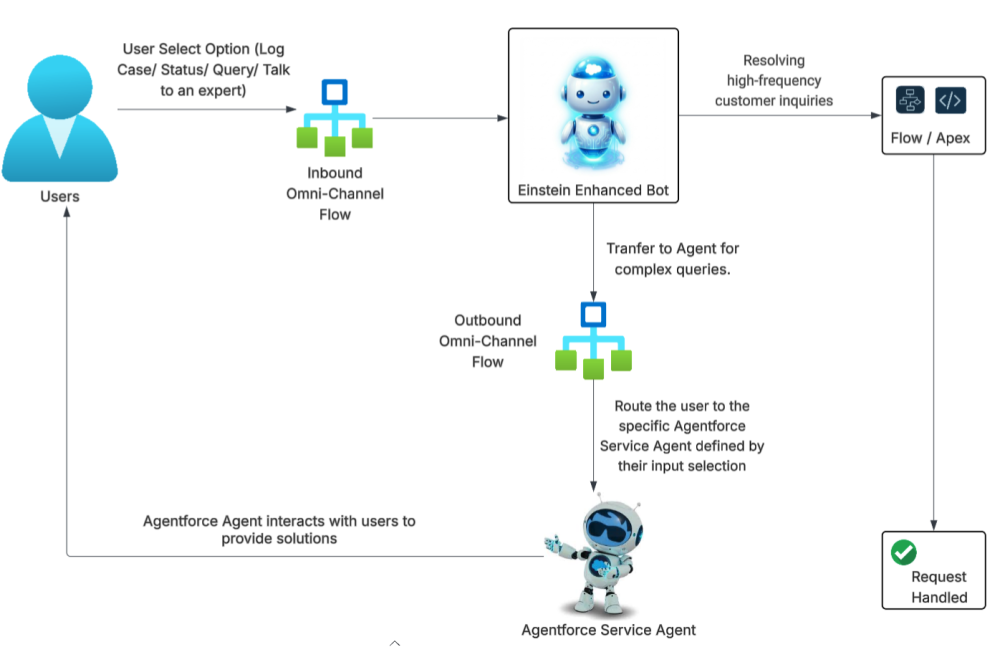
Let’s explore this hybrid bot architecture through the lens of QuantumConnect, a fictitious technology company that already has a solid foundation: an Experience Cloud site running the Astro Case Resolution Einstein Enhanced Bot. Now, they are taking the next step by deploying an Agentforce Service agent. We’ll look at how the company can get the most out of Agentforce and, crucially, how they can integrate it effectively with their existing Einstein Bot infrastructure.
As we analyze QuantumConnect’s journey, we see that their integration strategy is designed to maximize value by centering on three key pillars:
- Resource Optimization: They’re implementing a hybrid routing strategy that utilizes Einstein Enhanced Bots for transactional, compliance-heavy workflows to guarantee low latency and process adherence. This architecture offloads routine traffic from Agentforce, significantly reducing direct cost (Flex Credits and Conversations) and reserving generative capabilities for non-deterministic, deep-logic use cases.
- State Persistence: They’re using techniques for maintaining context variables and session parameters during the handoff from the Einstein Enhanced Bot to the Agentforce Service agent.
- Intent-Based Orchestration: They’re leveraging the Einstein Enhanced Bot as an intelligent orchestrator, routing user requests to the appropriate Agentforce Service agent based on detected intent.
For the sake of brevity, we won’t give the detailed instructions in this post, but you can check out this GitHub repository for a step-by-step guide.
Configure the Agentforce Service agent
The QuantumConnect team starts with the configuration and setup of their Agentforce Service agents. To address specific customer needs, they configure three specialized agents:
- Technical Support agent: Handles technical troubleshooting and bug reports
- Billing & Payments agent: Manages invoice inquiries and payment processing
- General Inquiry agent: Handles FAQs and company policy questions
See our GitHub repo for detailed setup instructions.
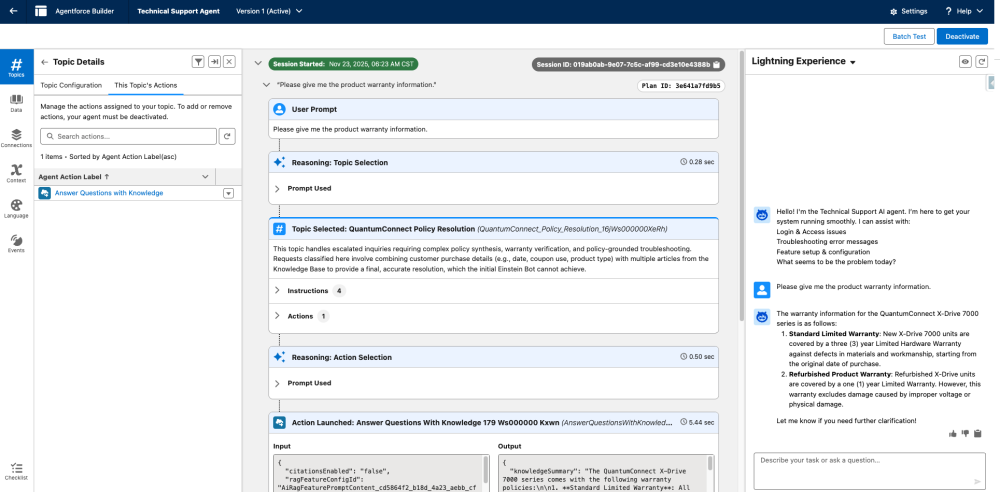
As an example, the Agentforce Builder screenshot below shows the Technical Support agent responding to a user prompt and accurately retrieving and grounding the warranty policy from the knowledge base.
Configure the Einstein Enhanced Bot
QuantumConnect’s existing Astro Case Resolution Einstein Enhanced Bot is currently equipped with two primary dialogs: Case Status and Log a Case. To expand functionality, they have added a new dialog titled “Talk to an expert.” In the subsequent steps, we will track QuantumConnect’s configuration process for this new Talk to an expert dialog.
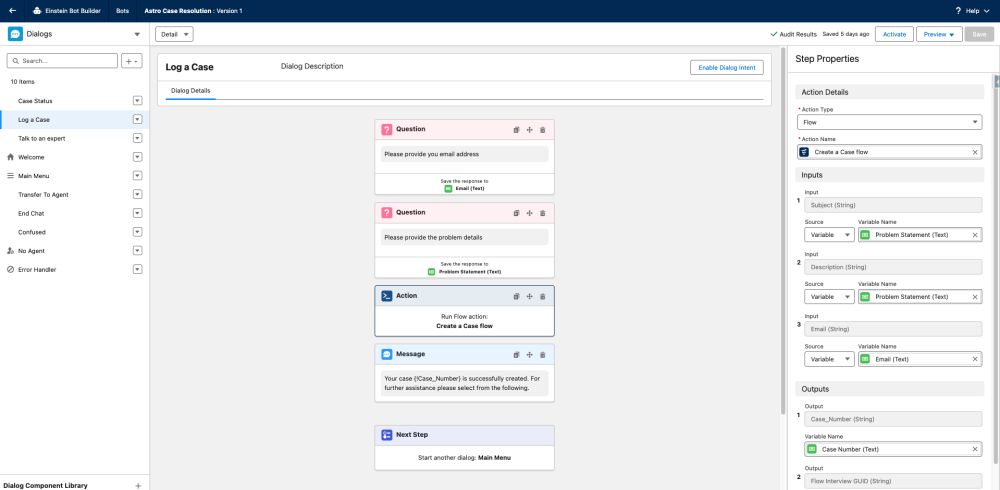
Configure the transfer logic in an Einstein Enhanced Bot
In this section, we observe how the QuantumConnect team constructs the transfer logic and routing intelligence required for a seamless handoff.
Step 1: Configure a flow to capture user intent by updating the Messaging Session object’s custom field
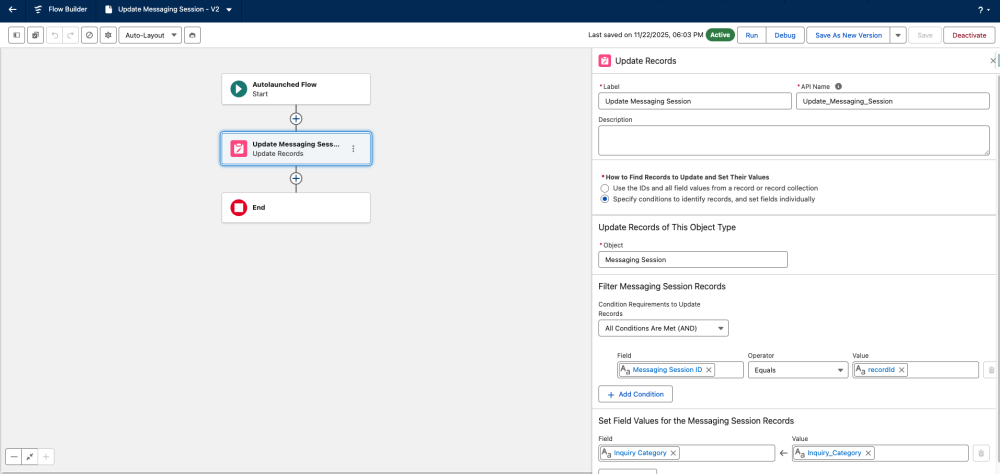
To preserve context during the Einstein Enhanced Bot-to-Agentforce Service agent handoff, the QuantumConnect team extends the Messaging Session object with an Inquiry Category custom field. By populating this field via the Update Messaging Session flow, they ensure that the user’s specific intent persists beyond the initial bot conversation. This provides the critical data point that their Omni-Channel flow needs to execute intelligent routing logic. We’ll see how they invoke this flow in the subsequent steps.

The QuantumConnect team successfully configures the Update Messaging Session flow to populate the Inquiry Category field on the Messaging Session object.
Step 2: Configure the “Talk to an expert” dialog
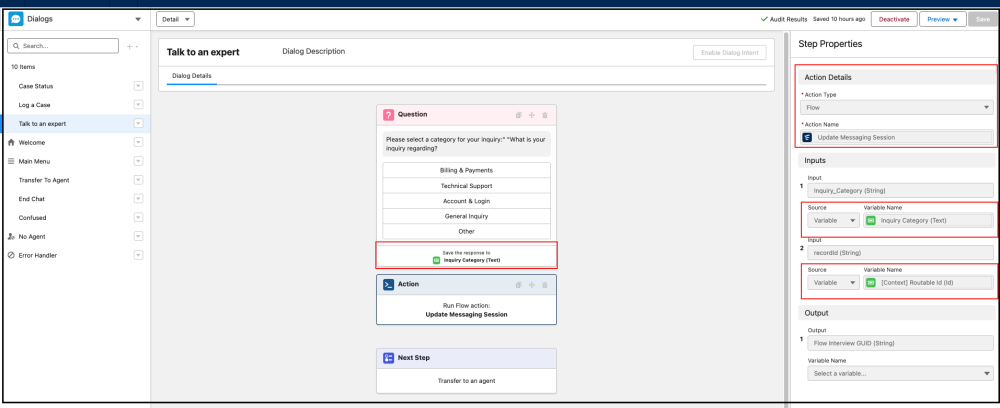
The QuantumConnect team utilizes the Talk to an expert dialog as the bridge between the bot and the agent. To optimize this transition, they configure the dialog to capture user intent before routing to the Transfer To Agent system dialog. By prompting for the inquiry type and passing that input into the Update Messaging Session flow — mapping the RoutableID (Messaging Session ID) and Inquiry Category — they ensure that the session is enriched with critical context before the final handoff occurs.
Step 3: Configure the outbound Omni-Channel flow
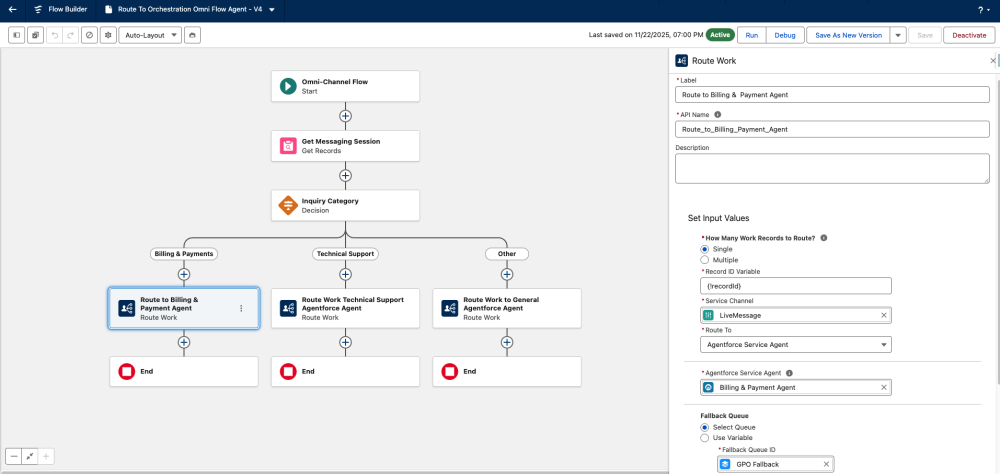
Intelligent routing based on user intent ensures that customers are immediately paired with the right Agentforce agent expertise. By utilizing an outbound Omni-Channel flow to process the inquiry category through a decision element, the QuantumConnect team creates a context-aware architecture. This directs the Route Work action to the relevant Agentforce Service agent — distinctly separating Billing & Payments from Technical Support — and secures the workflow with a fallback queue for added resilience.
Step 4: Configure the Einstein Enhanced Bot “Transfer To Agent” dialog
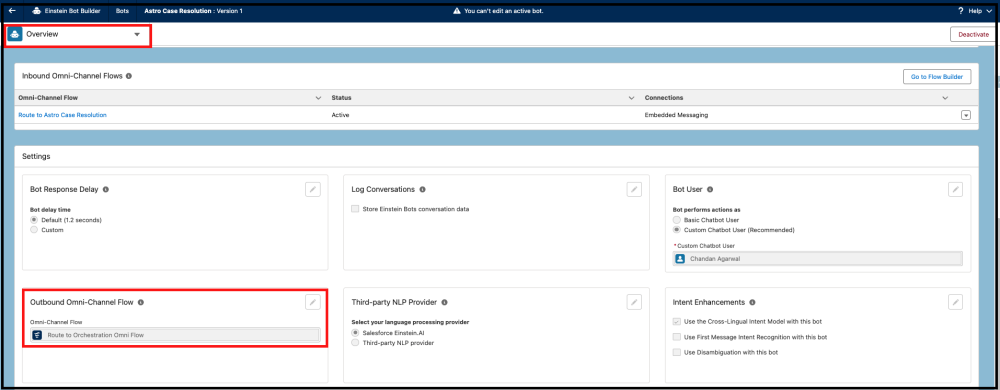
To operationalize the transfer, On the Bot Overview page, the QuantumConnect team establishes the routing foundation by configuring the Outbound Omni-Channel Flow setting. This action specifies the default Omni-Channel flow that the enhanced bot will utilize to manage and route outgoing conversations.
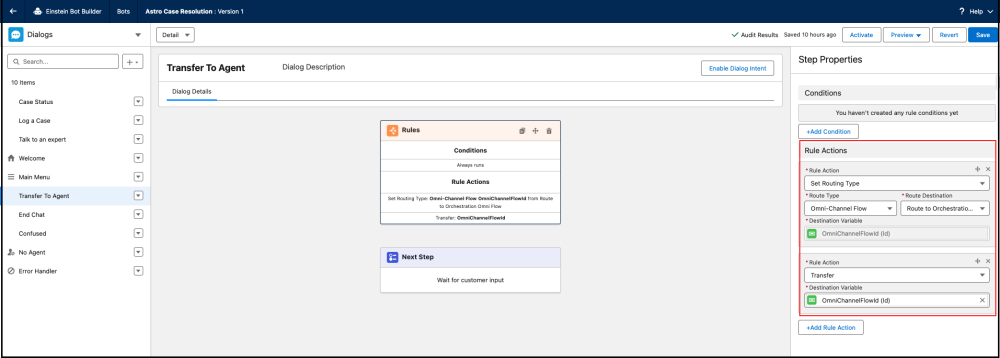
Once the Outbound Omni-Channel flow is linked in the Overview settings, the QuantumConnect team configures the Transfer To Agent dialog to handle routing. By leveraging the bot’s flow settings, this dialog dynamically directs conversations to the correct agent, queue, or skill based on defined business rules.
Test the hybrid solution
With the configuration complete, the QuantumConnect team moves on to the testing phase. They activate the Astro Case Resolution Einstein Enhanced Bot and navigate to the existing Experience Cloud site to validate the implementation in a live environment.
Their validation steps are as follows.
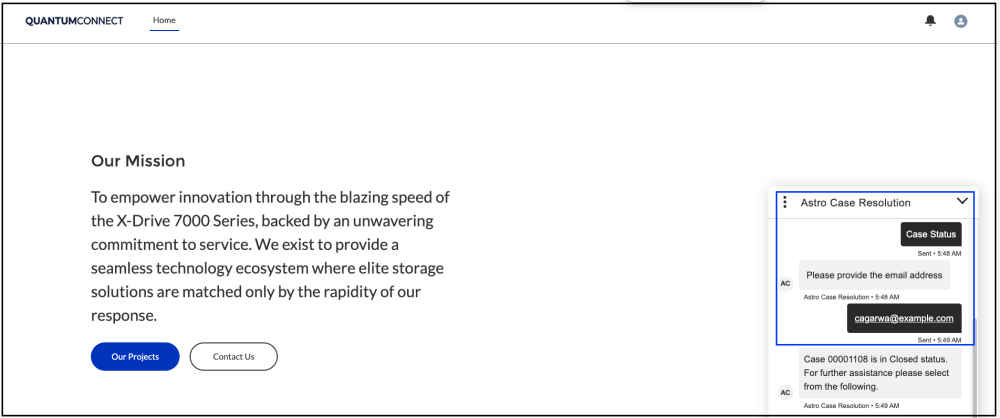
1. Case status: The user initiates a chat on an Experience Cloud site. The Einstein Enhanced Bot offers options, the user selects case status, and the bot provides the details.
Below is a screenshot of the QuantumConnect website with the chatbot window open. It shows the bot receiving the user’s email and responding with the case number and status.
2. Talk to an expert: Initiating the Talk to an expert path triggers a prompt requiring the user to identify their inquiry type.

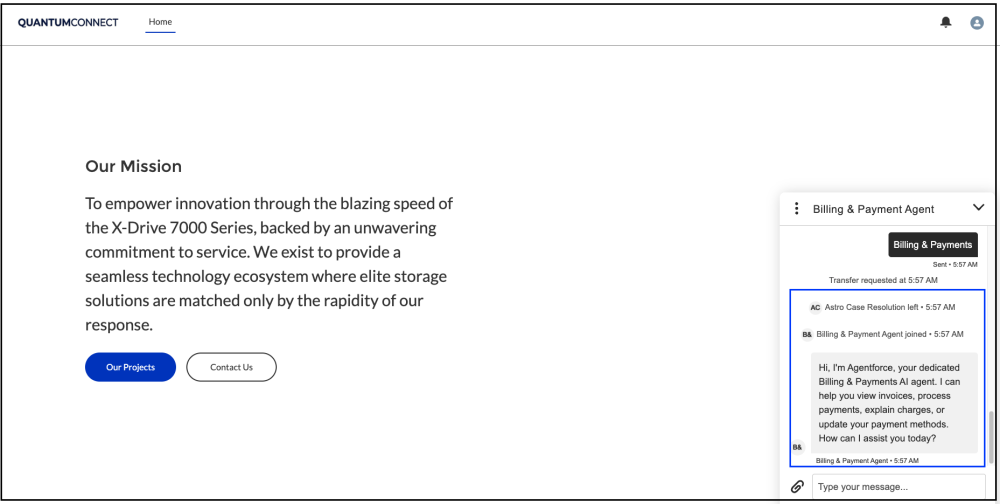
3. Inquiry category selection: When the user selects “Billing & Payments” the system automatically routes the inquiry to the specialized Billing & Payments Agentforce agent.
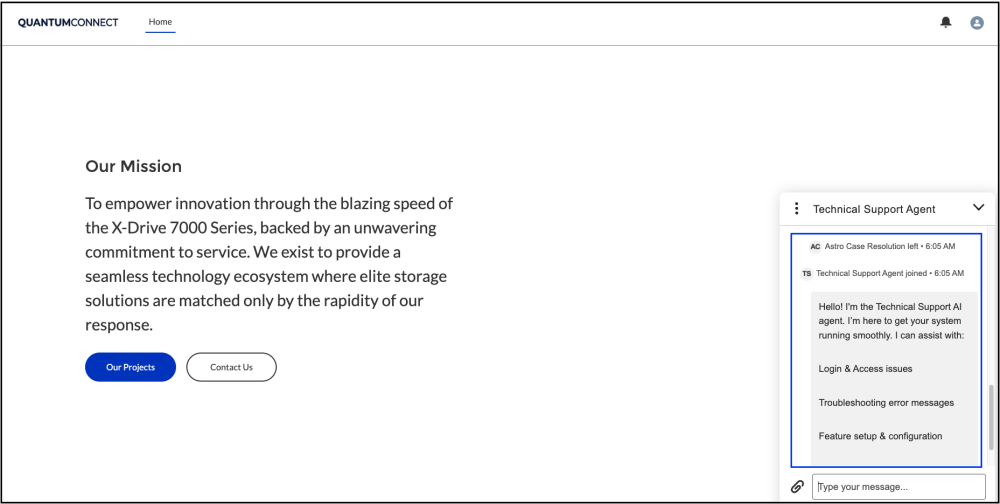
4. Inquiry category selection: When the user selects “Technical Support,”, the system automatically routes the inquiry to the specialized Technical Support Agentforce agent.
5. Testing context retention during bot-to-agent transfer: The QuantumConnect team successfully verifies that context remains intact during the handoff from the Einstein Enhanced Bot to the Agentforce Service agent. They confirm that upon selecting “Talk to an expert,” the necessary context was correctly written to the Messaging Session record, ensuring that no data was lost in transition.
The screenshot below illustrates how session details and context are preserved and transferred from the Einstein Enhanced Bot to the Agentforce Service agent.

Conclusion
Integrating Einstein Enhanced Bots with Agentforce Service agents represents a fundamental shift in how organizations architect scalable support on Salesforce. By orchestrating a hybrid model, businesses can strategically decouple deterministic workflows from generative ones. This ensures that high-volume, rule-based tasks are handled with near-zero latency and strict compliance, while Agentforce is reserved exclusively for complex problem-solving.
The result is a highly efficient system that not only optimizes performance but also drives significant cost savings by reducing unnecessary Flex Credits and Conversation consumption. Ultimately, this architecture ensures that every user interaction is routed to the most effective resource — perfectly balancing speed, cost, and intelligence.
Check out this GitHub repository for a step-by-step guide to getting started with building hybrid bots.
Resources
- GitHub Repository: Einstein-bot-to-agentforce-handoff
- Documentation: Set Up Enhanced Bots
- Documentation: Advanced Routing with Omni-Channel Flows
- Documentation: Transfer Conversations from an Enhanced Bot to an Agentforce Service Agent
- Documentation: Embedded Messaging
- Workshop: Build the Future with Agentforce
About the authors
Chandan Agarwal is a Lead Member of Technical Staff at Salesforce. You can find him on LinkedIn.
Ishita Saxena is a Senior Solution Consultant at Salesforce. You can find her on LinkedIn.