Aura (formally known as Lightning Aura Components) is a legacy UI framework that was replaced by the modern, web standards-based Lightning Web Components (LWC) in 2018. Despite the many performance and security benefits of LWC, tens of thousands of Aura components still remain in use today, primarily due to the cost and effort associated with migration.
As I started working on the sixth episode of the Agentforce Vibes Decoded video series, I ventured into the realm of migrating from Aura to LWC using Agentforce Vibes. In this post, I’ll present Agentforce Vibes and the Salesforce DX MCP tools that helped with this migration, share my experience, and suggest some practical tips to make the process easier.
About Agentforce Vibes and the Salesforce DX tools
Agentforce Vibes is an AI-powered tool that assists with development on the Salesforce Platform. One of the key elements that helps it deliver value is a set of 60+ tools available from its integration with the Salesforce DX MCP Server.
Tools for migrating from Aura to LWC
A subset of the Salesforce DX MCP tools are dedicated to assisting you with migrating Aura components to LWC. Unlike most of the other tools, these work in conjunction with one another.
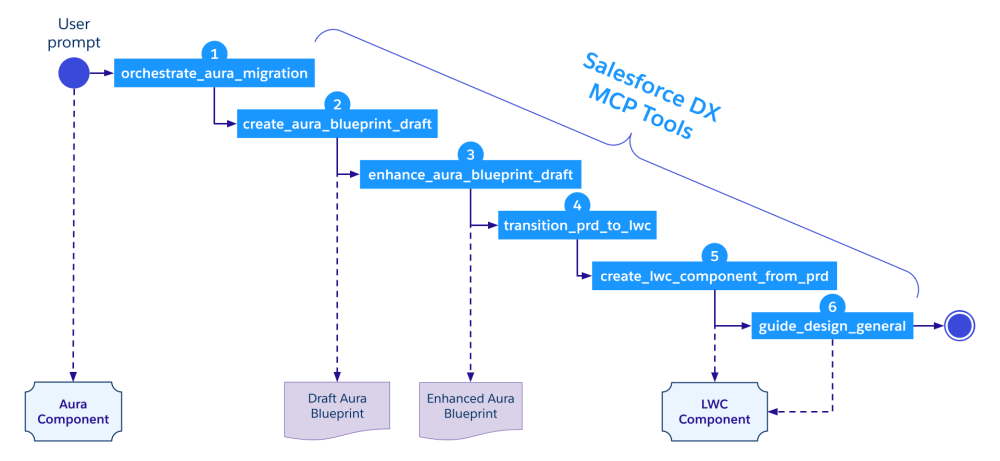
Here are the steps that take place when a user requests the migration of an Aura component with a prompt:
- The dev agent calls the
orchestrate_aura_migrationtool to build a plan for the migration steps. - It then calls the
create_aura_blueprint_drafttool to build a draft blueprint of the Aura component. This blueprint is a YAML file that describes the component and holds information like the basic purpose of the component, and technical details like references, child components, data being used, interactions, states, and more. - The Aura draft is then enhanced by another tool:
enhance_aura_blueprint_draft. - Next, the Aura blueprint is converted into a LWC blueprint with
transition_prd_to_lwc. - The LWC is then created from the LWC blueprint with
create_lwc_component_from_prd. - Finally, the
guide_design_generaltool runs to apply final styling touches to the LWC with SLDS.
Configuring the tools
The Aura-to-LWC migration tools are part of the aura-experts and lwc-experts toolsets. You’ll need to enable these toolsets in your Salesforce DX MCP Server configuration.
Tip: while you technically can enable all of the Salesforce DX MCP tools at once, bear in mind that this can be counterproductive as it may confuse the LLM when dealing with tool selection. It’s always best to handpick the right tools for the job.
At the time of writing, some of the tools required for the migration are still in Beta, so you’ll also have to enable non-GA tools by specifying the --allow-non-ga-tools flag in the MCP Server configuration.
With that, your MCP Server configuration should look like this:
1{
2  "servers": {
3    "Salesforce DX": {
4      "command": "npx",
5      "args": [
6        "-y", "@salesforce/mcp",
7        "--orgs", "DEFAULT_TARGET_ORG",
8        "--toolsets", "aura-experts,lwc-experts",
9        "--allow-non-ga-tools"
10      ]
11    }
12  }
13}
You can refer to the second episode of the Agentforce Vibes Decoded series for more details about how to configure MCP servers.
Migrating an Aura component to LWC
In order to build content for the Agentforce Vibes video, I chose to dig up our good old Dreamhouse sample app. You’ve probably bumped into it on Trailhead at some point, but if you haven’t, it’s a custom Lightning app featuring a fictitious real estate broker that we’ve open-sourced on GitHub for learning purposes.
We migrated Dreamhouse from Aura to LWC back in 2018, but we also archived the original Aura version as a reference for developers and dependent Trailhead badges. This felt like the perfect place to start for my current migration exercise. To be fully transparent, I worked on the initial implementation and the (manual) migration back then, but I’ve retained little memory of the legacy Aura implementation (time flies!).
Picking a component for the migration
The Dreamhouse app has dozens of custom components, but to keep this video brief, I’ve migrated just one. This mirrors our recommended strategy of incremental migration, which focuses on one piece at a time.
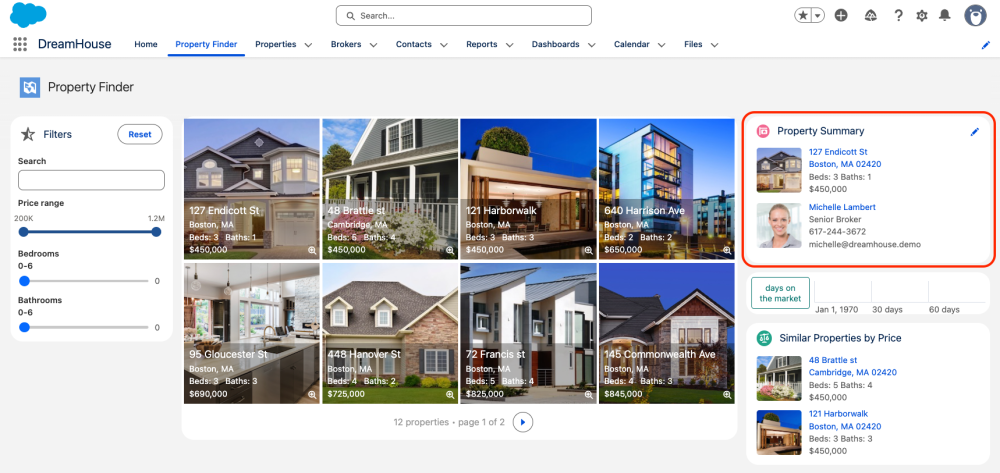
For this exercise, I picked the Property Summary component that displays details of the currently selected property and its assigned broker. This component is easy to understand, yet complex enough to demonstrate the challenges of migration.
Kicking off the migration
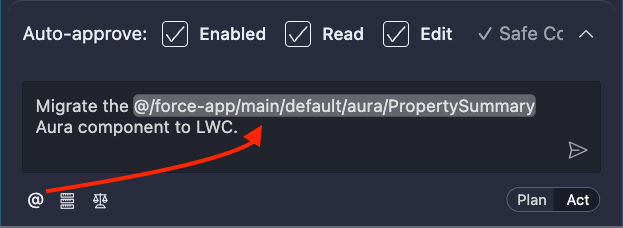
I started my migration with a simple and straight-to-the-point prompt in Agentforce Vibes:
Migrate the PropertySummary Aura component to LWC.
Tip: for extra efficiency, I use @ context references such as @/force-app/main/default/aura/PropertySummary in my prompts when designating components. I’ve removed these references from the prompts noted in this post to make them easier to read.
This first prompt created the LWC pretty rapidly, which gave me the confidence to deploy it right away. My goal was to have the Aura and LWC components side by side to compare them.
The first issue that I faced was that the LWC would not deploy because it had the same name as the existing Aura component. So, I renamed it to propertySummaryLwc, deployed it, and then added it to my Lightning page to try it out.
The Property Summary Lightning card showed up, but sadly, the summary details didn’t appear when a property tile was selected. The component remained stuck in its initial state, displaying “Select a property to see details here”.
Fixing component interactions
I looked back at the Agentforce Vibes task summary and then understood the issue thanks to this sentence:
Event communication for `ltng:selectSObject` equivalent can be implemented based on specific integration requirements.
I had to dig back into my Aura expertise, but what this meant was that I couldn’t use the Aura-specific selectSObject system event in my LWC to communicate across components. I had to find another way to convey the property selection from the PropertyTile component to the PropertySummary component.
It turns out that we introduced the Lightning Message Service for this exact purpose: communicating across all types of components regardless of whether they are written with Visualforce, Aura, or LWC. Knowing this, I sent a second prompt:
Use a Lightning Message to communicate between PropertyTile, PropertySummary, and propertySummaryLwc instead of ltng:selectSObject.
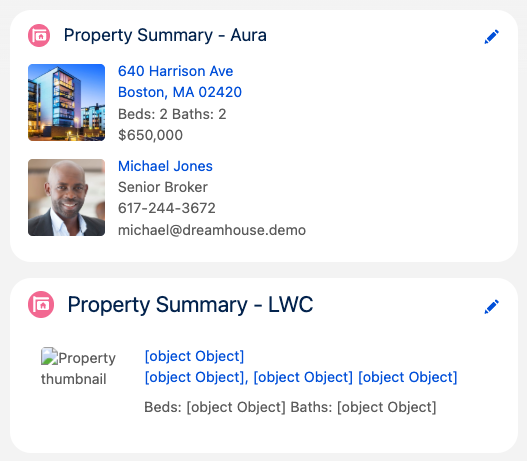
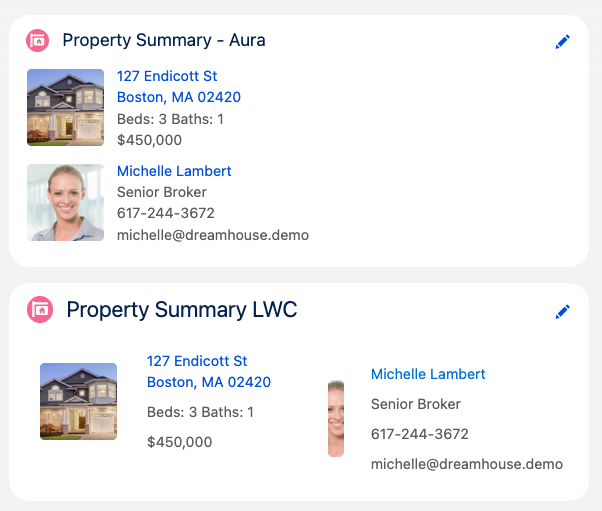
This prompt created a PropertySelected message channel and refactored my components to use it. I deployed the new metadata and was happy to see that my property could now be selected, but there was a catch — the data wasn’t displaying correctly. In the screenshot below, you can see that unlike the Aura component, the LWC component isn’t displaying record data, it’s only showing “[object Object]” instead of values.
Restoring data access
Having worked extensively with LWC and JS, I knew exactly what the issue was: the JS code wasn’t accessing the right fields in the record data. This is easy to fix, but instead of manually fixing the code or being specific about the issue, I decided to test Agenforce Vibes with another prompt (and I pretended not to know what the issue was):
Data is not being displayed correctly in the LWC. I only see “[object Object]” for all field values.
The agent immediately figured it out and adjusted the code to fix the issue. I redeployed the component and this time the record data showed up as expected, but the style was broken. The LWC component displayed the right data, but the layout did not match the Aura component.
Aligning the components’ style
At this point, I thought that I would have to manually tweak the CSS of my LWC. But before doing so, I took my chances with a final prompt:
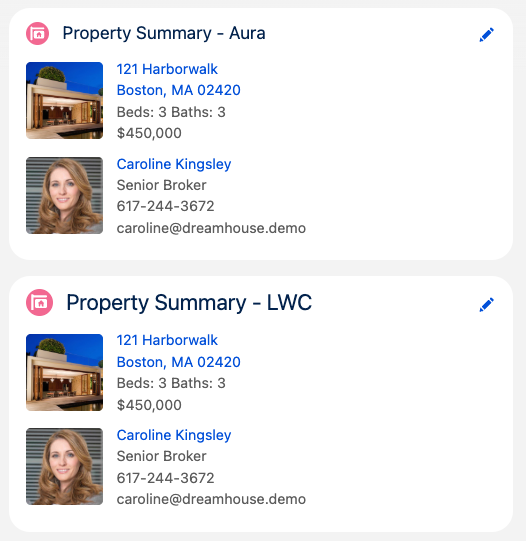
Update propertySummaryLwc so that its appearance better aligns with PropertySummary. Only work on the HTML and CSS of the LWC component. Don’t edit the JS.
This worked perfectly. The component was refactored and the end result was exactly what I was looking for: the two components look almost identical (the only minor difference is the font size of the title).
Bonus: Unintended bug fix
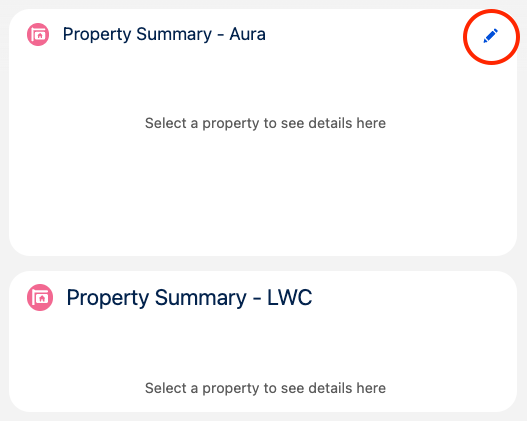
After testing the component a number of times post migration, I realized that the initial Aura component had a bug. The edit button icon was always visible, and clicking it when no property was selected would lead to an error message.
It turned out that the LWC version built by Agentforce Vibes didn’t have this bug because the agent implemented the proper checks. In other words, the migration fixed a bug that we didn’t know about.
The screenshot below shows the Property Summary Aura and LWC components side by side with no property selected. The Aura version displays an edit button (which it should not) whereas the LWC version does not display the button.
Conclusion
This concludes our tour of the Agentforce Vibes tools and the experience of migrating an Aura component to LWC. You can watch a summary of this post in Episode 6 of our Agentforce Vibes Decoded video series.
It took four prompts and about 30 to 40 minutes to migrate the component. While this may seem long for a single component, this includes the time I took to document the process. There was also a significant overhead for me when starting from scratch after a nearly six year break from writing Aura. With practice and a few optimizations, this duration can be significantly lowered.
The key takeaway is that you should start your migration with small child components and gradually increase the scope of the migration up to the app level.
Solid prompts grounded with context and the Salesforce DX MCP Server tools will help you get there, but you still need knowledge about your app’s architecture, Aura, and LWC. This holds true especially when it comes to managing dependencies and integrations. You can also optimize the process by creating custom Agentforce Vibes rules to handle the scenarios.
Now that Aura and LWC are at feature parity and that Agentforce Vibes is here to help, it’s the perfect time to migrate!
Resources
- Videos series: Agentforce Vibes Decoded
- Documentation
About the author
Philippe Ozil is a Principal Developer Advocate at Salesforce, where he focuses on the Salesforce Platform. He writes technical content and speaks frequently at conferences. He is a full-stack developer and enjoys working with APIs, DevOps, robotics, and VR projects. Follow him on X, LinkedIn, and Bluesky, and check out his GitHub projects.