If you’ve built Page Designer components in B2C Commerce for a composable storefront in the past, you had to maintain two implementations, one in ISML for Page Designer and another in React for your storefront. With PWA Kit v3.17, that duplication is no longer necessary.
You can now expose React-based composable storefront components directly in Page Designer, without maintaining ISML versions. Also, Page Designer now uses dynamic component loading, which loads only components that are in use. The new Page Designer streamlines your workflow and reduces maintenance, saving you development time while boosting storefront performance through dynamic component loading! In fact, the seamless integration of Page Designer with composable storefronts can save significant development time as reported by some early adopters.
In this post, we explain how the new headless Page Designer architecture works and how to use it in your storefront.
Comparing new and old Page Designer approaches
The diagram below shows a side-by-side comparison of the data flow in the old approach and the new approach. It illustrates the shift from a legacy ISML-dependent architecture to a direct Page Designer integration with the PWA-Kit based Composable Storefront. The new architecture removes the ISML rendering layer. Page Designer now injects your composable storefront directly, where React components render the page. The metadata cartridge contains reusable pages and components and defines component structure. In the new approach, Page Designer doesn’t execute server-side JavaScript from the metadata cartridge. Instead, all logic is implemented in the React storefront components.
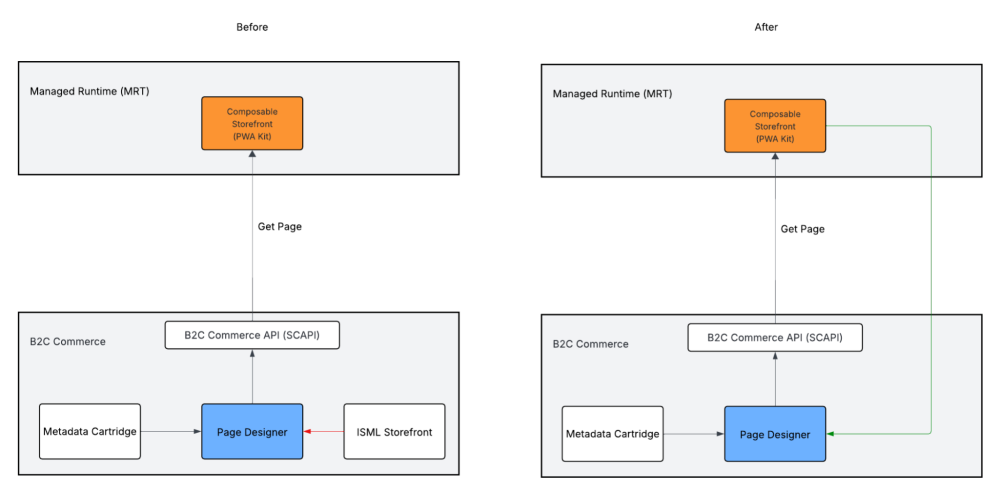
Check out the differences between the new headless approach and the old approach of building reusable pages and components in Page Designer.
| Aspect | Old Approach with ISML | New Approach |
| Component Definition | ISML and React components required | React components only |
| Metadata | Component metadata in JSON | Component metadata in JSON with arch_type: "headless" |
| Maintenance | Two implementations (ISML and React) | Single React implementation |
| Component Registry and Bundle Impact | Uses a mapping object that you configure manually to register components. All components loaded. No lazy loading. | Uses a dynamic registry to lazy load components. Only the used components are loaded (code splitting). Loading of non-critical components or resources is deferred until they are needed. |
| Dependencies | Requires @salesforce/commerce-sdk-react |
Requires @salesforce/storefront-next-runtime in PWA Kit v3.17 or later, in addition to @salesforce/commerce-sdk-react |
| Page Designer React Primitives | Static regions and components with limited behavior | Design-mode-aware regions and components rendered by the storefront |
| Server-Side Custom JavaScript | Executed at run time | Metadata JavaScript files aren’t executed. All component logic runs in the React storefront. |
| Preview | Preview in Page Designer shows only ISML pages. Storefront Preview needed for PWA live preview. | Page Designer can preview PWA Kit storefront. |
Page Designer new metadata attributes for PWA Kit
Page Designer uses a hierarchical architecture with three main concepts: pages, regions, and components. (To learn more, see Integrate Page Designer with PWA Kit in the Composable Storefront Developer Guide.) Page Designer components are defined using metadata files in the metadata cartridge. When the new headless mode is enabled, the storefront is responsible for rendering the components.
To enable headless rendering, two metadata attributes are required: arch_type and route. With the arch_type attribute, Page Designer recognizes your storefront as headless, and doesn’t render ISML components. The route attribute specifies a page’s location in the storefront. The route attribute enables Page Designer to open the correct storefront route when rendering the page in edit and preview mode.
The arch_type field in Page Designer metadata files
Add "arch_type": "headless" to Page Designer metadata files such as pages, components, and aspect types.
When arch_type is set to "headless", preexisting custom JavaScript in Page Designer metadata isn’t executed—all logic must be in your React components.
The route field in pages
Add the route field to specify a page’s location in the storefront. For example, "/" for homepage or "/about" for the About page. Also, you can set dynamic routes with parameters. For example, "/product/:productId" or "/category/:categoryId". Route parameters must match the attribute IDs defined in the page’s aspect type.
To learn more about routes, see Understanding Page Designer Components in the Composable Storefront Guide.
Example page
In this example, we show how to use the headless attribute with the home route of /.
1{
2    "name": "Home Page",
3    "description": "Main landing page",
4    "arch_type": "headless",
5    "route": "/",
6    "region_definitions": [...]
7}
Example: Card component metadata
In this example, we show metadata for a card component with the headless attribute.
1{
2    "name": "Content Card",
3    "description": "Flexible card component",
4    "group": "commerce_assets",
5    "arch_type": "headless",
6    "region_definitions": [],
7    "attribute_definition_groups": [...]
8
9}
To learn more about Page Designer best practices and permissions, see Page Designer in the B2C Commerce Guide.
Migration Checklist: ISML to Headless
To migrate your app to the new headless architecture, follow this sequence of steps.
- Install the required dependency, the
@salesforce/storefront-next-runtimepackage. - Update component metadata to headless.
- Update page metadata with routes.
- Update the aspect type metadata for the product detail page (PDP), the product list page (PLP), and search, by adding the
arch_typefield. - Migrate from manual mapping to the dynamic registry lazy loading.
- Set up PageDesignerProvider in the App component.
- Create a PageDesignerInit component.
- Create the
useGlobalAnchorBlockHook. - Add PageDesignerInit to the App.
- Deploy and test the storefront.
For details, see Migration Steps in the Composable Storefront Developer Guide.
Conclusion
The new headless Page Designer architecture removes one of the biggest pain points when building composable storefronts: maintaining duplicate ISML implementations. Developers can now build Page Designer components once in React, while merchants continue to use the familiar Page Designer UI to compose pages. This approach reduces maintenance, simplifies development workflows, and improves performance through dynamic component loading.
Resources
- B2C Commerce Guide: Page Designer
- Composable Storefront Developer Guide: Integrate Page Designer with PWA Kit
About the Authors
Maria Juraschik is a Lead Software Engineer at Salesforce, working on Page Designer and Content Management.
Katia Hage is a Lead Technical Writer at Salesforce. Katia writes documentation for storefront solutions for Commerce Cloud. Previously, Katia also covered documentation and Trailhead for the Salesforce Platform and Data 360.