Key Takeaways:
- AI isn’t replacing the Salesforce Developer role. It’s reshaping it around three higher-value capabilities: system design, quality engineering, and cross-system thinking.
- Adopting AI-assisted development tooling will slow you down before it speeds you up. The investment is in redesigning your workflows, not just adding tools.
- Most Salesforce development is brownfield engineering: working inside complex, inherited orgs where undocumented decisions outnumber documented ones. AI can’t navigate this context alone.
- The Salesforce Developer career path in 2026 and beyond rewards developers who pair deep platform knowledge with broad architectural judgment, not the fastest code writers.
- Whether your organization has adopted AI tools or not, you can start building the skills that matter most today.
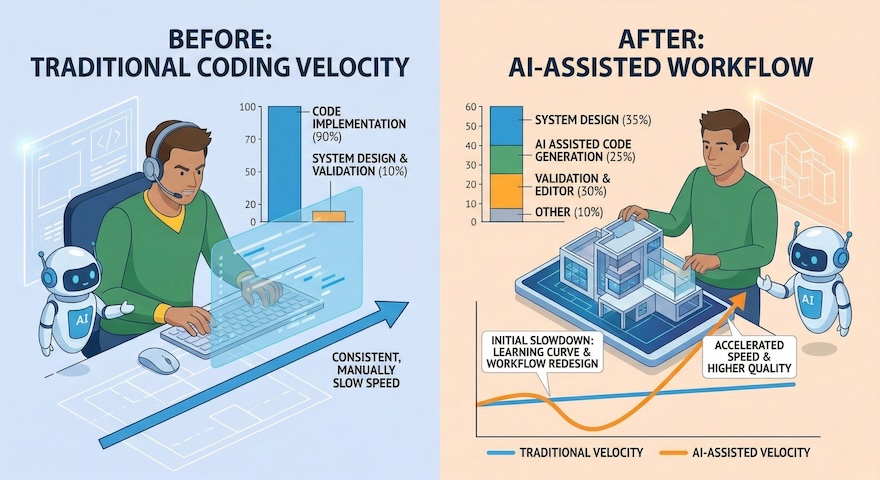
Adopting AI-assisted development might initially make you slower.
This isn’t because the tools are bad, or because you’re doing it wrong. Based on patterns we are seeing across Salesforce development teams adopting AI tooling, there is a consistent J-curve: Using AI effectively requires rethinking the task itself: your workflows, your team’s processes, and the way your organization builds software. That kind of change often creates new types of errors before it delivers new types of speed.
Skipping this part of the conversation has consequences. It feeds the fear of slop flooding codebases and fuels anxiety about whether AI improves outcomes or just creates the illusion of developer productivity.
Those feelings are valid, but aren’t the full picture. Here’s what’s actually happening to the Salesforce Developer role: where it’s been, what AI is changing, and where the career path is headed.
How the Salesforce Developer Role is Evolving
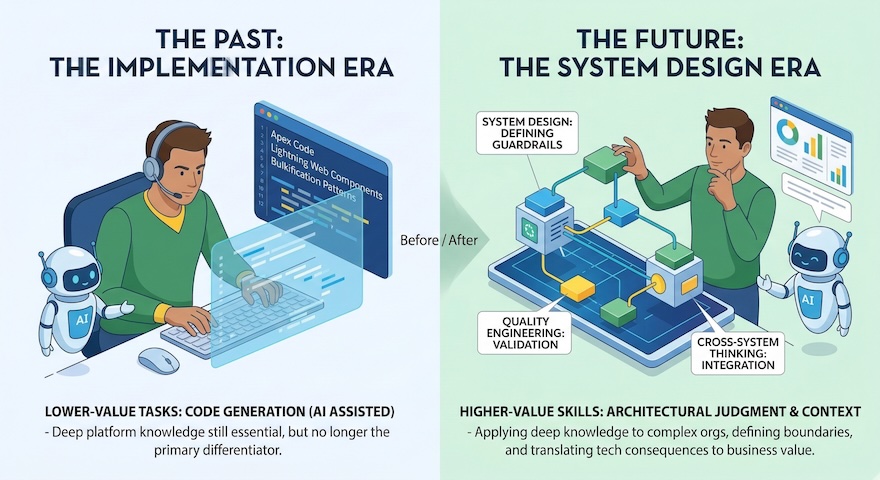
For most of the platform’s history, the Salesforce Developer’s value was clear: you made the platform do what it couldn’t do declaratively. When a Flow wasn’t enough, when a formula hit its limits, or when a business requirement went beyond configuration, you wrote Apex. You built Lightning Web Components. You designed integrations and extended the platform with code.
The core skill was implementation. You took a requirement and turned it into a working solution. Along the way, you navigated governor limits, bulkification patterns, the trigger execution order, and the nuances of multi-tenant architecture. Deep Salesforce-specific knowledge was what set the best developers apart. They didn’t just understand the platform’s constraints; they knew how to build effectively within them.
That era isn’t ending, but it is receding. The implementation skill still matters, but it is no longer the primary source of a developer’s value. That source is shifting toward system design, quality engineering, and cross-system thinking.
The shift underway isn’t just about AI writing code. That’s the visible part. What matters is what it exposes.
Will AI replace Salesforce Developers? No. AI is replacing parts of the work, especially first-draft code generation. But it’s not replacing the Salesforce Developer entirely. In fact, it’s increasing demand for the skills that remain: system design, quality validation, and cross-system thinking. The role is being redefined, not eliminated.
AI has inverted the bottleneck. For decades, the hard part was implementation: you knew what to build, and the challenge was writing the code. Now implementation is fast and cheap. An AI coding assistant – whether Agentforce Vibes, Claude Code, or Cursor paired with the Salesforce Extensions – can generate an Apex class, scaffold a Lightning Web Component, draft a test suite, or stub out an integration in seconds. The quality varies. The speed doesn’t.
What this exposes is that the real bottleneck was always system design. It was in understanding what to build, why to build it that way, and how it fits into the broader system. That bottleneck was invisible when implementation was slow. The time spent writing code also served as thinking time: time to discover edge cases, reconsider approaches, and absorb complexity.
When AI compresses implementation to near-zero, that thinking time is no longer built in by default. Developers who don’t replace it deliberately with design and analysis end up shipping faster but understanding less. That’s where the problems start.
AI isn’t just a code generation tool. It’s the most powerful learning tool developers have ever had. You can ask questions about unfamiliar codebases, explore platform behaviors in real time, and get instant feedback on design decisions. This changes the learning curve, not just the production curve. That distinction matters, and we’ll come back to it.
Why Brownfield Salesforce Orgs Are AI’s Biggest Challenge
There’s another reality that AI demos consistently ignore: most software in the world is not greenfield. The demos show new apps built in minutes from a blank canvas. But most Salesforce Developers walk into existing orgs every morning. These orgs have hundreds of custom objects. They have layered automations built across multiple releases. They have managed packages interacting in ways nobody fully mapped. They have business logic in configuration that hasn’t been documented since the person who built it left three years ago.
This is brownfield engineering, and it’s where the vast majority of Salesforce development happens.
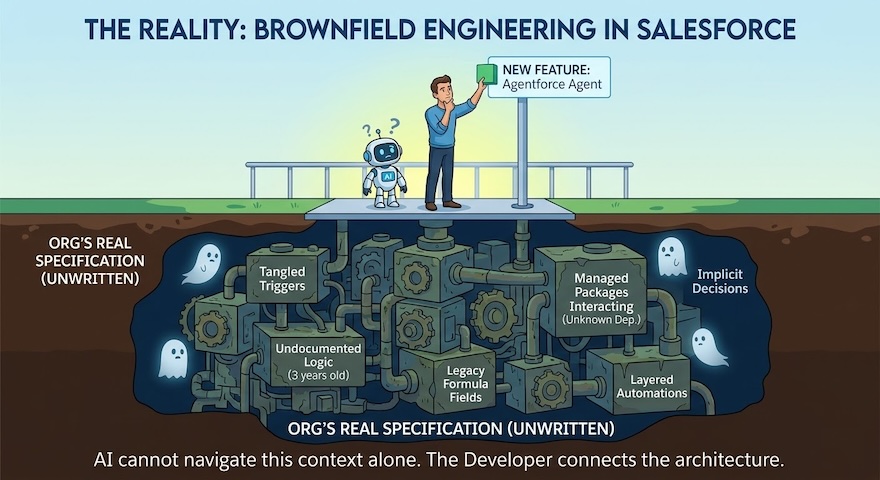
The Salesforce ecosystem supports millions of developers working across orgs that have evolved over years. In these environments, the systems themselves are the specification. That specification lives in code, metadata, tribal knowledge, and the collected judgment of everyone who’s ever touched the org. AI is increasingly good at analyzing the structural layer. What it can’t reach is the why underneath: why a data model was chosen, which trade-offs were made to serve a specific customer segment, what constraints shaped the architecture. That context lives in people, not in code.
A practical framework for brownfield AI-assisted development:
- Map before you build. Before using AI to generate code in an existing org, understand the current architecture. Look at trigger execution order, automation dependencies, sharing rules, and integration boundaries.
- Make the implicit explicit. Document the trade-offs behind the current data model, the reasons certain patterns exist, and the governor limit risks that only surface at scale.
- Treat context as input. The more system context you give AI tools, the better their output. A prompt grounded in your org’s real architecture produces results you can ship. A generic prompt produces results you have to rewrite.
Example: You ask an AI assistant to generate an after-update trigger on an Account that queries child Contacts to sync a status field. The code compiles. The tests pass. But your org already has two triggers on Account – one that recalculates territory assignments and another that fires a platform event to an external ERP. Combined, the three triggers exceed the 100-SOQL-query governor limit during bulk data loads. The AI had no visibility into the existing triggers, the execution order, or the cumulative query count. A developer with system context would have caught this before deployment. That’s the difference system design makes.
Future Salesforce Developer Skills: What Will Matter Most
| Skill | What It Means | Why AI Makes It More Important | How to Start Building It |
|---|---|---|---|
| System Design | Understanding inherited systems, defining architectural boundaries, and creating the guardrails AI operates within | AI compresses implementation to near-zero, exposing design as the real bottleneck – and the real value | Map your org’s current architecture: trigger order, automation dependencies, integration boundaries, and undocumented trade-offs |
| Quality Engineering | Treating
every AI-generated artifact as a first draft; validating that code fits the system, not just that it compiles |
Fast output increases the risk of accepting mediocre code – validation replaces generation as the core daily task | Establish non-negotiable checkpoints: tests passing, static analysis clean, manual walkthrough complete before every commit |
| Cross-System Thinking | Seeing how your specialty connects to the wider architecture – data model, integrations, security, business logic, and user experience | AI can’t see across system boundaries; developers who connect the layers become indispensable | Trace a single feature end-to-end: Apex → Flow → platform event → middleware → external system → end user impact |
The sections below dive deeper into each skill, demonstrating how they play out in practice.
System Design: The Core Salesforce Developer Skill of the Future
The most important work a Salesforce Developer will do in the coming years is not writing new code. It’s designing systems, understanding the systems they’ve inherited, deciding how those systems should evolve, and creating the structures and guardrails that AI operates within.
The brownfield framework above gives you the process. The harder question is what it actually takes to execute it – and why AI can’t do it for you. Why do triggers fire in a specific order? What trade-offs shaped the current data model? How do integrations behave under load? What does the security model assume? Where do the real governor limit risks live? Not just documenting what exists, but designing what comes next.
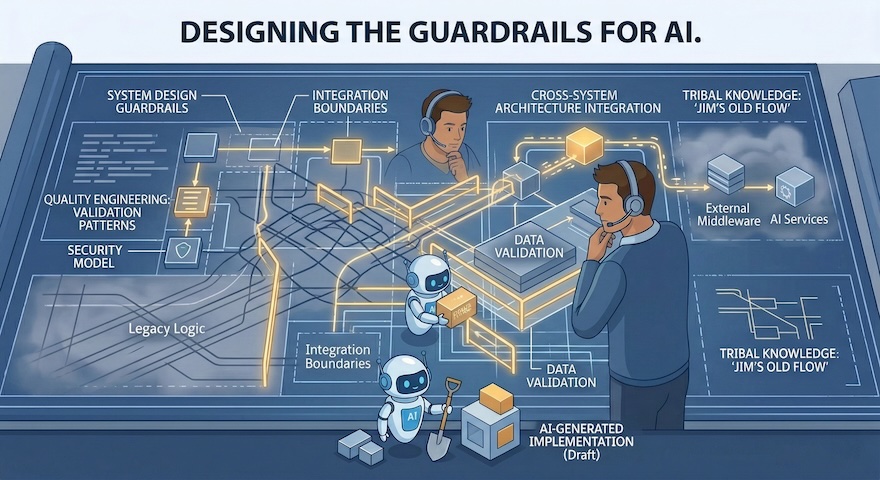
This work requires deep technical skill and creative judgment. AI is already strong at structural analysis. It can generate documentation drafts from code analysis, find patterns across metadata, and map dependency chains – often faster than any human could. But the design decisions depend on the why: why a pattern exists, why a trade-off was accepted, why a constraint matters to the business. That reasoning lives in relationships and institutional memory, not in a codebase.
In practical terms, a developer who can look at a complex, undocumented Salesforce org and build a clear architectural picture is the one who enables an entire team (and its AI tools) to work effectively. That capability matters far more than speed at writing Apex. The architectural thinker unlocks everyone else’s productivity. The fast coder is doing work that AI is already learning to do.
This applies whether you’re preparing an org for Agentforce, building new automations with Flow, or integrating AI coding assistants into your workflow. In each case, the quality of your output depends on system design thinking. A vague prompt produces vague output. A clear understanding of your org’s real architecture produces something you can ship.
Quality Engineering in AI-Assisted Salesforce Development
When AI generates code fast, the risk isn’t that the code is wrong. It’s that developers accept mediocre code because it arrived fast and looked plausible. This is where slop comes from: not from the model, but from the human who stopped reviewing.
Validation, not generation, is becoming the center of the developer’s daily work. That means treating every AI-generated class, Flow, and test suite as a first draft that needs editorial judgment. Read critically. Ask whether the approach fits the existing architecture, not just whether the syntax compiles. Refactor before committing.
AI-generated tests deserve special attention. These tests can confirm that code behaves as written, but not that it behaves as intended. An AI that writes both the code and the tests can easily generate tests that pass without testing anything meaningful. Write tests with the same rigor you’d apply to production code.
In brownfield Salesforce environments, the stakes are high. A poorly validated trigger can cascade into bulk data failures. An Agentforce agent without proper guardrails produces confusing outputs for end users. A Flow that wasn’t tested against concurrent record updates creates data integrity issues that take weeks to fix. The developer who sets non-negotiable validation checkpoints (tests passing, static analysis clean, manual walkthrough complete) is the one protecting the system’s long-term health. Pushing back when speed threatens integrity is part of the job. That role is more critical now than before AI, not less.
This is also a skill upgrade. When the first draft arrives in seconds instead of hours, you reclaim time for the work where human judgment matters most: architecture decisions, trade-off analysis, and knowing when to trust AI output versus when to override it.
This doesn’t mean every developer becomes an architect. It means every developer builds a stronger sense of system context. In many cases, developers become the person overseeing AI agents that do implementation work – and owning what ships. Frameworks, coding patterns, human code reviews, and thoughtful test design: these remain in human hands. For many companies, speed is the only variable leadership teams measure. Without developers who hold the quality line, AI becomes a multiplier of technical debt and vulnerabilities.
Why Cross-System Thinking Is the New Salesforce Developer Advantage
Deep specialization remains essential. Someone has to understand the platform internals that AI doesn’t yet grasp. But the premium is on developers who can pair that depth with breadth and see how their specialty connects to the wider system.
Salesforce itself is one piece of a wider architecture. Think about how Apex interacts with Flows. How Flows interact with platform events. How platform events interact with external middleware. And how all of it serves the end user. The developer who understands these connections is far more valuable than one who goes deep on a single layer without seeing the bigger picture.
This means holding the whole product in your head, not just the feature you’re building. It means understanding the data model, the integration landscape, the security architecture, and the business logic that ties it all together. It also means translating technical consequences into business language and surfacing risks early, even when doing so slows momentum.
On the Salesforce platform, this shift is already visible. Agentforce requires developers who understand not just code but agent design, guardrail configuration, data architecture, and user experience. The line between clicks and code keeps blurring with every release. Integration patterns grow more complex as Salesforce connects to AI services, data platforms, and external apps. The developer who can see across all of these layers and make smart decisions about where code is needed is the one teams will depend on.
Salesforce Developer Career Advice for the Agentic AI Era
If you’re reading this and feeling the weight of transition, you’re not alone. You’re not wrong to feel it. This is a shift in what the profession asks of you. But it’s an expansion, not a contraction.
What if I’m already using AI tools in my workflow?
Don’t let speed become your primary metric. The real investment is in redesigning your workflows: building the system designs, guardrails, and frameworks that AI operates within. This takes time. There will be errors. Once the new patterns take hold, you’ll be working at a level that wasn’t possible before. Treat AI output as a draft. Validate with rigor. Don’t let the pressure to ship override the judgment that makes your work effective.
What if my organization hasn’t adopted AI tooling yet?
You’re not as far behind as the FOMO suggests. The distinction between organizational adoption and individual learning matters. Your organization’s timeline for AI tools is out of your hands; your own learning timeline isn’t.
You can use AI assistants today to explore codebases, practice system design thinking, and generate documentation drafts. You can build the habits described in this post regardless of what your team has officially adopted. The system design work itself (understanding your systems in depth, making implicit knowledge explicit, and thinking about architecture as a whole) will make you more effective right now. It also positions you to move fast when organizational adoption happens.
What skills will set me apart in the Salesforce Developer career path?
Can you look at a complex, undocumented org and produce a clear architectural picture? Can you spot when an AI suggestion would work in isolation but break in context? Can you see across system boundaries and make decisions that account for the full architecture?
These are the capabilities that grow in value as AI handles more of the implementation work.
What if I’m learning or early in my Salesforce Developer career?
This is one of the best times to start. AI is now the most powerful tool available for building the skills that matter most.
A junior Salesforce Developer today can use AI to explore unfamiliar codebases and understand platform internals in real-time, simulate system design decisions, and get instant feedback on code. None of that existed two years ago. The path to becoming systems-minded is faster now, not slower.
You still need to learn how things work under the surface. You can listen to a language and understand it, but you don’t learn the rules until you start producing it. AI gives you a way to compress that learning curve.
Go broad before you go deep. Build the habit of documenting what you learn. Lean into the platform fundamentals on Trailhead. Certifications like Platform Developer I validate your foundational knowledge, but the skills described here (system thinking, architectural judgment, and quality discipline) go beyond any exam.
How the Salesforce Community Navigates the AI Transition
The shift to AI-assisted engineering is creating new knowledge faster than the ecosystem has seen before. That knowledge is spread unevenly. Some developers experiment with AI daily. Others are at organizations that haven’t made the leap yet. The gap between them is about access to shared, honest experience, not talent.
The most useful thing anyone in this community can do right now is share what they’re learning. Share openly, honestly, and without polish. Don’t just share the successes. Share the slowdowns, the failures, and the moments where AI made things harder before it made them easier. The admission that “this made us slower for three months before it made us faster” is one of the most helpful things a team can share. It normalizes the transition cost and helps others plan for it.
Whether it’s through the Trailblazer Community, GitHub discussions, Community Conferences, Salesforce user groups, or internal channels: Your experience speeds up someone else’s adoption. The collected, honest knowledge of the Salesforce Developer Community is our greatest asset in navigating this transition. Use it. Contribute to it. Community is more important than ever.
What This All Means for Your Salesforce Career
The future needs more Salesforce Developers, not fewer. It needs people who can design systems, not just implement them. People who can hold whole products in their heads. People who can guide AI with judgment, push back when speed threatens integrity, and share what they learn so the entire ecosystem gets stronger.
The tools are new. The opportunity is significant. And the capabilities that matter most are the ones that have always defined the best engineers: judgment, context, and the willingness to understand the whole system.
Related Reading
- Get Started with Salesforce Development on Trailhead
- Agentforce Developer Documentation
- Apex Developer Guide
- Lightning Web Components Developer Guide
About the Author
René Winkelmeyer leads the Developer Advocacy team at Salesforce. His team focuses on Agentforce, Data 360, and the Salesforce Platform. In his spare time, you might find him still coding on GitHub. Follow René on LinkedIn.