
Business applications rarely operate as standalone systems; they rely on integrations. In such distributed architectures, a single user click can trigger a cascade of events. For example, in a Salesforce app, a user interaction can go through Apex, external APIs, and asynchronous jobs. When something breaks, identifying the root cause is like searching for a needle in a haystack. The solution for this is to work with correlation IDs, also referred to as request IDs. These are unique fingerprints that follow transactions across system boundaries.
This post covers how to set up observability for operations across systems and how to architect a traceable system using Salesforce native identifiers and propagation patterns. It then explores a variety of integration scenarios demonstrating how to set up observability.
Tracking operations across systems
When multiple operations are chained together across systems, it becomes harder to diagnose issues and to measure performance. To compensate for this, developers use two techniques: logging and telemetry.
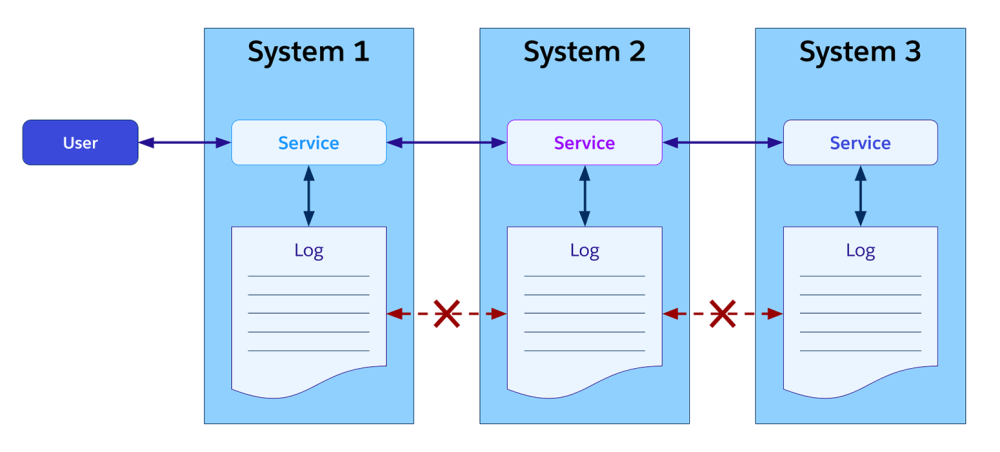
Logging is the first level of traceability. It provides a historical journal of activities within a given application. This information is generally stored in text-based log files or a database. Logs are easy to set up and great for debugging or compliance. However, because they are specific to each system, they don’t give a full picture of the user experience.
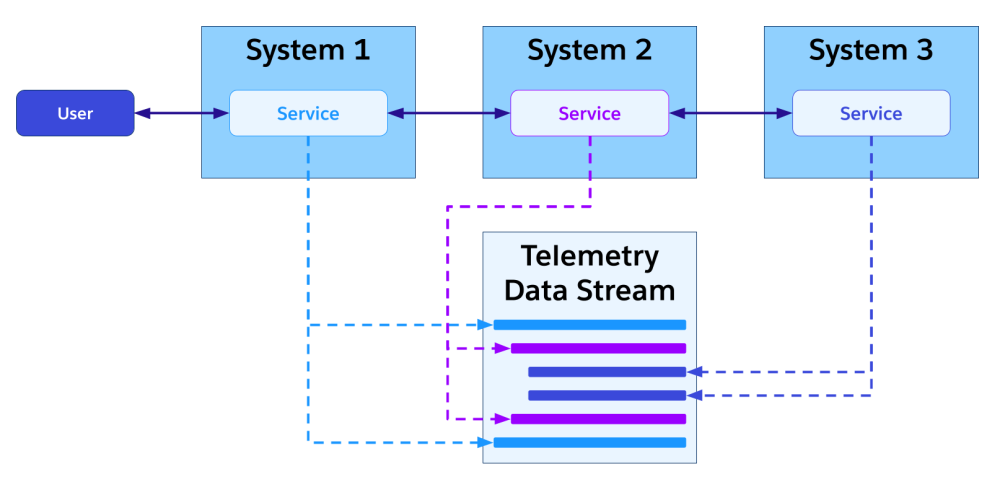
Telemetry focuses on real-time analytics and is based on event-driven data streams captured from multiple sources. It enables tracking a given user operation as it travels through different systems. The key that links the events across these systems is a shared correlation ID.
Correlating Salesforce Platform requests
The core concept: How to correlate
Every transaction in Salesforce is assigned a unique ID that is logged in the Event Monitoring logs. For example, this ID is represented by the REQUEST_ID field in EventLogFile logs. Using this native ID, you can seamlessly join your custom application logs with standard Salesforce logs.
As per the EventLogFile documentation, the request ID value is either a 32-character OpenTelemetry (OTel) and W3C compatible Trace-Id or a 22-character alphanumeric ID. This ID serves as the “parent” span for all subsequent operations (logs, callout, queueable, platform event, and so on).
Working with Apex
If you want to correlate some of your debug logs, you can prepend your lines with the request ID yourself:
1// Retrieve the native Salesforce Request ID
2String correlationId = Request.getCurrent().getRequestId();
3System.debug(correlationId +' <- Transaction Correlation ID');
Or, you can let a third-party logger like Nebula Logger handle it for you.
Passing a request ID when calling the Salesforce Platform APIs
When calling Salesforce Platform APIs, the correlation ID must travel with the request so that the receiving systems (Salesforce and possibly other systems) can log it. This enables “distributed tracing”, allowing you to see the full lifecycle of a request as it crosses system boundaries.
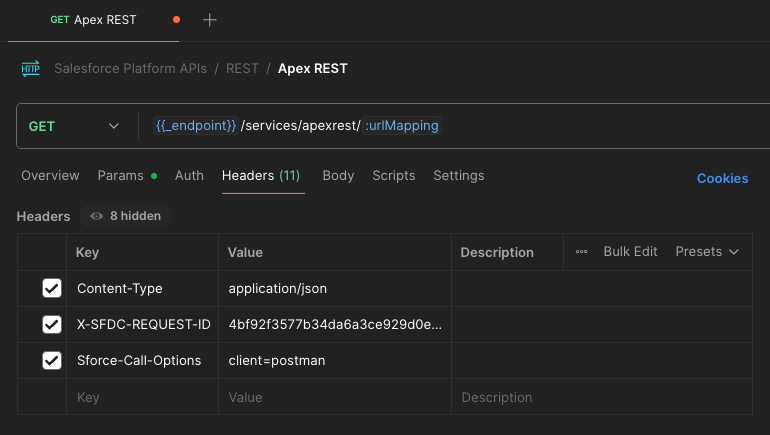
To set a request ID with the Salesforce REST API, set the X-SFDC-REQUEST-ID HTTP header with your unique correlation ID value. While it isn’t required for correlation, we also recommend that you set a client name using the Sforce-Call-Options header as a best practice. Just like for the request ID, the supplied client name will be reported in the CLIENT column of EventLogFile.
Here’s an example of how to configure a request for a custom Apex REST web service with such headers using the Salesforce Platform APIs collection for Postman:
Although this is beyond the scope of this blog post, note that other Salesforce products let you achieve this. For example, MuleSoft lets you set custom correlation IDs for Flows with HTTP endpoints and Salesforce Commerce APIs (SCAPI) let you pass correlation IDs as part of your requests.
Propagating correlation IDs in Apex HTTP Callouts
When calling a third-party API with Apex HTTP callouts, use a custom header in your request to propagate the current transaction’s unique request ID (correlation ID).
1HttpRequest req = new HttpRequest();
2req.setEndpoint('callout:My_External_Service');
3req.setMethod('POST');
4
5// Pass the correlation ID as a header
6String requestId = Request.getCurrent().getRequestId();
7req.setHeader('', requestId);
8
9Http http = new Http();
10HttpResponse res = http.send(req);
Note: If your downstream systems support the Trace Context W3C standard, you can map your request ID to a traceparent header. This allows you to simplify the correlation configuration and unify the event representation across logs.
Propagating correlation IDs in Platform Events
Platform event publishing is asynchronous. This means that the following three elements that control the life cycle of an event are transactionally separate and do not natively share the same request ID:
- the Apex code or client that enqueues the event for publication
- the event bus process that publishes the event
- the Apex trigger or client that subscribes to the event.
While Salesforce provides a system EventUuid to identify event messages, this UUID is generated after publish and does not identify the originating transaction. In order to pass correlation information in a platform event, you must create a custom field (e.g., SourceRequestId__c) on your platform event object to carry the context.
Here’s an example of how you can do this when publishing an event with Apex:
1// Create the event
2Order_Event__e event = new Order_Event__e();
3event.Order_Number__c = '12345';
4
5// Manually propagate the correlation ID
6event.SourceRequestId__c = Request.getCurrent().getRequestId();
7
8// Publish
9EventBus.publish(event);
When the subscriber (e.g., an external app or an after insert Apex trigger) receives the event, it reads the SourceRequestId__c value to retrieve the correlation ID and continue the logging trace.
Propagating correlation IDs when working with asynchronous Apex
Asynchronous jobs like Queueable, Batch, Schedulable, and future methods run in fresh transaction contexts with brand new request IDs. To trace the parent transactions that enqueued the jobs, you must pass the parent request ID through the constructor.
Here’s an example of how you can store the parent transaction’s correlation ID as a state variable within a Queueable class:
1public class AsyncProcessor implements Queueable {
2    private final String parentCorrelationId;
3
4    // Constructor captures the ID from the calling transaction
5    // Same logic applies to batch
6    public AsyncProcessor() {
7        this.parentCorrelationId = Request.getCurrent().getRequestId();
8    }
9
10    public void execute(QueueableContext context) {
11        // Log using the parent ID to maintain continuity
12        System.debug('Processing Queueable linked to: ' + this.parentCorrelationId);
13
14        // If making further callouts, pass the parent request ID, not the current request ID
15	 Assert.areNotEqual(
16this.parentCorrelationId,
17Request.getCurrent().getRequestId(),
18'The two request IDs are different because of the asynchronicity'
19);
20    }
21}
Use a similar approach for Batchable and Schedulable.
Use a String parameter to pass the ID in @future methods.
Propagating correlation IDs in Flow
When working with Flow, you can call third-party APIs declaratively with an HTTP callout action or with an external service action.
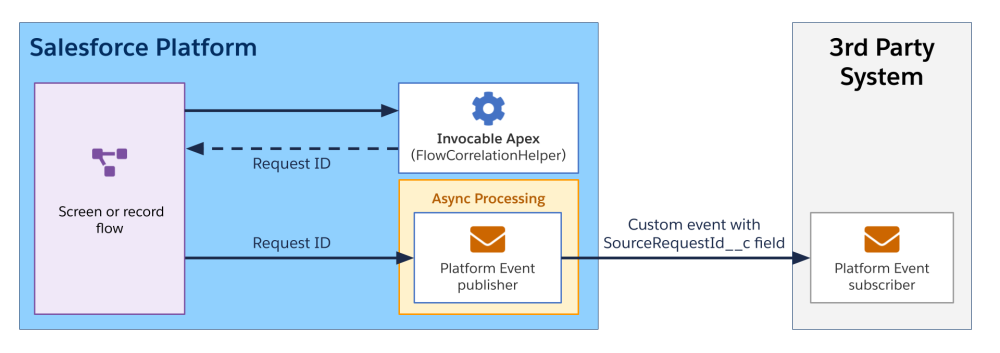
Regardless of the action type that you use, you first need to obtain the request ID. Flow does not have a native “Get Request ID” action so you must build your own. To do so, you can write and call a simple invocable Apex class to expose the current request ID to the flow:
1public class FlowCorrelationHelper {
2    @InvocableMethod(
3        label='Get Correlation ID'
4        description='Returns the current Request ID'
5    )
6    public static List<String> getCorrelationId() {
7        return new List<String>{
8            Request.getCurrent().getRequestId()
9        };
10    }
11}
At this point, if you use an HTTP callout action, you can pass the correlation ID as a custom header.
However, if you use an external service action, you might need to modify your service’s definition manually to add the proper header for passing the correlation ID in your operations. At run time, you won’t be able to create headers that are not part of the service definition.
Sample integration scenarios
Now that we’ve covered the theory, let’s take a look at four integration scenarios that mix the different techniques for passing request IDs across systems.
Scenario 1: Inbound request with custom Apex execution
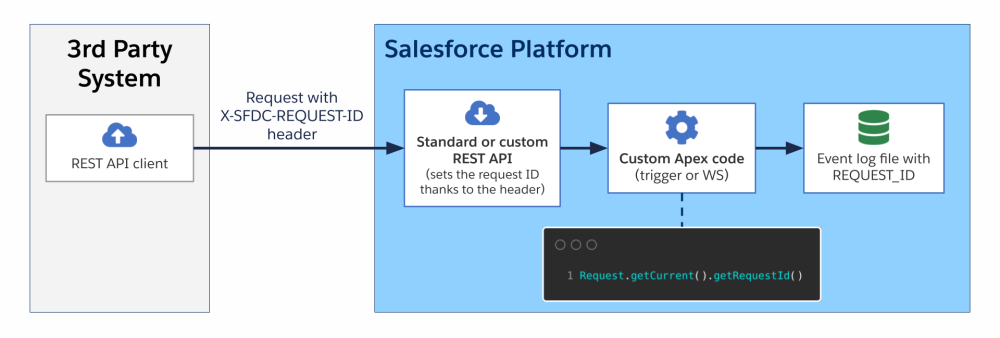
In this scenario, a third-party system sends a REST API request to the platform with a correlation ID passed in the X-SFDC-REQUEST-ID HTTP header. Upon receiving the request, the correlation ID is automatically retrieved and saved as the current request ID natively by the platform. Some custom Apex code (either a trigger or a custom Apex REST web service) is then executed. As part of the Apex execution, the correlation ID can be retrieved via Request.getCurrent().getRequestId(). Request IDs are saved in the event log file.
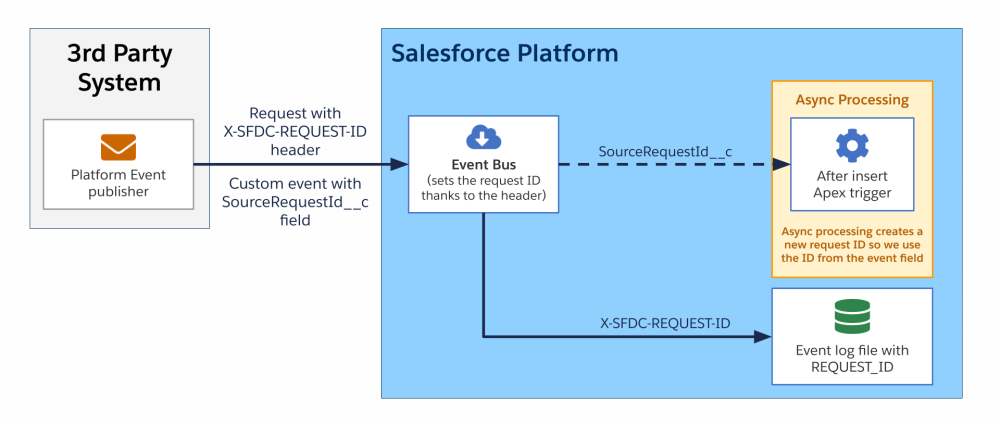
Scenario 2: Inbound platform event with custom Apex execution
In this second scenario, a third-party system publishes a custom platform event thanks to a REST API call. The request holds a correlation ID in the X-SFDC-REQUEST-ID HTTP header and the custom event holds the same correlation ID in a custom SourceRequestId__c field.
Upon receiving the request, the correlation ID is automatically retrieved and saved in the event log file and the platform event is published. The platform event is captured by the platform as part of an after insert Apex trigger.
Due to the asynchronous nature of triggers, the code runs in a separate transaction and cannot reuse the original request ID. Instead, the correlation ID is retrieved from the SourceRequestId__c event field and can be propagated further or logged.
Scenario 3: REST exchange with asynchronous processing
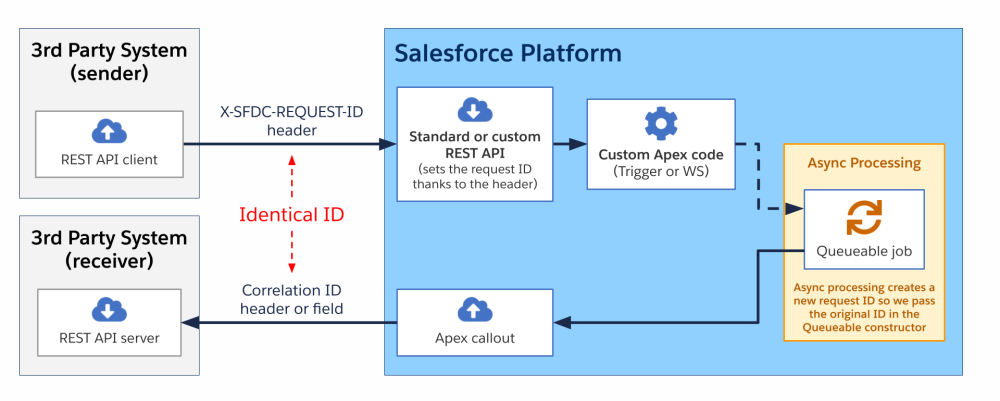
In this third scenario, a third-party system sends a request to the platform. This triggers some asynchronous processing. Once the process completes, the platform sends a request to a third-party system (either the one that triggered the scenario or a different one). The same correlation ID is shared across systems during the entire sequence.
As in previous scenarios, the correlation ID is passed to the platform via a header. The API request triggers the execution of custom Apex code. The code creates and enqueues a job for some long-running processing.
Since the queueable job runs asynchronously, a distinct request ID is generated in this context. In order to propagate the original correlation ID, we retrieve the Apex caller’s request ID and pass it to the job via the Queueable constructor.
Once the job is completed, it runs an Apex callout that sends a request back to the third-party system with the correlation ID passed in the request body or in a header.
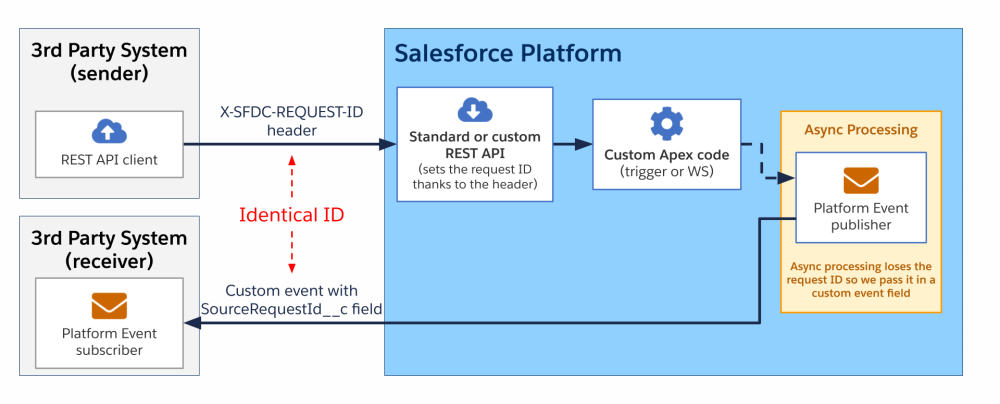
A variation of this scenario may include a platform event being sent back to the third-party system. This variant still includes asynchronous processing as the event bus assigns its own EventUuid after publish and doesn’t carry the original request ID. Hence, a custom SourceRequestId__c field is required to propagate the correlation ID.
Scenario 4: Flow with an HTTP callout
In this scenario, a screen or record flow processes some data, which then makes a callout to a third-party system. Since flows do not have a native “Get Request ID” action, an Apex class with an invocable method is required to expose the current Request ID to the Flow. Once retrieved, the request ID can be sent as part of the outbound request either in the body or as a header.
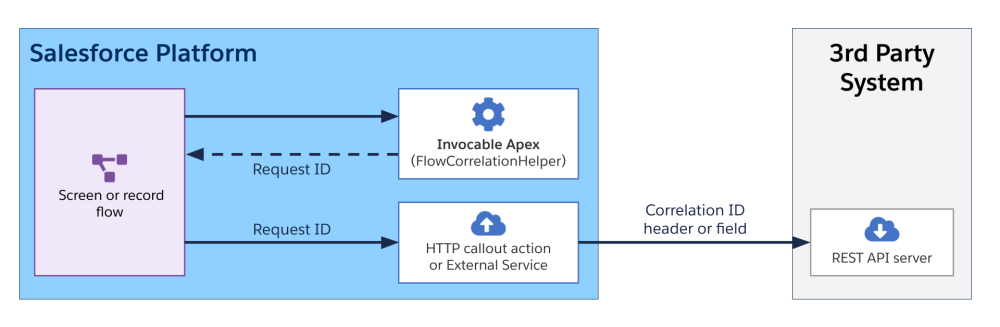
If you are using HTTP Callouts via Flow, you cannot dynamically set headers in Flow Builder. You may need to configure external credentials with custom headers to manage how metadata is passed, though dynamic injection often requires an Apex invocable action.
As with the previous scenario, a variation of this scenario may include a platform event being sent back to the third-party system. In this case, the request ID is propagated to the third-party system using a custom event field.
Conclusion
The techniques and patterns covered in this post provide a framework for implementing observability across the Salesforce Platform and third-party systems. The platform’s native request IDs serve as the foundation for end-to-end distributed tracing, and the key to success is consistent propagation across every boundary.
Once this transmission chain is correctly assembled, you can move beyond siloed logs to gain immediate and deep insights into cross-system interactions. This unified view is critical for efficiently troubleshooting issues and investigating performance bottlenecks, allowing teams to focus on a shared trace rather than wasting time cross-referencing multiple logs by date and time. Implementing these correlation patterns is essential for building and maintaining highly performant and resilient distributed applications.
Resources
About the authors
Sébastien Colladon is a Salesforce Certified Technical Architect (CTA). He loves contributing to the Salesforce ecosystem. He is passionate about his craft. Follow him on LinkedIn and check out his GitHub projects.
Philippe Ozil is a Principal Developer Advocate at Salesforce, where he focuses on the Salesforce Platform. He writes technical content and speaks frequently at conferences. He is a full-stack developer and enjoys working with APIs, DevOps, robotics, and VR projects. Follow him on X, LinkedIn, and Bluesky, and check out his GitHub projects.